
Quick Facts
- Manufacturer: Powerfleet
- Product: LV-500 Solar-Powered Asset Tracker
- Equipment category: Trailer and asset-tracking hardware
- Primary application: Location and utilization monitoring for trailers and containers
- Power architecture: Solar panel, supercapacitors, and primary batteries
- Communications: Cellular reporting and compatible wireless sensor integration
- Installation: Self-contained external installation without a tractor power connection
- ELD function: Asset tracking does not provide a complete driver electronic logging system
Overview
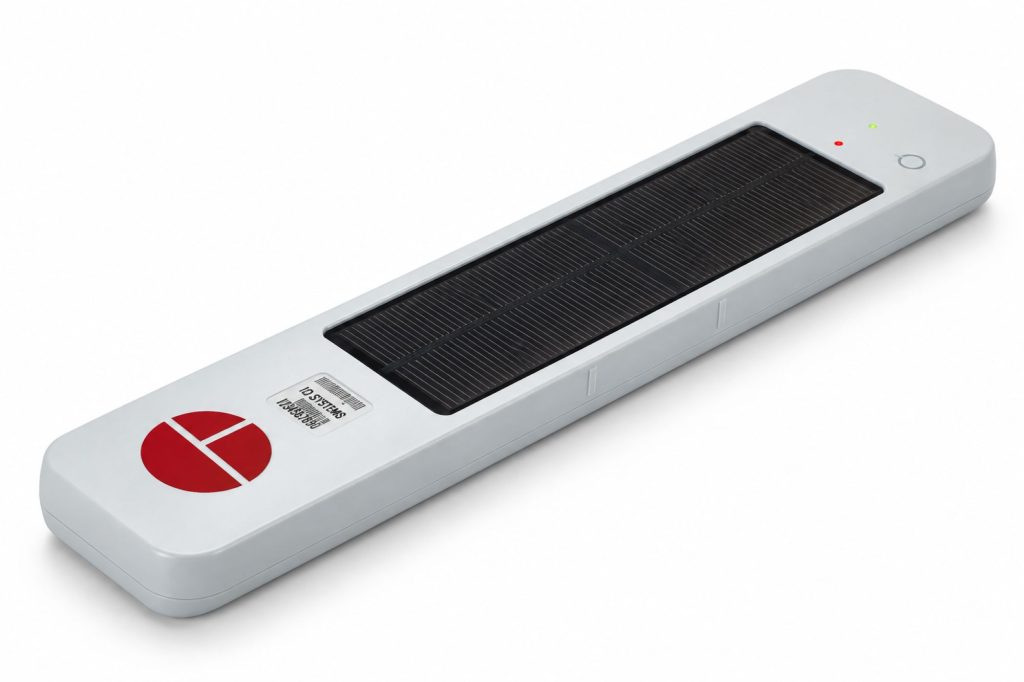
The Powerfleet LV-500 is an independent asset tracker intended to help fleets locate and manage equipment that regularly operates away from a tractor. Its multi-source power design supports tracking on detached trailers without relying on the trailer lighting circuit.
For dispatchers and equipment managers, the practical value is knowing which assets are available, which have moved, and which have remained at a customer or terminal longer than expected. Useful results depend on accurate asset assignments, suitable reporting settings, and a clear process for acting on the information.
Key Characteristics
- Self-contained power for equipment that spends time disconnected from a tractor.
- Solar energy stored in supercapacitors, supported by primary batteries.
- Location and movement information for asset-management decisions.
- Wireless expansion through approved sensors and accessories.
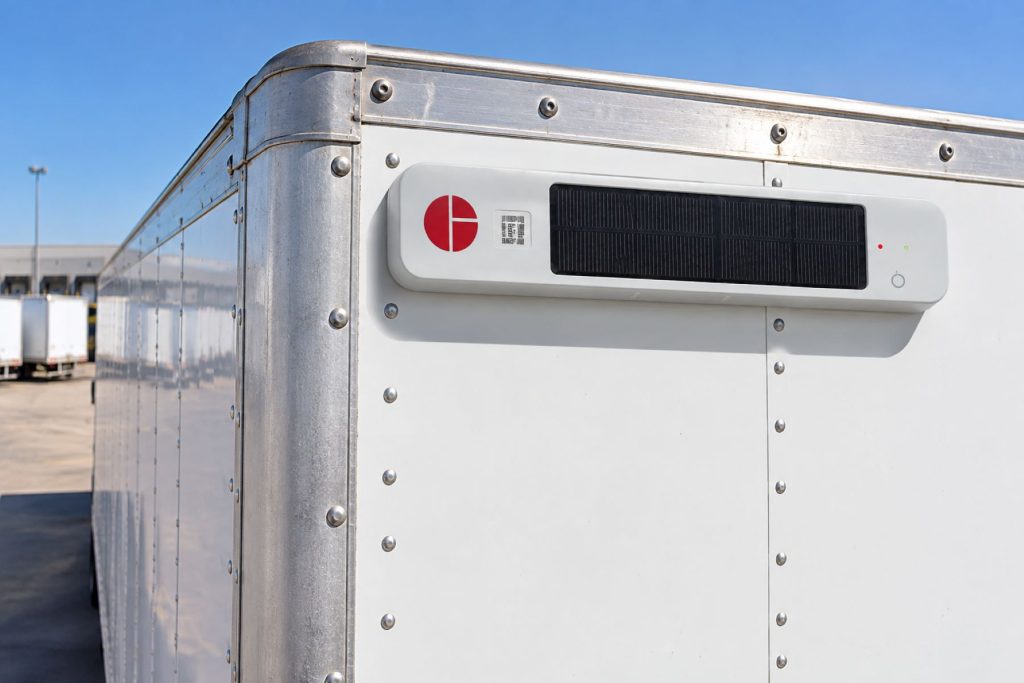
- External mounting that requires a suitable structural location and solar exposure.
Major Components
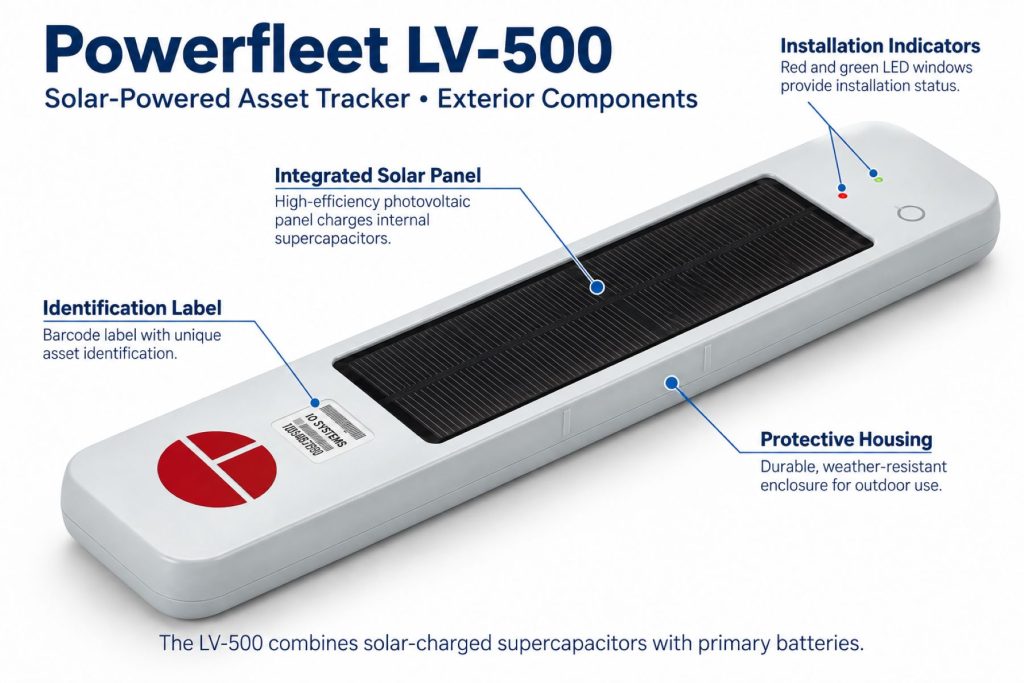
The system combines the tracker enclosure, solar collection surface, energy-storage components, positioning and cellular electronics, mounting hardware, and an activated fleet account. Optional sensing equipment adds its own installation, pairing, and maintenance requirements.
Product Type and Construction
The LV-500 belongs to the externally mounted asset-tracker category. It should be selected around the trailer’s physical installation requirements rather than treated as a universal plug-in accessory.
Hardware, Software, and Platform Design
The installed tracker supplies information to the fleet’s contracted Powerfleet service. The account determines how users view assets, receive alerts, and access reports. Confirm the supported portal and integrations for the specific LV-500 deployment; current Powerfleet branding alone does not establish a legacy device’s feature set.
How the Telematics or ELD System Works
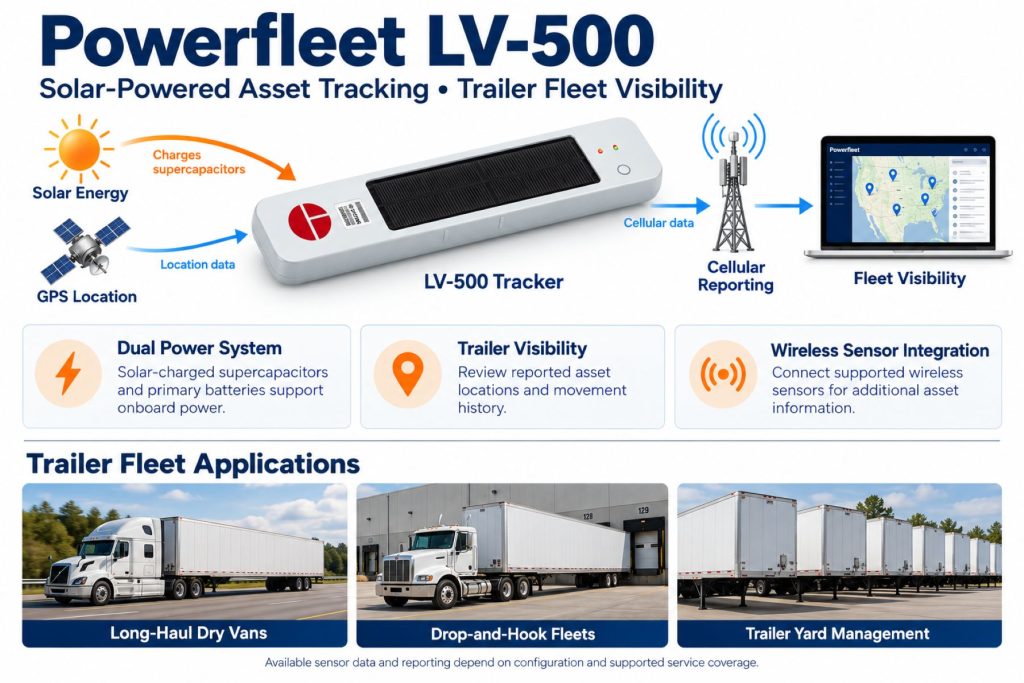
An asset-tracking installation links a physical device to an equipment record. Position and event reports reach the service over the cellular connection and appear against that record. Dispatchers interpret the report timestamp, asset identity, and location together before assigning equipment.
Position and Function Within the Vehicle
The tracker travels with the asset being monitored. On a trailer, this allows the equipment record to remain useful as different tractors move the trailer or leave it parked at another facility.
Common Specifications
Powerfleet’s published logistics catalog lists the following LV-500 specifications. Check the supplied part number and applicable documentation before using these values for installation planning.
- Dimensions: 4.4 inches wide × 1.6 inches high × 19.3 inches long
- Weight: Approximately 3.5 pounds (1.6 kilograms)
- Cellular: LTE Cat-1; historical documentation also lists 3G backup
- Wireless sensor interface: 2.4 GHz
- Primary battery specification: 34 Ah at 3.6 volts
- Operating temperature: -30°C to +75°C (-22°F to +167°F)
- Published enclosure protection: IP69K
- Enclosure material: Glass-fiber-reinforced nylon
Operating Capacity and Performance
Reporting frequency should match the operation. A fleet looking for daily equipment inventory has different requirements from a fleet monitoring customer dwell during active deliveries. Ask for a power and reporting assessment based on actual routes, parking conditions, and accessory use.
Installation Position and System Function
Select a manufacturer-approved mounting position with useful sunlight exposure and adequate clearance. Consider adjacent equipment, loading operations, trailer washing, and repair access when choosing the location.
System Voltage and Electrical Architecture
The published 3.6-volt primary battery value describes an internal power component. It is not an instruction to connect the tracker to a vehicle electrical circuit. Follow the installation procedure for the supplied unit.
Electrical Input, Output, and Power Function
Primary batteries are different from rechargeable batteries. Do not attach an improvised charger, external power lead, or replacement battery assembly. Any service involving the power system should follow Powerfleet’s instructions.
Data Collection and Vehicle Information
Define the information the fleet needs before selecting accessories. Location history, movement activity, cargo condition, and door activity serve different purposes and may require different hardware. An equipment record should clearly identify which measurements come from installed sensors.
GPS, Cellular, Wi-Fi, and Satellite Connectivity
Positioning and data transmission are separate functions. A tracker may determine its location where it cannot immediately transmit a report. Verify cellular coverage and modem support for the operating region; a historical 3G fallback specification should not be counted on for present-day service. Do not assume Wi-Fi hotspot or satellite messaging capability.
Vehicle Network and Diagnostic Integration
An independent trailer tracker should not be assumed to read tractor engine data or trailer ABS faults. If diagnostic information is required, obtain a documented integration showing the supported equipment, connection method, and available data.
Electronic Logging and Hours-of-Service Functions
The LV-500’s asset-management role does not establish a driver duty-status record. Fleets needing electronic logging should select a separate driver and vehicle solution appropriate to their operation.
Driver Identification and User Access
Assign the device to the trailer or asset number rather than permanently associating it with one driver. Give dispatchers, maintenance staff, and managers access appropriate to their responsibilities, and review access when employees or contractors change roles.
Fleet Portal and Mobile Application
Before purchasing, request a demonstration using the exact service proposed for the LV-500. Check asset search, map timestamps, reporting, exports, and any mobile access the fleet expects to use.
Dash Camera and Video Capabilities
The LV-500 is not an in-cab dash camera. Powerfleet has documented pairing it with the separate LV-710 freight camera for cargo imagery and related status information. That configuration does not imply continuous road video, driver-facing recording, or an included camera in every LV-500 package.
Trailer and Asset-Tracking Capabilities
A useful trailer-tracking workflow connects reported locations with dispatch decisions. Review equipment parked at customer facilities, check whether an assigned trailer has moved, and investigate assets that appear unavailable for longer than expected.
Remote Diagnostics and Fault-Code Management
Keep tracker health separate from mechanical diagnostics. A communication or power problem concerns the tracking installation; it does not identify a brake, tire, refrigeration, or engine fault without the appropriate supported data source.
Driver Communication and Workflow Tools
Dispatchers can use equipment location information when directing drivers to an assigned trailer. Messaging, navigation, document handling, and driver task completion require their own supported applications or integrations.
Alerts, Reports, and Fleet Analytics
Powerfleet lists tamper alerts and in-transit reporting among LV-500 features. During commissioning, test the events included in the service and assign an owner to each actionable alert. Repeated notifications without a response process can quickly become background noise.
Data Storage, Transfer, and Retention
Obtain written details on history retention, export formats, account cancellation, and any recovery of reports collected during a connection loss. Do not assume unlimited history or a particular offline storage capacity.
Cybersecurity, Privacy, and User Permissions
Use individual accounts and restrict administrative changes to authorized staff. Review how location information and any cargo images are shared with customers, vendors, and third-party systems.
Materials and Component Construction
Inspect the enclosure, solar surface, and mounting points as one assembly. A durable enclosure still needs sound attachment hardware and protection from loading equipment, branch strikes, and trailer repairs.
Wiring, Terminals, Connectors, and Grounding
Do not add vehicle wiring merely because other telematics devices use a powered harness. Identify the installation requirements for each accessory separately, and keep any approved accessory wiring secured and protected.
Controls, Monitoring, and Diagnostics
Powerfleet identifies LED indicators for installation verification. Use the applicable instructions to interpret them, then confirm that the correct asset appears in the account with a fresh report before releasing the trailer.
Electronic Controls and Driver-Assistance Integration
Asset location reporting does not establish control of braking, steering, collision avoidance, or other vehicle safety functions. Any requested control integration needs separate product documentation and approval.
Power Consumption and System Efficiency
Assess energy demand alongside reporting settings and installed accessories. Avoid promising a fixed service life without an operating profile that includes sunlight exposure, temperature, storage patterns, and expected reporting activity.
Environmental Sealing and Contamination Protection
A published enclosure rating does not make a damaged unit suitable for continued exposure. Check for cracks and follow the approved cleaning method rather than directing wash equipment at the tracker without regard to installation instructions.
Coverage, Connectivity, and Offline Operation
Review the last report time before treating a map marker as the asset’s present location. Test representative terminals, customer yards, and routes, and ask how the supplied configuration behaves when cellular service is unavailable.
Duty Cycle and Operating Conditions
Include indoor storage, covered parking, seasonal inactivity, and snow accumulation in the deployment plan. A trailer that spends weeks under cover presents a different energy profile from one regularly parked outdoors.
Mounting and Installation
Use the approved mounting kit and fastener procedure. Check the area behind proposed holes and obtain trailer-manufacturer guidance where attachment could affect structural members, roof integrity, or water sealing.
Installation, Activation, and Account Setup
Record the device identifier, asset number, installation date, and mounting location. Activate the contracted service, verify a current report, and test optional sensors before marking the installation complete.
Wiring, Grounding, and Installation Requirements
Keep the installation checklist specific to the supplied hardware. Do not improvise a chassis ground or splice into trailer circuits to compensate for a reporting problem; diagnose activation, reception, mounting, and power condition through the supported procedure.
Software Configuration and Vehicle Assignment
Use consistent trailer names and equipment groups. After moving a tracker to another asset, update its assignment and remove outdated associations so historical and current reports are interpreted correctly.
Vehicle, Network, and Platform Compatibility
Compatibility includes physical mounting, regional cellular service, account activation, and software support. Obtain confirmation for the exact device before purchasing used equipment or expanding an existing installation.
Related Component and System Compatibility
Specify accessory part numbers and required service features in the purchase order. A wireless frequency match alone does not establish that a third-party sensor can pair with the LV-500 or supply usable data to its account.
Common Applications
- Drop-and-hook trailer location management.
- Customer-yard equipment inventory.
- Trailer dwell and utilization review.
- Container tracking where mounting and service requirements are met.
- Cargo visibility projects using approved additional hardware.
Advantages
- Supports equipment visibility through tractor changes.
- Can reduce time spent searching for available trailers.
- Provides information for reviewing prolonged customer dwell.
- Allows a fleet to evaluate asset use across multiple facilities.
Limitations or Considerations
- Mounting must account for solar exposure and equipment clearance.
- Map information must be checked against its report timestamp.
- Accessory functions require the corresponding supported hardware.
- Used devices need activation and service eligibility checks.
- Long-term ownership includes service charges and physical inspections.
Driver and Operator Experience
Drivers mainly benefit when dispatch can provide a reliable trailer assignment and pickup location. They should still confirm the physical trailer number and report missing, damaged, or mismatched equipment through the fleet’s normal process.
Controls, Indicators, and Driver Feedback
Establish a simple procedure for reporting tracker damage. Drivers should not climb onto equipment, remove the enclosure, or attempt electrical repairs to resolve a dispatch visibility issue.
Compliance and Record Management
Keep tracking history alongside the records it supports, such as equipment assignments and customer movement documentation. Do not substitute a location report for a physical inspection or a required driver record.
Subscription Plans and Ongoing Service Costs
Request a written quote covering hardware, installation, cellular service, portal access, accessory reporting, integrations, and replacement terms. Check contract length and cancellation conditions when comparing total ownership costs.
Firmware, Software, and Map Updates
Ask who manages device updates and how configuration changes are verified. A portal update does not automatically establish that every installed tracker supports a newly advertised feature.
Data Accuracy and System Limitations
Dense yards, adjacent parking rows, buildings, and delayed reports can complicate equipment searches. Use the map to narrow the search and verify the asset number on arrival rather than assuming a marker identifies an exact parking slot.
Inspection and Wear Points
- Loose fasteners or mounting movement.
- Cracks, impact damage, or separation at the enclosure.
- Dirt, snow, or physical obstructions over the solar surface.
- Damage around trailer attachment points.
- Missing or damaged optional sensors.
- Incorrect asset assignments or unexpectedly old reports.
Maintenance and Ownership Notes
Add the tracker to routine trailer inspection records. Recheck the mounting and account assignment after body repairs, repainting, equipment transfers, or storage changes that could affect its installation.
Common Telematics and ELD System Problems
- A device assigned to the wrong trailer.
- A last-known location mistaken for a fresh report.
- Inactive service or unsuccessful account provisioning.
- Poor reception at recurring parking locations.
- Obstructed solar exposure or a power-system service issue.
- Incorrect accessory pairing or sensor assignment.
- Alert settings that do not match the fleet’s operating process.
Safety and Service Precautions
Secure the trailer and use suitable access equipment for elevated work. Follow the manufacturer’s procedures for installation and battery service, and avoid drilling where hidden wiring, structural parts, or cargo could be damaged.
Identification Information
Record the product label, part number, serial number, and cellular identifier where provided. Match those identifiers to the fleet account and retain installation photographs for future troubleshooting.
Buying Considerations
- Confirm current supply, activation eligibility, and support for the exact unit.
- Review the mounting location and expected sunlight exposure.
- Specify required reporting intervals and accessory functions.
- Evaluate regional cellular coverage.
- Check portal access, exports, and integration requirements.
- Compare the complete installed and contracted cost.
Variants and Configurations
The following describe deployment configurations rather than a verified list of separate LV-500 model variants.
- Asset-tracking deployment focused on equipment location.
- Tracking with approved wireless sensors.
- Tracking with the documented LV-710 freight-camera pairing, subject to current support.
- Fleet deployment with contracted reporting and business-system integrations.
Comparison to Similar Equipment
Compare solar-assisted trackers, primary-battery trackers, and externally powered gateways using the same reporting workload and storage conditions. Include accessory support, physical installation, service availability, and expected maintenance in the comparison rather than relying only on an advertised battery-life figure.
Best Fit For
- Fleets managing trailers across multiple customers and terminals.
- Operations with frequent tractor changes and detached equipment.
- Equipment managers reviewing trailer availability and dwell.
- Fleets able to provide suitable mounting and an ongoing inspection process.
Related Vehicle and Trailer Types
- Dry van trailers
- Refrigerated trailers
- Flatbed trailers
- Tanker trailers
- Day cab trucks
- Sleeper trucks
Related Truck and Trailer Models
- Stoughton Dry Van
- Wilson Flatbed
- CIMC Chassis Trailer
- Freightliner Cascadia
- Kenworth T680
- Peterbilt 579
Related Telematics and ELD System Types
- Trailer and asset-tracking systems
- Fleet telematics and vehicle gateways
- Remote diagnostics and fleet intelligence
- Driver communication and workflow systems
- AI dash cameras and video telematics
- Electronic logging devices and hours-of-service systems
Related Telematics and ELD Products
- Phillips Connect StealthNet Trailer-Tracking System
- SkyBitz Falcon GXT5000 Trailer-Tracking System
- Samsara AG52 Asset Gateway
- Motive Asset Gateway
- Geotab GO9 RUGGED Telematics Device
Related Equipment Systems
- Telematics and ELD systems
- Truck and trailer electrical systems
- Commercial vehicle safety systems
- Trailer brake systems
- ABS and electronic braking systems
- Tire-pressure monitoring and inflation systems
Related Guides
- Commercial Trailer and Asset Tracking Systems Explained
- GPS Fleet Tracking and Vehicle Telematics Explained
- How Commercial Truck Telematics Systems Work
- How to Choose a Commercial Truck ELD and Telematics System
- AI Dash Cameras and Video Telematics Explained
- Telematics and ELD System Guides
Regulatory and Compliance Notes
Verify the device’s regional approvals and any site-specific installation requirements. For specialized applications, including hazardous-material equipment, obtain written suitability confirmation rather than assuming a general environmental rating establishes approval.
Real World Operating Notes
Begin with a small deployment covering representative routes and parking conditions. Compare the reports with physical yard checks, investigate discrepancies, and refine asset naming and alert settings before expanding across the fleet.
Frequently Asked Questions
Does the LV-500 need a tractor power connection?
Powerfleet describes it as a self-contained tracker that does not require external power. Follow the installation instructions supplied with the specific unit.
Does solar power recharge its primary batteries?
The documented design uses solar-charged supercapacitors alongside primary batteries. Primary batteries should not be treated as rechargeable components.
Does the LV-500 include a camera?
Camera capability depends on additional equipment. Powerfleet has documented an LV-710 freight-camera pairing; confirm availability and support for the proposed installation.
Can it replace the truck’s ELD?
No. Trailer location tracking does not provide a complete driver electronic logging system.
Can a used LV-500 be activated?
Ask Powerfleet to verify the device identifier, account release, modem support, and service eligibility before purchase.
How long will the power system last?
Obtain an estimate for the actual reporting workload and operating conditions. Do not apply another tracker model’s battery-life claim to the LV-500.
Availability and Where to Find
Contact Powerfleet for current LV-500 availability, replacement options, service eligibility, and installation support.
- Powerfleet official website
- Powerfleet LV-500 product sheet
- Powerfleet logistics product catalog
- Powerfleet asset-tracking solutions
- Powerfleet product-sheet resources
Support Trucking Families
Truck Equipment Atlas supports the mission of Grey Cross, a nonprofit dedicated to helping families of truck drivers who lose their lives while on the road. As the site grows, part of its mission is to bring awareness and support to these families.
Podcast or Video Section
Learn More Through Audio and Video
Truck Equipment Atlas will continue expanding with podcast episodes, interviews, and equipment breakdowns to help drivers and fleets better understand trucks and equipment.
Follow the Growth of Truck Equipment Atlas
Truck Equipment Atlas continues to expand with new truck profiles, trailer coverage, diesel engine pages, equipment system resources, manufacturer information, and educational guides.
Visit our Site Updates page to explore recent additions, project milestones, and upcoming resources as we continue building one of the industry’s growing commercial trucking equipment reference libraries.
View the Latest Site Updates: Truck Equipment Atlas Site Updates