
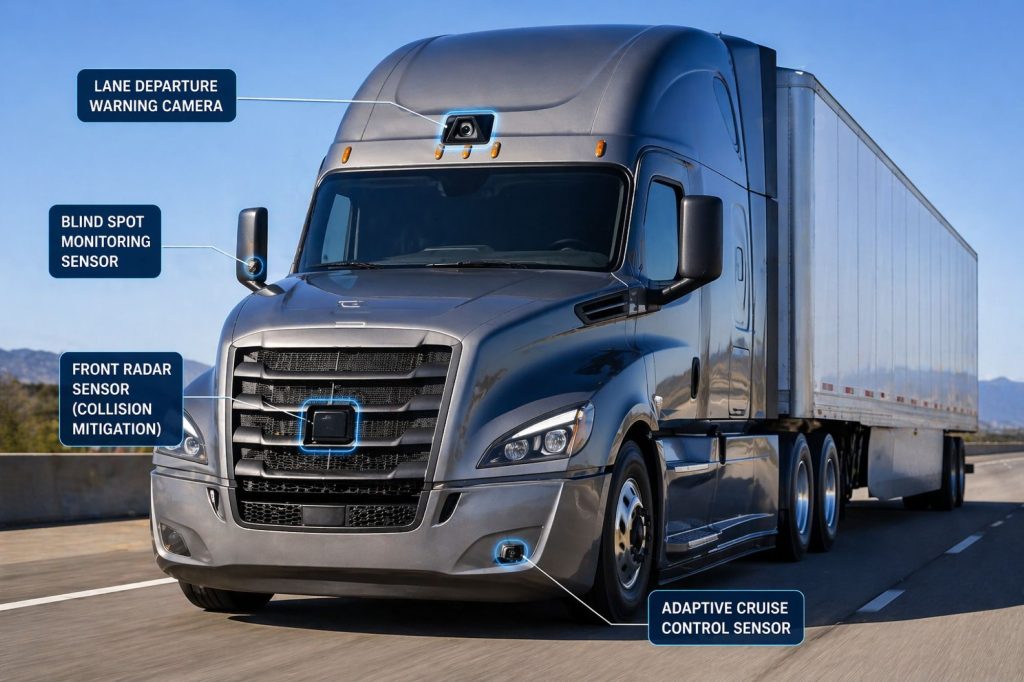
Commercial truck safety systems help drivers recognize hazards, monitor areas around the vehicle, manage following distance, and respond to certain collision risks. Equipment ranges from audible reversing alarms and camera monitors to integrated collision mitigation, lane assistance, and blind-spot detection systems.
Truck Equipment Atlas covers safety equipment used in highway, regional, delivery, vocational, and specialized trucking operations. The library connects individual products with their operating functions, installation requirements, driver interfaces, maintenance needs, and related vehicle systems.
Start with a system category, explore a manufacturer’s equipment, or use the guides to understand the differences between warning systems, camera-based visibility equipment, and systems that can intervene through supported vehicle controls.
Explore Commercial Truck Safety System Categories
Safety equipment can be organized by the hazard it addresses and the assistance it provides. Explore the main categories being developed for the Truck Equipment Atlas Safety Systems Library:
- Collision Warning and Automatic Emergency Braking Systems — Equipment that monitors certain forward collision risks and provides warnings or supported braking intervention.
- Adaptive Cruise Control Systems — Systems that adjust vehicle speed to help maintain a selected following interval under supported conditions.
- Lane Departure Warning and Lane Keeping Systems — Equipment that identifies lane boundaries and provides departure alerts or supported steering assistance.
- Blind-Spot and Vulnerable Road User Detection Systems — Systems intended to improve awareness of vehicles, pedestrians, or cyclists within specified detection areas.
- Reversing Safety and Audible Warning Systems — Backup alarms, proximity detection, and supported reversing assistance for maneuvering around people and obstacles.
- Camera Monitor and Surround-View Systems — Cameras, displays, and image-processing equipment that help drivers view areas around commercial vehicles.
Safety System Guides
The Safety System Guides section explains how different technologies work, what drivers can expect from them, and which questions matter when evaluating equipment. Topics include collision mitigation, following-distance control, lane assistance, blind-spot monitoring, camera visibility, and system selection.
Commercial Truck Safety Systems on Truck Equipment Atlas
The first group of product profiles covers integrated driver-assistance systems, individual hazard-warning technologies, camera monitor systems, and reversing equipment. Explore the product pages being added to the library by manufacturer:
Bendix
- Bendix Wingman Fusion Collision Mitigation System
- Bendix Wingman Advanced Collision Mitigation System
- Bendix BlindSpotter Radar System
ZF WABCO
- ZF WABCO OnGuardACTIVE Collision Mitigation System
- ZF WABCO OnLaneALERT Lane Departure Warning System
- ZF WABCO OnLaneASSIST Lane Keeping Assistance System
- ZF WABCO OnSideALERT Blind-Spot Detection System
- ZF WABCO TailGUARD Reversing Safety System
Detroit
Mobileye
Stoneridge
Brigade Electronics
- Brigade Backeye 360 Camera System
- Brigade Backeye 360 AI Camera System
- Brigade SA-BBS-107 White Sound Reversing Alarm
Additional products, system generations, sensors, driver interfaces, and specialized applications will be added as the Safety Systems Library expands.
Safety System Guides on Truck Equipment Atlas
Explore the educational guides being developed alongside the product library:
- How Commercial Truck Safety Systems Work
- Collision Warning and Automatic Emergency Braking Explained
- Adaptive Cruise Control for Commercial Trucks Explained
- Lane Departure Warning and Lane Keeping Assistance Explained
- Blind-Spot Detection and Camera Monitor Systems Explained
- How to Choose a Commercial Truck Safety System
Understanding Commercial Truck Safety Functions
A product’s name does not explain every function it provides. When comparing systems, identify what the equipment detects, how it communicates with the driver, and whether it can influence vehicle controls.
Warning Systems
Warning equipment uses visual, audible, or other driver alerts to draw attention to a detected condition. The driver remains responsible for interpreting the warning and taking the appropriate action.
Driver-Assistance Systems
Assistance systems may adjust speed or provide steering support within their defined operating conditions. Their capabilities depend on the installed hardware, vehicle integration, software, and enabled functions.
Collision Mitigation Systems
Collision mitigation equipment may apply supported braking responses when certain risks are detected. Read the exact product and vehicle documentation to understand which situations it addresses and when intervention may be limited.
Visibility Systems
Camera monitor equipment presents views around the vehicle. A displayed image does not automatically mean the system identifies hazards, produces warnings, records video, or controls the vehicle.
Safety System Specifications and Operating Capabilities
Compare equipment using the specifications relevant to its intended function. Important information can include:
- Supported vehicle makes, models, and model years.
- System generation and software version.
- Detection zones and camera viewing areas.
- Operating speed range and activation conditions.
- Warning types and driver controls.
- Supported braking or steering intervention.
- Electrical supply and communication requirements.
- Mounting, alignment, and calibration procedures.
- Environmental protection and operating temperature.
- Diagnostic, recording, and fleet-reporting capabilities.
Compare the installed configuration rather than assuming that every vehicle carrying the same product-family name has identical capabilities.
Factory-Installed and Aftermarket Safety Equipment
Factory-installed systems are selected and integrated as part of a vehicle configuration. Aftermarket equipment requires its own compatibility and installation review, particularly when it connects to vehicle networks or is expected to influence braking or steering.
Before planning a retrofit, obtain confirmation of the approved vehicle application, required components, installation procedure, calibration method, and available service support. An upgrade offered for one truck configuration may not apply to another.
Sensors, Cameras, and Driver Displays
The complete installation matters as much as the main control unit. Sensor brackets, camera positions, wiring, displays, and driver controls all affect how a system is used and serviced.
Sensor and Camera Placement
Use the approved mounting location and alignment procedure. Review possible interference from body equipment, accessories, trailer geometry, dirt accumulation, and repair work.
Driver Interfaces
Drivers need to understand the meaning of alerts, status indicators, and unavailable-system messages. Displays should be installed according to the vehicle and equipment instructions, with suitable visibility and access.
Calibration and Service
Check the required service procedure after repairs affecting a sensor, camera, windshield, mounting bracket, or related vehicle geometry. Follow the documented calibration triggers for the exact installation.
Safety Systems and Related Vehicle Controls
Integrated safety equipment operates within the capabilities of the vehicle carrying it. Brake condition, steering condition, tires, electrical supply, and supported electronic controls remain important when evaluating the complete installation.
Keep physical maintenance and electronic troubleshooting connected. A warning should be investigated using the manufacturer’s diagnostic process rather than assumed to indicate a failed sensor or resolved by replacing parts without diagnosis.
Common Commercial Truck Safety Configurations
Safety equipment can be deployed individually or as part of a larger vehicle package. Common configuration types include:
- Forward collision warning equipment.
- Integrated collision mitigation and following-distance assistance.
- Lane departure warning equipment.
- Supported lane keeping assistance.
- Side-mounted blind-spot detection.
- Pedestrian and cyclist detection for specified operating areas.
- Rear-view camera and monitor installations.
- Multi-camera surround-view installations.
- Camera monitor systems for driver visibility.
- Audible reversing alarms.
- Reversing obstacle-detection systems.
- Combined factory-installed safety packages.
Highway, Regional, and Vocational Applications
Highway fleets may focus on forward collision risks, following distance, lane awareness, and driver visibility during extended travel.
Regional and urban operations may place additional emphasis on pedestrians, cyclists, nearby traffic, frequent turns, customer access, and maneuvering in crowded delivery areas.
Vocational operations should evaluate body equipment, changing worksite layouts, nearby personnel, reversing activity, and the suitability of sensor and camera locations for the vehicle’s actual duties.
Advantages of Commercial Truck Safety Equipment
Depending on the product and application, safety equipment can support:
- Driver awareness of specified collision risks.
- Improved visibility around the vehicle.
- Following-distance awareness and supported speed adjustment.
- Lane departure alerts.
- Awareness of objects or road users in monitored areas.
- More informed reversing and low-speed maneuvering.
- Supported braking or steering responses in defined situations.
- Driver training and fleet review where reporting is available.
Evaluate these benefits against the documented capability of the selected installation and the conditions in which the vehicle operates.
Safety System Limitations and Considerations
Equipment selection should account for both the intended assistance and its operating limits. Important considerations include:
- Vehicle and system compatibility.
- Warning-only functions versus supported intervention.
- Detection coverage and unmonitored areas.
- Weather, visibility, and road-marking conditions.
- Sensor obstruction or damage.
- Mounting and calibration requirements.
- Driver training and alert interpretation.
- Repair support and replacement availability.
- Optional subscriptions or fleet-reporting services.
- Changes in performance between system generations.
Drivers should use each system within its documented operating instructions and continue maintaining control and awareness of the vehicle and surrounding traffic.
Driver and Operator Considerations
Training should cover the equipment actually installed on the truck. Familiarity with one product generation does not establish familiarity with every system bearing the same brand.
- Learn the meaning of each warning and status indicator.
- Understand how to identify unavailable or faulted functions.
- Follow the documented use of cruise and assistance controls.
- Check camera views and display operation using the approved procedure.
- Report damaged, obstructed, or displaced equipment.
- Use the fleet’s process for documenting unexpected alerts or behavior.
Maintenance and Ownership
Include safety equipment in the vehicle’s inspection and service records. Maintenance planning should address the complete installation and the manufacturer’s required checks.
- Inspect sensor and camera mounting hardware.
- Check exposed wiring and connectors.
- Clean approved surfaces using the specified method.
- Check displays, alarms, and status indicators.
- Investigate recurring faults through supported diagnostics.
- Review calibration requirements after relevant repairs.
- Record part numbers, software information, and service history.
- Confirm replacement components match the installed system.
Major Commercial Truck Safety System Manufacturers
Initial library coverage includes the following manufacturers and product families. Their official resources provide additional product and service information:
Related Truck Equipment Resources
Explore related equipment libraries to understand the vehicle systems and operating applications connected with safety technology:
- Commercial Trucks
- Commercial Trailers
- Brake Systems
- ABS and Electronic Braking Systems
- Tires & Wheels
- Tire Pressure Monitoring & Inflation Systems
- Drivelines & Steering Systems
- Electrical Systems
- Telematics & ELD Systems
- AI Dash Cameras & Video Telematics
- Equipment Systems
- Safety System Guides
How to Use the Safety Systems Library
Begin with the category that matches the function you want to understand, then explore individual products and the related guides. Product profiles will provide more detailed information where manufacturer documentation is available.
- Product purpose and operating functions.
- Major components and installation locations.
- Driver warnings, displays, and controls.
- Vehicle compatibility and integration requirements.
- Operating capabilities and limitations.
- Inspection, calibration, and maintenance considerations.
- Common problems and service information.
- Buying considerations and related equipment.
Safety Systems Library Expansion
The planned Safety Systems Library includes 55 product profiles across three development phases. The first phase introduces 15 products, supported by six system-category pages, a guides hub, and six educational guides.
Later development will expand manufacturer coverage, system generations, supporting components, and specialized trucking applications. Existing brake, tire-monitoring, electrical, and telematics resources will connect with this library through related links.
The library is intended to help drivers, owner-operators, fleet managers, technicians, students, and equipment buyers understand what different safety technologies do and how they fit into commercial trucking operations.
Follow the Growth of Truck Equipment Atlas
Truck Equipment Atlas continues to add vehicle profiles, equipment libraries, manufacturer coverage, and educational resources for the commercial trucking industry.
Follow the project’s progress and see newly added resources on the Site Updates page.