
Quick Facts
- Manufacturer: Geotab
- Product: GO9 RUGGED telematics device
- Equipment category: Ruggedized vehicle and powered-equipment gateway
- Fleet platform: MyGeotab
- Primary functions: Location tracking, movement monitoring, and supported vehicle information
- Environmental ratings: IP68 and IP69K for the device; harness protection boundaries must be checked separately
- Electrical systems: 12-volt and 24-volt systems; maximum supplied battery voltage of 36 volts
- Installation: Professional installation with an application-appropriate harness
- Important distinction: GO9 RUGGED specifications and connections differ from the standard GO9
Overview
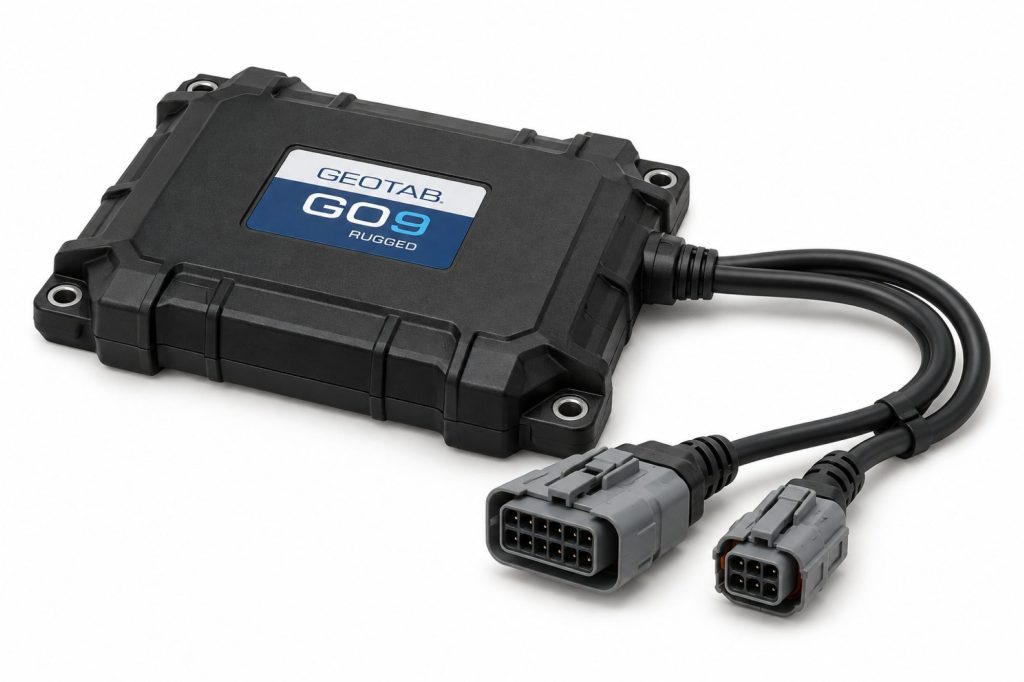
The Geotab GO9 RUGGED connects suitable vehicles and powered equipment to a fleet management environment. Its protected construction supports installations where exposure makes a standard in-cab device unsuitable.
The complete system includes the gateway, installation harness, service arrangement, database configuration, and any required accessories. Selecting the right combination matters more than choosing the device by name alone.
Key Characteristics
- Hardware intended for demanding installation environments.
- Harness selection based on the vehicle or equipment application.
- Vehicle information that depends on available connections and support.
- Expansion options requiring compatible hardware and installation provisions.
- Software configuration that determines reporting and user workflows.
Major Components
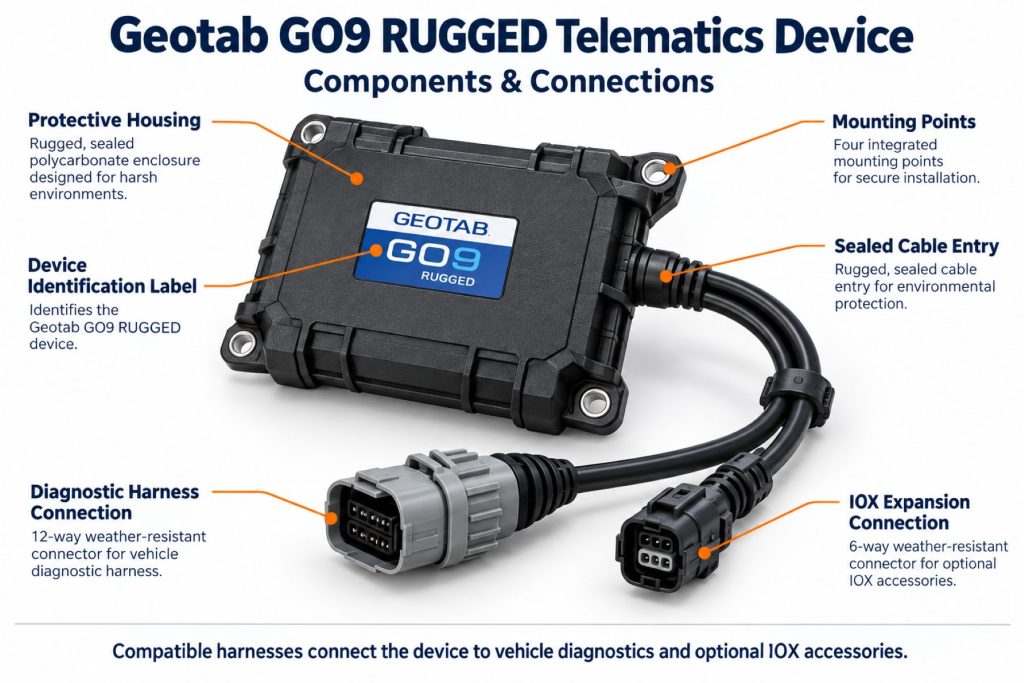
- GO9 RUGGED device and attached cable assembly.
- Application-specific vehicle or equipment harness.
- Mounting hardware and cable retention provisions.
- Active fleet account and service configuration.
- Optional compatible accessories and integrations.
Product Type and Construction
This product is an electronic gateway rather than a driver display or self-contained camera. Installation planning must account for its enclosure, cable routing, connection points, and the conditions surrounding the mounted equipment.
Hardware, Software, and Platform Design
The hardware supplies information to the fleet platform, while software organizes that information into useful records and configured workflows. Evaluate the reseller’s support, account setup, integrations, and reporting options as part of the equipment purchase.
How the Telematics or ELD System Works
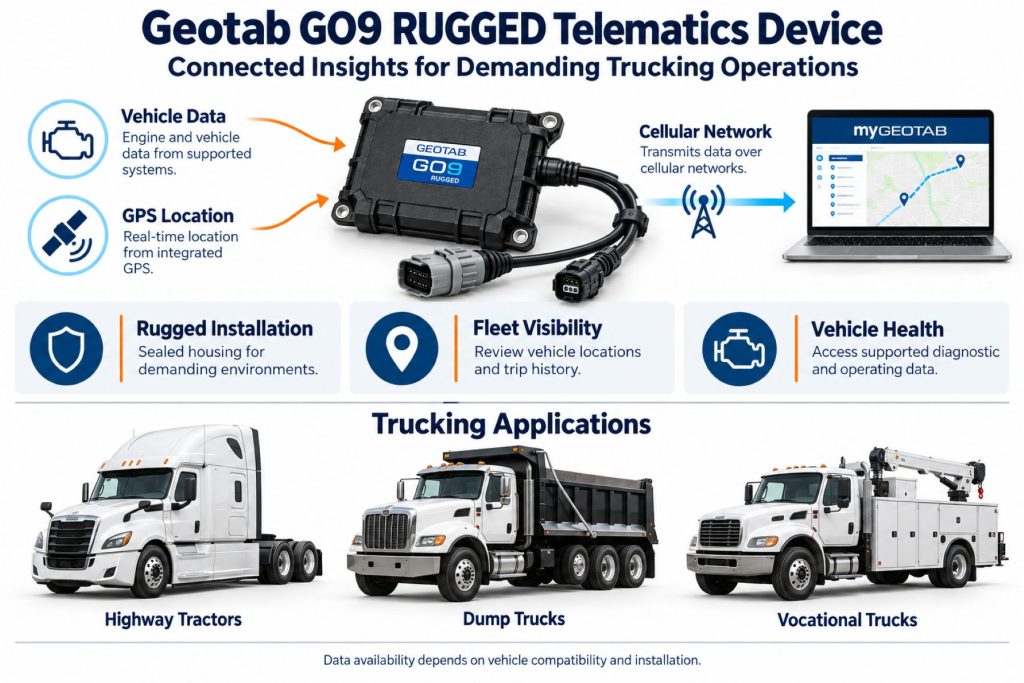
A configured installation collects supported operating information and transfers it to the fleet system. Authorized users review activity and respond to alerts. Driver logging requires additional application, account, and compliance arrangements beyond the gateway installation.
Position and Function Within the Vehicle
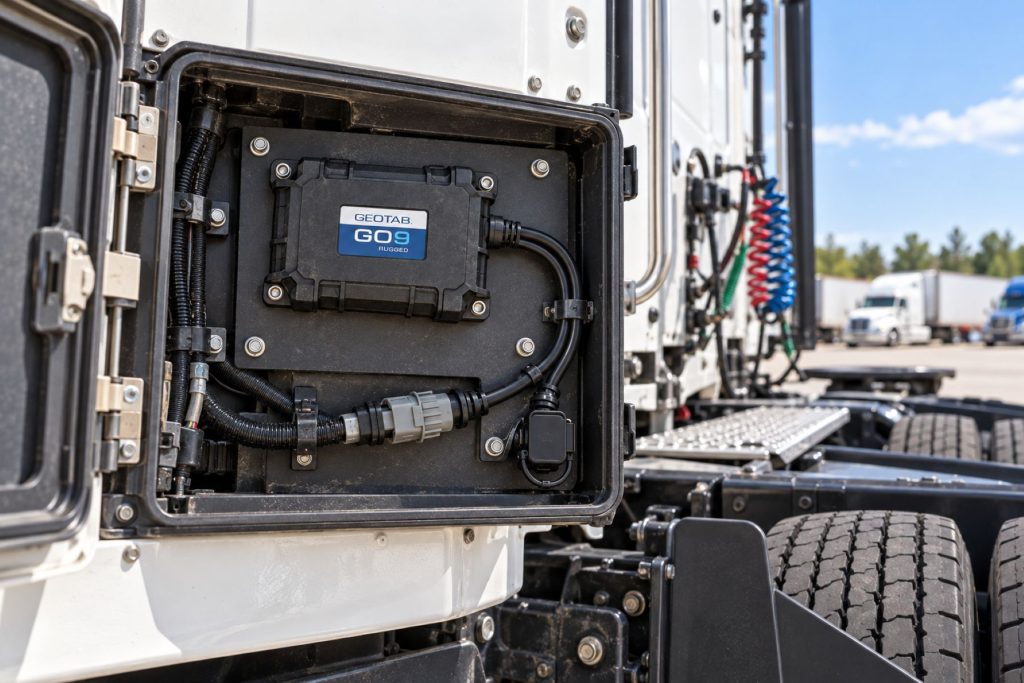
The mounting location should protect the device from impact, excessive heat, and interference with vehicle operation. Accessible placement helps inspection, but cables and connectors must remain secure throughout normal movement and service work.
Common Specifications
- Casing dimensions: 159 × 122 × 31 mm.
- Weight: Approximately 396 g.
- Attached cable length: 1,000 mm.
- Housing: Polycarbonate.
- Operating temperature: −40 to +85°C.
- Motion sensors: Three-axis accelerometer and gyroscope.
- Vehicle interfaces: Supported OBD, CAN, J1939, and J1708/1587 applications.
- Connectivity: Cellular and positioning configuration varies by model and revision.
Operating Capacity and Performance
Assess performance using representative routes and work cycles. Useful checks include trip completeness, update timing, required equipment measurements, and alert relevance. Compare recorded event time with upload time when investigating apparent reporting delays.
Installation Position and System Function
A diagnostic installation and a power-only installation can serve different needs. Identify the required measurements before choosing a mounting and connection arrangement. Do not assume that providing electrical power also provides engine data.
System Voltage and Electrical Architecture
Verify supply voltage and the behavior of battery disconnect switches before installation. Equipment with unusual grounding or isolation arrangements needs application-specific guidance rather than a generic connection method.
Electrical Input, Output, and Power Function
The gateway requires an appropriate power connection. Accessories add electrical demand and may introduce additional wiring requirements. Review the complete system load and circuit protection with the installer.
Data Collection and Vehicle Information
Request confirmation of the information needed for each equipment type. Engine hours, distance, operating status, and diagnostic measurements should be validated on the actual application before the fleet builds reports around them.
GPS, Cellular, Wi-Fi, and Satellite Connectivity
Position reception and remote communication are separate considerations. Metal structures and enclosed mounting locations can complicate reception, while route coverage affects upload timing. Do not assume Wi-Fi hotspot or satellite service is included; confirm any additional connectivity arrangement with the provider.
Vehicle Network and Diagnostic Integration
Protocol support differs from the standard GO9, including exclusions for single-wire and medium-speed CAN applications. Have the reseller verify the exact vehicle and required measurements before substituting one device for another.
Electronic Logging and Hours-of-Service Functions
For commercial-truck logging, obtain confirmation that the proposed GO9 RUGGED installation supports the intended Geotab compliance solution. Rugged construction alone does not establish an accepted ELD configuration. Include the driver application, supported mobile device, and operating procedures in the assessment.
Driver Identification and User Access
Establish clear identification and equipment-selection procedures where several operators share vehicles. Match account permissions to responsibilities, and review assignments after personnel changes or equipment transfers.
Fleet Portal and Mobile Application
Evaluate the portal and any mobile workflow as part of the complete purchase. Confirm which users need maps, reports, inspections, messages, or logging functions and whether those functions are included in the proposed service arrangement.
Dash Camera and Video Capabilities
The GO9 RUGGED does not contain a dash camera. Video requires separate equipment and a supported integration. Camera placement, recording configuration, access permissions, and costs should be reviewed independently.
Trailer and Asset-Tracking Capabilities
Assess trailer and equipment applications against available power, installation exposure, and required reporting. A tractor-mounted device does not provide independent visibility of a disconnected trailer. Unpowered assets may need a different tracking solution.
Remote Diagnostics and Fault-Code Management
Use available diagnostic records to prioritize investigation. Check equipment symptoms, operating conditions, and service information before deciding that an alert identifies a failed component. Unsupported measurements should not be treated as zero values.
Driver Communication and Workflow Tools
Communication workflows depend on the selected software and integrations. Define how operators receive instructions, report equipment issues, and complete required records. Keep interactive tasks separate from driving and active equipment operation.
Alerts, Reports, and Fleet Analytics
Configure reports around actionable questions such as equipment utilization, unexpected movement, or maintenance planning. Assign an owner to each important alert and document the response expected from that person.
Data Storage, Transfer, and Retention
Confirm offline buffering, historical retention, exports, and integration access with the provider. These are distinct requirements. Establish a preservation procedure for information needed beyond routine reporting periods.
Cybersecurity, Privacy, and User Permissions
Control access to fleet records and review third-party connections before enabling them. Explain monitoring practices to operators and remove account access when it is no longer required. Include security responsibilities in reseller and integration discussions.
Materials and Component Construction
Inspect the enclosure, mounting features, cable jacket, and connector seals before installation. Damage to the surrounding harness can undermine an otherwise sound device installation, particularly where movement and abrasion occur.
Wiring, Terminals, Connectors, and Grounding
Use the exact harness instructions for the application. Provide strain relief and protect wiring at panel openings and sharp edges. Avoid improvised adapters, unapproved terminal changes, and assumptions based only on wire color.
Controls, Monitoring, and Diagnostics
Review device indicators alongside portal communication status. For intermittent problems, record the operating state, recent service activity, and last successful update. This gives support personnel a clearer starting point than a general report that tracking stopped.
Electronic Controls and Driver-Assistance Integration
Telematics monitoring should not be described as active control of braking, steering, or equipment safety functions. Verify any proposed integration separately and identify which information is observed versus which functions are actually controlled.
Power Consumption and System Efficiency
Review operating and parked power demand for the complete installation. Accessories, battery condition, and long storage periods can affect the suitability of the arrangement. Confirm how battery isolation changes device availability.
Environmental Sealing and Contamination Protection
Inspect the entire installation’s protection boundary. An enclosure rating does not automatically apply to every adapter, accessory, or exposed connection. Preserve connector seals and follow the approved routing and cleaning guidance.
Coverage, Connectivity, and Offline Operation
Test reporting at representative jobsites and along normal routes. Distinguish temporary upload delays from lost power or installation faults. Confirm the required offline workflow before relying on the system in remote operating areas.
Duty Cycle and Operating Conditions
Consider vibration, worksite debris, wash procedures, seasonal storage, and frequent equipment servicing. Select a mounting location and inspection interval that reflect those conditions rather than assuming all fleet assets operate alike.
Mounting and Installation
Use Geotab’s approved installation guidance and suitable fasteners. Keep the device and cabling away from controls, moving parts, hot surfaces, and likely impact areas. Verify that normal service access will not disturb the installation.
Installation, Activation, and Account Setup
Record the device identifier and equipment assignment, establish the fleet account configuration, and complete installation verification. Review a representative trip or work cycle before commissioning the asset for routine reporting.
Wiring, Grounding, and Installation Requirements
Harness selection must account for the diagnostic connection and electrical architecture. Where wiring is required, the installer should confirm power, grounding, circuit protection, and disconnect behavior using the specific installation documentation.
Software Configuration and Vehicle Assignment
Use consistent equipment names and verify that each device is assigned correctly. Configure groups, report units, notifications, and operator access. Update assignments whenever equipment changes owners, locations, or operational roles.
Vehicle, Network, and Platform Compatibility
Confirm the model year, engine, diagnostic connector, device revision, and required measurements with the reseller. A supported manufacturer name or network type does not establish identical functionality across all equipment.
Related Component and System Compatibility
IOX expansion requires the HRN-RX06S4 harness. Driver feedback uses suitable external accessories. Verify the complete accessory combination, its mounting environment, and any additional service requirements before purchase.
Common Applications
- Vocational truck fleet visibility.
- Construction and industrial equipment monitoring.
- Service equipment operating in demanding environments.
- Powered-asset utilization reporting.
- Mixed-fleet tracking with verified application support.
- Installations requiring an alternative to standard in-cab hardware.
Advantages
- Construction suited to appropriately planned exposed installations.
- Connection to a centralized fleet platform.
- Harness options for different equipment applications.
- Potential to consolidate vehicle and equipment reporting.
- Expansion opportunities through compatible accessories.
Limitations or Considerations
- Installation requires suitable technical expertise.
- Vehicle support differs from the standard GO9.
- Exposed harness sections require their own protection assessment.
- Power availability affects tracking continuity.
- Coverage affects the timeliness of remote updates.
- Accessories and integrations can increase total cost.
- Used hardware requires activation and account-status verification.
Driver and Operator Experience
Operators need clear instructions for identification, equipment selection, and issue reporting. Explain which records the fleet reviews and how unusual activity is investigated. Training should reflect the actual software and accessories installed.
Controls, Indicators, and Driver Feedback
Use the manufacturer’s indicator guidance during installation and troubleshooting. If operator feedback is part of the configuration, explain the alert meanings and expected response before putting the system into service.
Compliance and Record Management
Assign responsibility for reviewing records, correcting assignments, and preserving required information. When electronic logging is included, confirm the complete accepted configuration and train drivers on normal and malfunction procedures.
Subscription Plans and Ongoing Service Costs
Obtain a current quote covering the device, harness, installation, recurring service, accessories, and integrations. Review support provisions, contract terms, and equipment replacement arrangements when comparing ownership cost.
Firmware, Software, and Map Updates
Maintain a documented support process for updates and configuration changes. Verify essential reporting functions after significant changes and communicate revised operating procedures to affected users.
Data Accuracy and System Limitations
Investigate unexpected readings using assignment history, timestamps, installation condition, and equipment operating context. Different assets may expose different measurements, so reports should distinguish unsupported information from actual operating values.
Inspection and Wear Points
- Mounting fasteners and enclosure condition.
- Cable abrasion, tension, and pinch points.
- Connector engagement and seal condition.
- Exposure of adapters and accessory connections.
- Clearance from hot or moving components.
- Changes following equipment service.
- Correct asset assignment in the fleet platform.
Maintenance and Ownership Notes
Include the installation in routine equipment inspections. Keep photographs, device identifiers, harness part numbers, and support contacts with the asset record. Recheck reporting after repairs that disturb wiring, batteries, or surrounding panels.
Common Telematics and ELD System Problems
- Delayed updates requiring coverage and communication checks.
- Intermittent power caused by a disturbed connection.
- Unexpected offline status after battery isolation.
- Missing measurements requiring compatibility review.
- Damaged harnesses or exposed accessory connections.
- Incorrect equipment assignments.
- Alerts requiring adjustment to the actual duty cycle.
Safety and Service Precautions
Perform installation and service only with the equipment securely parked. Secure the device and wiring clear of controls. Follow Geotab’s warnings and use qualified support for compatibility questions, installation changes, or unexpected vehicle behavior following installation.
Identification Information
Record the serial number, model identifier, hardware revision, harness numbers, and assigned asset. Include the equipment model and power arrangement so support can identify the correct documentation and configuration.
Buying Considerations
- Confirm the exact equipment and required measurements.
- Select an approved harness and installation method.
- Review environmental protection across the complete installation.
- Check power supply and battery disconnect behavior.
- Confirm regional connectivity and service eligibility.
- Include accessory and integration requirements in the quote.
- Verify the intended logging configuration where applicable.
- Trial the installation before a larger rollout.
Variants and Configurations
- Regional hardware: Configurations selected for supported cellular markets.
- Diagnostic installation: An approved connection for supported equipment information.
- Wired installation: An application-specific arrangement where a suitable diagnostic connection is unavailable.
- Accessory installation: Compatible expansion hardware and required connection equipment.
- Separate products: Standard GO9 and GO9+ should be evaluated using their own specifications.
Comparison to Similar Equipment
Compare rugged gateways using installation suitability, supported measurements, service quality, integrations, and total cost. Independent battery-powered asset trackers address different power requirements. The best choice depends on the asset and the information the fleet needs.
Best Fit For
- Fleets using MyGeotab for vehicle and equipment management.
- Applications requiring a rugged installation arrangement.
- Vocational operations with verified vehicle support.
- Powered equipment requiring centralized activity records.
- Operators prepared to maintain the complete device and harness installation.
Related Vehicle and Trailer Types
Related Truck and Trailer Models
Related Telematics and ELD System Types
- Fleet telematics and vehicle gateways
- Trailer and asset-tracking systems
- Remote diagnostics and fleet intelligence
- Driver communication and workflow systems
- Electronic logging devices and HOS compliance
- AI dash cameras and video telematics
Related Telematics and ELD Products
- Geotab GO9 Telematics Device
- Motive Vehicle Gateway
- Samsara Vehicle Gateway
- Motive Asset Gateway
- Samsara AG52 Asset Gateway
- Omnitracs Intelligent Vehicle Gateway
Related Equipment Systems
- Telematics and ELD systems
- Truck electrical systems
- Truck safety systems
- Truck brake systems
- Driveline and steering systems
- Tire pressure monitoring and inflation systems
Related Guides
- How Commercial Truck Telematics Systems Work
- Electronic Logging Devices and Hours-of-Service Compliance Explained
- How to Choose a Commercial Truck ELD and Telematics System
- GPS Fleet Tracking and Vehicle Telematics Explained
- AI Dash Cameras and Video Telematics Explained
- Commercial Trailer and Asset Tracking Systems Explained
Regulatory and Compliance Notes
Confirm the regional hardware approvals and the requirements governing the intended use. Radio certification, environmental ratings, and electronic logging acceptance address different matters. Verify the complete solution for the jurisdiction and operating application.
Real World Operating Notes
A rugged enclosure is only one part of a dependable installation. Secure mounting, protected connections, correct assignments, and consistent inspection make the system useful over time. Validate reporting during actual work before expanding to additional equipment.
Frequently Asked Questions
How does the GO9 RUGGED differ from the standard GO9?
It uses a different enclosure and installation arrangement for demanding environments. Vehicle support and accessory connections must also be checked independently.
Can it be installed outside the cab?
Yes, in an approved installation. The mounting location and every exposed connection still need an appropriate environmental assessment.
Does it operate as a battery-powered asset tracker?
Plan for a suitable equipment power connection. Do not assume it provides the independent operating duration of a dedicated battery-powered tracker.
Will every truck provide the same diagnostic information?
No. Available information depends on the equipment, connection, and supported configuration. Verify the measurements needed for each application.
Does the rugged rating cover every accessory?
No. Review the protection boundaries of the complete installation, including adapters, harness sections, and accessory connections.
Can it be used for electronic logging?
Have Geotab or the reseller confirm the intended hardware, vehicle connection, application, and compliance configuration before purchasing it for that purpose.
Availability and Where to Find
Contact Geotab or an authorized reseller for current availability, application support, harness selection, installation, and service pricing.
- Geotab Official Website
- GO9 RUGGED Support Document
- GO9 RUGGED Installation and Warnings
- GO9 RUGGED Installation Resources
- Geotab Support Center
Support Trucking Families
Truck Equipment Atlas supports the mission of Grey Cross, a nonprofit dedicated to helping families of truck drivers who lose their lives while on the road. As the site grows, part of its mission is to bring awareness and support to these families.
Podcast or Video Section
Learn More Through Audio and Video
Truck Equipment Atlas will continue expanding with podcast episodes, interviews, and equipment breakdowns to help drivers and fleets better understand trucks and equipment.
Follow the Growth of Truck Equipment Atlas
Truck Equipment Atlas continues to expand with new truck profiles, trailer coverage, diesel engine pages, equipment system resources, manufacturer information, and educational guides.
Visit our Site Updates page to explore recent additions, project milestones, and upcoming resources as we continue building one of the industry’s growing commercial trucking equipment reference libraries.
View the Latest Site Updates: Truck Equipment Atlas Site Updates