
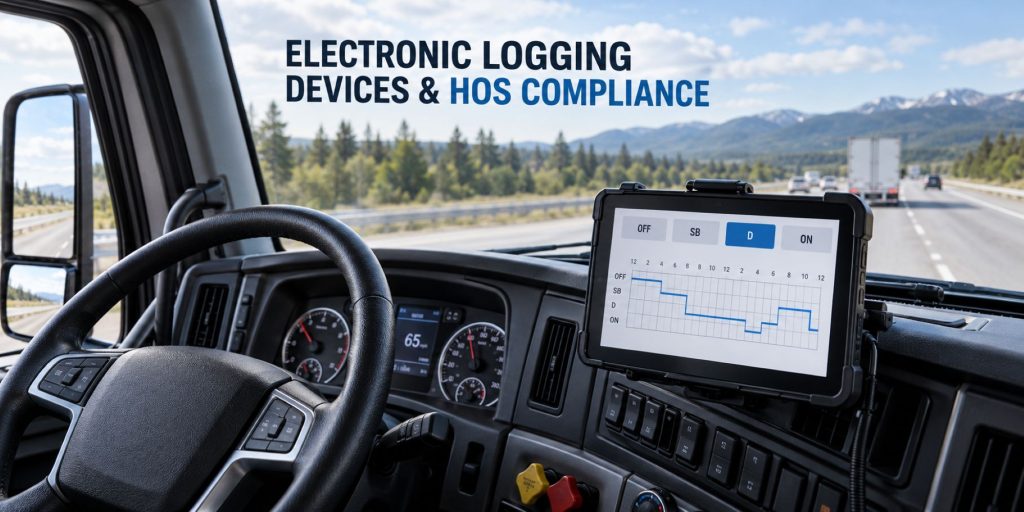
Electronic logging devices record commercial-vehicle driving activity and support the creation, management, certification, and transfer of driver records of duty status.
An ELD synchronizes with a compatible vehicle engine or electronic control system to automatically record driving time and other required vehicle information. Drivers use a connected display, smartphone, tablet, or dedicated terminal to review logs, select duty statuses, add annotations, certify records, and provide information during roadside inspections.
Truck Equipment Atlas covers electronic logging hardware, vehicle gateways, in-cab displays, driver applications, hours-of-service software, inspection functions, data-transfer methods, diagnostic indicators, malfunction procedures, vehicle compatibility, installation, and individual ELD systems used throughout commercial trucking.
Electronic Logging Devices on Truck Equipment Atlas
Explore the electronic logging devices and compatible vehicle-gateway systems being added to Truck Equipment Atlas:
Samsara
Motive
Geotab
Omnitracs
ISAAC Instruments
EROAD
Zonar
Additional electronic logging devices, driver displays, vehicle gateways, mobile applications, hours-of-service platforms, inspection tools, and compliance systems will be added as the Truck Equipment Atlas Telematics and ELD Systems Library continues to expand.
How an Electronic Logging Device Works
An electronic logging device connects with a compatible commercial vehicle to obtain information about engine operation, vehicle movement, distance traveled, and operating time. The device combines this vehicle information with location, date, time, driver identification, motor-carrier information, and driver-entered duty-status information.
When the vehicle begins moving, a compliant ELD automatically records driving activity according to the system’s configuration and applicable requirements. When the vehicle stops, the driver may need to select the appropriate on-duty, sleeper-berth, or off-duty status.
The resulting electronic record can be reviewed by the driver and authorized fleet personnel. The driver normally certifies the record after verifying that the information is complete and accurate.
ELDs and Hours-of-Service Compliance
Hours-of-service rules establish limits and requirements governing driving time, on-duty time, rest periods, sleeper-berth use, and recordkeeping for covered commercial drivers.
An ELD helps create and maintain electronic records, but it does not change the underlying hours-of-service limits or automatically make every driver and carrier compliant.
Drivers and motor carriers remain responsible for:
- Following the applicable hours-of-service rules
- Selecting the correct duty status
- Reviewing and certifying records
- Adding required annotations
- Managing unidentified driving activity
- Retaining required supporting documents
- Responding correctly to diagnostic and malfunction events
- Providing required records during inspections
- Following applicable exemptions and exceptions
Major ELD Components
An electronic logging system may include several physical and software components:
- Vehicle gateway or engine-connected module
- Vehicle-specific diagnostic cable
- GPS receiver
- Cellular or wireless modem
- Dedicated in-cab display
- Driver smartphone or tablet application
- Web-based fleet dashboard
- Hours-of-service software
- Roadside inspection mode
- Electronic data-transfer functions
- Diagnostic and malfunction indicators
- Driver and administrator accounts
Some systems place the gateway and display in separate components. Others use a gateway connected to a driver-provided or fleet-provided mobile device.
Automatically Recorded ELD Information
Depending on the applicable regulations and system design, an ELD may automatically record information associated with:
- Date and time
- Vehicle location
- Engine power status
- Vehicle movement
- Vehicle mileage
- Engine hours
- Driver or authenticated-user identity
- Vehicle identification
- Motor-carrier information
- ELD malfunction and diagnostic events
Information such as duty status, shipping-document details, annotations, trailer numbers, co-driver information, and certain special driving categories may require driver or carrier input.
Driver Duty Statuses
Electronic logs generally organize a driver’s activity into recognized duty-status categories. The correct selection depends on what the driver is doing and the rules that apply to the operation.
Common duty-status categories include:
- Off duty
- Sleeper berth
- Driving
- On duty, not driving
Supported systems may also provide special driving categories or annotations for authorized personal conveyance, yard movement, adverse conditions, exemptions, or other permitted situations. Availability does not by itself establish that a driver qualifies to use a particular category.
Driver Accounts and Authentication
Drivers generally sign in using an individual account connected to the motor carrier’s ELD system. Individual credentials help associate automatically recorded driving activity with the correct driver.
Drivers should not share login credentials or operate under another person’s account. Team drivers should verify that the active driver and co-driver are assigned correctly before vehicle movement.
Fleet administrators should manage account permissions, deactivate former users, review unidentified records, and protect access to driver and carrier information.
Unidentified Driving Records
Vehicle movement may be recorded without an authenticated driver when no driver is signed in, the wrong vehicle is selected, a driver fails to accept an assignment, or the system experiences a configuration or communication problem.
Carriers should regularly review unidentified driving records and assign them to the correct driver when supported by the available information. Drivers should review proposed assignments carefully and accept only records that belong to them.
Unidentified activity should not be assigned or edited merely to make a driver’s available hours appear more favorable.
Log Edits, Annotations, and Certification
Electronic logs may permit drivers and authorized carrier personnel to propose or make supported corrections. The system should preserve the required history of changes rather than replacing the original record without documentation.
Drivers should review dates, locations, duty statuses, vehicle assignments, shipping information, unidentified activity, annotations, and proposed carrier edits before certifying a record.
A motor carrier may propose a correction, but the driver may need to confirm or reject the proposed change. Automatically recorded driving time generally cannot be freely converted into a non-driving status simply because the record creates an hours-of-service problem.
Roadside Inspection and Data Transfer
During a roadside inspection, a driver may be required to display or transfer electronic records using the supported functions of the installed ELD.
Depending on the system and applicable requirements, inspection functions may include:
- On-screen inspection mode
- Electronic record transfer
- Email-based transfer
- Web-service transfer
- USB transfer
- Bluetooth transfer
- Printed backup records where applicable
Drivers should know how to place their system into inspection mode and how to initiate its supported transfer method before beginning a trip.
ELD Diagnostics and Malfunctions
An ELD may display a diagnostic event when it detects a condition that could affect data accuracy, synchronization, positioning, communication, timing, or record completeness.
A malfunction indicates a more serious or persistent problem that may require driver notification, carrier documentation, troubleshooting, repair, and temporary alternative recordkeeping procedures.
Possible causes can include:
- Loss of power
- Disconnected diagnostic cable
- Vehicle-network communication failure
- GPS or positioning failure
- Timing synchronization problems
- Missing vehicle data
- Data-transfer failure
- Driver-application failure
- Damaged hardware
- Incorrect installation or configuration
Drivers and carriers should follow the applicable regulations and the manufacturer’s instructions when responding to diagnostic or malfunction events.
Vehicle and Engine Compatibility
An ELD or vehicle gateway must be compatible with the vehicle, diagnostic connection, engine network, model year, voltage, and operating application.
Compatibility can depend on:
- Truck manufacturer
- Truck model and model year
- Engine manufacturer
- Diagnostic-port design
- Vehicle data protocol
- Electrical-system voltage
- Required installation cable
- Dedicated or mobile display requirements
- Cellular-network availability
- Fleet software and integration requirements
A cable that physically connects to the diagnostic port is not automatically compatible with the vehicle’s electronic network or the selected ELD.
Installation and In-Cab Placement
The gateway, display, wiring, antennas, and mounting equipment should be installed according to the manufacturer’s instructions and applicable vehicle requirements.
The installation should avoid interfering with:
- Driver visibility
- Steering-wheel movement
- Vehicle controls
- Airbag deployment areas
- Entry and exit
- Pedal operation
- Diagnostic access
- Other in-cab equipment
Cables should be routed and secured to reduce abrasion, disconnection, pinching, water exposure, and driver interference.
Dedicated Displays vs Mobile-Device ELDs
A dedicated-display system uses fleet-installed hardware designed to remain with the vehicle. This arrangement can provide consistent mounting, power, software configuration, and driver access.
A mobile-device system may use a smartphone or tablet connected to a vehicle gateway. This arrangement can reduce installed hardware but may require careful management of device compatibility, charging, Bluetooth connections, operating-system updates, data plans, screen condition, and driver access.
The correct choice depends on fleet size, driver assignments, vehicle sharing, maintenance support, operating environment, cellular coverage, workflow requirements, and company policies.
Common Applications
- Long-haul trucking fleets
- Regional carriers
- Dedicated fleets
- Private fleets
- Owner-operators
- Pickup-and-delivery fleets
- Construction fleets
- Heavy-haul operations
- Tank and bulk carriers
- Refrigerated carriers
- Bus and motorcoach operations
- Utility and service fleets
- Municipal fleets
- Specialized commercial vehicles
Selecting an Electronic Logging Device
ELD selection should be based on verified regulatory, vehicle, driver, fleet, communication, and software requirements.
Important selection factors include:
- Applicable operating jurisdiction
- Required registration or certification status
- Vehicle and engine compatibility
- Diagnostic-cable requirements
- Dedicated or mobile display design
- Data-transfer methods
- Driver usability
- Team-driver support
- Inspection mode
- Cellular and operating-area coverage
- Fleet-management integrations
- Administrator controls
- Reporting capabilities
- Technical support
- Hardware warranty
- Monthly subscription cost
- Contract length and cancellation terms
- Data access and retention
Purchase price should not be considered separately from subscription fees, installation, replacement hardware, training, technical support, data access, software integration, and the operational cost of system downtime.
Related Telematics and ELD Categories
- Fleet Telematics & Vehicle Gateways
- AI Dash Cameras & Video Telematics
- Trailer & Asset Tracking Systems
- Driver Communication & Workflow Systems
- Remote Diagnostics & Fleet Intelligence
Related Telematics and ELD Guides
- Telematics & ELD System Guides
- How Commercial Truck Telematics Systems Work
- Electronic Logging Devices and Hours-of-Service Compliance Explained
- How to Choose a Commercial Truck ELD and Telematics System
- GPS Fleet Tracking and Vehicle Telematics Explained
- AI Dash Cameras and Video Telematics Explained
- Commercial Trailer and Asset Tracking Systems Explained
Related Truck and Equipment Resources
- Telematics & ELD Systems
- Electrical Systems
- Safety Systems
- Commercial Trucks
- Commercial Trailers
- Equipment Systems
Electronic Logging Device Library Expansion
Truck Equipment Atlas will continue expanding its electronic logging device coverage as additional manufacturers, hardware platforms, mobile applications, vehicle gateways, compliance tools, and fleet integrations are added.
Future coverage may include:
- Additional vehicle-connected ELDs
- Dedicated in-cab ELD terminals
- Smartphone- and tablet-based ELD systems
- Canadian-certified ELD platforms
- Owner-operator ELD systems
- Large-fleet compliance platforms
- ELD and dispatch integrations
- ELD and maintenance integrations
- Driver workflow and document systems
- Electronic inspection tools
- ELD system comparisons
The goal is to build an organized commercial ELD reference that helps drivers, owner-operators, fleets, safety personnel, dispatchers, technicians, students, and equipment buyers understand how electronic logging systems work and where individual products fit within the trucking industry.
Explore the Complete Telematics and ELD Systems Library
Visit the Telematics & ELD Systems hub to explore electronic logging devices, vehicle gateways, fleet telematics, AI dash cameras, trailer and asset tracking, driver communication systems, remote diagnostics, individual product profiles, and educational guides.
Follow the Growth of Truck Equipment Atlas
Truck Equipment Atlas continues to expand with new truck profiles, trailer coverage, diesel engine pages, equipment-system resources, manufacturer information, and educational guides.
Visit our Site Updates page to explore recent additions, project milestones, and upcoming resources.