
Quick Facts
- Manufacturer: SkyBitz
- Product: Falcon GXT5000
- Equipment category: Independent trailer and asset-tracking system
- Primary function: Trailer location and configured asset-status reporting
- Power design: Solar charging with onboard battery storage
- Operating arrangement: Trailer-mounted hardware and associated tracking service
- Driver interface: Not an in-cab driver terminal
- Electronic logging: Not a standalone ELD
- Important distinction: GXT5000 specifications should not be borrowed from GXT5002 or GXT5002C equipment
- Buying priority: Verify exact hardware, connectivity, account status, and service eligibility
Overview
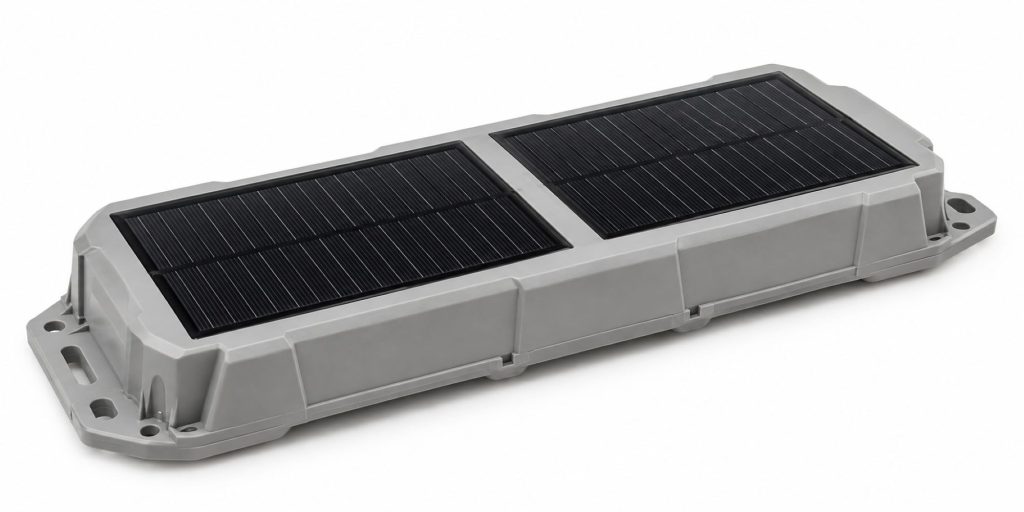
The SkyBitz Falcon GXT5000 is a solar-powered tracking system developed for trailers and other mobile assets. It provides an independent asset installation rather than relying solely on a tractor’s vehicle gateway.
The complete arrangement includes tracking hardware, mounting equipment, reporting configuration, and an active service account. Exact functionality and continued service eligibility must be checked for the particular unit.
Key Characteristics
- Tracking equipment assigned to the trailer or asset.
- Solar charging that reduces dependence on a tractor power connection.
- Reporting behavior configured for the operating application.
- Account and service requirements beyond the hardware purchase.
- Model-specific verification for accessories and technical specifications.
Major Components
- Falcon GXT5000 tracking unit.
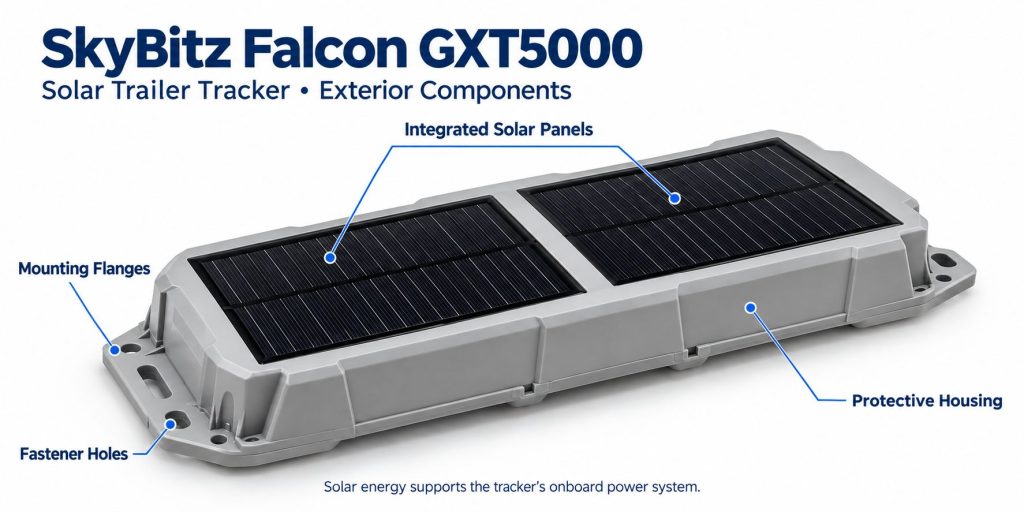
- Solar charging surface and onboard energy storage.
- Approved mounting hardware.
- Active tracking account and reporting configuration.
- Compatible additional sensors where specified.
- Asset identifiers and installation records.
Product Type and Construction
The GXT5000 is a self-contained asset tracker rather than a driver display or camera. Mounting and environmental suitability must be evaluated using documentation for the exact unit.
Hardware, Software, and Platform Design
The trailer hardware supplies records to a configured tracking service. Confirm the portal, available reports, integrations, and support arrangements associated with the account before comparing equipment options.
How the Telematics or ELD System Works
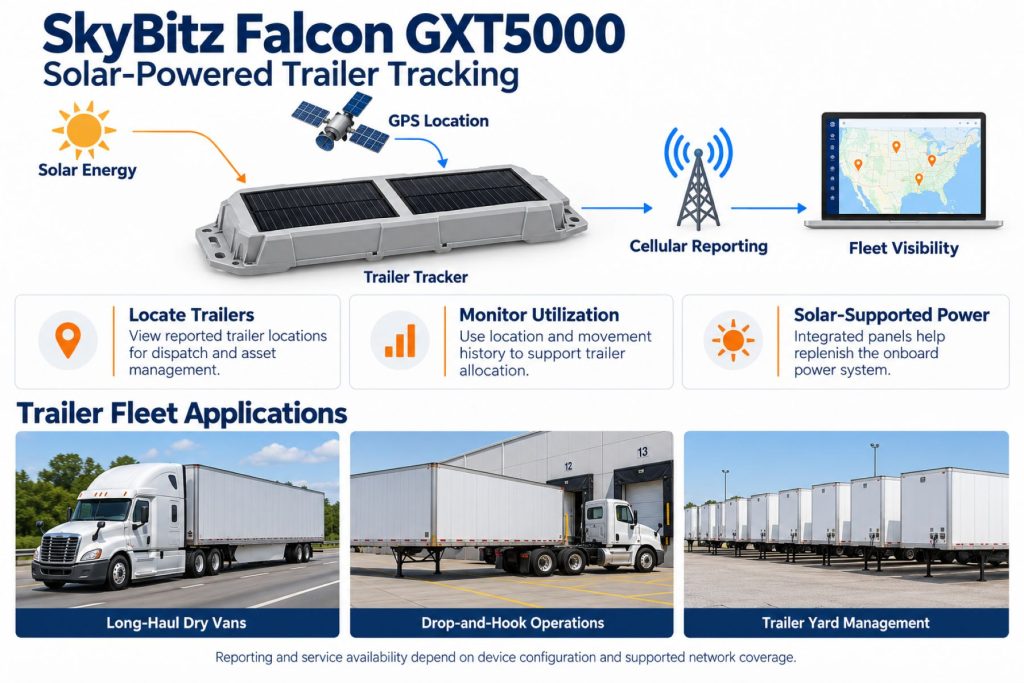
The tracker records supported asset information and transfers reports through its communication arrangement. Fleet personnel review location and activity records through the service. This workflow does not create driver hours-of-service logs.
Position and Function Within the Vehicle
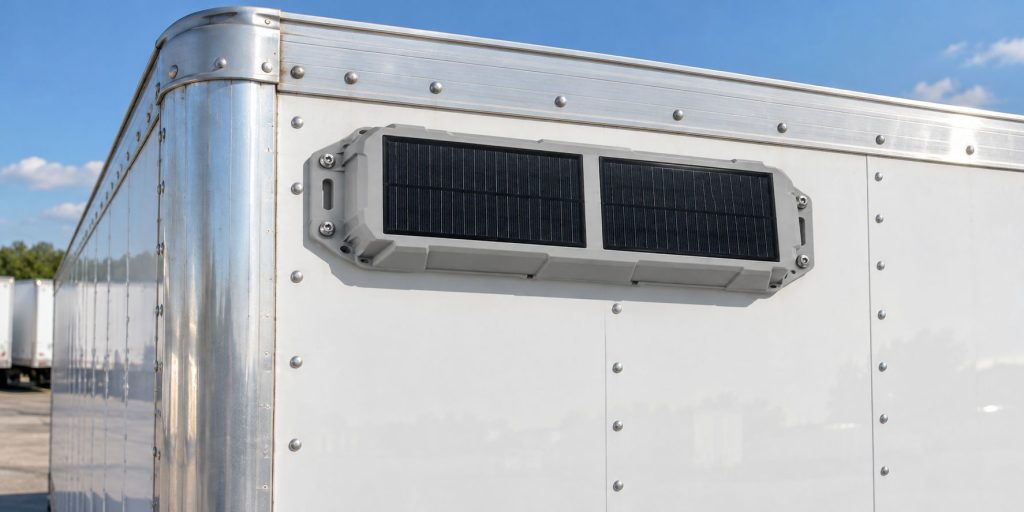
The unit is assigned to the trailer or asset being monitored. Use an approved mounting location that balances reception, solar exposure, protection from impact, and access for inspection.
Common Specifications
- Model: Falcon GXT5000; verify any additional identifier on the unit.
- Energy source: Solar charging and onboard battery storage.
- Positioning: GPS asset tracking.
- Modem: Confirm the exact installed communication hardware.
- Dimensions and weight: Obtain the original model-specific specification.
- Environmental ratings: Verify against GXT5000 documentation.
- Battery capacity and endurance: Confirm the unit’s specification and present condition.
- Reporting interval: Verify the configured service and operating behavior.
Operating Capacity and Performance
Evaluate the system using actual trailer movements and storage patterns. Check update timing, report completeness, energy status, and the usefulness of activity records before expanding deployment.
Installation Position and System Function
Mounting must support both tracking and charging. A location that receives good sunlight may still be vulnerable to damage, while a protected location may introduce shading or reception problems.
System Voltage and Electrical Architecture
Do not treat the solar tracker as a generic 12-volt or 24-volt gateway. Obtain the approved instructions before considering any external power connection or modification.
Electrical Input, Output, and Power Function
Energy availability depends on charging conditions, stored energy, and operating demand. Verify accessory requirements separately. Avoid assuming that the unit provides power outputs for unrelated trailer equipment.
Data Collection and Vehicle Information
Define the records needed for dispatch, yard management, and utilization review. Trailer movement records should not be assumed to include tractor engine data, driver identity, or every cargo condition.
GPS, Cellular, Wi-Fi, and Satellite Connectivity
Positioning and report transfer are separate functions. Verify the exact modem and current network eligibility with SkyBitz. Receiving GPS signals does not mean the unit uses satellite communication to upload records, and hotspot capability should not be assumed.
Vehicle Network and Diagnostic Integration
This trailer-tracking application should not be described as a tractor diagnostic gateway. Confirm any proposed trailer-system connection individually, including the required interface and supported information.
Electronic Logging and Hours-of-Service Functions
The GXT5000 is not a standalone electronic logging device. Driver duty-status records require a separate supported logging solution. Trailer activity records should not be presented as certified driver logs.
Driver Identification and User Access
Assign fleet account permissions according to responsibilities. Trailer location alone does not identify the current driver or tractor. Any assignment process must be established through supported workflows and verified records.
Fleet Portal and Mobile Application
Confirm the portal and mobile tools supported for the specific account and hardware. Newer SkyBitz application features should not automatically be attributed to the original GXT5000.
Dash Camera and Video Capabilities
The GXT5000 tracker is not a dash camera or cargo camera. Image and video coverage require separate equipment and an appropriate service configuration.
Trailer and Asset-Tracking Capabilities
Independent trailer visibility is the primary application. Confirm which location, activity, and sensor records the exact installation supplies. Do not infer built-in cargo sensing from the specifications of later Falcon models.
Remote Diagnostics and Fault-Code Management
Distinguish tracker health information from trailer mechanical diagnostics. Communication or energy-status records can help investigate the tracking installation without establishing the condition of brakes, tires, or other trailer systems.
Driver Communication and Workflow Tools
The tracker does not provide a driver messaging screen. Fleet personnel may use asset information within supported dispatch workflows, but direct driver communication requires separate tools.
Alerts, Reports, and Fleet Analytics
Build reports around actionable questions such as trailer availability, time at customer locations, and unusual movement. Assign responsibility for investigating exceptions and verify the context before taking action.
Data Storage, Transfer, and Retention
Confirm device buffering, platform retention, exports, and integration access. Recorded event time and upload time should be distinguished when reviewing delayed reports.
Cybersecurity, Privacy, and User Permissions
Limit access to asset records and review integration permissions. Establish account-transfer procedures when trailers change ownership and remove obsolete user access promptly.
Materials and Component Construction
Inspect the enclosure, charging surface, and mounting points for damage. Obtain the original material and environmental specifications before assessing suitability for an exposed installation.
Wiring, Terminals, Connectors, and Grounding
Follow the instructions for the exact hardware and any additional sensors. Do not add wiring or modify connectors based on another Falcon model’s installation guide.
Controls, Monitoring, and Diagnostics
Record the unit identifier, last successful report, available health information, and recent installation changes when requesting support. Separate communication problems from charging, assignment, and account issues.
Electronic Controls and Driver-Assistance Integration
Tracking does not establish active control of trailer brakes, lights, or other equipment. Verify any proposed control integration separately and identify its required hardware and supported functions.
Power Consumption and System Efficiency
Balance reporting needs with available charging and battery condition. Frequent reporting, poor reception, shading, and long indoor storage may affect the energy budget. Validate the proposed settings under actual operating conditions.
Environmental Sealing and Contamination Protection
Use the original GXT5000 environmental guidance. Inspect for enclosure damage and contamination, and follow approved cleaning methods. Do not borrow an ingress rating from a newer product.
Coverage, Connectivity, and Offline Operation
Check service coverage on representative routes and storage locations. A stale portal position may indicate delayed transfer rather than the trailer’s current location. Confirm buffering and recovery behavior with the provider.
Duty Cycle and Operating Conditions
Consider outdoor parking, shaded yards, indoor storage, seasonal use, and frequent transfers between tractors. These conditions influence mounting, reporting configuration, and inspection requirements.
Mounting and Installation
Use the approved bracket, location, and fastening method. Check for underlying wiring and structural restrictions before drilling. Preserve reception and charging exposure while avoiding likely impact areas.
Installation, Activation, and Account Setup
Confirm activation eligibility before mounting. Record the device identifier, assign the correct trailer, configure reporting, and verify a successful report using the supported commissioning procedure.
Wiring, Grounding, and Installation Requirements
Do not introduce connections to trailer lighting or braking circuits without an approved application-specific instruction. Sensor installations and other additions require their own compatibility assessment.
Software Configuration and Vehicle Assignment
Use consistent trailer names and match each device to the correct asset. Review groups, reporting behavior, notifications, and integration mappings. Update assignments when trailers are sold or equipment is transferred.
Vehicle, Network, and Platform Compatibility
Assess trailer construction, mounting restrictions, reception, and service support. A suitable physical mounting surface does not establish current network compatibility or account eligibility.
Related Component and System Compatibility
Confirm sensors and integrations for the original GXT5000. Later SkyBitz products may use different accessory arrangements. Request a complete supported equipment list before ordering additions.
Common Applications
- Independent trailer location reporting.
- Drop-and-hook asset visibility.
- Yard inventory and trailer searches.
- Utilization and dwell-time review.
- Existing fleets maintaining supported installations.
- Asset monitoring where installation and service support are verified.
Advantages
- Tracking equipment remains assigned to the trailer.
- Solar charging reduces dependence on tractor power.
- Potential to improve visibility of dispersed assets.
- Activity records can support allocation and utilization decisions.
- Configured reporting can reflect different operating needs.
Limitations or Considerations
- Current network and activation support require confirmation.
- Used-unit battery condition can affect performance.
- Solar charging depends on exposure and operating conditions.
- Reporting frequency is not necessarily continuous tracking.
- Cargo sensing requires exact configuration verification.
- Later Falcon specifications do not apply automatically.
- The tracker does not replace a driver ELD or camera.
Driver and Operator Experience
Most interaction occurs through fleet procedures rather than a tracker screen. Explain trailer identification, assignment practices, and how drivers should report damage or discrepancies between physical assets and portal records.
Controls, Indicators, and Driver Feedback
Use the original model’s instructions for any local checks or indicators. Do not assume that installation lights and app procedures documented for later Falcon hardware are present on the GXT5000.
Compliance and Record Management
Define the business purpose and retention needs for asset records. Location reports may assist investigations but do not automatically establish compliance with driver logging or other regulated recordkeeping requirements.
Subscription Plans and Ongoing Service Costs
Request current pricing and eligibility for the exact hardware. Include installation, recurring service, sensors, integrations, support, and replacement provisions when comparing ownership cost.
Firmware, Software, and Map Updates
Confirm supported update and configuration procedures with SkyBitz. Verify reporting after changes. Portal mapping should not be confused with an onboard truck-navigation service.
Data Accuracy and System Limitations
Review timestamps, assignments, and communication status when a location appears incorrect. Periodic reports do not show every movement between updates. Investigate exceptions using physical asset information where available.
Inspection and Wear Points
- Mounting fasteners and bracket condition.
- Enclosure damage.
- Solar surface contamination or damage.
- Shading introduced by trailer modifications.
- Available battery-health information.
- Sensor condition where fitted.
- Correct device-to-trailer assignment.
Maintenance and Ownership Notes
Include the tracker in routine trailer inspections. Keep installation photographs, identifiers, support contacts, and account records. Follow manufacturer guidance for cleaning and battery-related service.
Common Telematics and ELD System Problems
- Stale positions requiring communication checks.
- Low energy associated with shading or battery condition.
- Incorrect asset assignments.
- Reporting settings unsuitable for the operating pattern.
- Physical damage to the unit or mount.
- Sensor discrepancies requiring configuration review.
- Unsupported used hardware requiring provider assessment.
Safety and Service Precautions
Secure the trailer before installation or service and use appropriate access equipment. Follow approved mounting and battery-service instructions. Avoid drilling into unknown structural or electrical areas.
Identification Information
Record the exact model, serial number, additional hardware identifiers, and assigned trailer. These details help SkyBitz confirm service eligibility and the correct documentation.
Buying Considerations
- Confirm exact hardware and modem support.
- Verify current activation eligibility.
- Check existing account association.
- Assess battery and solar-surface condition.
- Obtain original model-specific specifications.
- Confirm sensor and integration compatibility.
- Review reporting settings and recurring costs.
- Compare supported replacement options.
Variants and Configurations
- Original GXT5000: The product covered by this page.
- Reporting configuration: Settings matched to asset activity and service support.
- Sensor configuration: Additional monitoring only where compatibility is verified.
- Fleet configuration: Account groups, permissions, and integrations.
- Later Falcon models: GXT5002 and GXT5002C require separate specifications.
Comparison to Similar Equipment
Compare solar trackers with battery-powered and externally powered alternatives using charging exposure, reporting needs, service support, installation cost, and asset duty cycle. A tractor gateway serves a different installation role.
Best Fit For
- Existing installations confirmed as serviceable by SkyBitz.
- Trailer operations needing independent asset visibility.
- Assets with suitable mounting and solar exposure.
- Fleets prepared to manage assignments and reporting settings.
- Buyers who have verified support before purchasing hardware.
Related Vehicle and Trailer Types
Related Truck and Trailer Models
Related Telematics and ELD System Types
- Trailer and asset-tracking systems
- Fleet telematics and vehicle gateways
- Remote diagnostics and fleet intelligence
- Driver communication and workflow systems
- AI dash cameras and video telematics
- Electronic logging devices and HOS compliance
Related Telematics and ELD Products
- Samsara AG52 Asset Gateway
- Motive Asset Gateway
- Geotab GO9 RUGGED Telematics Device
- Zonar V4 Telematics Control Unit
- Samsara Vehicle Gateway
- Motive Vehicle Gateway
Related Equipment Systems
- Telematics and ELD systems
- Truck and trailer electrical systems
- Truck and trailer safety systems
- Truck and trailer brake systems
- Tires and wheels
- Tire pressure monitoring and inflation systems
Related Guides
- Commercial Trailer and Asset Tracking Systems Explained
- GPS Fleet Tracking and Vehicle Telematics Explained
- How Commercial Truck Telematics Systems Work
- How to Choose a Commercial Truck ELD and Telematics System
- AI Dash Cameras and Video Telematics Explained
- Electronic Logging Devices and Hours-of-Service Compliance Explained
Regulatory and Compliance Notes
Confirm radio and installation requirements for the operating region. Asset location records do not make the tracker an ELD or establish compliance with unrelated trailer or cargo regulations.
Real World Operating Notes
Useful trailer visibility depends on correct assignments, suitable charging exposure, supported communication, and reporting settings that match operations. Validate a representative asset and investigate stale records before treating them as current positions.
Frequently Asked Questions
Does the GXT5000 need to remain connected to a tractor?
Its solar-and-battery design supports an independent trailer installation, subject to available energy and service conditions.
Is the GXT5000 the same as the GXT5002C?
No. Confirm specifications and accessories using the exact model.
Does every unit provide cargo status?
Verify the installed sensors and supported configuration. Do not assume cargo sensing is included.
Can a used unit be activated?
Have SkyBitz check its exact identifier, modem, account association, and current service eligibility before purchase.
Will solar charging guarantee continuous operation?
No. Exposure, energy demand, battery condition, and operating settings must be assessed together.
Is the tracker an ELD?
No. It tracks assets rather than providing a complete driver electronic logging solution.
Availability and Where to Find
Contact SkyBitz for original GXT5000 documentation, service eligibility, support, and replacement recommendations. Current product offerings should be evaluated separately from historical Falcon equipment.
- SkyBitz Official Website
- SkyBitz Customer Support
- SkyBitz Trailer-Tracking Solutions
- SkyBitz Resources
- Contact SkyBitz
Support Trucking Families
Truck Equipment Atlas supports the mission of Grey Cross, a nonprofit dedicated to helping families of truck drivers who lose their lives while on the road. As the site grows, part of its mission is to bring awareness and support to these families.
Podcast or Video Section
Learn More Through Audio and Video
Truck Equipment Atlas will continue expanding with podcast episodes, interviews, and equipment breakdowns to help drivers and fleets better understand trucks and equipment.
Follow the Growth of Truck Equipment Atlas
Truck Equipment Atlas continues to expand with new truck profiles, trailer coverage, diesel engine pages, equipment system resources, manufacturer information, and educational guides.
Visit our Site Updates page to explore recent additions, project milestones, and upcoming resources as we continue building one of the industry’s growing commercial trucking equipment reference libraries.
View the Latest Site Updates: Truck Equipment Atlas Site Updates