
Quick Facts
- Manufacturer: Samsara
- Product Type: Commercial vehicle telematics gateway
- Primary Function: Collects vehicle, location, diagnostic, driver, and operational data and transfers it to the Samsara Connected Operations Platform
- Current Product Family: VG55 Vehicle Gateway family
- Earlier Models: VG54 and VG34 configurations may remain in service
- Vehicle Compatibility: Light-, medium-, and heavy-duty vehicles when configured with the correct gateway model and installation cable
- Vehicle Connections: Application-specific diagnostic, data-network, and power connections
- Network Connectivity: Cellular, GPS, Bluetooth, and Wi-Fi capabilities vary by gateway model, region, and service configuration
- ELD Capability: Supports Samsara electronic logging and hours-of-service functions when properly configured with the required software, driver application, and subscription
- Primary Applications: Trucking fleets, delivery vehicles, service fleets, construction operations, public-sector fleets, passenger transportation, and specialized commercial vehicles
- Subscription Required: Cloud-connected features generally require an active Samsara service plan
Overview
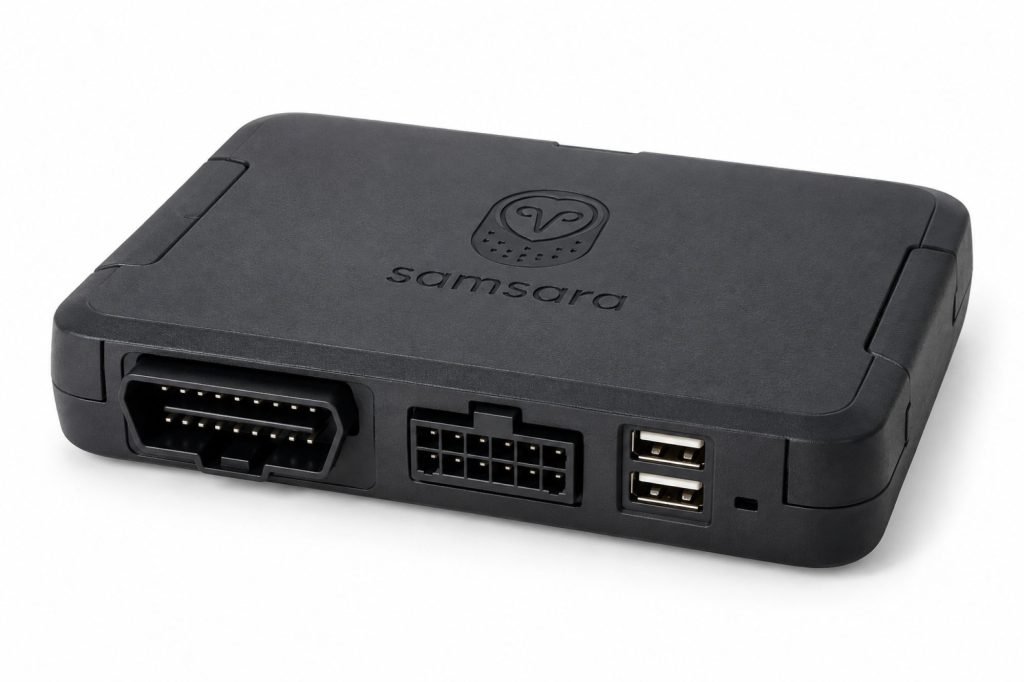
The Samsara Vehicle Gateway is a connected telematics device designed to collect information from a commercial vehicle and transmit that information to the Samsara Connected Operations Platform. It combines vehicle-network access, GPS location tracking, wireless connectivity, onboard processing, and cloud-based fleet-management tools in one integrated system.
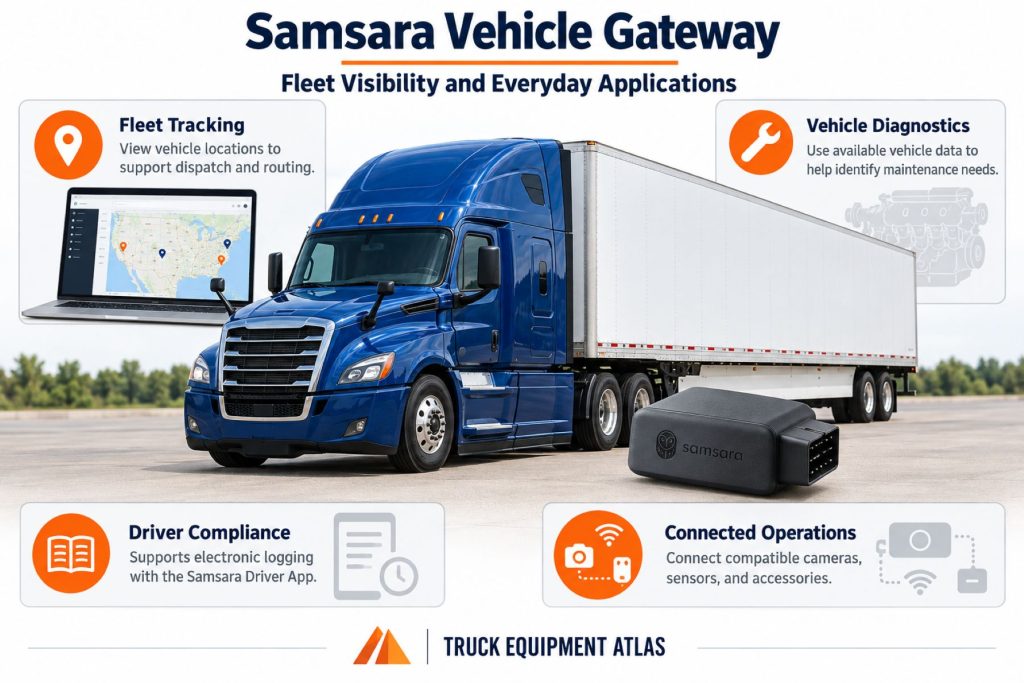
Depending on the vehicle, gateway model, service plan, and connected accessories, the system can support live vehicle location, route visibility, engine diagnostics, fuel and energy reporting, idling analysis, maintenance information, driver identification, electronic logging, hours-of-service compliance, safety monitoring, and fleet alerts.
The gateway is normally installed inside the cab or another protected vehicle location and connected through an application-specific diagnostic cable. That connection supplies power and allows the device to read compatible vehicle-network information. Collected data is then transferred through a wireless connection to the Samsara dashboard and authorized mobile applications.
Samsara has offered several Vehicle Gateway generations, including the VG34, VG54, and VG55 families. Hardware features, supported cables, regional connectivity, accessory compatibility, and service availability must be confirmed using the complete gateway model and the vehicle being equipped.
Key Characteristics
- Cloud-connected commercial vehicle telematics gateway
- Live and historical GPS vehicle tracking
- Compatible vehicle diagnostic-data collection
- Remote fault-code and maintenance visibility
- Electronic logging and hours-of-service support
- Cellular transmission to the Samsara platform
- Driver and administrator mobile applications
- Fleet alerts, reports, maps, and analytics
- Compatibility with selected Samsara cameras and accessories
- Application-specific installation cables
- Support for light-, medium-, and heavy-duty vehicles
- Configurable fleet and driver permissions
- Over-the-air software and configuration management
- Multiple hardware generations and regional versions
Major Components
- Vehicle Gateway hardware module
- Internal GPS receiver
- Cellular communications hardware
- Bluetooth and Wi-Fi hardware where supported
- Onboard processor and memory
- Internal motion and operating sensors
- Status indicator lights
- Gateway electrical connector
- Application-specific vehicle cable
- Diagnostic-port connector
- Pass-through diagnostic connector on applicable cables
- Mounting bracket or adhesive mounting equipment
- Cable ties and cable-management hardware
- Samsara cloud platform
- Samsara Driver App
- Samsara Fleet mobile and web tools
- Optional dash cameras, driver-identification devices, auxiliary inputs, and other accessories
Product Type and Construction
The Samsara Vehicle Gateway is a compact electronic module intended for permanent or semi-permanent installation in a commercial vehicle. Its housing protects the communications, location, processing, memory, and vehicle-interface electronics required to collect and transmit fleet information.
The gateway is not a standalone display or conventional dashboard instrument. Drivers normally interact with the system through the Samsara Driver App, connected accessories, status indicators, or other approved interfaces. Fleet administrators use the Samsara web dashboard and mobile tools to review vehicle and driver information.
Construction and connector arrangements differ between gateway generations. The exact model, region, vehicle class, cable family, accessory requirements, and active service license must be identified before installation or replacement.
Hardware, Software, and Platform Design
The Vehicle Gateway operates as the vehicle-level hardware connection for the Samsara Connected Operations Platform. It gathers compatible information from the vehicle and its own sensors, processes that information, and sends it to Samsara’s cloud services.
The complete system can include several connected layers:
- Gateway hardware installed in the vehicle
- Vehicle diagnostic and power cable
- Cellular and GPS connectivity
- Samsara cloud services
- Fleet-management web dashboard
- Driver and administrator mobile applications
- Optional cameras, sensors, identification devices, and auxiliary inputs
- Application programming interfaces and approved third-party integrations
Available functions depend on the purchased hardware and software package. A gateway installation does not automatically activate every feature offered across the broader Samsara platform.
How the Telematics or ELD System Works
The gateway receives electrical power through its vehicle connection and communicates with compatible onboard networks. Depending on the installation, it can collect vehicle speed, engine state, odometer information, fuel data, diagnostic trouble codes, operating hours, and other supported information.
Its GPS receiver determines vehicle location and movement. The gateway combines location information with vehicle and sensor data, then transmits the information through a cellular network to the Samsara platform.
Authorized fleet users can view the resulting information through maps, reports, alerts, maintenance tools, compliance records, and operational dashboards. Drivers can use the Samsara Driver App for electronic logs, vehicle selection, inspection workflows, messages, routes, and other enabled functions.
If cellular coverage is temporarily unavailable, the system may retain information and transmit it after connectivity returns. Actual offline behavior, storage capacity, reporting frequency, and feature availability depend on the gateway model and service configuration.
Position and Function Within the Vehicle
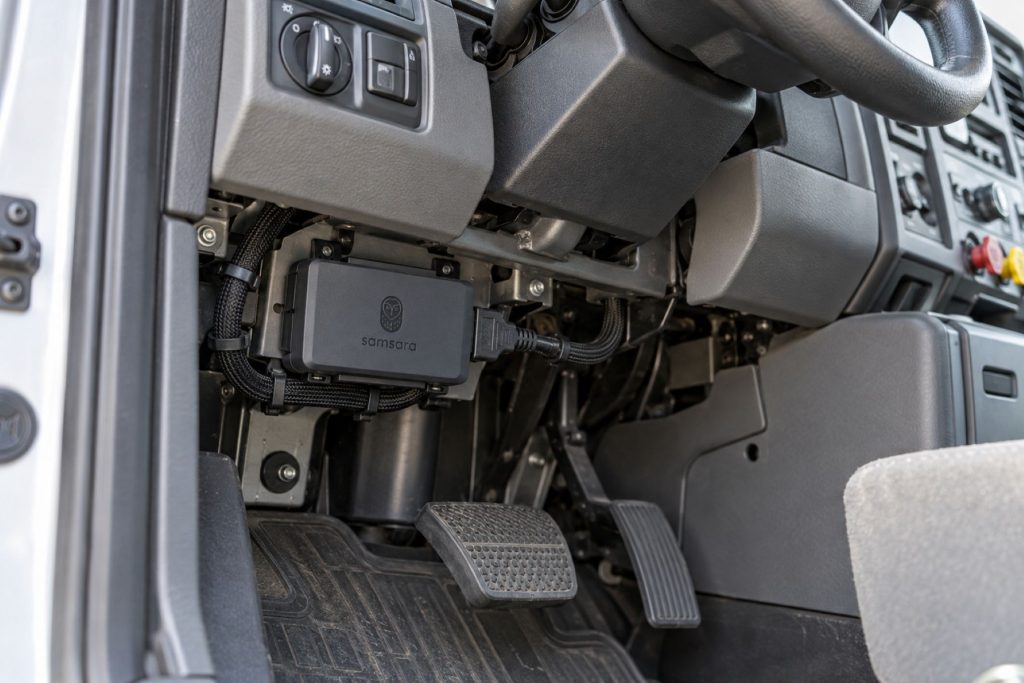
The Vehicle Gateway is normally mounted in a protected location inside the cab, frequently beneath or behind the dashboard. The installation location must allow secure mounting, suitable cable routing, reliable wireless performance, and access to the required vehicle connection without interfering with pedals, steering components, airbags, controls, service panels, or driver movement.
Within the vehicle’s connected systems, the gateway serves as the bridge between onboard vehicle information and Samsara’s cloud platform. It does not replace the engine control module, brake controller, instrument cluster, or other original vehicle controllers.
Common Specifications
- Device Category: Vehicle telematics and communications gateway
- Common Models: VG55, VG54, and legacy VG34 configurations
- Location Technology: Integrated GPS and related positioning technologies, depending on model and region
- Communications: Cellular connectivity with model-specific Bluetooth and Wi-Fi capabilities
- Vehicle Data: Application-specific diagnostic and vehicle-network information
- Vehicle Connections: Model- and vehicle-specific diagnostic, data, and power cables
- ELD Support: Available through compatible Samsara hardware, software, driver applications, and licensing
- Accessories: Compatibility may include cameras, driver-identification equipment, auxiliary inputs, panic or privacy controls, and other approved devices
- User Interfaces: Samsara web dashboard and supported mobile applications
- Installation: Plug-and-play or application-specific installation using the approved Samsara cable and mounting hardware
- Service Requirement: Most connected functions require an active Samsara subscription and cellular service
Exact dimensions, voltage limits, environmental ratings, network technologies, supported connectors, and accessory compatibility must be confirmed using the data sheet and installation instructions for the complete gateway model.
Operating Capacity and Performance
The Vehicle Gateway is designed to collect and transmit fleet information continuously while the vehicle is operating and to support selected monitoring functions while it is parked. Reporting frequency and available information depend on the vehicle, gateway model, network coverage, connected equipment, software configuration, and service plan.
The system can provide near-real-time operational visibility, but users should not assume that every data point is available instantaneously under every condition. Cellular coverage, satellite visibility, vehicle-network support, device installation, and platform processing can affect reporting.
Installation Position and System Function
The gateway should be mounted according to the instructions for its model and cable. The selected location must protect the device from driver contact, excessive moisture, direct heat, moving components, and unsecured cargo.
Cable routing should prevent abrasion, pinching, sharp bends, connector strain, or interference with normal vehicle service. The gateway and cable must be secured so that vibration does not allow them to move beneath the dashboard.
System Voltage and Electrical Architecture
The Vehicle Gateway receives power through its approved installation cable or a compatible independent power arrangement. Voltage compatibility and wiring architecture vary by gateway model and vehicle application.
Commercial trucks may use different electrical systems, diagnostic connectors, and communication protocols. The installer must select the correct cable using the exact vehicle make, model, year, engine, diagnostic connection, and gateway model rather than relying on connector appearance alone.
Electrical Input, Output, and Power Function
The vehicle connection supplies operating power and may provide ignition-state and network information. Optional connections can support compatible accessories or auxiliary inputs, depending on the gateway generation and installed cable assembly.
The gateway is primarily a data-collection and communications device. It should not be used as an unapproved power source for unrelated equipment, and its wiring should not be altered outside Samsara’s documented installation procedures.
Data Collection and Vehicle Information
Available vehicle information can include:
- Vehicle location and route history
- Ignition and engine status
- Vehicle speed
- Odometer and engine-hour information
- Fuel level and fuel-consumption information where supported
- Idling activity
- Diagnostic trouble codes
- Selected engine and vehicle-network parameters
- Harsh-driving and motion events
- Driver assignment and duty-status information
- Geofence arrivals and departures
- Auxiliary-input status when equipped
The exact data available varies by vehicle and connection. A data field displayed for one truck should not be assumed to be supported by every vehicle in a mixed fleet.
GPS, Cellular, Wi-Fi, and Satellite Connectivity
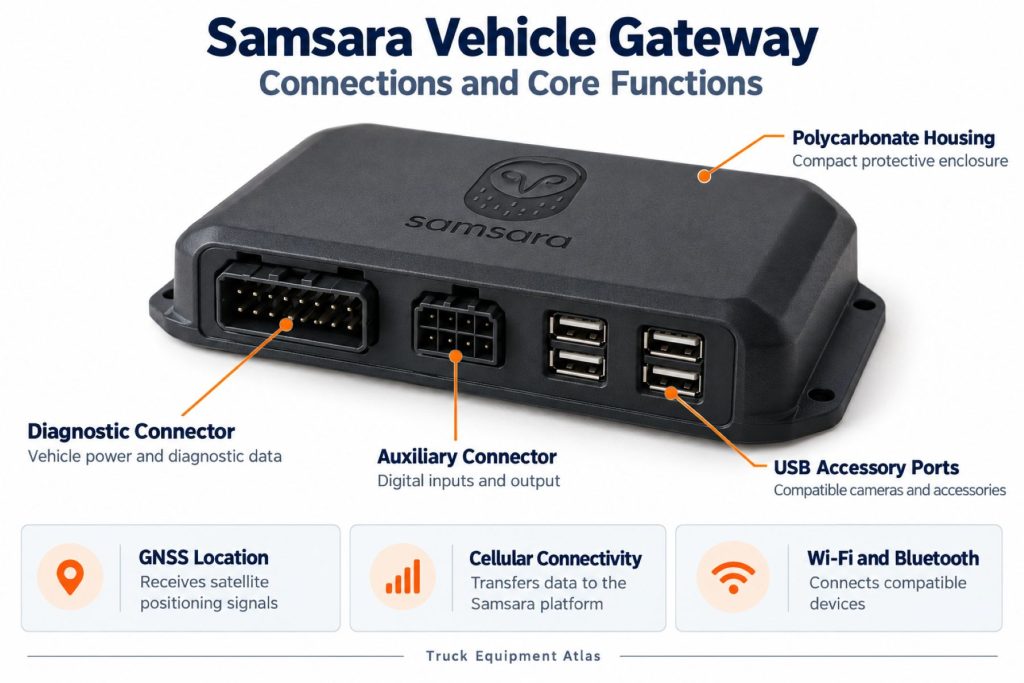
GPS provides vehicle-location and movement information, while cellular service transfers data between the gateway and Samsara’s cloud platform. Bluetooth and Wi-Fi capabilities may support driver devices, accessories, hotspot functions, installation, or system communication depending on the hardware and subscription.
The gateway requires a suitable view and installation environment for dependable positioning and wireless performance. Metal shielding, improper placement, damaged wiring, network outages, and poor cellular coverage can delay or interrupt reporting.
Vehicle Network and Diagnostic Integration
Application-specific cables allow the gateway to connect with compatible vehicle diagnostic ports and communication networks. Heavy-duty installations may use J1939, J1708, RP1226, or manufacturer-specific connections, while light-duty vehicles may use compatible OBD-style or other approved connections.
Network access depends on the vehicle and cable. Some connections provide more information than others, and certain vehicle parameters may not be broadcast or supported. Installation should preserve access to the vehicle’s service connector when required.
Electronic Logging and Hours-of-Service Functions
When combined with the appropriate Samsara service, driver application, vehicle assignment, and administrative setup, the Vehicle Gateway can support electronic logging and hours-of-service compliance. The system can use vehicle-motion and engine information to assist with recording driving activity.
Drivers remain responsible for signing in correctly, selecting the proper vehicle, reviewing their records, entering required annotations, certifying logs, and following applicable hours-of-service rules. Fleet administrators must maintain accurate driver, vehicle, carrier, and terminal information.
Driver Identification and User Access
Driver identification can be managed through the Samsara Driver App and compatible identification accessories. Accurate assignment connects vehicle movement, inspection activity, routes, safety events, and compliance records with the correct driver.
Administrators can establish user roles and permissions so dispatchers, safety personnel, maintenance staff, compliance teams, and managers receive access appropriate to their responsibilities.
Fleet Portal and Mobile Application
The Samsara dashboard provides centralized access to vehicle maps, route history, reports, maintenance information, alerts, driver activity, safety information, and compliance tools. Available menus and reports depend on the organization’s licenses and enabled products.
The Samsara Driver App can support electronic logs, driver-vehicle inspection reports, document submission, messaging, routes, navigation, vehicle selection, and other fleet workflows. Mobile-device compatibility and operating-system requirements should be verified before deployment.
Dash Camera and Video Capabilities
The Vehicle Gateway can operate as part of a broader Samsara video-safety system when connected to compatible Samsara dash-camera hardware and the required service plan. Camera functions are not provided by the gateway alone.
Depending on the camera and service configuration, the integrated system may support safety-event recording, video retrieval, driver coaching, incident review, camera health monitoring, and selected AI-assisted safety functions.
Trailer and Asset-Tracking Capabilities
The Vehicle Gateway primarily monitors the powered vehicle in which it is installed. Separate Samsara asset-tracking hardware may be required for trailers, containers, powered equipment, and unpowered assets.
Vehicle and asset information can be presented within the same connected-operations environment when the organization deploys compatible Samsara products and subscriptions.
Remote Diagnostics and Fault-Code Management
Compatible vehicle-network information can allow the platform to display diagnostic trouble codes and other maintenance-related data remotely. Fleet personnel can use this information to prioritize inspections, prepare parts, identify recurring faults, and reduce unnecessary vehicle downtime.
Remote diagnostic information should support—not replace—proper physical inspection and manufacturer-approved diagnostic procedures. A fault code identifies an affected circuit or condition but does not always identify the failed component.
Driver Communication and Workflow Tools
When enabled through the Samsara platform and mobile applications, fleets can use connected workflows for dispatch information, messages, forms, documents, routes, inspections, and driver tasks.
The exact workflow tools available depend on the organization’s service package and administrative configuration. Driver training is important so electronic processes are completed consistently.
Alerts, Reports, and Fleet Analytics
Fleet administrators can configure reports and alerts for supported conditions such as:
- Vehicle arrival or departure from a geofence
- Excessive idling
- Speeding
- Unauthorized vehicle movement
- Diagnostic trouble codes
- Maintenance intervals
- Device disconnection
- Driver compliance events
- Fuel or energy trends
- Harsh-driving events
Alert thresholds should be configured carefully. Excessive or poorly targeted notifications can make it more difficult for fleet personnel to identify genuinely important events.
Data Storage, Transfer, and Retention
The gateway collects information locally and transfers supported data to Samsara’s cloud services. Storage, synchronization, retention, export, and reporting availability depend on the type of information, hardware, license, account configuration, and applicable Samsara policies.
Fleets should establish internal policies for log retention, video access, driver documents, incident records, privacy requests, and data exports. Important records should not be assumed to remain available indefinitely without confirming the applicable retention terms.
Cybersecurity, Privacy, and User Permissions
Telematics systems can contain sensitive information about vehicle locations, drivers, routes, customers, operating behavior, and business activity. Organizations should limit access according to job responsibilities and promptly disable accounts belonging to former employees.
Recommended administrative practices include:
- Using unique user accounts
- Applying strong authentication controls
- Reviewing administrator permissions
- Protecting mobile devices
- Controlling data exports and integrations
- Documenting camera and location-tracking policies
- Reviewing applicable employee, labor, privacy, and recording requirements
- Maintaining current software and firmware
Materials and Component Construction
The gateway uses an enclosed housing, internal circuit assemblies, wireless communications hardware, positioning components, electrical connectors, and status indicators. Installation cables use molded connectors, insulated conductors, protective coverings, and vehicle-specific connection hardware.
The device should remain secured in its approved operating environment. A damaged housing, loose connector, pinched cable, corroded terminal, or unauthorized modification can affect data reliability and electrical safety.
Wiring, Terminals, Connectors, and Grounding
The approved Samsara cable should be used for the vehicle and gateway model. Connectors must be fully seated, locking features engaged, and wiring secured away from sharp edges, heat sources, pedals, steering shafts, service controls, and moving components.
Hardwired or independent-power installations require particular attention to power, ignition, fuse protection, and ground quality. Improper grounding can cause intermittent operation, communication faults, inaccurate ignition status, or complete loss of service.
Controls, Monitoring, and Diagnostics
Status indicators help installers and technicians evaluate power, connection, activation, and communication conditions. Additional device-health information may be available through the Samsara dashboard.
When troubleshooting, technicians should confirm the gateway model, vehicle assignment, power supply, cable part number, connector condition, cellular coverage, device status, and platform configuration before replacing hardware.
Electronic Controls and Driver-Assistance Integration
The Vehicle Gateway can exchange information with compatible Samsara cameras, mobile applications, sensors, and selected integrations. It can support driver-safety monitoring and coaching workflows, but it is not itself a steering, braking, collision-avoidance, or autonomous-driving controller.
Drivers remain responsible for operating the vehicle safely and obeying all traffic laws regardless of alerts, navigation instructions, or electronic monitoring.
Power Consumption and System Efficiency
The gateway is designed for continuous vehicle use with comparatively low electrical demand. However, any connected device can contribute to battery discharge if a vehicle remains parked for an extended period, has a weak battery, or has an incorrectly configured installation.
Unexpected battery drain should be investigated by checking battery condition, charging-system performance, gateway wiring, accessory connections, power-management settings, and the vehicle’s other electrical loads.
Environmental Sealing and Contamination Protection
The gateway should be installed in the environmental location specified for its model. The unit and connectors should be protected from water intrusion, chemical exposure, excessive dirt, unsecured objects, direct high-pressure cleaning, and extreme heat.
Exterior, engine-compartment, trailer, or equipment installations should only use hardware specifically approved for those environments.
Coverage, Connectivity, and Offline Operation
Cellular coverage affects how quickly information reaches the cloud platform. Vehicles operating in remote areas, underground facilities, enclosed buildings, border regions, or areas with limited network service may experience delayed updates.
The gateway may store selected information until communications return. Fleets operating in remote regions should confirm network coverage, roaming availability, offline behavior, and synchronization expectations before deployment.
Duty Cycle and Operating Conditions
The Vehicle Gateway is designed for fleet vehicles that may operate daily across changing routes, weather, traffic, and duty cycles. It can support highway tractors, regional trucks, delivery vehicles, service units, construction equipment, buses, and public-sector fleets when the correct installation is used.
Vibration, severe temperature changes, moisture, electrical faults, connector movement, and repeated cab servicing can affect long-term reliability. Periodic inspection remains important even though the device normally operates without regular driver adjustment.
Mounting and Installation
Installation normally includes identifying the correct vehicle cable, connecting it to the approved diagnostic or data connection, attaching the gateway, securing the device, routing excess cable, and confirming activation.
The mounting location should:
- Keep the gateway secure during vehicle operation
- Protect it from pedals and driver movement
- Avoid interference with airbags and steering components
- Prevent cable abrasion or pinching
- Provide suitable wireless and GPS performance
- Allow future inspection and service
- Avoid blocking access to other diagnostic equipment
Installation, Activation, and Account Setup
After physical installation, the gateway must be associated with the correct organization and vehicle. The vehicle record should include accurate identification, license, VIN, odometer, engine-hour, and operational information where required.
Activation should include confirming that the device appears online, location is accurate, ignition status changes correctly, supported vehicle data is present, and driver or compliance functions operate as intended.
Wiring, Grounding, and Installation Requirements
The installation must follow the instructions for the exact gateway, cable, vehicle, and accessory arrangement. Unapproved splices, poor grounds, incorrect fuse protection, strained connectors, or substituted cables can create intermittent operation and may affect vehicle electronics.
Any installation near supplemental-restraint systems, high-voltage electric-vehicle components, multiplexed networks, or manufacturer-specific electrical equipment should be completed by qualified personnel.
Software Configuration and Vehicle Assignment
Correct software configuration connects the physical gateway with the corresponding vehicle record. Administrators may also configure drivers, geofences, alerts, maintenance schedules, compliance settings, routes, permissions, integrations, and reporting preferences.
Moving a gateway between vehicles without updating the assignment can produce incorrect mileage, maintenance, location, driver, and compliance records.
Vehicle, Network, and Platform Compatibility
Compatibility depends on:
- Vehicle manufacturer and model
- Vehicle model year
- Engine and powertrain configuration
- Light-, medium-, or heavy-duty classification
- Diagnostic connector and vehicle-network protocol
- Gateway generation and regional version
- Required installation cable
- Cellular coverage and operating region
- Mobile-device operating system
- Required Samsara subscription
- Connected cameras, sensors, and accessories
- Fleet software and third-party integration requirements
A gateway should not be transferred to another vehicle until the cable, electrical system, data-network support, regional service, and account assignment have been verified.
Related Component and System Compatibility
The Vehicle Gateway can form part of a larger connected fleet system that includes dash cameras, asset gateways, environmental monitors, driver-identification equipment, auxiliary inputs, panic or privacy controls, mobile devices, maintenance software, dispatch platforms, and approved integrations.
Accessory support varies by gateway generation. The compatible part number and installation method should be confirmed before purchasing cameras, adapters, cables, sensors, or control devices.
Common Applications
- Long-haul trucking fleets
- Regional and local delivery fleets
- Less-than-truckload operations
- Private commercial fleets
- Construction and vocational vehicles
- Service and utility fleets
- Municipal and public-sector vehicles
- Passenger transportation fleets
- Emergency and public-safety support vehicles
- Rental and leasing fleets
- Food-service and refrigerated fleets
- Waste and recycling operations
- Field-service organizations
- Mixed light-, medium-, and heavy-duty fleets
Advantages
- Combines GPS tracking and compatible vehicle data
- Provides centralized fleet visibility
- Supports remote diagnostic information
- Can support ELD and hours-of-service compliance
- Works across multiple commercial vehicle classes
- Can integrate with Samsara cameras and accessories
- Supports configurable alerts and reports
- Helps fleets monitor idling, fuel use, and utilization
- Can improve maintenance planning
- Supports driver communication and digital workflows
- Provides cloud-based access for authorized personnel
- Can connect with approved fleet-software integrations
Limitations or Considerations
- Most connected functions require an active subscription
- Feature availability varies by hardware and license
- Cellular coverage affects live reporting
- Vehicle data varies by make, model, year, and connection
- Incorrect cable selection can prevent proper operation
- Improper vehicle assignment can corrupt fleet records
- Installation requires careful cable routing and secure mounting
- Driver and administrator training is required
- Location and camera monitoring can raise privacy concerns
- Cloud access requires appropriate account security
- The gateway does not replace physical vehicle inspections
- Older gateway generations may use different cables and accessories
Driver and Operator Experience
Drivers may interact with the system through the Samsara Driver App, connected dash-camera equipment, driver-identification tools, alerts, messages, routes, inspections, and electronic logs. The gateway itself normally requires little direct interaction after installation.
A well-configured deployment can reduce paperwork and simplify communication. A poorly configured deployment can create incorrect assignments, unnecessary alerts, missing records, or driver frustration. Clear fleet policies and training are therefore as important as the hardware installation.
Controls, Indicators, and Driver Feedback
The gateway uses status indicators to communicate installation and operating conditions. Drivers usually receive operational feedback through the mobile application or connected Samsara equipment rather than through controls on the gateway.
Drivers should report unexpected sign-outs, incorrect vehicle assignments, missing drive time, repeated connection warnings, inaccurate locations, device movement, damaged cables, or other abnormal behavior.
Compliance and Record Management
For fleets using the gateway as part of an ELD system, administrators must maintain correct carrier, terminal, vehicle, driver, and ruleset information. Drivers must review unidentified driving events, enter required information, certify records, and follow malfunction procedures when necessary.
The system can assist with compliance, but responsibility remains with the motor carrier and driver. Fleet policies should address log review, edits, annotations, roadside transfer procedures, supporting documents, malfunctions, record retention, and device replacement.
Subscription Plans and Ongoing Service Costs
The Vehicle Gateway is normally deployed with a Samsara software and connectivity subscription. Pricing can depend on contract length, fleet size, hardware package, enabled applications, camera services, compliance tools, and other connected products.
Buyers should confirm:
- Initial hardware cost
- Installation cost
- Monthly or annual service charges
- Contract length
- Hardware replacement terms
- Cellular connectivity coverage
- ELD and compliance features
- Camera and video-retention charges
- Application programming interface access
- Data-retention terms
- Training and support
- Cancellation and hardware-return requirements
Firmware, Software, and Map Updates
The gateway and connected applications may receive software, firmware, configuration, and map updates. Mobile devices should use supported operating systems and current application versions.
Administrators should monitor release information, device-health notifications, application compatibility, and any changes affecting drivers, compliance, reports, integrations, or workflows.
Data Accuracy and System Limitations
Location, fuel, odometer, engine-hour, diagnostic, and driver information depends on the quality of the vehicle connection and the data made available by the vehicle. Differences can occur between dashboard information, physical gauges, service tools, fuel receipts, and other fleet systems.
Telematics data should be reviewed in context. A single alert or unusual value may result from vehicle configuration, poor coverage, a loose connection, an incorrect assignment, delayed synchronization, or unsupported data rather than an actual vehicle failure.
Inspection and Wear Points
- Gateway housing
- Mounting bracket or adhesive attachment
- Gateway electrical connector
- Vehicle diagnostic connector
- Pass-through diagnostic connection
- Cable insulation
- Cable bends and routing points
- Ground and power connections where applicable
- Fuse holder where equipped
- Cable ties and mounting hardware
- Status indicators
- Connected accessory cables
- Areas exposed during dashboard or cab service
Maintenance and Ownership Notes
The gateway generally requires limited routine service, but fleets should include it in scheduled cab and electrical-system inspections.
- Confirm that the gateway remains securely mounted
- Inspect cables for pinching, abrasion, and strain
- Check connectors after dashboard or electrical repairs
- Review device-health and offline-device reports
- Keep driver and fleet applications current
- Remove inactive users and review permissions
- Verify vehicle assignments after equipment changes
- Investigate repeated power or connection interruptions
- Maintain accurate vehicle and driver records
- Follow documented replacement and return procedures
Common Telematics and ELD System Problems
- Gateway appears offline: Loss of power, a loose connector, damaged wiring, poor cellular coverage, account configuration, or hardware failure may be responsible.
- Incorrect vehicle location: A poor GPS environment, delayed reporting, incorrect vehicle assignment, or device installation problem may affect the displayed location.
- Missing vehicle data: The wrong cable, unsupported vehicle parameters, incomplete connector engagement, network incompatibility, or configuration errors may prevent data collection.
- Incorrect ignition status: Cable selection, wiring, vehicle-network behavior, or configuration may cause the system to report the wrong operating state.
- Driver cannot connect: Bluetooth settings, mobile-device permissions, application status, gateway assignment, or account credentials may be involved.
- Unassigned driving events: The driver may not be signed in, may have selected the wrong vehicle, or may not have been properly assigned before movement.
- Repeated diagnostic alerts: An active vehicle fault, an intermittent network signal, unsupported data, or alert configuration may create repeated notifications.
- Battery discharge: A weak battery, charging-system problem, incorrect wiring, another parasitic load, or extended parked operation may be responsible.
- Inaccurate odometer or fuel information: Vehicle-data limitations, calibration differences, incorrect assignment, or unsupported parameters may cause discrepancies.
- Accessory not recognized: Model incompatibility, an incorrect adapter, damaged wiring, incomplete setup, or unsupported software may prevent operation.
Safety and Service Precautions
Disconnect or isolate power as directed before electrical service. Do not probe connectors, splice wires, substitute cables, or relocate the gateway without following the applicable installation instructions.
Installation must not interfere with:
- Steering movement
- Brake, clutch, or accelerator pedals
- Airbag deployment zones
- Driver visibility
- Emergency exits
- Factory diagnostic access
- High-voltage electric-vehicle components
- Other safety-critical vehicle systems
Drivers should not handle mobile devices or attempt to troubleshoot the gateway while operating the vehicle.
Identification Information
Identification information may be printed on the gateway label, packaging, cable tag, installation records, or Samsara dashboard.
Record the following information:
- Complete gateway model
- Hardware serial number
- Regional version
- Gateway generation
- Vehicle identification number
- Vehicle make, model, and year
- Engine and powertrain information
- Diagnostic connector type
- Installation cable part number
- Connected accessory part numbers
- Vehicle assignment in the Samsara dashboard
- Active service and license package
- Installation date and installer
Do not identify a replacement gateway or cable by appearance alone. Similar devices and connectors may support different regions, vehicles, networks, or accessories.
Buying Considerations
- Confirm the current gateway model offered for the operating region
- Verify compatibility with every vehicle class in the fleet
- Identify the correct installation cable for each vehicle
- Determine which ELD and compliance features are required
- Review GPS reporting and cellular coverage needs
- Confirm dash-camera and accessory compatibility
- Review driver-app and mobile-device requirements
- Compare software licenses and subscription terms
- Confirm data-retention and video-retention policies
- Review installation and training requirements
- Evaluate integrations with dispatch, maintenance, payroll, and safety systems
- Confirm support, warranty, and replacement procedures
- Understand cancellation and hardware-return obligations
- Plan user permissions, privacy policies, and cybersecurity controls
- Test the system on representative fleet vehicles before full deployment
Variants and Configurations
- Samsara VG55 regional configurations
- Samsara VG55 FirstNet configuration for eligible public-safety operations
- Samsara VG54 light-duty configurations
- Samsara VG54 heavy- and medium-duty configurations
- Legacy Samsara VG34 configurations
- Heavy-duty diagnostic-cable installations
- Light-duty vehicle installations
- Manufacturer-specific cable arrangements
- Independent-power installations
- Camera-integrated configurations
- ELD-enabled configurations
- Auxiliary-input configurations
- Driver-identification configurations
- Mixed-fleet deployments
Model availability and compatibility can change. The exact gateway, cable, accessory, operating region, and service package should be confirmed before purchasing equipment.
Comparison to Similar Equipment
Compared with the Motive Vehicle Gateway, the Samsara Vehicle Gateway operates within a different fleet-management platform with its own hardware, driver applications, camera ecosystem, integrations, reporting tools, and subscription structure.
Compared with the Geotab GO9 Telematics Device, the Samsara gateway provides a vertically integrated connection to Samsara’s Connected Operations Platform. Geotab uses its own marketplace, software environment, and hardware architecture.
Compared with the Omnitracs Intelligent Vehicle Gateway, the Samsara system emphasizes cloud-based fleet visibility, mobile workflows, vehicle diagnostics, cameras, and connected-operations tools through the Samsara platform.
Compared with an electronic logging device that only records driver logs, the Samsara Vehicle Gateway can support a broader set of fleet-management, vehicle-tracking, diagnostic, maintenance, safety, and workflow functions when the necessary services are enabled.
Best Fit For
- Fleets wanting live vehicle visibility
- Motor carriers requiring electronic logging support
- Mixed light-, medium-, and heavy-duty fleets
- Fleets combining telematics with video safety
- Organizations requiring remote diagnostic information
- Operations monitoring idling, fuel use, and utilization
- Fleets moving inspections and documents into digital workflows
- Service, delivery, construction, and public-sector fleets
- Organizations needing configurable alerts and fleet reports
- Fleets willing to use a subscription-based connected platform
Related Vehicle and Trailer Types
- Semi Trucks
- Straight Trucks
- Day Cab Trucks
- Sleeper Trucks
- Vocational Trucks
- Box Trucks
- Dump Trucks
- Service Trucks
- Commercial Buses
- Refrigerated Trucks
Related Truck and Trailer Models
- Freightliner Cascadia
- Kenworth T680
- Peterbilt 579
- Volvo VNL
- International LT Series
- Mack Anthem
- Western Star 57X
- Freightliner M2 106
- Kenworth T280
- Peterbilt 536
Related Telematics and ELD System Types
- Electronic Logging Devices & HOS Compliance
- Fleet Telematics & Vehicle Gateways
- AI Dash Cameras & Video Telematics
- Trailer & Asset Tracking Systems
- Driver Communication & Workflow Systems
- Remote Diagnostics & Fleet Intelligence
Related Telematics and ELD Products
- Samsara AI Dash Cam
- Samsara Driver App
- Samsara AG52 Asset Gateway
- Motive Vehicle Gateway
- Motive AI Dashcam
- Geotab GO9 Telematics Device
- Omnitracs Intelligent Vehicle Gateway
- Garmin eLog Compliant ELD
Related Equipment Systems
- Telematics & ELD Systems
- Electrical Systems
- Safety Systems
- Brake Systems
- Drivelines & Steering Systems
- Tires & Wheels
Related Guides
- Telematics & ELD System Guides
- How Commercial Truck Telematics Systems Work
- Electronic Logging Devices and Hours-of-Service Compliance Explained
- How to Choose a Commercial Truck ELD and Telematics System
- GPS Fleet Tracking and Vehicle Telematics Explained
- AI Dash Cameras and Video Telematics Explained
- Commercial Trailer and Asset Tracking Systems Explained
Regulatory and Compliance Notes
Electronic logging use must comply with applicable Federal Motor Carrier Safety Administration requirements and any state, provincial, federal, or international regulations governing the operation.
Fleets should maintain procedures for:
- Driver log review and certification
- Unidentified driving-event assignment
- ELD malfunction reporting
- Paper-log use during qualifying malfunctions
- Roadside inspection data transfer
- Required supporting documents
- Record retention
- Driver training
- Personal conveyance and yard-move policies
- Camera, location, and employee privacy requirements
Installation must not affect required vehicle safety systems, diagnostic access, emissions equipment, or certified vehicle operation. California and other jurisdictions may impose additional labeling, privacy, or installation requirements.
Real World Operating Notes
The quality of a telematics deployment depends heavily on correct installation and accurate vehicle assignment. A securely installed gateway using the proper cable can operate with little driver attention, while loose wiring or incorrect configuration can create repeated support problems.
Mixed fleets should expect differences in available data. A late-model highway tractor may report more engine and fuel information than an older vocational vehicle, even when both use the same telematics platform.
Before relying on alerts for maintenance or compliance, fleets should test the selected thresholds and confirm that managers know who is responsible for responding. Telematics information has limited value when alerts are not assigned to a clear operational process.
Drivers should be trained on how vehicle selection, sign-in status, unidentified driving, inspections, documents, and synchronization affect their records. Hardware installation alone does not create a reliable compliance program.
Frequently Asked Questions
What is the Samsara Vehicle Gateway?
It is a commercial vehicle telematics device that collects location, vehicle, driver, and operating information and sends supported data to the Samsara Connected Operations Platform.
Is the Samsara Vehicle Gateway an ELD?
It can serve as part of Samsara’s ELD solution when combined with the appropriate vehicle connection, driver application, software configuration, and active service plan.
Does the gateway track the vehicle in real time?
It supports live GPS fleet tracking, although update timing can be affected by cellular coverage, installation conditions, and system configuration.
Can it read engine fault codes?
Compatible installations can provide remote diagnostic trouble-code information and selected engine data. Available information varies by vehicle and connection.
Does every truck use the same installation cable?
No. Cable selection depends on the gateway model, vehicle manufacturer, model year, engine, diagnostic connector, and vehicle-network architecture.
Can it be used in light-duty vehicles?
Yes. Samsara offers configurations and cables for light-, medium-, and heavy-duty vehicles, but the correct hardware and cable must be confirmed.
Does it include a dash camera?
No. Compatible Samsara dash cameras are separate devices that can operate with the gateway and the appropriate video-safety service.
What happens when cellular service is unavailable?
Selected information may be retained and transmitted after connectivity returns. Exact offline behavior depends on the gateway model, data type, and service configuration.
Is a subscription required?
Most cloud-connected tracking, reporting, compliance, diagnostic, and fleet-management functions require an active Samsara service plan.
How is the correct replacement gateway identified?
Use the gateway model, serial number, region, vehicle information, cable part number, connected accessories, account assignment, and active service package.
Availability and Where to Find
Samsara Vehicle Gateways may be available directly through Samsara, authorized sales channels, fleet-technology providers, vehicle-equipment installers, leasing companies, and fleet-management partners.
Availability depends on operating region, gateway generation, required vehicle cables, service plan, contract terms, and accessory configuration. Used devices should not be purchased without confirming that they can be released from any previous organization, activated under a new account, and supported with the required cable and subscription.
Current product information, sales assistance, installation resources, and support are available through the Samsara Vehicle Gateway website.
Support Trucking Families
Truck Equipment Atlas supports the mission of Grey Cross, a nonprofit dedicated to helping families of truck drivers who lose their lives while on the road. As the site grows, part of its mission is to bring awareness and support to these families.
Podcast or Video Section
Learn More Through Audio and Video
Truck Equipment Atlas will continue expanding with podcast episodes, interviews, and equipment breakdowns to help drivers and fleets better understand trucks and equipment.
Follow the Growth of Truck Equipment Atlas
Truck Equipment Atlas continues to expand with new truck profiles, trailer coverage, diesel engine pages, equipment system resources, manufacturer information, and educational guides.
Visit our Site Updates page to explore recent additions, project milestones, and upcoming resources as we continue building one of the industry’s growing commercial trucking equipment reference libraries.
View the Latest Site Updates: Truck Equipment Atlas Site Updates