
Quick Facts
- Manufacturer: Samsara
- Model: AG52 Asset Gateway
- Product Type: Powered asset and trailer telematics gateway
- Primary Function: Asset location tracking and supported sensor or equipment monitoring
- Hardware Format: Rugged asset-mounted electronic gateway
- Vehicle Connection: Application-specific trailer or equipment harness
- Connectivity: Cellular communication with integrated satellite positioning
- GPS Capability: Integrated positioning with internal antenna
- ELD and HOS Support: Not a standalone ELD
- Camera Support: No built-in camera
- Trailer and Asset Support: Trailers, powered equipment, and suitable mobile assets
- Fleet Portal: Samsara Connected Operations Platform
- Mobile Application: Supported Samsara fleet applications
- Subscription Required: Compatible powered-asset license and service
- Primary Applications: Trailer fleets, construction equipment, generators, and rental assets
- Availability: Confirm current regional hardware availability with Samsara
Overview
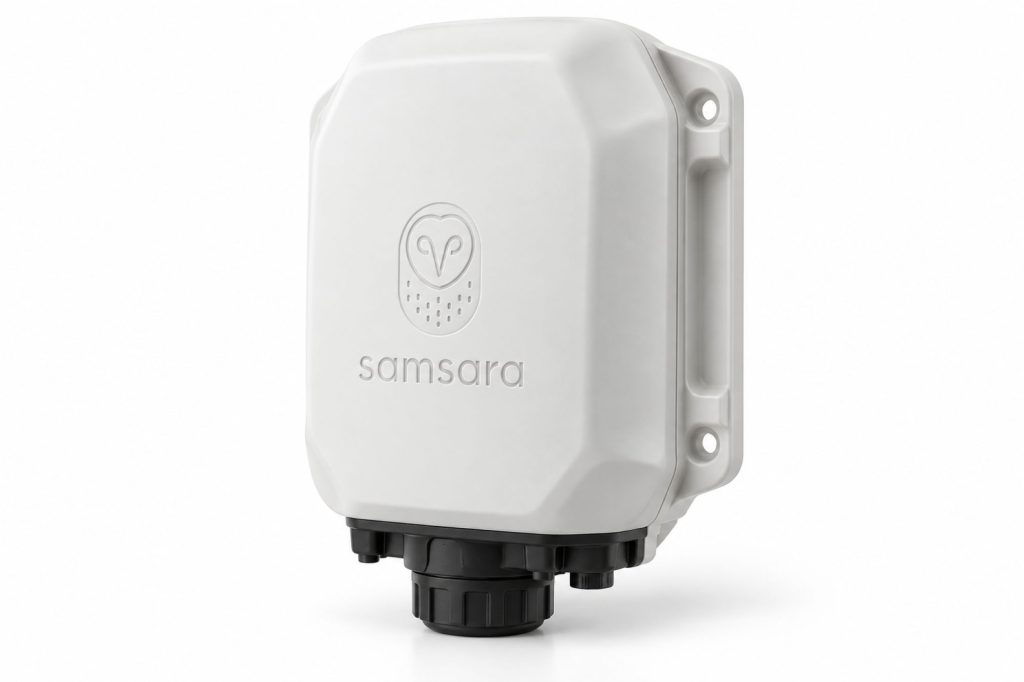
The Samsara AG52 Asset Gateway is a connected tracking device installed on a trailer, machine, or other mobile asset. It keeps tracking associated with the equipment rather than relying entirely on the location of a towing truck.
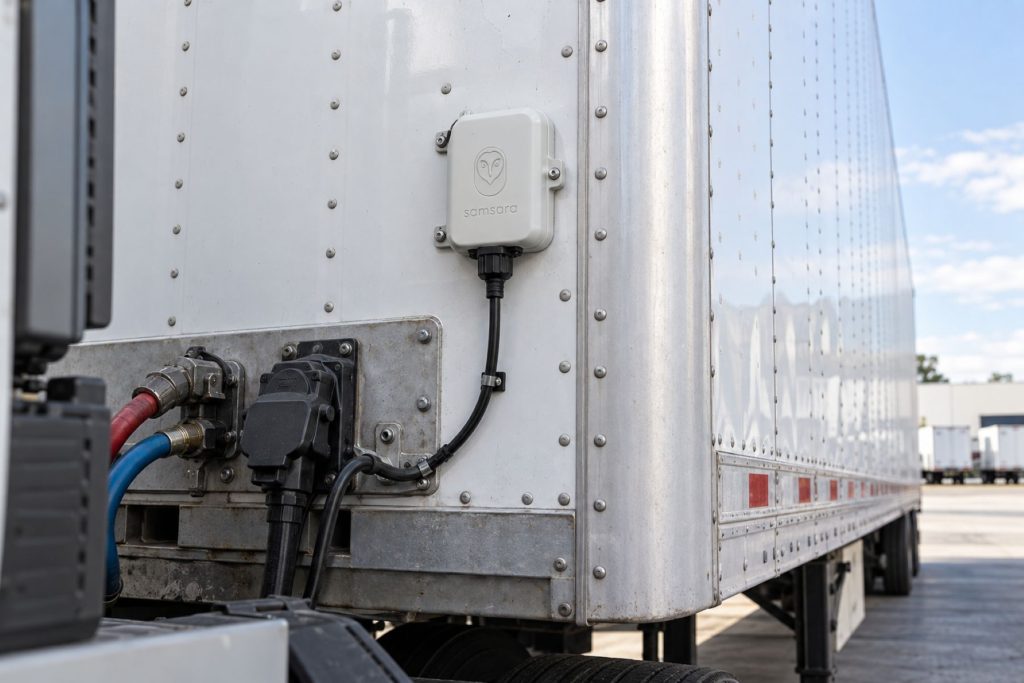
That distinction matters in drop-and-hook operations, trailer pools, and equipment fleets. A tractor may leave a facility while its trailer remains behind. An asset-mounted gateway allows the fleet to maintain a separate record for that trailer.
The AG52 combines external power with an internal rechargeable backup battery. Monitoring capabilities depend on the selected cable, compatible accessories, regional hardware, and account configuration.
Key Characteristics
- Asset tracking independent of a particular tractor
- External power with rechargeable battery backup
- Rugged enclosure for trailer and equipment installations
- Application-specific wiring and mounting requirements
- Optional monitoring through supported sensors and interfaces
- Fleet-based asset identification and administration
- Reporting behavior dependent on power and configuration
Major Components
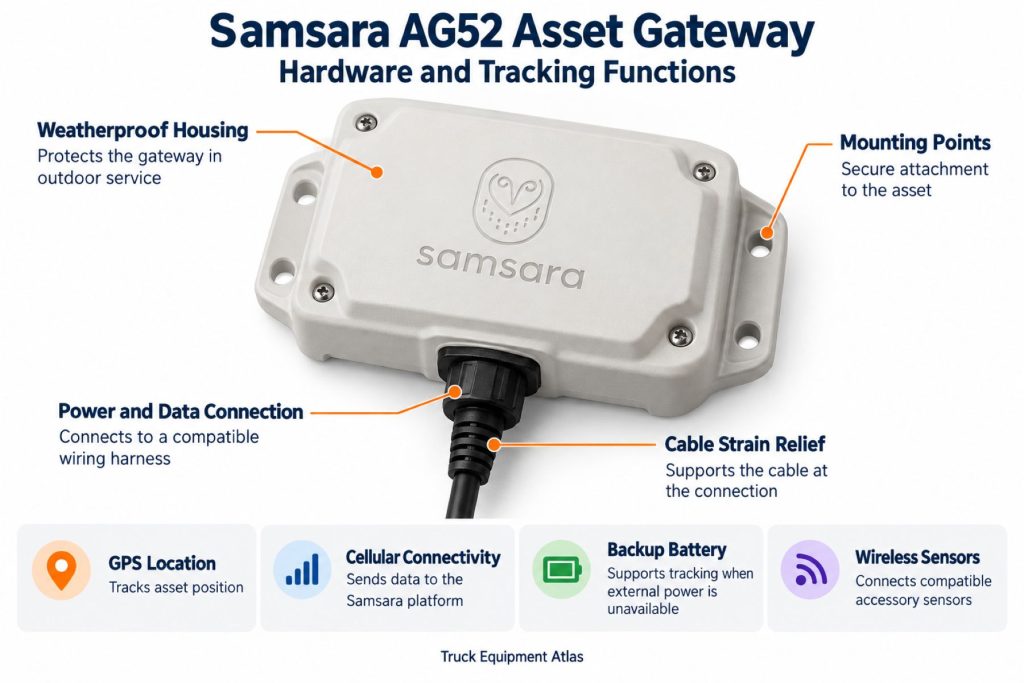
- Gateway housing and mounting points
- Internal positioning hardware
- Cellular communications hardware
- Rechargeable backup battery
- Processing and storage electronics
- Harness connector
- Setup button and status indicator
- Application-specific power or interface cable
- Optional compatible sensors
- Fleet account and software service
Product Type and Construction
The AG52 is an asset-mounted electronic gateway with a protective enclosure and secured harness connection. Installation must account for the trailer or machine’s construction, electrical system, and operating environment.
Protect the gateway from cargo handling, road debris, moving parts, and accidental contact during maintenance.
Hardware, Software, and Platform Design
The installed hardware supplies the asset-side connection, while the fleet platform provides the administrative record. The physical gateway and digital asset identity must remain correctly matched.
Use consistent fleet numbers across dispatch, maintenance, and tracking records. Similar descriptions such as “white trailer” are not sufficient to identify individual units.
How the Telematics or ELD System Works
The gateway determines its location and communicates supported information to the fleet platform. Installed inputs and compatible accessories can provide additional monitoring.
The AG52 serves an asset-management role. It does not create driver hours-of-service records or replace a tractor’s electronic logging installation.
Position and Function Within the Vehicle
The gateway remains attached to the trailer or machine as tractors, operators, and job sites change. Its mounting location should balance reception, protection, cable routing, and service access.
Do not place the unit where landing gear, coupling activity, suspension travel, or loading equipment can damage it.
Common Specifications
- External Supply: 9–31 VDC in the AG52-specific datasheet
- Internal Battery: 3 Ah lithium-ion
- Dimensions: 124 × 81 × 35 mm
- Weight: 192 g
- Housing Material: UV-stabilized polycarbonate
- Ingress Protection: IP67 and IP69K
- Cellular Hardware: LTE Cat M1 and NB-IoT listed in the datasheet; regional service must be confirmed
- Externally Powered Operation: −40°C to 60°C
- Battery Discharge: −20°C to 60°C
- Battery Charging: 0°C to 45°C
Use the exact hardware label and current AG52 installation documentation when selecting a supply or replacement cable.
Operating Capacity and Performance
Performance depends on reception, reporting settings, external-power availability, and connected accessories. A trailer receiving power daily has different operating conditions from equipment parked for months.
Evaluate tracking behavior in representative yards, customer facilities, and job sites before a large deployment.
Installation Position and System Function
Follow the installation procedure for the selected asset and harness. Verify reporting from the final mounting position rather than testing only before attachment.
System Voltage and Electrical Architecture
The AG52-specific supply range is 9–31 VDC. A nominal 12-volt or 24-volt system still requires a suitable connection, correct harness, and measured supply voltage.
Confirm whether the connection provides continuous or switched power. That determines when the gateway receives external power.
Electrical Input, Output, and Power Function
The electrical supply operates the gateway and supports battery charging. Monitoring inputs report selected signals; they are not general-purpose outputs for powering or controlling other equipment.
Data Collection and Vehicle Information
Available information depends on the installed configuration. Location tracking alone does not establish door status, cargo condition, engine hours, or brake-system health.
Document each connected input so personnel understand what its reported state represents.
GPS, Cellular, Wi-Fi, and Satellite Connectivity
Satellite positioning determines location, while cellular communication connects the gateway to the fleet account. The AG52 should not be treated as a satellite messaging terminal or driver Wi-Fi hotspot.
Confirm regional network support and expected coverage along the asset’s operating routes.
Vehicle Network and Diagnostic Integration
Diagnostic functions require a suitable interface and supported asset system. Samsara distinguishes power-only harnesses from cables intended for trailer ABS integration.
A connection to trailer power does not automatically provide brake diagnostics.
Electronic Logging and Hours-of-Service Functions
This function does not apply directly to the AG52. Driver electronic logging requires a separate suitable gateway, application, service, and configuration.
Driver Identification and User Access
The AG52 identifies the assigned asset. Its location does not by itself identify the driver or operator responsible for a movement.
Maintain dispatch and custody records where individual responsibility must be established.
Fleet Portal and Mobile Application
Supported asset information is available through the Samsara account. Mobile functions depend on the application, service package, and user permissions.
Keep asset names consistent across the platform and the fleet’s physical labels.
Dash Camera and Video Capabilities
The AG52 has no built-in camera or standalone video-recording function. Separate video equipment is required for visual coverage.
Trailer and Asset-Tracking Capabilities
The gateway stays with the asset when a tractor disconnects. Continued reporting depends on remaining battery charge, reception, and power-loss settings.
Always read the location timestamp. The latest available report is not necessarily the current position.
Remote Diagnostics and Fault-Code Management
Supported diagnostic information depends on the selected cable and connected equipment. Warning-state visibility and detailed diagnostics are different capabilities.
Use remote information to help prioritize inspection, while following the equipment manufacturer’s service procedures.
Driver Communication and Workflow Tools
The AG52 is not a driver messaging terminal. Dispatch communication, electronic paperwork, and driver workflows require other tools.
Provide a clear process for reporting gateway damage or incorrect asset assignments.
Alerts, Reports, and Fleet Analytics
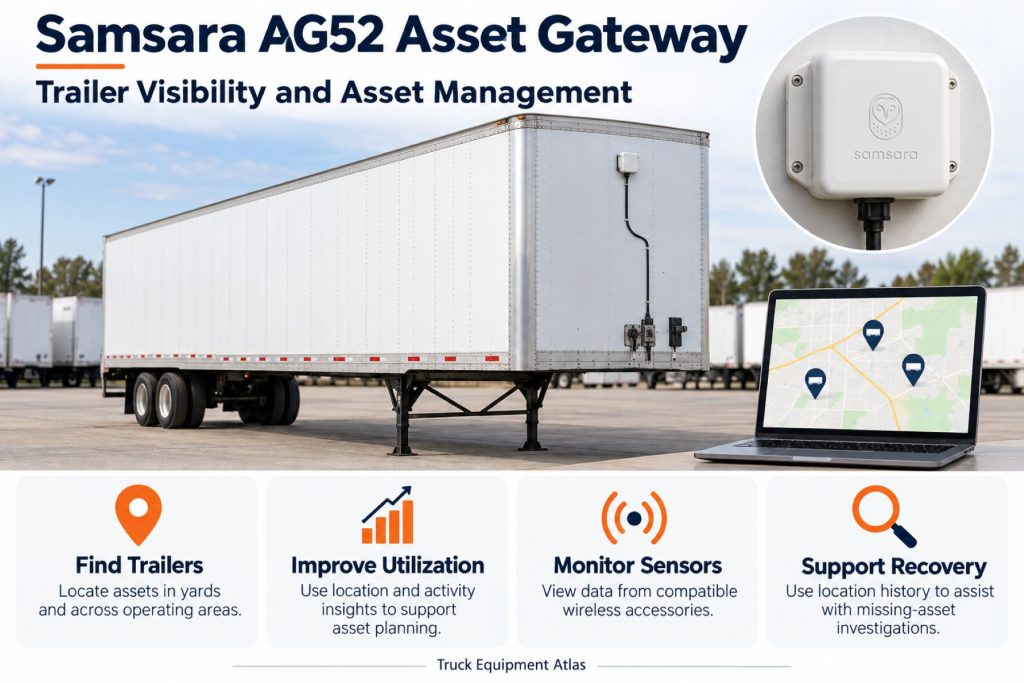
The powered-asset platform supports mapping, geofences, alerts, and operational reporting. Fleets can use these tools to review asset inventory, movement, and utilization.
Assign responsibility for important alerts and define the action expected after a notification.
Data Storage, Transfer, and Retention
The gateway includes offline logging memory. Remote visibility still requires successful communication with the fleet platform.
Confirm historical access, exports, and retention terms before relying on tracking records for billing or investigations.
Cybersecurity, Privacy, and User Permissions
Limit asset-location access to personnel with a defined business need. Equipment records can reveal customer facilities, job sites, and operating patterns.
Review account permissions and external integrations when employees or service providers change.
Materials and Component Construction
The housing protects the electronics, while mounting points and the connector secure the installation. Inspect for cracks, impact damage, and loosened attachment points.
Wiring, Terminals, Connectors, and Grounding
Follow the instructions for the exact harness. Do not transfer wire-color assumptions from another cable or gateway model.
Protect connections from corrosion and wiring from sharp edges, strain, and moving equipment.
Controls, Monitoring, and Diagnostics
The status indicator and setup button assist with commissioning and troubleshooting. Use the current AG52 guide for their interpretation.
Confirm that the account record matches the physical asset after installation or service.
Electronic Controls and Driver-Assistance Integration
The AG52 does not replace ABS, electronic braking, stability control, or other required vehicle systems. Monitoring a system does not mean the gateway controls it.
Power Consumption and System Efficiency
Reporting frequency, signal conditions, temperature, and accessories affect battery endurance. Plan settings around the asset’s charging opportunities and required visibility.
A seasonal storage asset requires different expectations from equipment powered every day.
Environmental Sealing and Contamination Protection
Ingress ratings do not eliminate the need for sound connectors, protected wiring, and secure mounting. Include road salt, mud, wash practices, and job-site exposure in inspections.
Coverage, Connectivity, and Offline Operation
Diagnose positioning, communications, and power separately. Metal buildings and enclosed storage can affect reception.
Test the asset in its normal parking locations and review expected reporting intervals before treating a delayed check-in as a failure.
Duty Cycle and Operating Conditions
Consider movement frequency, power availability, parked duration, and changes in custody. These conditions affect reporting expectations and inspection needs.
Mounting and Installation
Select a suitable mounting surface and follow the approved procedure. Check for hidden wiring, tanks, air lines, and structural restrictions before drilling.
Verify clearance, cable security, and reception from the completed installation.
Installation, Activation, and Account Setup
Activate the gateway in the correct organization, install the selected harness, and complete the manufacturer’s setup checks.
Samsara’s setup guidance defaults these gateways to a trailer asset type. Equipment installations require the appropriate asset reassignment and input configuration.
Wiring, Grounding, and Installation Requirements
Measure the intended supply before connection. Follow the harness procedure for power, ground, inputs, and unused conductors.
Preserve required lighting and braking functions throughout installation.
Software Configuration and Vehicle Assignment
Configure the asset number, type, reporting behavior, connected inputs, and alert recipients. Update the record whenever a gateway moves to another asset.
Vehicle, Network, and Platform Compatibility
Compatibility depends on the supply, harness, regional gateway, connected systems, and service. References covering AG52 and AG53 together do not establish identical capabilities.
Related Component and System Compatibility
Check sensor and interface compatibility individually. Refrigeration monitoring, trailer diagnostics, and environmental sensing each require their own supported installation.
Common Applications
- Trailer pools and drop-and-hook operations
- Customer-site trailer inventory
- Construction and rental equipment
- Generators and light towers
- Mobile equipment transferred between sites
Advantages
- Keeps tracking tied to the asset
- Supports organized inventory management
- Can reduce time spent locating equipment
- Provides movement information for operating reviews
- Combines external power with battery backup
- Supports additional monitoring through compatible equipment
Limitations or Considerations
- Ongoing service is required.
- Battery-mode reporting differs from powered operation.
- Coverage and mounting affect visibility.
- Additional functions require compatible hardware.
- Asset assignments must remain accurate.
- Tracking cannot guarantee theft prevention or recovery.
- Location does not prove roadworthiness or load readiness.
Driver and Operator Experience
The gateway generally operates in the background. Drivers should report visible damage and assignment errors while continuing normal walkaround and coupling procedures.
Controls, Indicators, and Driver Feedback
The setup button and indicator support installation and service. They are not an in-cab warning system. Follow current instructions for their use.
Compliance and Record Management
Define how tracking records support dispatch, custody, maintenance, and customer disputes. Keep required inspection and operating records separately.
Subscription Plans and Ongoing Service Costs
Request a complete quote covering the gateway, harness, installation, accessories, licenses, and support. Review renewal terms, replacement provisions, and historical-data access.
Firmware, Software, and Map Updates
Follow Samsara’s update and support procedures. Review operating instructions when platform features or reporting behavior change.
Data Accuracy and System Limitations
Interpret location together with the report timestamp. Movement, cargo condition, input state, and operating hours are separate measurements.
Confirm availability and condition through normal fleet procedures before dispatching an asset.
Inspection and Wear Points
- Mounting points and fasteners
- Connector seating
- Harness abrasion and strain
- Corrosion at electrical connections
- Housing impact damage
- External-power detection
- Battery and reporting condition
- Correct asset assignment
Maintenance and Ownership Notes
Inspect the installation during scheduled asset service and after electrical work, repairs, or transfers. Investigate repeated power loss rather than depending indefinitely on the backup battery.
Common Telematics and ELD System Problems
- No Recent Report: Check power, battery, coverage, and reporting settings.
- Missing Position: Review mounting and nearby obstructions.
- Wrong Asset Record: Verify the gateway identifier and assignment.
- No External Power: Inspect the supply, ground, connector, and harness.
- Rapid Battery Depletion: Review charging opportunities and check-in frequency.
- Incorrect Input: Check wiring and software mapping.
- Missing Diagnostics: Confirm harness and equipment compatibility.
Safety and Service Precautions
Secure equipment and isolate power as required before wiring service. Preserve required braking, lighting, and other operating functions.
Hazardous-location installations require the specific approved configuration and procedure. A rugged enclosure alone is not sufficient authorization.
Identification Information
Record the model, serial number, regional version, cable number, asset number, and installation date. Keep the physical asset label readable for verification.
Buying Considerations
- Define the required monitoring functions.
- Confirm the available power source.
- Select the correct harness.
- Check regional network support.
- Plan for extended parking.
- Verify sensor and diagnostic compatibility.
- Review total installation and service costs.
- Test representative assets before expanding.
Variants and Configurations
- Regional AG52 hardware versions
- Trailer power configurations
- Powered-equipment configurations
- Compatible input and sensor installations
- Supported trailer diagnostic interfaces
- Approved specialized mounting arrangements
Comparison to Similar Equipment
A tractor gateway follows the truck, while the AG52 follows its assigned asset. Battery-only and solar trackers provide different power arrangements.
Compare reporting behavior, installation requirements, parked duration, and supported monitoring rather than hardware size alone.
Best Fit For
- Trailer fleets operating independently of assigned tractors
- Equipment distributed across multiple sites
- Assets with recurring external-power access
- Teams with defined inventory and alert-review procedures
- Operations using compatible Samsara services
Related Vehicle and Trailer Types
Related Truck and Trailer Models
Related Telematics and ELD System Types
- Trailer & Asset Tracking Systems
- Fleet Telematics & Vehicle Gateways
- Remote Diagnostics & Fleet Intelligence
- Driver Communication & Workflow Systems
- Electronic Logging Devices & HOS Compliance
Related Telematics and ELD Products
- Samsara Vehicle Gateway
- Samsara CM34 Dual-Facing AI Dash Cam
- Samsara Driver App
- Motive Vehicle Gateway
- Geotab GO9 Telematics Device
- Omnitracs Intelligent Vehicle Gateway
Related Equipment Systems
- Telematics & ELD Systems
- Electrical Systems
- Brake Systems
- ABS & Electronic Braking Systems
- Tire Pressure Monitoring & Inflation Systems
- Safety Systems
Related Guides
- Telematics & ELD System Guides
- How Commercial Truck Telematics Systems Work
- Electronic Logging Devices and Hours-of-Service Compliance Explained
- How to Choose a Commercial Truck ELD and Telematics System
- GPS Fleet Tracking and Vehicle Telematics Explained
- AI Dash Cameras and Video Telematics Explained
- Commercial Trailer and Asset Tracking Systems Explained
Regulatory and Compliance Notes
Follow applicable electrical, radio-device, workplace, and installation requirements. Tracking does not by itself establish inspection, braking, cargo, or driver-log compliance.
Real World Operating Notes
Check the asset number and report timestamp before acting on a map location. Confirm load status, condition, and availability through normal fleet procedures.
Review installations after repairs or equipment transfers, when both wiring and digital assignments may have changed.
Frequently Asked Questions
What does the AG52 track?
It tracks its assigned trailer or equipment and reports information supported by the installed configuration.
Can it report after a trailer disconnects?
Yes, subject to battery charge, reception, and configured reporting behavior.
Does every harness provide brake diagnostics?
No. Diagnostic functions require the appropriate cable and compatible trailer system.
Is the AG52 an ELD or camera?
No. Electronic logging and video recording require separate suitable equipment.
Why can a parked asset report less frequently?
Battery-mode settings and available power can differ from externally powered operation.
Can it be installed on any 24-volt machine?
Nominal voltage alone is insufficient. Verify the actual supply, harness, mounting method, and required monitoring functions.
Availability and Where to Find
Contact Samsara for current AG52 availability, regional service, compatible harnesses, and pricing.
- Samsara AG52 Datasheet
- Installation Guides by Asset Type
- AG52/AG53 Device Setup
- AG52/AG53 Troubleshooting
Support Trucking Families
Truck Equipment Atlas supports the mission of Grey Cross, a nonprofit dedicated to helping families of truck drivers who lose their lives while on the road. As the site grows, part of its mission is to bring awareness and support to these families.
Podcast or Video Section
Learn More Through Audio and Video
Truck Equipment Atlas will continue expanding with podcast episodes, interviews, and equipment breakdowns to help drivers and fleets better understand trucks and equipment.
Follow the Growth of Truck Equipment Atlas
Truck Equipment Atlas continues to expand with new truck profiles, trailer coverage, diesel engine pages, equipment system resources, manufacturer information, and educational guides.
Visit our Site Updates page to explore recent additions, project milestones, and upcoming resources as we continue building one of the industry’s growing commercial trucking equipment reference libraries.
View the Latest Site Updates: Truck Equipment Atlas Site Updates