
Quick Facts
- Manufacturer: Omnitracs
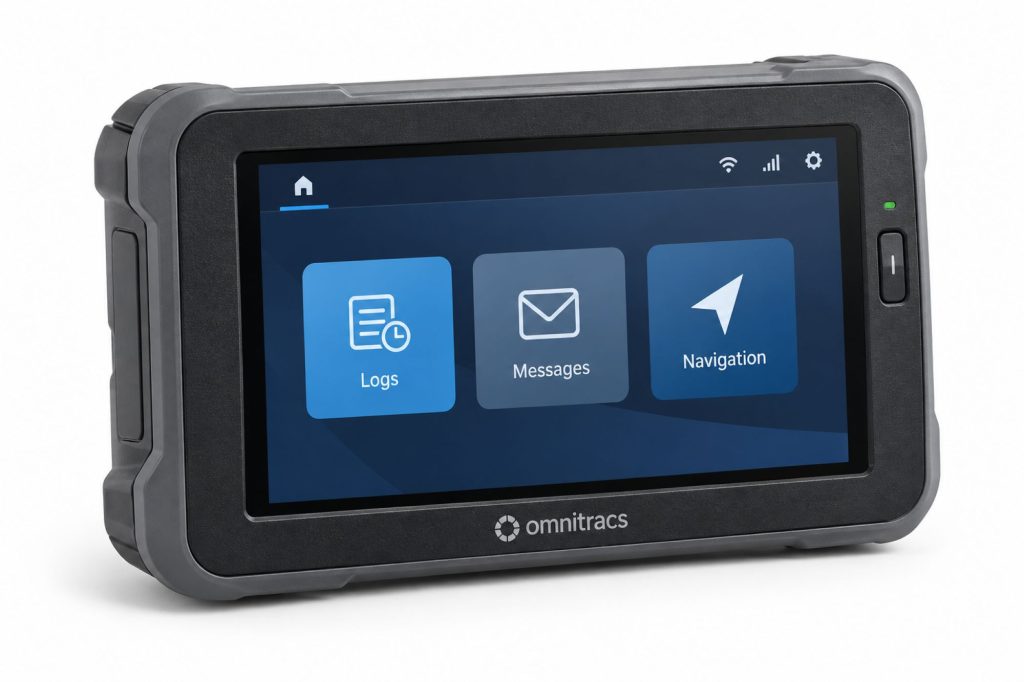
- Product: Intelligent Vehicle Gateway, commonly called IVG
- Equipment category: Dedicated in-cab electronic logging and telematics system
- Driver interface: Integrated touchscreen display
- Display resolution: 1024 × 600 pixels
- Primary applications: Electronic logging, driver communication, and configured fleet workflows
- Vehicle connection: Application-specific power and vehicle-data cable
- Connectivity: Depends on hardware generation and enabled services
- Ownership requirement: Compatible hardware, active service, correct account assignment, and supported software
- Buying consideration: Confirm current activation eligibility and support before purchasing used equipment
Overview
The Omnitracs Intelligent Vehicle Gateway combines a dedicated driver interface with vehicle-connected fleet technology. It gives the driver an installed terminal for enabled applications rather than relying exclusively on a personal phone or a separate consumer tablet.
The complete operating system includes the IVG hardware, vehicle cable, mounting arrangement, software configuration, and service account. Available functions depend on the specific equipment and applications provisioned for the fleet.
Key Characteristics
- Dedicated driver-facing terminal.
- Vehicle-connected installation with application-specific cabling.
- Touchscreen operation for enabled fleet applications.
- Hardware and software differences between product generations.
- Service configuration that determines available functions.
- Installation requirements covering both display placement and vehicle connections.
Major Components
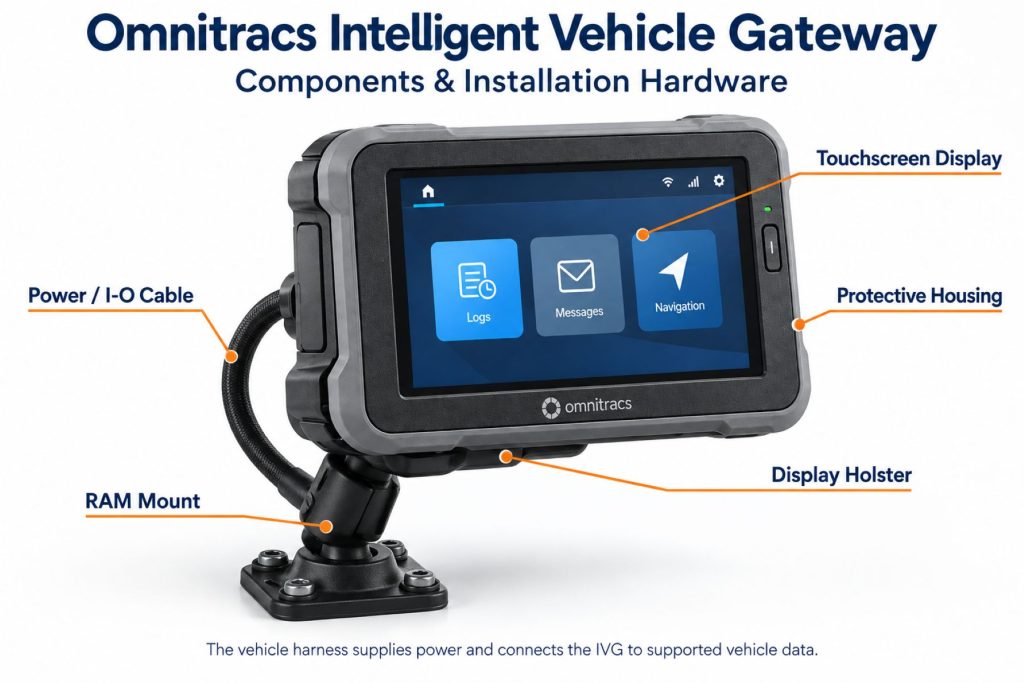
- IVG terminal and touchscreen.
- Mounting assembly and supporting hardware.
- Compatible vehicle power and data cable.
- Enabled applications and active service account.
- Driver credentials and administrative access.
- Additional equipment for optional integrations.
Product Type and Construction
The IVG is an installed electronic terminal for the truck cab. Its display and mounting arrangement are central to the installation, making operator access, visibility, and secure retention important selection factors.
Hardware, Software, and Platform Design
The terminal provides the driver interface, while enabled software and fleet services determine the available workflows. Review the exact hardware identifier and software requirements before adding equipment to an existing account.
How the Telematics or ELD System Works
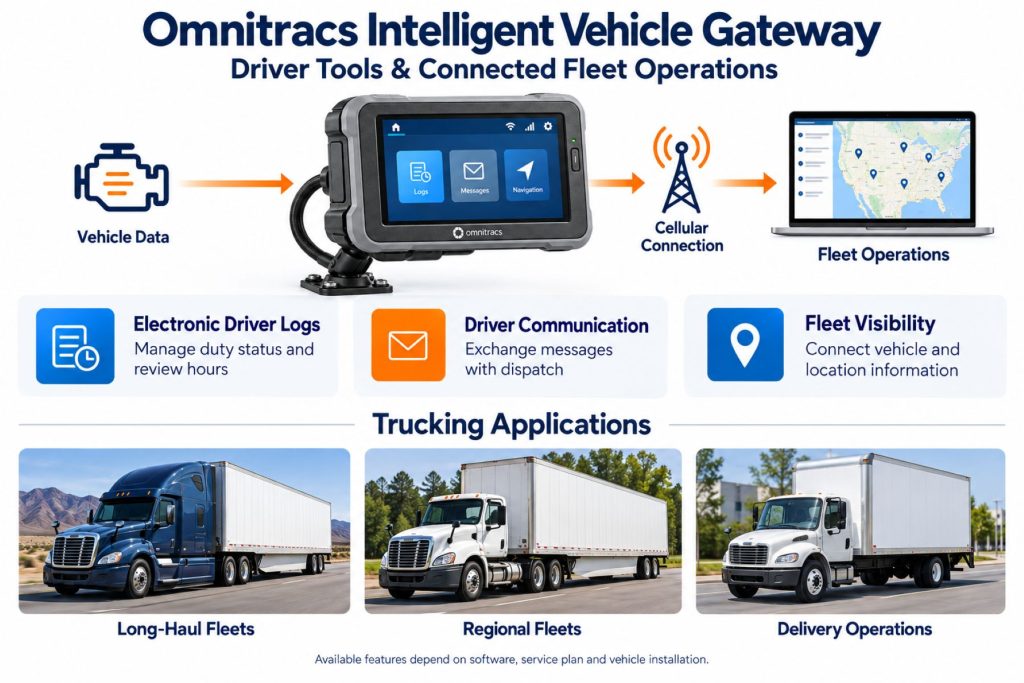
The installed system receives supported vehicle information and associates activity with configured driver workflows. Drivers review and complete records through the terminal, while authorized fleet personnel manage the corresponding information through the service platform.
Position and Function Within the Vehicle
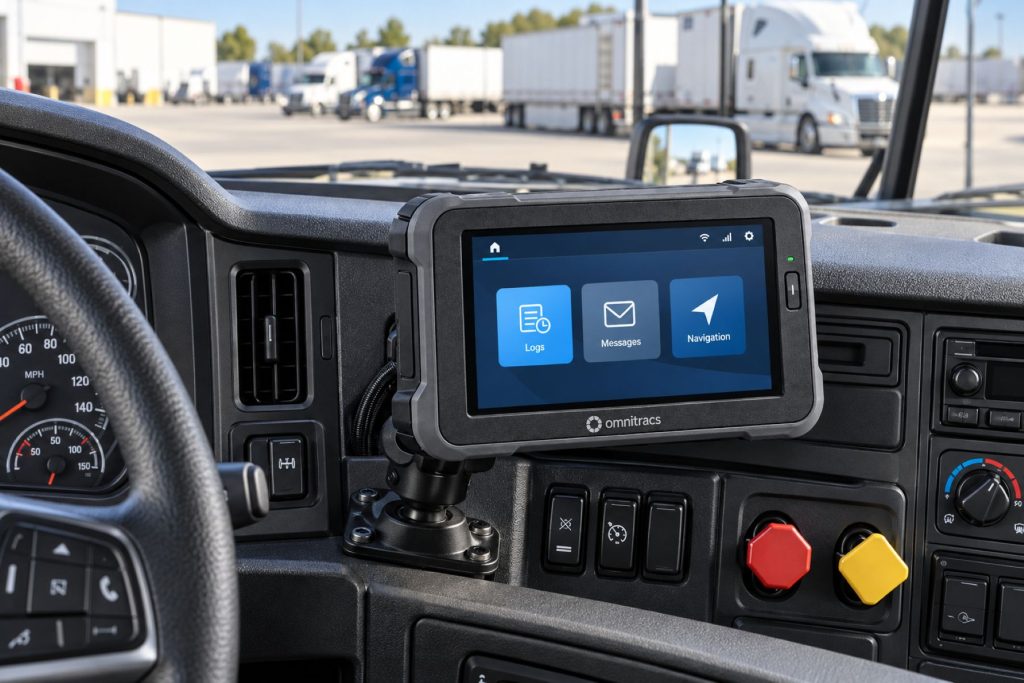
The IVG display belongs in an approved cab location that supports safe access without obstructing visibility, controls, or entry and exit. Cable routing must accommodate the mounting position without tension or interference.
Common Specifications
- Display type: Resistive touchscreen with automatic dimming described in Omnitracs product literature.
- Published operating temperature: −30 to +70°C in the referenced installation guide.
- Published electrical input: +6 to +18 VDC in the referenced installation guide.
- Published maximum current: 1.5 amps at 12 volts in that guide.
- Published sleep current: Approximately 10 mA in that guide.
- Specification qualification: Verify these figures against the exact hardware version before installation.
- Vehicle interface: Selected using the appropriate cable and vehicle-specific guidance.
Operating Capacity and Performance
Evaluate performance using the fleet’s normal driver tasks and operating routes. Useful checks include login reliability, record visibility, application response, message delivery, and the availability of required vehicle information.
Installation Position and System Function
A display installation must account for driver reach, viewing angle, reflections, and mounting movement. Confirm that the terminal stays secure throughout normal cab vibration and that its position does not create a snag or impact point.
System Voltage and Electrical Architecture
Check the input requirements for the exact IVG version. Do not assume direct 24-volt compatibility because another fleet gateway supports it. The vehicle connection and any required power provisions must follow the applicable installation instructions.
Electrical Input, Output, and Power Function
The terminal requires a dependable power connection and an installation suited to vehicle operation and parked conditions. Review the complete circuit arrangement, including any accessories, rather than considering the display alone.
Data Collection and Vehicle Information
Confirm which measurements are available from each vehicle and required by each application. A cable connection should be verified through commissioning checks before the fleet relies on the resulting records.
GPS, Cellular, Wi-Fi, and Satellite Connectivity
Omnitracs literature describes LTE, Bluetooth, and Wi-Fi capabilities, but equipment generations differ. Confirm the modem, supported network, and enabled services for the specific unit. Satellite service should be verified as a complete supported configuration rather than assumed from the IVG name.
Vehicle Network and Diagnostic Integration
Select the connection using the truck’s manufacturer, model year, and connector arrangement. Matching connector shapes do not establish electrical compatibility. Confirm the required vehicle measurements with Omnitracs before selecting a cable.
Electronic Logging and Hours-of-Service Functions
Electronic logging is a primary IVG application. The fleet must still verify the supported software, correct configuration, driver accounts, and applicable operating requirements. Train drivers to review records and follow the documented inspection and malfunction procedures.
Driver Identification and User Access
Use individual credentials and a clear login and logout procedure. Shared trucks and team operations need particular attention so that records remain associated with the correct driver. Review administrator permissions when personnel responsibilities change.
Fleet Portal and Mobile Application
Confirm which fleet portal and companion applications apply to the account. Do not assume that every application described in historical product literature remains available for every service arrangement or mobile operating system.
Dash Camera and Video Capabilities
The IVG terminal is not a dash camera. Video functions require separate camera equipment and a supported integration. Verify recording, retrieval, account access, and service requirements independently from the terminal purchase.
Trailer and Asset-Tracking Capabilities
A tractor-mounted IVG does not independently establish the location of a disconnected trailer. Trailer and other asset visibility require suitable additional tracking equipment and fleet integration.
Remote Diagnostics and Fault-Code Management
Determine which diagnostic functions are included in the proposed service. Use available information to prioritize inspection, then evaluate vehicle symptoms and service documentation before identifying a failed component.
Driver Communication and Workflow Tools
Omnitracs training covers messaging and driver-facing settings. Establish a consistent process for reviewing instructions, acknowledging important communications, and reporting equipment problems. Interactive tasks should be completed when safely parked.
Alerts, Reports, and Fleet Analytics
Configure alerts around actions the fleet can take. Identify who reviews each report, who resolves record questions, and which events need immediate attention. Compare similar operating assignments when evaluating performance.
Data Storage, Transfer, and Retention
Confirm record availability on the terminal, fleet retention, exports, and inspection transfer procedures. Establish a preservation process for information needed beyond normal operational review periods.
Cybersecurity, Privacy, and User Permissions
Manage driver and administrator credentials carefully. Review integration access, remove obsolete accounts, and ask the provider about the supported security configuration for the installed hardware and software generation.
Materials and Component Construction
Inspect the housing, touchscreen, mount, and connector area for damage. A secure display depends on the supporting bracket and attachment points as well as the condition of the terminal itself.
Wiring, Terminals, Connectors, and Grounding
Use the approved cable for the vehicle. Protect wiring from sharp edges, pinch points, and tension at the mount. Have unfamiliar connections or damaged terminals evaluated by a qualified installer.
Controls, Monitoring, and Diagnostics
Terminal settings and system information can help support personnel investigate problems. Record the unit identifier, software version, displayed messages, and recent installation or service changes when requesting assistance.
Electronic Controls and Driver-Assistance Integration
Driver information and fleet alerts should not be confused with active braking or steering controls. Any proposed safety-system integration should be verified separately, including its equipment, supported functions, and service requirements.
Power Consumption and System Efficiency
Assess both operating and parked electrical demand. Extended storage, battery condition, and additional cab accessories can affect the overall power arrangement. Verify the expected sleep behavior for the installed configuration.
Environmental Sealing and Contamination Protection
The referenced installation guide states that the IVG display is not watertight. Protect it from spilled liquids and wet cleaning. A durable outer housing should not be treated as approval for exposed outdoor installation.
Coverage, Connectivity, and Offline Operation
Test communication along the fleet’s normal routes. Distinguish local terminal operation from successful remote transfer. Drivers should understand the documented procedure for coverage gaps and any resulting record or communication limitations.
Duty Cycle and Operating Conditions
Consider daily use, shared-driver operation, cab temperature, vibration, and parked periods. These conditions influence mounting, power planning, inspection frequency, and the support procedures needed by the fleet.
Mounting and Installation
Use the approved mounting arrangement and verify clearance through normal seat and control adjustments. Secure the terminal so that vibration cannot shift it into an unsafe position. Route the cable to preserve access for inspection and service.
Installation, Activation, and Account Setup
Confirm activation eligibility and account assignment before installation. Complete the physical connection, enable the required applications, and verify driver access and communication. Follow the provider’s current commissioning process for the specific unit.
Wiring, Grounding, and Installation Requirements
Apply the instructions for the exact truck and cable. Avoid generic diagnostic adapters or assumed pin assignments. Verify the vehicle’s normal operation and warning-light status before and after commissioning.
Software Configuration and Vehicle Assignment
Match the terminal identifier to the correct truck and use consistent vehicle names. Review enabled applications, driver access, report settings, and notification responsibilities before relying on operational records.
Vehicle, Network, and Platform Compatibility
Verify the truck’s model year, engine, connector arrangement, and required functions. Confirm that the IVG hardware and software are supported by the intended account. Compatibility should be established before transferring equipment between trucks.
Related Component and System Compatibility
Review the complete combination of cables, mounting equipment, applications, and integrations. Equipment from another telematics platform should not be assumed to connect directly or share account services.
Common Applications
- Dedicated in-cab electronic logging.
- Driver communication and configured dispatch workflows.
- Commercial truck fleet reporting.
- Shared-vehicle driver records.
- Existing fleets maintaining supported IVG installations.
- Operations preferring an installed driver terminal.
Advantages
- Dedicated driver interface within the truck.
- Vehicle-connected hardware arrangement.
- Ability to organize enabled workflows through one terminal.
- Established manufacturer training resources.
- Potential continuity for fleets with supported existing installations.
Limitations or Considerations
- Hardware generations have different communication and software requirements.
- Used equipment needs activation and account-status verification.
- Display installation requires suitable cab space and mounting.
- Vehicle cabling must be selected for the specific application.
- Available functions depend on enabled services.
- The display requires protection from liquids.
- Current support and replacement options should be confirmed before purchase.
Driver and Operator Experience
A dedicated terminal provides a consistent location for driver tasks. Effective training should cover login, record review, messaging, and support contacts. Drivers should know which tasks require parking and how to report an incorrect or unavailable function.
Controls, Indicators, and Driver Feedback
Review display settings, notifications, and any enabled voice functions during training. Configure the terminal for readable operation and explain the response expected for important alerts. Feature availability must be checked on the installed version.
Compliance and Record Management
Assign responsibility for driver record review, unassigned activity, access management, and required documentation. Keep fleet procedures aligned with the configured logging solution and applicable jurisdictional requirements.
Subscription Plans and Ongoing Service Costs
Request a current quote for hardware, installation, service, applications, and integrations. Include replacement equipment, support provisions, and contract terms when comparing continued IVG ownership with other solutions.
Firmware, Software, and Map Updates
Use the supported update process for the exact hardware version. Check dependencies before changing software and verify essential applications afterward. Navigation updates should be assessed separately where navigation is enabled.
Data Accuracy and System Limitations
Investigate unusual records using timestamps, driver assignment, vehicle connection status, and communication history. Installation faults and incorrect operating procedures can make records misleading even when the terminal appears to be working.
Inspection and Wear Points
- Mounting security and bracket movement.
- Touchscreen damage or inconsistent response.
- Cable abrasion and tension.
- Connector retention.
- Evidence of liquid exposure.
- Power interruptions following service.
- Correct terminal and vehicle assignment.
Maintenance and Ownership Notes
Keep unit identifiers, cable information, installation photographs, and support contacts with the vehicle record. Inspect the installation after cab repairs or diagnostic service. Follow manufacturer guidance for cleaning and authorized repair.
Common Telematics and ELD System Problems
- Login issues requiring account or credential checks.
- Unavailable applications requiring configuration review.
- Communication delays requiring network and service checks.
- Missing vehicle information requiring cable inspection.
- Power interruptions associated with disturbed connections.
- Touchscreen problems requiring supported troubleshooting.
- Incorrect records associated with driver or vehicle assignment.
Safety and Service Precautions
Install and service the system with the truck securely parked. Keep the display and wiring clear of controls and sightlines. Use qualified support for electrical questions, compatibility checks, and unexpected vehicle behavior after installation.
Identification Information
Record the unit address or identifier, hardware model, software version, vehicle cable number, and assigned truck. These details help support determine service eligibility, compatibility, and the correct troubleshooting procedure.
Buying Considerations
- Confirm current support and activation eligibility.
- Verify the hardware generation and modem.
- Check existing account association for used equipment.
- Select the correct vehicle cable.
- Inspect the display, mount, and connectors.
- Confirm required applications and compliance configuration.
- Include installation and recurring service in the cost comparison.
- Review replacement and migration options with the provider.
Variants and Configurations
- Earlier hardware: Requires careful verification of current connectivity and service eligibility.
- LTE hardware: Must be matched to supported software and account requirements.
- Vehicle installation: Cable and mounting configuration selected for the truck.
- Application configuration: Functions determined by enabled services.
- Integrated configuration: Additional equipment and services for supported fleet workflows.
Comparison to Similar Equipment
The IVG’s dedicated display is an important comparison point against gateways that rely on separate mobile devices. Evaluate driver usability, vehicle support, service quality, integration requirements, and total cost across the complete system.
Best Fit For
- Fleets maintaining supported Omnitracs IVG installations.
- Operators preferring a dedicated in-cab terminal.
- Commercial trucks with verified cable and application support.
- Fleets using consistent driver training and account procedures.
- Buyers who have confirmed current service and replacement arrangements.
Related Vehicle and Trailer Types
Related Truck and Trailer Models
Related Telematics and ELD System Types
- Electronic logging devices and HOS compliance
- Fleet telematics and vehicle gateways
- Driver communication and workflow systems
- Remote diagnostics and fleet intelligence
- AI dash cameras and video telematics
- Trailer and asset-tracking systems
Related Telematics and ELD Products
- Samsara Vehicle Gateway
- Motive Vehicle Gateway
- Geotab GO9 Telematics Device
- Geotab GO9 RUGGED Telematics Device
- Motive Asset Gateway
- Samsara AG52 Asset Gateway
Related Equipment Systems
- Telematics and ELD systems
- Truck electrical systems
- Truck safety systems
- Truck brake systems
- ABS and electronic braking systems
- Tire pressure monitoring and inflation systems
Related Guides
- How Commercial Truck Telematics Systems Work
- Electronic Logging Devices and Hours-of-Service Compliance Explained
- How to Choose a Commercial Truck ELD and Telematics System
- GPS Fleet Tracking and Vehicle Telematics Explained
- AI Dash Cameras and Video Telematics Explained
- Commercial Trailer and Asset Tracking Systems Explained
Regulatory and Compliance Notes
Check the current official ELD listing and supported software configuration for the jurisdiction where the truck operates. Product literature alone does not establish that every used terminal is configured for current requirements.
Real World Operating Notes
A dependable IVG installation combines secure mounting, correct cabling, supported service, and consistent driver procedures. Before a larger rollout or replacement purchase, validate the complete workflow on a representative truck.
Frequently Asked Questions
Does the IVG have its own driver display?
Yes. The dedicated touchscreen is part of the IVG system.
Can a used IVG be activated?
Have Omnitracs verify the exact unit identifier, hardware generation, account association, and current service eligibility before purchase.
Are all IVG units LTE devices?
No. Historical documentation identifies both earlier and LTE hardware. Confirm the modem and supported service for the specific unit.
Can it connect to any diagnostic cable?
No. Use the vehicle-specific cable selection guidance and verify the connector arrangement before installation.
Does it include a dash camera?
No. Camera coverage requires separate equipment and a supported integration.
Should existing fleets replace their IVG equipment?
Review support status, equipment condition, required functions, and total service cost with the provider. That assessment should guide a replacement or migration decision.
Availability and Where to Find
Contact Omnitracs for current hardware availability, replacement options, activation eligibility, and account support. Confirm these details before ordering equipment through a secondary seller.
- Omnitracs Official Website
- Omnitracs IVG Product Brochure
- Omnitracs Customer Support
- Omnitracs Cable Selector
- IVG Training Videos
Support Trucking Families
Truck Equipment Atlas supports the mission of Grey Cross, a nonprofit dedicated to helping families of truck drivers who lose their lives while on the road. As the site grows, part of its mission is to bring awareness and support to these families.
Podcast or Video Section
Learn More Through Audio and Video
Truck Equipment Atlas will continue expanding with podcast episodes, interviews, and equipment breakdowns to help drivers and fleets better understand trucks and equipment.
Follow the Growth of Truck Equipment Atlas
Truck Equipment Atlas continues to expand with new truck profiles, trailer coverage, diesel engine pages, equipment system resources, manufacturer information, and educational guides.
Visit our Site Updates page to explore recent additions, project milestones, and upcoming resources as we continue building one of the industry’s growing commercial trucking equipment reference libraries.
View the Latest Site Updates: Truck Equipment Atlas Site Updates