
Quick Facts
- Manufacturer: Geotab
- Product: GO9 telematics device
- Equipment category: Connected vehicle gateway and fleet telematics hardware
- Primary platform: MyGeotab
- Primary functions: Vehicle location, trip records, supported vehicle diagnostics, and movement monitoring
- Electrical systems: Supports 12-volt and 24-volt vehicle systems
- Expansion: Compatible Geotab IOX accessories
- ELD application: Can form part of a configured Geotab Drive electronic logging solution
- Installation: Diagnostic connection or approved harness appropriate to the vehicle
- Important distinction: Standard GO9, GO9+, and GO9 RUGGED specifications are not interchangeable
Overview
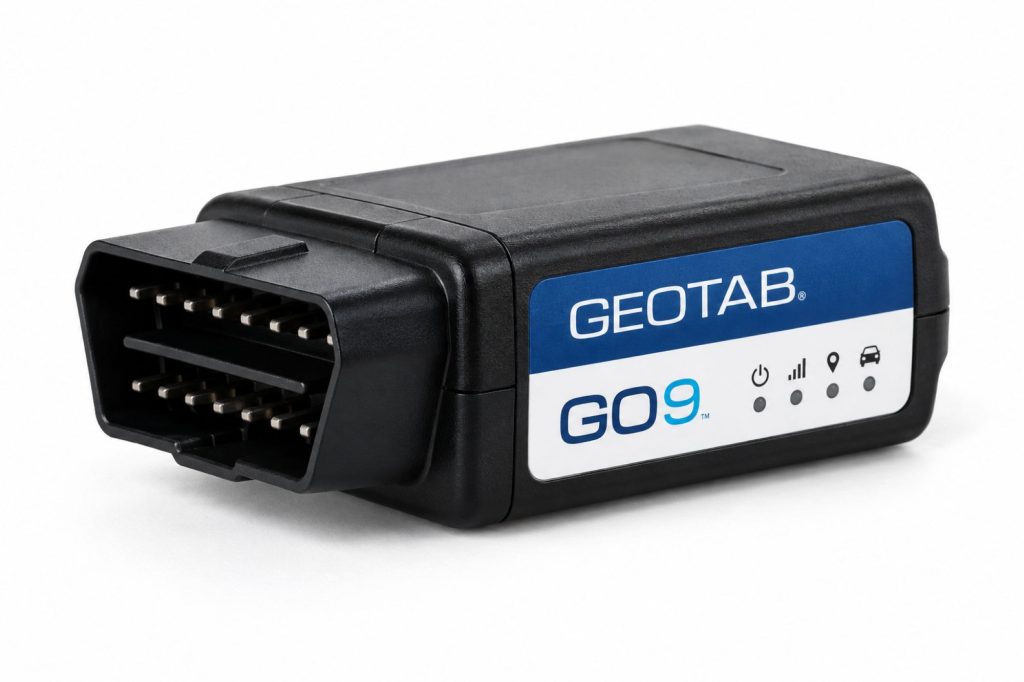
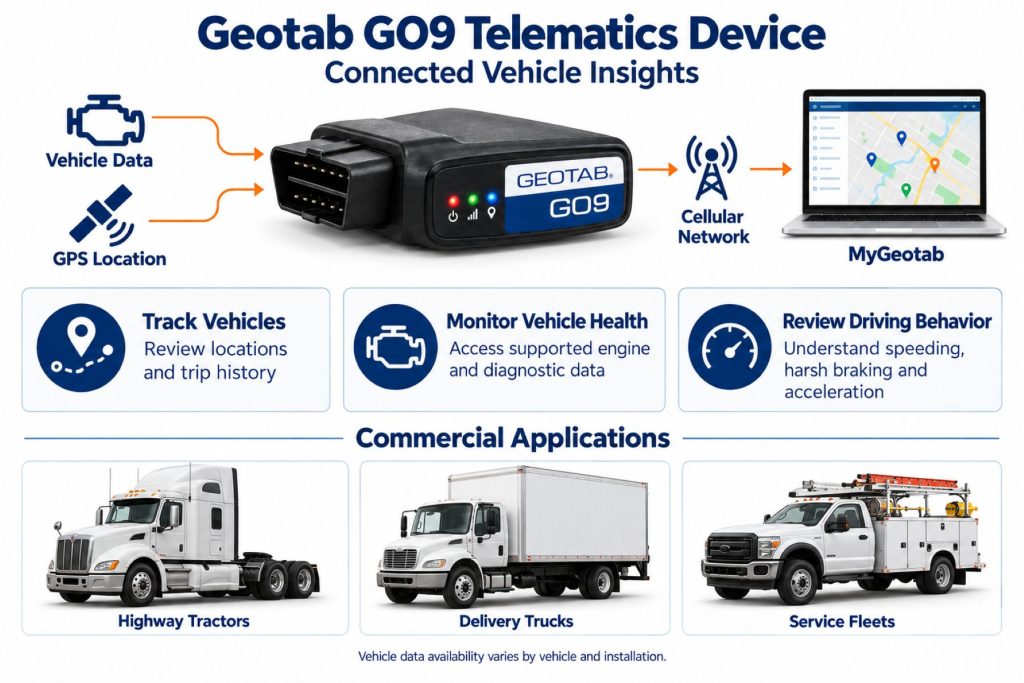
The Geotab GO9 is an in-vehicle telematics device that connects fleet equipment to MyGeotab. It provides a hardware foundation for understanding where vehicles travel, how they are used, and which supported operating conditions require attention.
A complete installation includes more than the device itself. The vehicle connection, service plan, database configuration, user accounts, and any driver applications or accessories determine what the fleet can do with the collected information.
Key Characteristics
- Compact hardware suited to protected in-cab installation.
- Cellular communication for transferring fleet information.
- Vehicle data availability that depends on the connected vehicle and installation.
- Expansion options for additional fleet functions.
- Separate software configuration for tracking, reporting, driver workflows, and compliance.
Major Components
- GO9 device and vehicle connection.
- Approved adapter or installation harness where required.
- MyGeotab database and active service arrangement.
- Compatible mobile device and Geotab Drive application when used for driver workflows.
- Optional IOX hardware and supported integrations.
Product Type and Construction
The standard GO9 is a compact electronic vehicle gateway. Its enclosure houses the processing, positioning, communication, and sensing hardware used by the telematics system. It is installed as part of the vehicle’s electrical and data architecture rather than as a driver display.
Hardware, Software, and Platform Design
The device supplies vehicle information to the fleet platform, while the software organizes that information into maps, records, reports, and configured rules. Purchasing decisions should consider the complete arrangement, including reseller support, integrations, and administrator responsibilities.
How the Telematics or ELD System Works
For fleet tracking, the installed device collects supported information and sends it to the platform. Authorized users then review vehicle activity and respond to configured alerts. Electronic logging adds driver identification, duty-status workflows, and compliance configuration to that foundation.
Position and Function Within the Vehicle
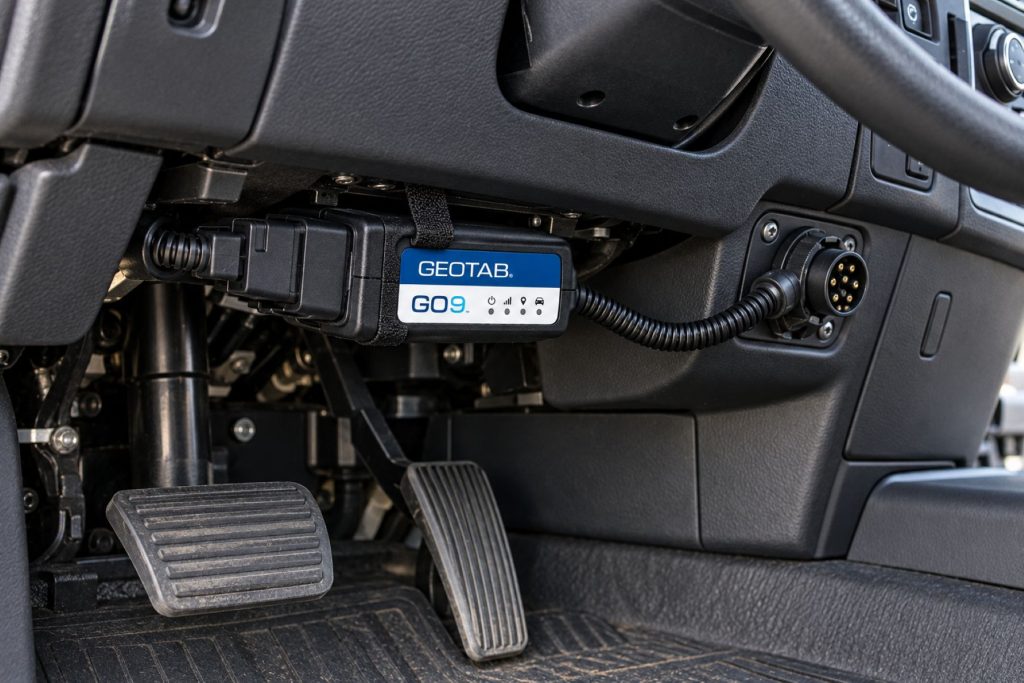
The GO9 belongs in a protected location where its connection can be secured without obstructing pedals, steering components, or service access. Placement should follow the approved installation instructions for the vehicle and harness.
Common Specifications
- Standard GO9 dimensions: 75 × 50 × 23 mm.
- Standard GO9 weight: Approximately 70 g.
- Housing: PC+ABS.
- Motion sensing: Three-axis accelerometer and gyroscope.
- Vehicle interfaces: Supported OBD and CAN protocols, including applicable J1939 and J1708 connections.
- Connectivity selection: Cellular model and positioning capabilities depend on hardware revision and region.
- Specification check: Confirm the exact device identifier before applying a published specification.
Operating Capacity and Performance
Evaluate performance against the fleet’s actual needs: useful trip records, timely alerts, supported diagnostic information, and dependable reporting across normal routes. Portal freshness and recorded event time should be assessed separately when investigating communication delays.
Installation Position and System Function
A suitable harness can provide a more secure mounting arrangement and preserve access to the diagnostic connector. The chosen installation must support the intended functions; a power-only connection should not be assumed to provide the same information as a supported diagnostic connection.
System Voltage and Electrical Architecture
Match the device and harness to the vehicle’s electrical system. Connector appearance alone does not establish compatibility, particularly when comparing passenger-vehicle diagnostic ports with commercial-truck installations.
Electrical Input, Output, and Power Function
The GO9 draws power through its approved connection. Optional accessories add electrical demand and may require their own installation provisions. Include the entire accessory arrangement when reviewing power requirements and parked-vehicle battery management.
Data Collection and Vehicle Information
Before deployment, identify which information is essential to the business and verify it on representative vehicles. A mixed fleet may not expose identical measurements across every truck, engine, model year, or powertrain.
GPS, Cellular, Wi-Fi, and Satellite Connectivity
Positioning reception and cellular service are separate requirements. A recorded location does not necessarily mean the portal has received an immediate update. Confirm carrier coverage along operating routes. Wi-Fi hotspot functionality belongs to applicable GO9+ configurations; satellite communication requires a supported additional solution.
Vehicle Network and Diagnostic Integration
Use the vehicle-specific installation guidance to select the connection. For a purchase evaluation, request confirmation of the measurements needed on each vehicle rather than relying only on a broad statement that the device supports a particular network protocol.
Electronic Logging and Hours-of-Service Functions
Geotab’s Cloud ELD arrangement combines a GO device, MyGeotab, and a mobile device running Geotab Drive. The GO9 hardware alone is not the complete driver-facing logging system. Implementation must include the appropriate configuration, operating procedures, and driver training.
Driver Identification and User Access
Establish individual driver accounts and a clear vehicle-selection procedure. Shared trucks need particular attention at shift changes so that activity is associated with the correct person. Administrator permissions should reflect each employee’s responsibilities.
Fleet Portal and Mobile Application
MyGeotab is the fleet management platform. Geotab Drive provides driver workflows such as electronic logging, inspections, identification, and messaging. Available functions depend on the configured solution and supported mobile environment.
Dash Camera and Video Capabilities
The standard GO9 is not a dash camera. Video coverage requires separate camera equipment and an appropriate integration. Confirm camera compatibility, installation, video access, and service costs independently from the gateway purchase.
Trailer and Asset-Tracking Capabilities
A gateway installed in a tractor does not establish the independent location of a disconnected trailer. Trailer and equipment visibility requires an appropriate asset-tracking arrangement, selected for the asset’s power supply and exposure conditions.
Remote Diagnostics and Fault-Code Management
Use supported diagnostic information to help prioritize inspection and maintenance. A remote alert should lead to investigation of the vehicle, its symptoms, and relevant service information. It should not automatically be treated as a confirmed failed component.
Driver Communication and Workflow Tools
Driver workflows depend on the application and integrations selected by the fleet. Establish when drivers should review messages, complete inspections, and resolve record questions so that the technology supports normal operations without distracting from driving.
Alerts, Reports, and Fleet Analytics
Start with a manageable set of rules tied to specific actions. Define who receives each alert, what requires investigation, and how follow-up is documented. Compare similar vehicles and assignments when using reports to evaluate operating practices.
Data Storage, Transfer, and Retention
Confirm device buffering, platform retention, report exports, and integration access with the provider. These are separate considerations. Establish a record-preservation procedure before historical information is needed for an investigation or business review.
Cybersecurity, Privacy, and User Permissions
Geotab documents authenticated and encrypted communications and signed firmware updates. Fleet administrators should also control account access, review third-party integrations, and remove access when responsibilities change. Explain tracking practices and data use to affected personnel.
Materials and Component Construction
Inspect the enclosure and connector area for damage before installation. Protection of the surrounding harness matters as much as the condition of the device, especially where cables pass near trim, brackets, or frequently serviced equipment.
Wiring, Terminals, Connectors, and Grounding
Use approved connectors and the installation method specified for the vehicle. Avoid improvised adapters or changes to network wiring. Where a wired installation is required, power and ground provisions must follow the relevant harness instructions.
Controls, Monitoring, and Diagnostics
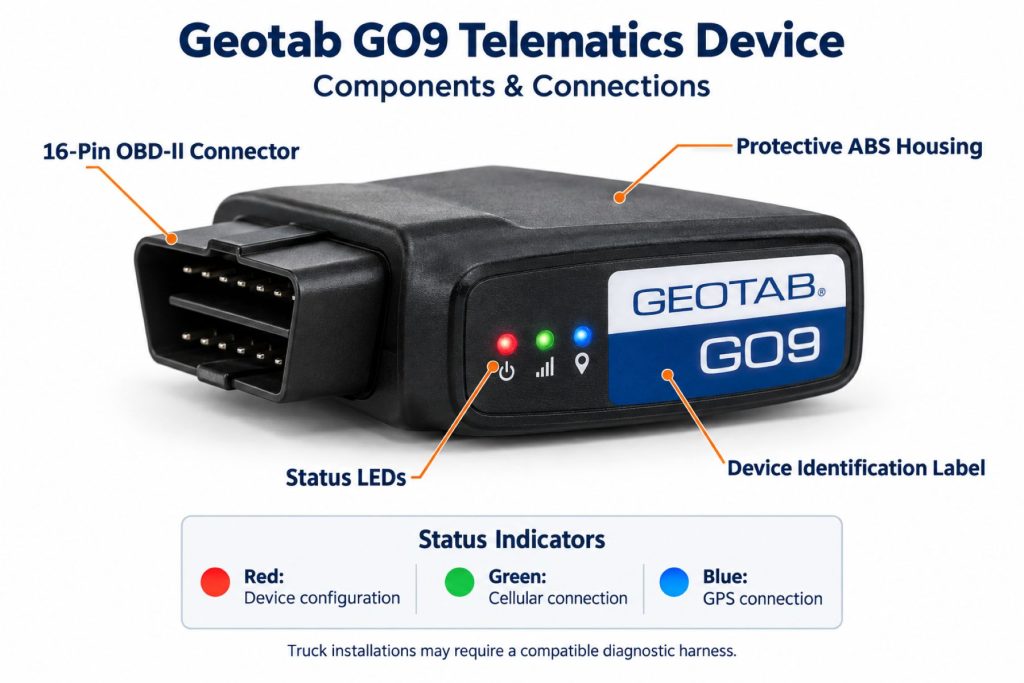
Device indicators and portal records help assess installation status. When investigating a problem, document the indicator behavior, last communication time, recent service work, and whether other vehicle functions changed at the same time.
Electronic Controls and Driver-Assistance Integration
Fleet monitoring should not be confused with the truck’s braking, steering, or collision-avoidance controls. Evaluate any proposed driver-assistance integration separately and verify the supported functions before describing it as part of the installation.
Power Consumption and System Efficiency
Power demand changes with operating state and attached equipment. For vehicles parked for extended periods, assess battery condition and the complete accessory load. Do not use an operating-current figure as a substitute for evaluating the parked configuration.
Environmental Sealing and Contamination Protection
Protect the standard GO9 from water, debris, and cleaning exposure. Geotab directs installations exposed to environmental contaminants toward suitable GO RUGGED equipment. A protected cab installation and an exposed equipment installation require different hardware assessments.
Coverage, Connectivity, and Offline Operation
Test communication on representative routes and distinguish delayed uploads from missing records. Fleets using electronic logging should review Geotab’s offline operating guidance for their mobile platform and connection arrangement before deploying vehicles into extended coverage gaps.
Duty Cycle and Operating Conditions
Consider daily mileage, parked time, seasonal storage, shared-driver use, and service frequency. These conditions influence mounting, support procedures, battery planning, and how the fleet interprets recorded activity.
Mounting and Installation
Secure the device and harness so they cannot loosen or interfere with vehicle operation. Verify clearance with the seat, pedals, and adjustable controls in their normal positions. Keep the installation accessible for authorized inspection.
Installation, Activation, and Account Setup
Record the serial number, confirm vehicle compatibility, and establish the database assignment before commissioning. Follow the installation guide, verify communication, and review a test trip. Complete driver account setup before relying on driver-associated records.
Wiring, Grounding, and Installation Requirements
Installation requirements vary with the vehicle and harness. Obtain the exact instructions rather than applying a generic pinout. Have an authorized installer resolve unfamiliar wiring, connector damage, or uncertainty about the correct connection.
Software Configuration and Vehicle Assignment
Use a consistent vehicle naming convention and verify the device-to-vehicle assignment. Review report units, groups, notifications, and driver access. Incorrect assignments can make otherwise valid records misleading during dispatch or maintenance review.
Vehicle, Network, and Platform Compatibility
Compatibility must be checked for the specific model year, powertrain, connection, hardware revision, and required functions. Brand-level compatibility statements do not establish that every measurement is available on every vehicle from that manufacturer.
Related Component and System Compatibility
Confirm the supported combination of harnesses, IOX accessories, cameras, mobile devices, and integrations before ordering. Include installation labor and subscription requirements in the equipment list so the purchase covers the intended workflow.
Common Applications
- Commercial truck location and trip reporting.
- Delivery and distribution fleet visibility.
- Service and utility vehicle monitoring.
- Maintenance planning using supported vehicle information.
- Configured electronic logging and driver workflows.
- Mixed-fleet reporting where vehicle support has been verified.
Advantages
- Small device footprint.
- Connection to a broader fleet software environment.
- Options to expand the installation with supported accessories.
- Useful foundation for centralized operating records.
- Potential to combine tracking with driver and maintenance workflows.
Limitations or Considerations
- Vehicle information varies by application.
- Coverage affects the timeliness of remote updates.
- Additional functions may require accessories, software, or service changes.
- The standard device requires protection from environmental exposure.
- Electronic logging requires a complete configured solution.
- Older used hardware needs verification of activation eligibility and regional connectivity.
Driver and Operator Experience
Most driver interaction occurs through the configured application and fleet procedures. Clear training should explain vehicle selection, record review, inspection reporting, and whom to contact when the system appears incorrect.
Controls, Indicators, and Driver Feedback
The device includes status indicators and audible feedback. Use Geotab’s indicator guidance to interpret them. Explain any configured coaching alerts to drivers so they understand the intended response and can report unexpected behavior.
Compliance and Record Management
Assign responsibility for reviewing driver records, resolving unassigned activity, and managing access. Keep operating procedures aligned with the configured logging solution and applicable requirements. Hardware installation alone does not complete the fleet’s compliance process.
Subscription Plans and Ongoing Service Costs
Request a current quote covering hardware, installation, recurring service, driver functions, accessories, and integrations. Review contract terms, support arrangements, replacement provisions, and account-transfer conditions before comparing total ownership cost.
Firmware, Software, and Map Updates
Maintain a support process for device firmware, fleet software, and driver applications. After a significant change, verify the functions most important to the fleet and communicate any revised procedures to users.
Data Accuracy and System Limitations
Investigate unusual records using timestamps, assignment history, vehicle information, and communication status. Location reception, installation condition, and inconsistent operating procedures can affect how records are interpreted.
Inspection and Wear Points
- Device retention and connector seating.
- Harness abrasion, pinching, and strain.
- Clearance around pedals and moving controls.
- Evidence of moisture or contamination.
- Changes following vehicle service.
- Correct database and vehicle assignment.
Maintenance and Ownership Notes
Include the telematics installation in routine cab inspections and post-service checks. Keep device identifiers, harness information, installation photographs, and support contacts in the vehicle’s equipment record.
Common Telematics and ELD System Problems
- Delayed portal updates requiring coverage and communication checks.
- Intermittent power associated with a loose or damaged connection.
- Missing vehicle measurements requiring a compatibility review.
- Incorrect records associated with a wrong vehicle assignment.
- Driver access problems requiring account or application checks.
- Unexpected alerts requiring review of configuration and recorded events.
Safety and Service Precautions
Follow Geotab’s installation and limitations-of-use instructions. Keep the installation clear of driving controls and contamination. Have compatibility checked before moving equipment to another vehicle, and use authorized support for servicing or suspected installation faults.
Identification Information
Record the device serial number, model identifier, hardware revision, harness part number, and assigned vehicle. These details help the reseller confirm compatibility, account status, and the correct documentation.
Buying Considerations
- Confirm the exact vehicle and required measurements.
- Select the approved harness and installation arrangement.
- Verify regional cellular service and activation eligibility.
- Identify driver application and electronic logging requirements.
- Price accessories, integrations, installation, and recurring service.
- Check support and account-transfer terms for used equipment.
- Evaluate a trial installation before a mixed-fleet rollout.
Variants and Configurations
- Standard GO9: The device covered by this page.
- Regional configurations: Hardware and cellular arrangements suited to supported markets.
- GO9+: A separate configuration with applicable Wi-Fi hotspot capability.
- GO9 RUGGED: A separate ruggedized device for appropriate exposed applications.
- Accessory configurations: Approved harnesses and compatible IOX additions.
Comparison to Similar Equipment
Compare the GO9 with other vehicle gateways using the complete operating arrangement. Relevant differences include vehicle support, driver workflows, reporting, camera integration, reseller service, and recurring cost. An independent asset tracker serves a different installation need from an in-cab vehicle gateway.
Best Fit For
- Fleets selecting MyGeotab as their management platform.
- Operators seeking centralized vehicle activity records.
- Mixed fleets willing to verify support by vehicle.
- Businesses requiring supported accessory expansion.
- Fleets implementing a configured Geotab Drive workflow.
Related Vehicle and Trailer Types
Related Truck and Trailer Models
Related Telematics and ELD System Types
- Fleet telematics and vehicle gateways
- Electronic logging devices and HOS compliance
- Remote diagnostics and fleet intelligence
- Driver communication and workflow systems
- AI dash cameras and video telematics
- Trailer and asset-tracking systems
Related Telematics and ELD Products
- Motive Vehicle Gateway
- Samsara Vehicle Gateway
- Omnitracs Intelligent Vehicle Gateway
- Motive AI Dashcam — related video equipment from another platform
- Motive Asset Gateway — related independent asset-tracking equipment
- Samsara AG52 Asset Gateway — related asset-tracking equipment
Related Equipment Systems
- Telematics and ELD systems
- Truck electrical systems
- Truck safety systems
- Truck brake systems
- ABS and electronic braking systems
- Tire pressure monitoring and inflation systems
Related Guides
- How Commercial Truck Telematics Systems Work
- Electronic Logging Devices and Hours-of-Service Compliance Explained
- How to Choose a Commercial Truck ELD and Telematics System
- GPS Fleet Tracking and Vehicle Telematics Explained
- AI Dash Cameras and Video Telematics Explained
- Commercial Trailer and Asset Tracking Systems Explained
Regulatory and Compliance Notes
Confirm the current requirements and accepted solution configuration for the jurisdiction where the fleet operates. Device radio approvals and electronic logging requirements address different matters. Review the complete implementation rather than relying on the GO9 model name alone.
Real World Operating Notes
A useful rollout begins with a representative vehicle and a defined set of checks. Verify trip records, required measurements, driver procedures, and support response before expanding. Recheck the installation after cab work or diagnostic service that may disturb its connection.
Frequently Asked Questions
Is the Geotab GO9 an ELD?
It can serve as the vehicle hardware in a Geotab electronic logging solution. The complete arrangement also requires the configured platform, driver application, and operating procedures.
Does the GO9 include a dash camera?
No. Camera coverage requires separate video equipment and an appropriate integration.
Will it work in every commercial truck?
Compatibility must be verified for the specific vehicle, connection, and required functions. Do not assume that a physically matching connector establishes full support.
Can a used GO9 be activated?
Have the reseller check the exact serial number, regional hardware, service eligibility, and any existing account association before purchase.
Can the standard GO9 track an exposed trailer?
An exposed trailer needs an installation and device suited to its power and environmental conditions. Do not treat the standard in-cab GO9 as interchangeable with ruggedized or independent asset-tracking equipment.
What should be checked when updates stop?
Check the last communication time, device indicators, connection condition, coverage, and account assignment. Use authorized support when the cause is unclear or vehicle behavior changes.
Availability and Where to Find
Contact Geotab or an authorized reseller for current availability, compatibility confirmation, installation equipment, and service pricing.
- Geotab Official Website
- Geotab GO9 Support Document
- Geotab GO Device Installation Resources
- Geotab Drive Information
- Geotab HOS and ELD Support
Support Trucking Families
Truck Equipment Atlas supports the mission of Grey Cross, a nonprofit dedicated to helping families of truck drivers who lose their lives while on the road. As the site grows, part of its mission is to bring awareness and support to these families.
Podcast or Video Section
Learn More Through Audio and Video
Truck Equipment Atlas will continue expanding with podcast episodes, interviews, and equipment breakdowns to help drivers and fleets better understand trucks and equipment.
Follow the Growth of Truck Equipment Atlas
Truck Equipment Atlas continues to expand with new truck profiles, trailer coverage, diesel engine pages, equipment system resources, manufacturer information, and educational guides.
Visit our Site Updates page to explore recent additions, project milestones, and upcoming resources as we continue building one of the industry’s growing commercial trucking equipment reference libraries.
View the Latest Site Updates: Truck Equipment Atlas Site Updates