
Quick Facts
- Manufacturer: Motive Technologies
- Product Type: Connected AI fleet dash camera
- Model Family: DC-53 road-facing and DC-54 dual-facing
- Primary Function: Video recording, supported safety-event detection, and driver coaching
- Hardware Format: Windshield-mounted camera assembly
- Vehicle Connection: USB connection to a compatible Motive Vehicle Gateway
- Network Connectivity: Cloud communication through the connected gateway
- GPS Capability: Vehicle-location context supplied by the gateway
- ELD and HOS Support: Separate gateway and Driver App functions; the camera is not a standalone ELD
- Camera Coverage: Forward roadway; DC-54 also includes an inward-facing camera
- Trailer or Asset Support: Separate equipment required for independent asset tracking
- Fleet Portal: Motive Fleet Dashboard
- Mobile Applications: Supported Motive Fleet App and Driver App functions
- Subscription Required: Compatible Motive camera and fleet services
- Primary Applications: Commercial trucking, delivery, vocational, and service fleets
- Availability: Confirm current model availability, gateway compatibility, and service options with Motive
Overview
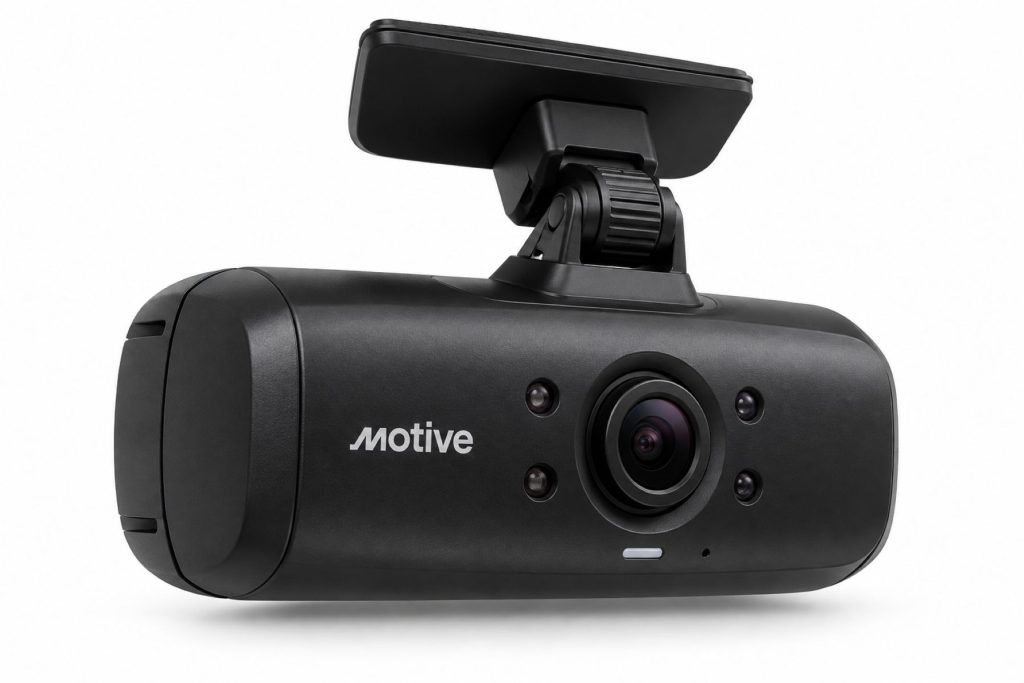
The Motive AI Dashcam is a connected fleet camera used to record driving activity and support safety-event review. The DC-53 records the forward roadway, while the DC-54 adds a camera looking into the cab.
The camera connects to a compatible Motive Vehicle Gateway. Its role is to contribute video and supported safety detections to the fleet’s operating system, while the gateway supplies the associated vehicle connection.
A useful camera program requires more than installed hardware. Fleets need clear responsibilities for reviewing events, preserving evidence, communicating with drivers, and following through on coaching.
Key Characteristics
- Road-facing and dual-facing model choices
- AI-assisted safety monitoring
- Gateway-connected installation
- Fleet-based event review
- Supported driver feedback and capture functions
- Adjustable windshield mounting
- Recording and privacy settings requiring fleet administration
- Model-dependent viewing and detection capabilities
Major Components
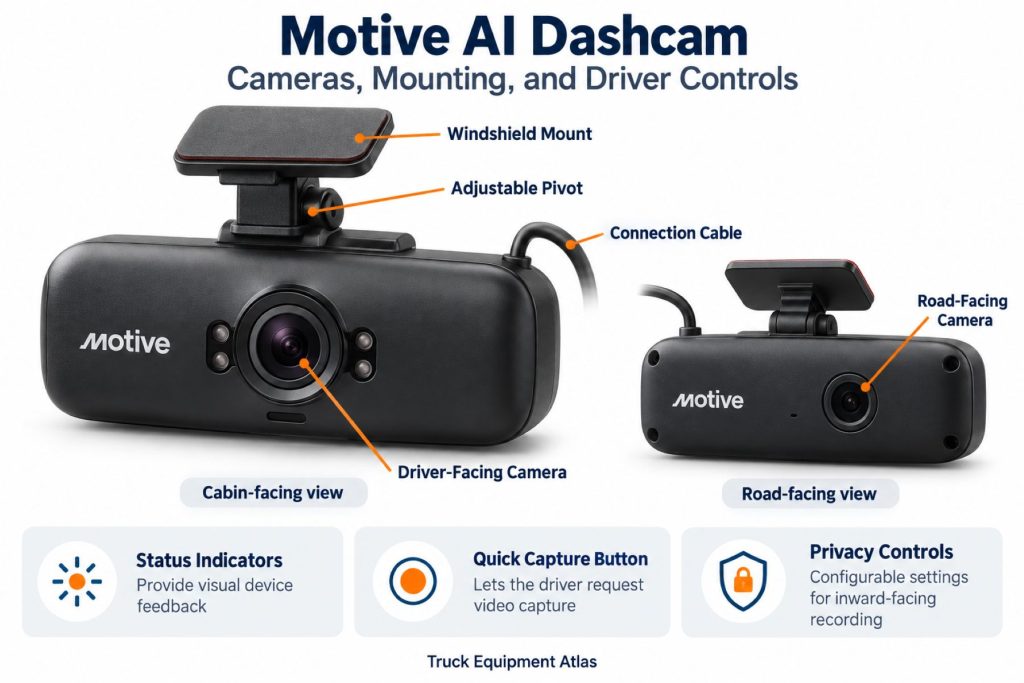
- Road-facing camera
- Inward-facing camera on DC-54
- Camera housing and internal electronics
- Windshield mount and adjustment hardware
- USB connection cable
- Status light bar
- Quick Capture button
- Audio hardware
- Separate compatible Vehicle Gateway
- Fleet account and camera service
Product Type and Construction
The AI Dashcam is an interior-mounted electronic camera. The mount positions the optics toward the required viewing area and secures the housing against normal vehicle movement.
Evaluate the actual cab layout before installation. Windshield angle, sun visors, overhead equipment, and driver seating position can affect the result.
Hardware, Software, and Platform Design
The complete system includes the camera, gateway, vehicle cable, account, and enabled services. Fleet personnel should commission these together.
Define who checks camera faults, who reviews events, and who can download or release footage.
How the Telematics or ELD System Works
The camera records according to its configuration and contributes supported safety-event information. The connected gateway supplies vehicle context and communication with the fleet environment.
Electronic logging remains a separate function. Camera footage does not replace duty-status records or the driver’s logging responsibilities.
Position and Function Within the Vehicle
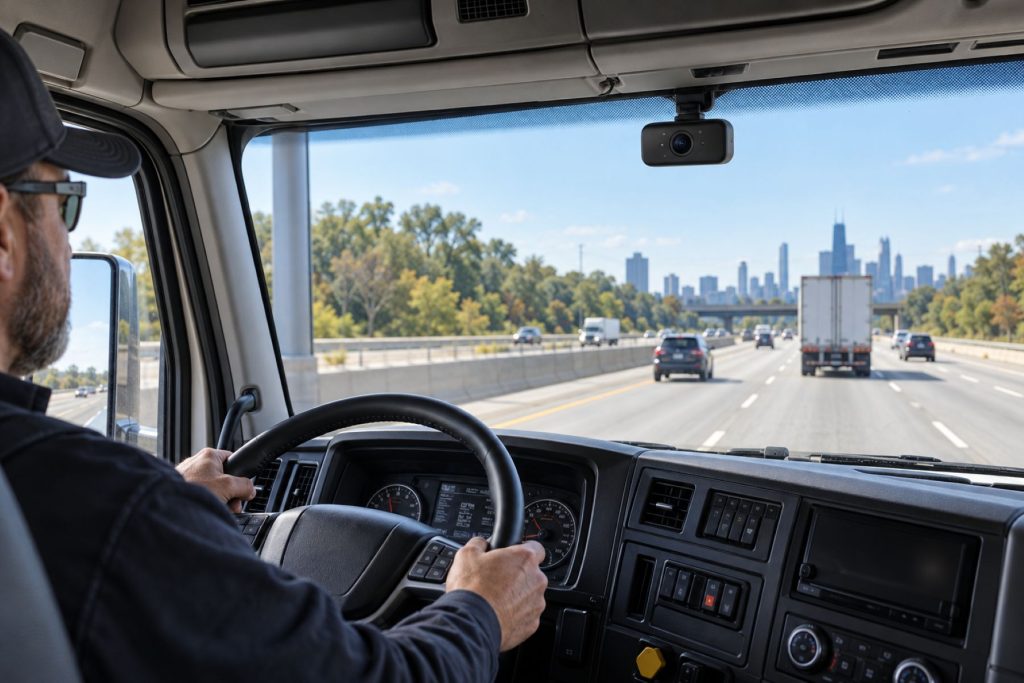
Position the camera to obtain a clear roadway view without obstructing required driver visibility. A dual-facing installation must also capture the intended driver area.
Check the views with the driver seated normally and cab accessories in their operating positions.
Common Specifications
- DC-53: Road-facing AI Dashcam
- DC-54: Dual-facing AI Dashcam
- DC-54 Road Camera: Published 1080p resolution, 30 fps, and 150-degree field of view
- DC-54 Driver Camera: Published 1080p resolution, 30 fps, and 180-degree field of view
- DC-54 Low-Light Cab Recording: Infrared illumination
- DC-54 Dimensions: Published 115 × 60 × 27 mm
- DC-54 Cable Length: Published 4 meters
- Connection: Compatible Motive Vehicle Gateway
DC-54 specifications should not be applied automatically to DC-53 or AI Dashcam Plus models. Confirm the exact camera and current datasheet before ordering.
Operating Capacity and Performance
Recording history depends on the model and selected settings. Evaluate the available retrieval window against the vehicle’s daily operating hours.
A continuously operated truck consumes recording history faster than a vehicle used for a short daily route. Preserve important footage promptly.
Installation Position and System Function
Check actual camera images before completing the installation. A housing that appears straight may still produce an unsuitable road or driver view.
Recheck alignment after windshield work, mount replacement, or camera relocation.
System Voltage and Electrical Architecture
The published AI Dashcam installation connects through the Vehicle Gateway. Vehicle voltage compatibility belongs to the complete gateway and cable arrangement.
Do not apply truck battery voltage directly to the camera connection or substitute an unapproved power arrangement.
Electrical Input, Output, and Power Function
The approved camera connection supports operation and communication with the gateway. It is not a power output for unrelated vehicle accessories.
Check gateway power and cable engagement before assuming the camera has failed.
Data Collection and Vehicle Information
The camera contributes visual information. Vehicle measurements and location context come from other parts of the installed system.
Separate what a clip directly shows from conclusions drawn using speed, location, or other records.
GPS, Cellular, Wi-Fi, and Satellite Connectivity
The DC-53 and DC-54 use the compatible Vehicle Gateway for their connected installation. They should not be purchased as independent satellite communications devices or Wi-Fi hotspots.
Review gateway coverage along the fleet’s operating routes.
Vehicle Network and Diagnostic Integration
The camera does not connect directly to the truck’s diagnostic port. That connection belongs to the gateway and vehicle-specific cable.
Verify video and vehicle-data functions separately during commissioning.
Electronic Logging and Hours-of-Service Functions
The AI Dashcam is not a standalone ELD. Logging requires the appropriate gateway, Driver App, account, service, and configuration.
Driver Identification and User Access
Confirm driver assignment before using an event for coaching. Shared trucks, relief drivers, and equipment transfers can complicate attribution.
Provide a process for drivers to report an incorrectly assigned event.
Fleet Portal and Mobile Application
The Fleet Dashboard provides event review and administration. Supported mobile functions include installation checks and driver-facing access.
Assign responsibility for checking device faults and reviewing important events.
Dash Camera and Video Capabilities
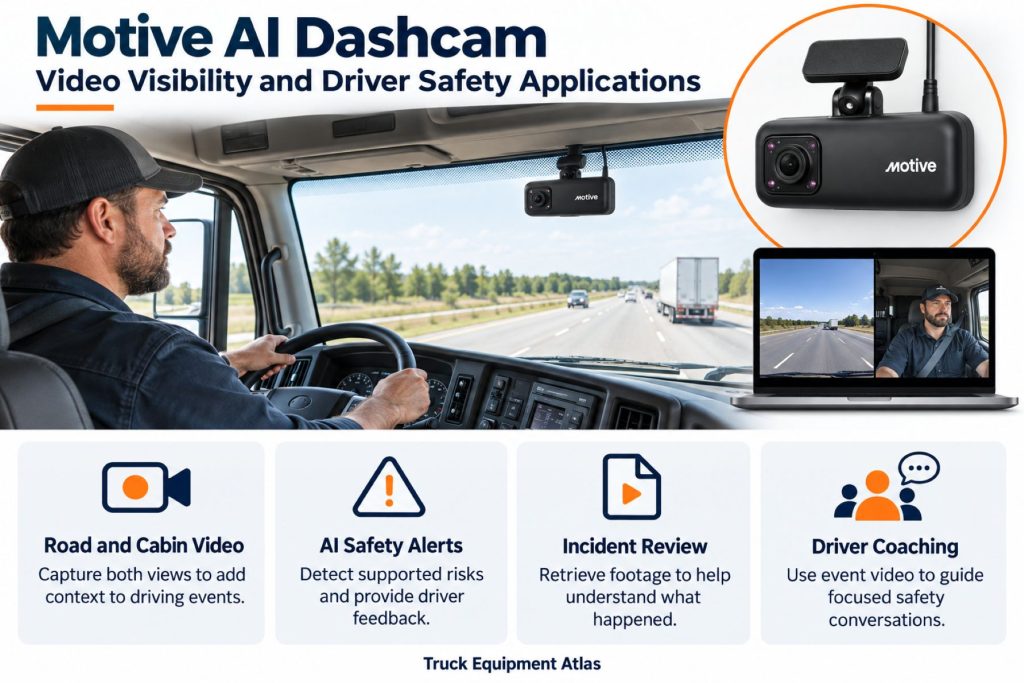
Supported detections vary by model. Road-facing functions include selected roadway risks, while driver-facing functions require an inward-facing camera and suitable visibility.
Motive distinguishes event capture from in-cab alerts. Enabling one does not necessarily enable the other, and not every event includes video.
Trailer and Asset-Tracking Capabilities
The camera does not independently track a disconnected trailer. Separate equipment is needed for trailer location and dedicated side, rear, or cargo views.
Remote Diagnostics and Fault-Code Management
Engine diagnostics belong to the gateway’s vehicle connection. Camera troubleshooting focuses on power, connection, image quality, recording settings, and assignment.
Driver Communication and Workflow Tools
Explain the camera program before deployment. Cover event review, driver capture, enabled feedback, privacy settings, and support contacts.
Dispatch messaging and paperwork require other platform tools.
Alerts, Reports, and Fleet Analytics
Use alerts to direct attention to events the safety team can review. Configure capture and driver feedback deliberately rather than enabling every option without a process.
Interpret trends within the operating context of highway, delivery, or vocational work.
Data Storage, Transfer, and Retention
Local recording history and saved cloud footage are different. Confirm the available retrieval window and successful upload when preserving evidence.
Define retention and export procedures before an incident occurs.
Cybersecurity, Privacy, and User Permissions
Limit footage access to authorized personnel. Establish policies for inward-facing recording, optional audio, downloads, external sharing, and sleeper-cab use.
Review permissions when employees or service providers change.
Materials and Component Construction
The assembly combines optical surfaces, electronic housing, mounting hardware, and cable connections. Protect lenses from scratches and mounts from impact or excessive adjustment force.
Wiring, Terminals, Connectors, and Grounding
Use the approved camera cable and compatible gateway. Route wiring clear of controls, airbags, sharp edges, and areas where it can be pinched.
Do not splice the camera connection or add unapproved power wiring.
Controls, Monitoring, and Diagnostics
The light bar and Quick Capture button provide status and driver interaction. Use current model-specific instructions to interpret the indicators.
Confirm that the account shows the intended camera and vehicle after service.
Electronic Controls and Driver-Assistance Integration
Camera alerts do not operate the truck’s brakes or steering. Drivers remain responsible for observation and safe vehicle operation.
Power Consumption and System Efficiency
Evaluate parked recording as part of the complete electrical installation. Battery condition, gateway behavior, other accessories, and parked duration affect the result.
Environmental Sealing and Contamination Protection
Install the camera inside the cab using the approved arrangement. Protect lenses and connections from cleaning spray, dust, condensation, and liquid spills.
Coverage, Connectivity, and Offline Operation
Separate recording status from cloud availability. A delayed remote request does not automatically establish that footage was never recorded.
Check power, device connection, recording configuration, and gateway coverage individually.
Duty Cycle and Operating Conditions
Match recording and review procedures to the vehicle’s work schedule. Consider night operation, vibration, windshield contamination, and frequent driver changes.
Mounting and Installation
Clean the selected mounting surface, confirm viewing angles, attach the approved mount, and secure the cable. Follow Motive’s procedure for the specific camera and cab arrangement.
Use the supported app image checks to verify the finished installation.
Installation, Activation, and Account Setup
Confirm that the gateway is compatible and correctly assigned. Connect the camera, complete setup, and verify its status and images.
Record camera and gateway identifiers for future support.
Wiring, Grounding, and Installation Requirements
Secure the cable along an approved route. Leave service access without creating loose loops near controls or cab entry points.
Inspect the route again after windshield replacement or dashboard repairs.
Software Configuration and Vehicle Assignment
Configure recording, privacy, event capture, driver feedback, and access rights. Verify the correct vehicle and driver context.
Update assignments and retest images when the camera moves to another vehicle.
Vehicle, Network, and Platform Compatibility
Compatibility depends on the camera, gateway generation, cable, software, and service. Confirm the complete combination before purchasing replacement equipment.
Related Component and System Compatibility
Confirm support for additional cameras, mounts, privacy covers, and accessories individually. Do not assume components from another Motive camera generation are interchangeable.
Common Applications
- Highway and regional trucking
- Delivery and distribution fleets
- Vocational and construction trucks
- Service and utility operations
- Mixed fleets with managed safety programs
Advantages
- Provides visual context for incident review
- Supports driver coaching discussions
- Offers road-only and dual-facing choices
- Fits within a compatible Motive fleet environment
- Can support consistent fleet-wide review procedures
Limitations or Considerations
- Requires supporting gateway hardware and service.
- Driver-facing recording needs clear privacy policies.
- Views can be obstructed or poorly aligned.
- Recording history is finite.
- AI events require contextual review.
- Additional views require separate equipment.
- Features vary by model and configuration.
Driver and Operator Experience
Explain how footage is reviewed and how drivers can question an interpretation. Keep coaching focused on the event and its context.
Include drivers in installation checks so normal seating and cab routines are considered.
Controls, Indicators, and Driver Feedback
Train drivers on the Quick Capture button, status light, and enabled feedback. Provide a way to report repeated or confusing alerts.
Review footage and change settings while safely parked.
Compliance and Record Management
Define who preserves incident footage and how it is associated with the correct vehicle, driver, and report. Confirm applicable retention and disclosure requirements.
Keep video procedures separate from driver-log administration.
Subscription Plans and Ongoing Service Costs
Request pricing for the camera, gateway, vehicle cable, installation, software, and optional features. Review replacement terms and footage access when service ends.
Firmware, Software, and Map Updates
Follow Motive’s update and support procedures. After changes, verify settings and update driver instructions where behavior has changed.
Data Accuracy and System Limitations
Lighting, weather, glare, dirty glass, and camera position affect interpretation. A wide field of view does not guarantee that small objects or license plates will be readable.
Review the driver’s account and available surrounding footage before drawing conclusions.
Inspection and Wear Points
- Mount adhesion and adjustment hardware
- Lens and windshield cleanliness
- Unobstructed road and driver views
- Cable clips and pinch points
- Camera and gateway connections
- Housing damage
- Correct vehicle assignment
- Usable test images
Maintenance and Ownership Notes
Include the camera in regular cab inspections. Clean optical surfaces using approved methods and recheck images after mount or windshield work.
Retain the camera model and gateway details for troubleshooting.
Common Telematics and ELD System Problems
- No Camera Power: Check gateway power and camera connections.
- Poor Images: Inspect lenses, glass, glare, and alignment.
- Missing Footage: Review recording settings, available history, and request status.
- Delayed Upload: Check gateway connectivity.
- Incorrect Driver: Review assignments and trip records.
- Repeated Alerts: Review clips and installation before changing settings.
- ELD Issue: Diagnose gateway and Driver App logging separately.
Safety and Service Precautions
Install and adjust the camera while securely parked. Preserve required visibility, airbag paths, and access to controls.
Camera feedback does not replace road observation or safe driving.
Identification Information
Record the camera model and serial number, gateway identifier, vehicle assignment, mount type, and installation date.
Distinguish DC-53 and DC-54 from Smart Dashcam and AI Dashcam Plus models when ordering parts or requesting support.
Buying Considerations
- Choose road-only or dual-facing coverage.
- Verify the exact camera and gateway combination.
- Check mounting requirements for each cab.
- Review enabled detections and recording settings.
- Establish privacy and access policies.
- Compare complete hardware and service costs.
- Plan event-review staffing and driver training.
Variants and Configurations
- DC-53 road-facing AI Dashcam
- DC-54 dual-facing AI Dashcam
- Compatible mounting arrangements
- Supported privacy and audio settings
- Configured event-capture and driver-feedback options
- Compatible additional-camera installations
AI Dashcam Plus DC-63 and DC-64 belong to a separate hardware family and require their own specification and installation review.
Comparison to Similar Equipment
A road-facing camera provides roadway context. A dual-facing camera adds cab visibility and the corresponding privacy responsibilities.
Compare complete systems when evaluating other fleet cameras, including gateway requirements, review tools, recording history, and service costs.
Best Fit For
- Fleets using compatible Motive gateways
- Operations with defined incident-review procedures
- Safety teams that can review and coach
- Organizations with clear recording policies
- Commercial fleets standardizing video equipment
Related Vehicle and Trailer Types
- Sleeper Trucks
- Day Cab Trucks
- Vocational Trucks
- Dry Van Trailers
- Flatbed Trailers
- Refrigerated (Reefer) Trailers
Related Truck and Trailer Models
Related Telematics and ELD System Types
- AI Dash Cameras & Video Telematics
- Fleet Telematics & Vehicle Gateways
- Electronic Logging Devices & HOS Compliance
- Trailer & Asset Tracking Systems
- Driver Communication & Workflow Systems
- Remote Diagnostics & Fleet Intelligence
Related Telematics and ELD Products
- Motive Vehicle Gateway
- Samsara CM34 Dual-Facing AI Dash Cam
- Samsara Vehicle Gateway
- Geotab GO9 Telematics Device
- Omnitracs Intelligent Vehicle Gateway
- Samsara AG52 Asset Gateway
Related Equipment Systems
- Telematics & ELD Systems
- Electrical Systems
- Safety Systems
- Brake Systems
- Drivelines & Steering Systems
- Tires & Wheels
Related Guides
- Telematics & ELD System Guides
- How Commercial Truck Telematics Systems Work
- Electronic Logging Devices and Hours-of-Service Compliance Explained
- How to Choose a Commercial Truck ELD and Telematics System
- GPS Fleet Tracking and Vehicle Telematics Explained
- AI Dash Cameras and Video Telematics Explained
- Commercial Trailer and Asset Tracking Systems Explained
Regulatory and Compliance Notes
Confirm applicable windshield-placement, recording, employee-monitoring, privacy, and evidence-retention requirements for the operating jurisdictions.
Camera installation does not establish ELD compliance or replace required vehicle safety equipment.
Real World Operating Notes
Check views after normal cab changes. A visor, curtain, dashboard device, or personal item can obstruct a previously clear image.
Retrieve incident footage promptly and review it together with the driver’s explanation and other available records.
Frequently Asked Questions
What is the difference between DC-53 and DC-54?
DC-53 is road-facing. DC-54 records both the roadway and the cab.
Does this AI Dashcam require a Vehicle Gateway?
The DC-53 and DC-54 installation uses a compatible Motive Vehicle Gateway.
Is it the same as AI Dashcam Plus?
No. AI Dashcam Plus is a separate hardware family with its own specifications and installation requirements.
Does every safety event include video?
No. Available media depends on the event, hardware, and configuration.
Does the camera automatically brake or steer?
No. Its feedback does not operate the vehicle’s brakes or steering.
Can it show the entire truck and trailer?
Additional cameras are required for dedicated side, rear, or trailer coverage.
What should be checked after windshield replacement?
Inspect the mount, cable, connections, alignment, and actual camera images.
Availability and Where to Find
Contact Motive for current camera availability, compatible gateways, installation options, and service pricing.
- Dual-Facing AI Dashcam Specification Information
- Road-Facing AI Dashcam Specification Information
- AI Dashcam Installation and Support
- Motive Camera Model Identification
- Motive Safety Event Reference
Support Trucking Families
Truck Equipment Atlas supports the mission of Grey Cross, a nonprofit dedicated to helping families of truck drivers who lose their lives while on the road. As the site grows, part of its mission is to bring awareness and support to these families.
Podcast or Video Section
Learn More Through Audio and Video
Truck Equipment Atlas will continue expanding with podcast episodes, interviews, and equipment breakdowns to help drivers and fleets better understand trucks and equipment.
Follow the Growth of Truck Equipment Atlas
Truck Equipment Atlas continues to expand with new truck profiles, trailer coverage, diesel engine pages, equipment system resources, manufacturer information, and educational guides.
Visit our Site Updates page to explore recent additions, project milestones, and upcoming resources as we continue building one of the industry’s growing commercial trucking equipment reference libraries.
View the Latest Site Updates: Truck Equipment Atlas Site Updates