
Quick Facts
- Manufacturer: Motive Technologies
- Product Type: Commercial-vehicle telematics gateway and ELD hardware
- Primary Function: Connects vehicle information and driver logging to the Motive fleet platform
- Hardware Format: Compact in-vehicle electronic gateway
- Vehicle Connection: Vehicle-specific diagnostic or approved hardwired cable
- Network Connectivity: Cellular, Bluetooth, and supported Wi-Fi hotspot functions
- GPS Capability: Integrated satellite positioning
- ELD and HOS Support: Available with the appropriate installation, account, Driver App, and configuration
- Camera Support: Compatible Motive dash cameras are separate hardware
- Trailer or Asset Support: Separate asset-tracking equipment is required for independent trailer visibility
- Fleet Portal: Motive Fleet Dashboard
- Mobile Applications: Motive Driver App and Motive Fleet App
- Subscription Required: Compatible Motive service agreement
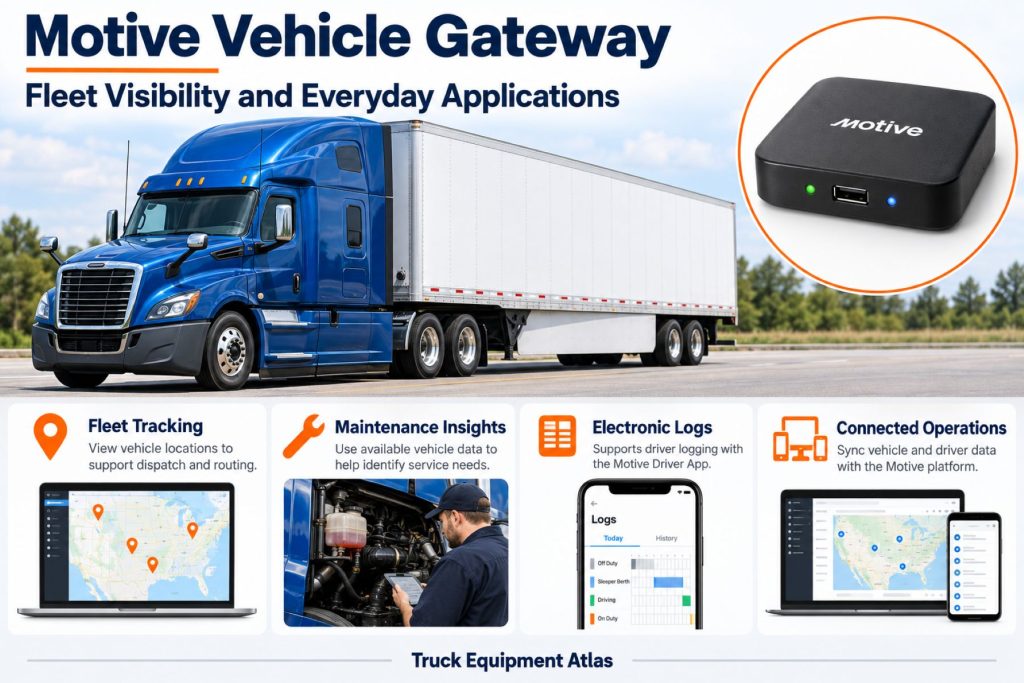
- Primary Applications: Highway, regional, delivery, vocational, and mixed commercial fleets
- Production Status: Current product family; confirm hardware generation and regional availability
Overview
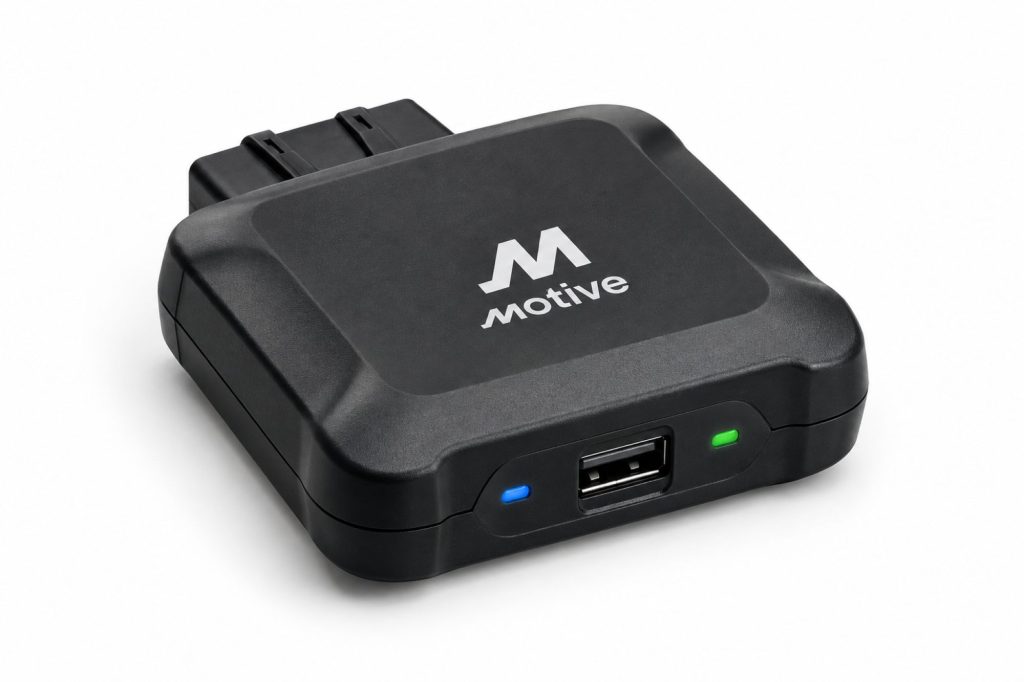
The Motive Vehicle Gateway is an installed electronic device that connects a commercial vehicle to Motive’s fleet-management environment. It provides the hardware foundation for vehicle tracking, supported telematics, and electronic driver logging.
The gateway is one part of a complete operating system. The vehicle cable, fleet account, driver application, enabled services, and installation quality all affect what the fleet can use.
For trucking operations, the practical value comes from making vehicle information available to the people responsible for dispatch, compliance, maintenance, and safety. Each department needs a defined process for acting on that information.
Key Characteristics
- Vehicle-installed telematics hardware
- Integrated positioning and cellular communication
- Electronic logging support through the wider Motive system
- Application-specific vehicle cables
- Supported driver-device connection
- Separate camera and asset-tracking options
- Fleet account and vehicle assignment requirements
- Hardware-generation and service-dependent capabilities
Major Components
- Vehicle Gateway enclosure
- Internal positioning and communications hardware
- Vehicle-interface electronics
- Processing and data-storage components
- Power and vehicle-data cable
- Status indicators
- Mounting and cable-securing materials
- Driver mobile device and application
- Fleet Dashboard account
- Optional compatible cameras and auxiliary accessories
Product Type and Construction
The Vehicle Gateway is a compact electronic module installed inside the vehicle. Its cable must match the required vehicle connection and gateway hardware.
A secure installation protects the device from movement, connector strain, and interference with normal cab operation.
Hardware, Software, and Platform Design
The gateway provides the installed vehicle connection. The Driver App provides the driver interface, while the Fleet Dashboard provides administrative access.
Commission the complete system together. A powered gateway alone does not prove that driver assignments, logging, alerts, or maintenance information are configured correctly.
How the Telematics or ELD System Works
The gateway receives power and supported information through its vehicle connection. Positioning hardware supplies location information, while communications connect the installation with the Motive account and driver application.
For logging operations, drivers must use the correct account and vehicle connection. Fleet personnel must review exceptions and manage records through the applicable workflow.
Position and Function Within the Vehicle
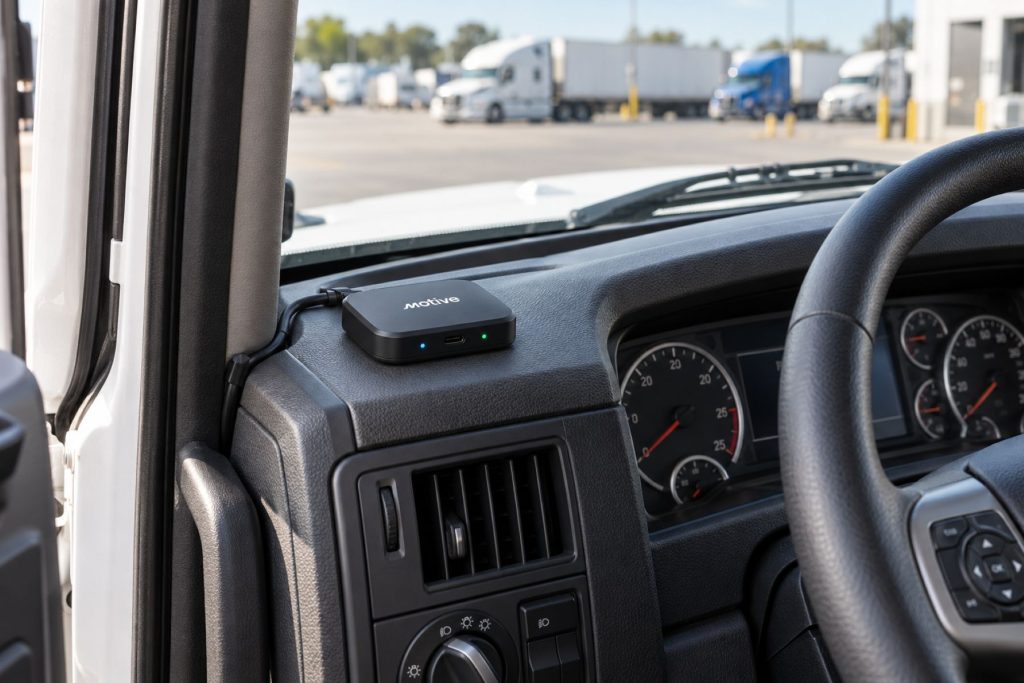
Mount the gateway in a protected position that follows Motive’s reception and orientation guidance. Keep it clear of pedals, steering equipment, airbags, and cab entry paths.
The device must remain accessible enough for identification and service without leaving loose wiring in the driver’s work area.
Common Specifications
- Published Supply Range: 8–32 VDC
- Published Dimensions: 111 × 106 × 25 mm
- Published Weight: 257 g
- Published Operating Temperature: −40°C to 85°C
- Vehicle Interfaces: Supported J1939, J1708, OBD-II, RP1226, and vehicle-specific connections through the appropriate cables
- Driver Connection: Supported Bluetooth connection to the Driver App
- Cloud Communication: Built-in cellular connectivity
- Accessory Options: Compatible Motive cameras and auxiliary interfaces
These values describe the hardware covered by Motive’s published specification sheet. Confirm the exact installed model before applying them to another gateway generation.
Operating Capacity and Performance
Available information and update behavior depend on the vehicle, hardware, service, and reception. Test the functions the fleet actually needs rather than using a successful map update as proof that every feature works.
Include normal operating routes, yards, and driver-device combinations in the commissioning review.
Installation Position and System Function
Use the selected cable’s installation procedure. Confirm connector engagement, gateway security, reception, and diagnostic-port accessibility.
Complete the account assignment and driver connection checks before releasing the vehicle into service.
System Voltage and Electrical Architecture
Motive’s referenced gateway specification lists an 8–32 VDC supply range. The correct vehicle cable and installation method remain necessary for a nominal 12-volt or 24-volt vehicle.
Do not assume that every connector pin or auxiliary input accepts the same voltage as the main power connection.
Electrical Input, Output, and Power Function
The installed cable supplies operating power and, where supported, vehicle information. Accessory connections must be used only for their intended functions.
Inspect the vehicle supply and cable before treating a power interruption as an internal gateway failure.
Data Collection and Vehicle Information
Supported telematics can include vehicle speed, mileage, engine information, fuel information, and fault codes. Availability differs by vehicle and connection.
Distinguish vehicle-reported measurements from calculated reports and manually entered information when interpreting a record.
GPS, Cellular, Wi-Fi, and Satellite Connectivity
The gateway combines satellite positioning with cellular communication and supported local connections. Wi-Fi hotspot access is a separate service consideration from the gateway’s own data connection.
Confirm current hotspot allowances and regional network support. Satellite positioning does not provide satellite messaging.
Vehicle Network and Diagnostic Integration
Choose the connection based on vehicle make, model, year, and available port. Motive offers heavy-duty, light-duty, OEM-specific, and approved hardwired installation options.
A hardwired power connection does not automatically provide the same engine information as a compatible diagnostic connection.
Electronic Logging and Hours-of-Service Functions
The gateway supports Motive electronic logging through the required hardware, Driver App, account, and configuration. Drivers need training in connection checks, vehicle selection, log review, and malfunction reporting.
Verify the applicable device listing and jurisdiction requirements for the exact configuration used by the carrier.
Driver Identification and User Access
Drivers should connect using their assigned accounts and select the correct vehicle. Shared trucks and relief drivers require particular attention to assignments.
Review unidentified or incorrectly attributed activity through the approved fleet process.
Fleet Portal and Mobile Application
The Fleet Dashboard provides administrative access, while the Driver App supports driver-facing functions. The Fleet App supports installation and available fleet-management tasks.
Assign clear responsibility for device faults, driver account issues, and vehicle-record changes.
Dash Camera and Video Capabilities
The gateway is not itself a camera. Compatible Motive dash cameras add video hardware and the corresponding service requirements.
Camera installation, recording settings, privacy policies, and footage access should be reviewed separately.
Trailer and Asset-Tracking Capabilities
The Vehicle Gateway follows the powered vehicle. A trailer left behind requires separate tracking hardware for independent visibility.
Supported asset-pairing features do not remove the need to maintain accurate equipment identities and dispatch records.
Remote Diagnostics and Fault-Code Management
Supported fault information can help maintenance teams prioritize inspection. A reported code identifies a condition requiring interpretation rather than automatically identifying the failed part.
Use the vehicle manufacturer’s diagnostic and repair procedures when servicing the truck.
Driver Communication and Workflow Tools
Driver workflows depend on the application and enabled services. The gateway supplies the vehicle connection rather than a standalone screen or messaging terminal.
Train drivers on the functions the fleet uses and provide a clear support contact.
Alerts, Reports, and Fleet Analytics
Configure reports and alerts around decisions personnel can make. Assign an owner to important notifications and review whether the settings create useful information.
Compare vehicle performance within its operating context. Highway hauling and urban delivery expose equipment to different conditions.
Data Storage, Transfer, and Retention
Local records, mobile-device records, and cloud history are different parts of the system. Confirm successful synchronization before relying on remote access.
Review retention, exports, and account-access terms for the fleet’s record-management needs.
Cybersecurity, Privacy, and User Permissions
Give users access appropriate to their roles. Vehicle location and driver records can reveal sensitive operating information.
Review account permissions, connected applications, and device assignments when employees or service providers change.
Materials and Component Construction
The enclosure contains electronic processing, communications, and vehicle-interface components. Protect the housing and connectors from impact, liquids, and cable strain.
Wiring, Terminals, Connectors, and Grounding
Use the approved cable for the vehicle and gateway. Secure connectors and route wiring clear of pedals, steering parts, and airbag paths.
Hardwired installations require the specific power, ground, and protection instructions for that cable.
Controls, Monitoring, and Diagnostics
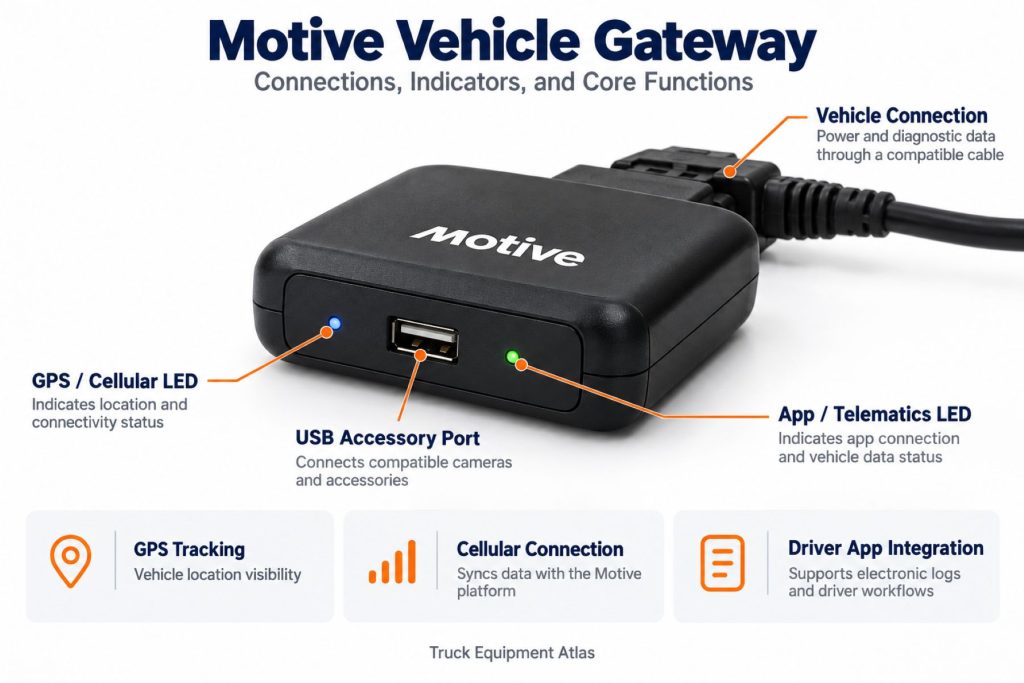
Status indicators help distinguish connection conditions. Motive’s indicator guidance varies by gateway model, so identify the hardware before interpreting a light pattern.
Check both the installed device and its account status during troubleshooting.
Electronic Controls and Driver-Assistance Integration
The gateway does not replace the vehicle’s braking, steering, or stability-control systems. Reading vehicle information does not mean it controls those systems.
Power Consumption and System Efficiency
Assess parked operation as part of the complete vehicle electrical load. Gateway behavior, accessories, battery condition, and storage duration all matter.
Do not assume an internal backup battery supports indefinite operation without vehicle power.
Environmental Sealing and Contamination Protection
Use the approved interior mounting arrangement. A published temperature range does not establish suitability for exposed exterior mounting or pressure washing.
Coverage, Connectivity, and Offline Operation
A cloud connection and a local driver connection are separate. Poor cellular coverage does not automatically mean the driver’s local gateway connection has failed.
Follow the applicable offline and malfunction procedures, and verify later synchronization.
Duty Cycle and Operating Conditions
Include vibration, frequent driver changes, parked periods, and operating territory in deployment planning. Inspect connections after cab repairs or vehicle transfers.
Mounting and Installation
Park securely, identify the correct connection, install the selected cable, and secure the gateway and wiring. Follow Motive’s mounting orientation guidance.
Verify actual reporting and driver-device connection after installation.
Installation, Activation, and Account Setup
Create or confirm the vehicle record, assign the gateway identifier, and complete the installation checks. Establish the required driver accounts and application setup.
Record the installed model and cable number for future support.
Wiring, Grounding, and Installation Requirements
Follow the specific cable procedure rather than a generic connector assumption. Preserve vehicle safety functions and access needed for service.
Recheck cable security after dashboard work or diagnostic-port repairs.
Software Configuration and Vehicle Assignment
Configure the correct vehicle identity, driver access, enabled services, and alert responsibilities. Review jurisdiction and operating settings for logging use.
Update the account when hardware moves between vehicles.
Vehicle, Network, and Platform Compatibility
Confirm vehicle make, model, year, connector, gateway generation, and regional service. A familiar truck name does not establish the correct cable for every model year.
Related Component and System Compatibility
Verify camera, auxiliary-input, and asset-related compatibility separately. Physical connector fit alone does not establish supported operation.
Common Applications
- Highway and regional trucking
- Local delivery and distribution
- Vocational and construction fleets
- Service and utility vehicles
- Mixed commercial fleets
Advantages
- Connects installed vehicle hardware with fleet administration
- Supports tracking and electronic logging in one ecosystem
- Provides supported vehicle information for maintenance review
- Offers compatible camera and accessory options
- Can support a consistent deployment across multiple vehicles
Limitations or Considerations
- Requires the correct hardware, cable, and service.
- Vehicle information varies by application.
- Drivers need connection and logging training.
- Cloud updates depend on communications availability.
- Cameras and independent asset tracking require separate hardware.
- Account assignments and permissions need ongoing administration.
Driver and Operator Experience
Drivers should know how to select the correct vehicle, confirm connection, review records, and report faults. Provide a simple support process for device or application problems.
Controls, Indicators, and Driver Feedback
Gateway lights and application status indicators provide connection feedback. Use the model-specific instructions rather than assuming every Motive gateway displays the same patterns.
Compliance and Record Management
Establish procedures for log review, unidentified activity, edits, certification, roadside access, and malfunctions. Confirm applicable requirements for the carrier’s operation.
Installing hardware is only one part of maintaining compliant records.
Subscription Plans and Ongoing Service Costs
Request a complete quote covering hardware, cables, installation, software, camera options, and hotspot service where needed.
Review renewal terms, replacements, vehicle transfers, and historical access before comparing total costs.
Firmware, Software, and Map Updates
Motive supports over-the-air gateway updates. Keep supported mobile applications current and review changed behavior with drivers when necessary.
Location maps belong to the platform rather than a standalone navigation screen in the gateway.
Data Accuracy and System Limitations
Review timestamps, assignments, and the source of each measurement. A calculated report, manual entry, and vehicle-reported value may require different interpretation.
Investigate unexpected readings before using them to make maintenance or personnel decisions.
Inspection and Wear Points
- Gateway mounting and security
- Cable abrasion and strain
- Connector engagement
- Diagnostic-port condition
- Housing or liquid damage
- Power and connection status
- Correct vehicle assignment
- Driver-device connection
Maintenance and Ownership Notes
Include the installation in cab inspections. Recheck it after dashboard repairs, battery work, gateway transfers, or diagnostic-port service.
Keep hardware and cable identifiers available for support.
Common Telematics and ELD System Problems
- No Power: Check the vehicle supply and approved cable connection.
- No Cloud Update: Review cellular service, device status, and account assignment.
- Driver App Disconnected: Follow the supported pairing and connection checks.
- Incorrect Vehicle: Verify the driver selection and gateway assignment.
- Missing Vehicle Data: Confirm cable and diagnostic compatibility.
- Unidentified Activity: Review driver connections and fleet records.
- Repeated Disconnections: Inspect cable security and mounting.
Safety and Service Precautions
Install and service the equipment while securely parked. Keep wiring clear of controls and safety equipment, and use qualified installation support where needed.
Handle application setup and troubleshooting while safely stopped.
Identification Information
Record the gateway model, serial number, cable number, vehicle VIN, fleet number, and installation date. Hardware generation matters when requesting replacement parts or interpreting indicators.
Buying Considerations
- Define tracking, logging, and maintenance requirements.
- Confirm the vehicle and cable combination.
- Identify the supplied gateway generation.
- Check regional service coverage.
- Review camera and accessory compatibility.
- Confirm hotspot terms where needed.
- Plan driver training and fleet administration.
- Compare complete contract and installation costs.
Variants and Configurations
- Different gateway hardware generations
- Heavy-duty diagnostic installations
- Light-duty OBD-II installations
- OEM-specific and RP1226 connections
- Approved hardwired installations
- Compatible camera configurations
- Supported auxiliary-input installations
Comparison to Similar Equipment
Compared with other vehicle gateways, Motive uses its own hardware, applications, services, and accessory ecosystem. Compare the complete installation and operating workflow.
An independent asset tracker serves a different purpose by staying with a trailer or machine after the truck leaves.
Best Fit For
- Commercial fleets seeking integrated vehicle visibility
- Carriers using compatible Motive logging services
- Operations combining dispatch, maintenance, and safety information
- Fleets with defined driver training and support procedures
- Organizations standardizing compatible fleet hardware
Related Vehicle and Trailer Types
- Sleeper Trucks
- Day Cab Trucks
- Vocational Trucks
- Dry Van Trailers
- Flatbed Trailers
- Refrigerated (Reefer) Trailers
Related Truck and Trailer Models
Related Telematics and ELD System Types
- Fleet Telematics & Vehicle Gateways
- Electronic Logging Devices & HOS Compliance
- AI Dash Cameras & Video Telematics
- Trailer & Asset Tracking Systems
- Driver Communication & Workflow Systems
- Remote Diagnostics & Fleet Intelligence
Related Telematics and ELD Products
- Motive AI Dashcam
- Samsara Vehicle Gateway
- Geotab GO9 Telematics Device
- Omnitracs Intelligent Vehicle Gateway
- Samsara CM34 Dual-Facing AI Dash Cam
- Samsara AG52 Asset Gateway
Related Equipment Systems
- Telematics & ELD Systems
- Electrical Systems
- Safety Systems
- Brake Systems
- Drivelines & Steering Systems
- Tires & Wheels
Related Guides
- Telematics & ELD System Guides
- How Commercial Truck Telematics Systems Work
- Electronic Logging Devices and Hours-of-Service Compliance Explained
- How to Choose a Commercial Truck ELD and Telematics System
- GPS Fleet Tracking and Vehicle Telematics Explained
- AI Dash Cameras and Video Telematics Explained
- Commercial Trailer and Asset Tracking Systems Explained
Regulatory and Compliance Notes
Verify applicable ELD, recordkeeping, installation, and privacy requirements for the carrier’s jurisdictions and exact configuration.
Device installation does not replace driver training, record review, or required malfunction procedures.
Real World Operating Notes
Reliable operation depends on secure connections and accurate assignments. A working device attached to the wrong digital vehicle record still creates operational problems.
Use a representative pilot group to refine installation, driver training, and support procedures before expanding across the fleet.
Frequently Asked Questions
What does the Motive Vehicle Gateway do?
It connects supported vehicle information and driver logging with the Motive fleet platform.
Does every truck use the same cable?
No. Cable selection depends on the vehicle, connector, hardware model, and required functions.
Does the gateway include a camera?
No. Compatible cameras are separate hardware.
Can it independently track a dropped trailer?
The gateway stays with the vehicle. Independent trailer tracking requires separate asset hardware.
Does loss of cellular service always stop local logging?
No. Local driver connection and cloud communication are separate. Follow the supported procedures for the installed configuration.
Is a service plan required?
A compatible Motive service arrangement is required for the intended platform functions.
How should a replacement gateway be identified?
Use the hardware model, serial number, vehicle details, cable number, and required services.
Availability and Where to Find
Contact Motive for current gateway hardware, compatibility assistance, installation options, and service pricing.
- Motive Vehicle Gateway Specification Sheet
- Vehicle Gateway Installation and Support
- Vehicle Gateway Driver Guide
- Vehicle Gateway Fleet Manager Guide
- Motive Help Center
Support Trucking Families
Truck Equipment Atlas supports the mission of Grey Cross, a nonprofit dedicated to helping families of truck drivers who lose their lives while on the road. As the site grows, part of its mission is to bring awareness and support to these families.
Podcast or Video Section
Learn More Through Audio and Video
Truck Equipment Atlas will continue expanding with podcast episodes, interviews, and equipment breakdowns to help drivers and fleets better understand trucks and equipment.
Follow the Growth of Truck Equipment Atlas
Truck Equipment Atlas continues to expand with new truck profiles, trailer coverage, diesel engine pages, equipment system resources, manufacturer information, and educational guides.
Visit our Site Updates page to explore recent additions, project milestones, and upcoming resources as we continue building one of the industry’s growing commercial trucking equipment reference libraries.
View the Latest Site Updates: Truck Equipment Atlas Site Updates