
Quick Facts
- Manufacturer: Detroit, a Daimler Truck North America brand.
- Product: Detroit Assurance with Active Brake Assist 6 (ABA6).
- Equipment type: Integrated driver-assistance suite with automatic emergency braking.
- Primary sensing: Fused radar and camera technology.
- Primary purpose: Help mitigate supported collision scenarios through warnings and braking.
- Documented application: Fifth Generation Freightliner Cascadia.
- Primary section: Safety Systems.
- Compatibility: Confirm vehicle build date, equipment specification, powertrain, and installed options.
Overview
Detroit Assurance combines several driver-assistance functions within a vehicle-integrated safety suite. Active Brake Assist 6 is its collision-mitigation braking function; the Assurance name also covers other features that must be identified separately.
Drivers remain responsible for vehicle speed, following distance, steering, and timely braking. Assistance should support attentive driving rather than become the basis for deciding that a maneuver is safe.
This page provides an equipment overview. The individual truck’s build records and operating manual determine its fitted functions, controls, limitations, and service requirements.
Key Characteristics
- Integrates sensing, driver feedback, and supported vehicle responses.
- Requires vehicle-specific equipment identification.
- Separates emergency braking from cruise, lane, and side-assistance functions.
- Requires familiarization with the actual truck’s controls and indications.
- Should be evaluated by build configuration rather than branding alone.
Major Components
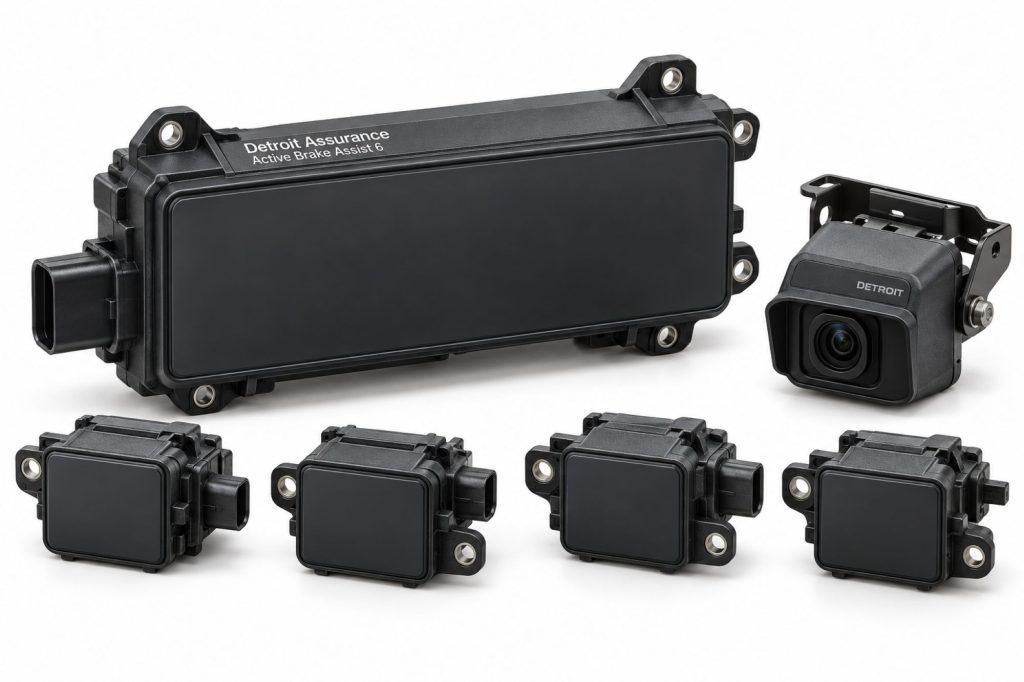
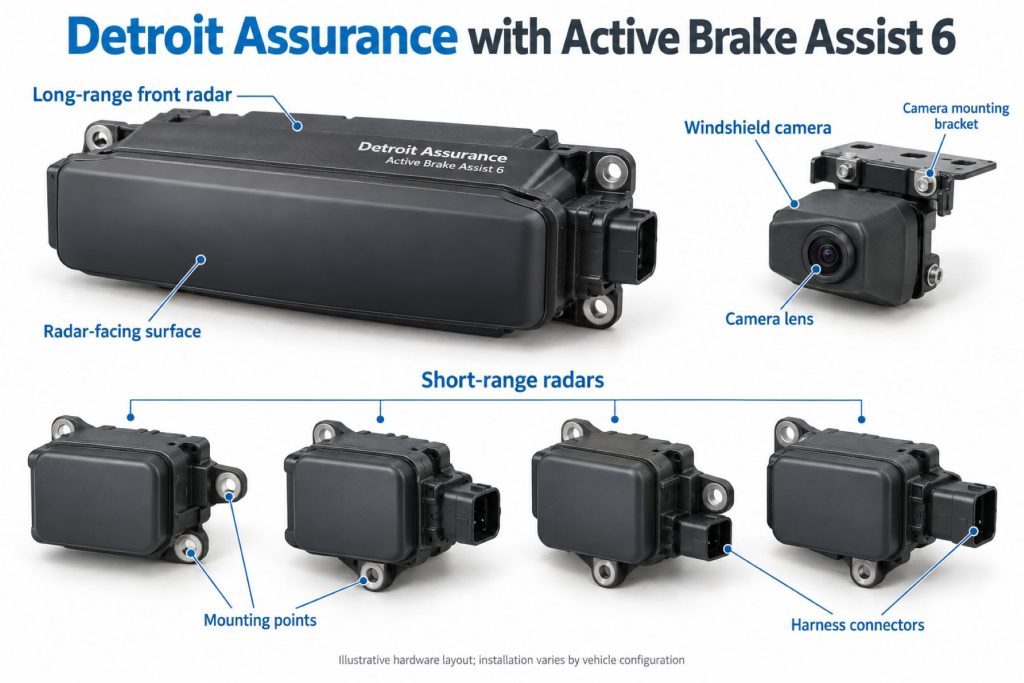
DTNA describes the suite’s sensing foundation as one long-range radar, four short-range radars, and a multipurpose camera. Identify their application-specific parts and connections through the vehicle records.
- Approved sensing equipment and mounts.
- Control electronics and software.
- Vehicle power and communication connections.
- Supported braking-system integration.
- Instrument-cluster warnings and driver controls.
- Additional hardware required by fitted options.
Product Type and Construction
Detroit Assurance should be reviewed as a vehicle-integrated system. A camera or radar unit alone does not establish the truck’s complete assistance capability.
Match replacement equipment to approved part numbers and procedures. Similar housings do not establish compatibility between system generations.
Sensor, Hardware, and Software Design
Record sensor identities, controller information, software versions, and fitted options before comparing equipment or planning repairs.
Use the service information for the exact generation and vehicle. Do not transfer software settings or replacement procedures from an ABA5 installation without manufacturer confirmation.
How the Safety System Works
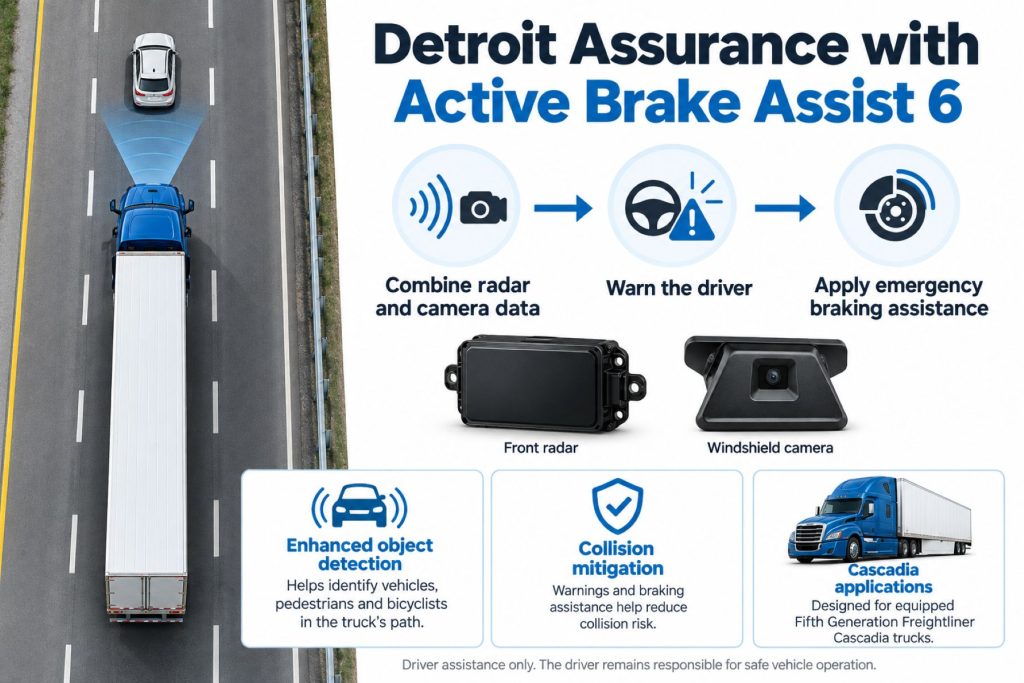
ABA6 can provide audible and visual warnings, partial braking, and full braking in supported circumstances. Detroit describes detection of moving and stationary vehicles, pedestrians, and bicyclists.
Drivers must assess the hazard and take appropriate action. Do not wait for a warning or automatic brake application when the road situation requires braking.
Position and Function Within the Vehicle
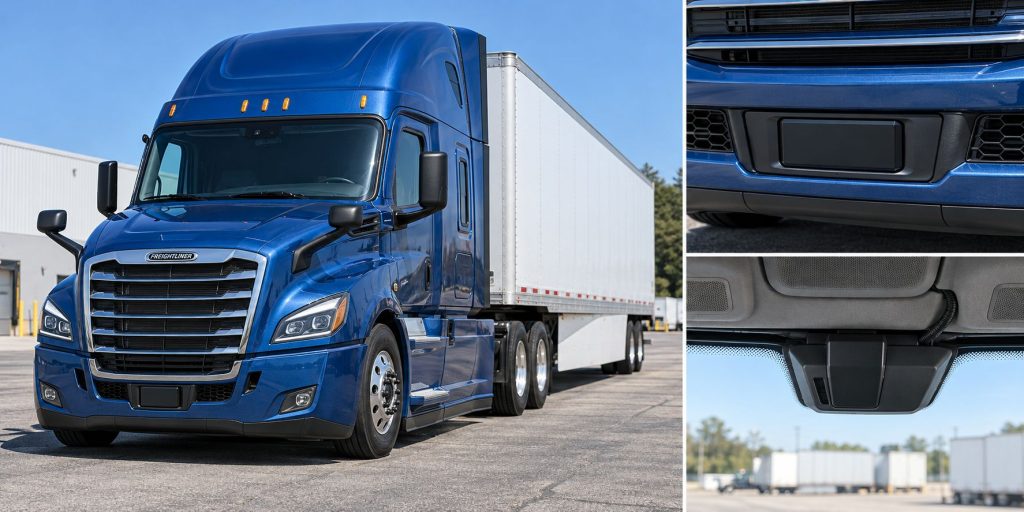
Identify sensing locations, driver-interface components, and vehicle connections using the approved layout. Check surrounding bodywork and accessories when reviewing an installation.
Keep forward braking, side warnings, low-speed front alerts, lane assistance, and recording functions distinct. Each should be described according to its own documented capability.
Common Specifications
A useful specification identifies the actual truck and fitted package. Obtain numerical limits from the applicable vehicle documentation.
- Vehicle identification number and production date.
- Cascadia generation and equipment codes.
- Installed ABA version.
- Radar and camera part numbers.
- Engine and transmission configuration.
- Fitted cruise, side, front, and lane functions.
- Driver-interface arrangement.
- Calibration and diagnostic requirements.
Detection Coverage and Operating Performance
Detroit lists expanded ABA6 scenarios involving visible vehicles in curves, adjacent lanes, and offset or angled vehicles. These capabilities do not establish detection in every road situation.
When comparing equipment, separate object recognition, warning availability, and possible braking response. Detecting an object does not guarantee that a collision can be avoided.
Object Recognition and Road Conditions
Review the operating manual for limitations involving visibility, road layout, weather, and sensor condition. Train drivers for the conditions encountered on the fleet’s actual routes.
Maintain appropriate speed and following distance for the road. A system indication should be interpreted alongside direct observation of traffic.
Operating Speeds and Activation Conditions
Confirm operating limits, activation conditions, and driver-input effects from the correct manual. Different functions within the suite may operate under different conditions.
Do not apply an adaptive cruise operating threshold to emergency braking, side assistance, or lane assistance.
Warning Functions and Alert Behavior
Learn the meaning of the actual truck’s warning symbols, messages, sounds, and braking feedback. Distinguish a hazard warning from an unavailable-system indication.
Drivers should respond to the traffic situation rather than expect every warning to follow an identical sequence.
Automatic Emergency Braking and Driver Responsibility
Emergency braking assistance does not remove the driver’s responsibility to brake in time. Vehicle loading, road grip, traffic movement, and the available stopping space must still be considered.
Use the vehicle manual to understand documented intervention and driver-control behavior. Do not test the system by deliberately approaching traffic or pedestrians.
Adaptive Cruise Control and Following-Distance Assistance
Adaptive cruise control manages a different task from collision-mitigation braking. Review its fitted controls, following-distance settings, and powertrain-dependent operating limits separately.
Drivers must continue judging appropriate speed and spacing. Cruise operation does not establish that the truck can handle every developing hazard.
Lane Departure Warning and Steering Assistance
Lane warnings and active steering assistance should be identified separately from ABA6. Do not infer lane centering or corrective steering from the braking-system name.
Confirm the fitted lane package and provide vehicle-specific familiarization for its controls, feedback, and limitations.
Side and Front Assistance Functions
Identify side-warning and front-alert equipment through the build specification. Warning-only functions and active braking functions should be listed individually.
Review turn-related assistance separately from forward emergency braking. Similar suite branding does not establish identical responses.
Camera and Event-Recording Functions
Confirm recording hardware, configuration, fleet access, and service arrangements independently. A sensing camera should not automatically be described as a video-coaching subscription.
Keep one equipment page for this safety suite and cross-link relevant telematics resources when the installed recording or connected services justify it.
Electrical Requirements, Wiring, and Connections
Use approved wiring diagrams to identify power, grounds, circuit protection, and communication connections. Verify replacement harness and connector compatibility.
Inspect routing around cab trim, body panels, and exposed mounting areas. Repairs should preserve the manufacturer-approved installation.
Vehicle Network and System Integration
Review controller compatibility, required inputs, and software information using the vehicle’s service documentation. Diagnose communication complaints as part of the complete installation.
Optional connected services require separate verification. A vehicle-network connection does not by itself establish remote access or fleet-video functionality.
Controls, Indicators, and Driver Feedback
- Identify hazard warnings and their meanings.
- Learn normal startup and status information.
- Understand fitted cruise controls.
- Review side, front, and lane indications separately.
- Recognize unavailable assistance and fault messages.
Driver Controls and System Availability
Follow the actual vehicle’s instructions for driver controls and conditions that affect assistance. Avoid transferring disable or override instructions from older generations.
A quiet system does not confirm clear traffic or correct operation. Continue observing the road and controlling the vehicle.
System Status, Fault Indicators, and Diagnostics
Record messages, fault codes, and the circumstances of a complaint before clearing information. Include recent windshield, body, electrical, or sensor work.
Use supported diagnostic tools and manufacturer procedures. Complete required verification after repair rather than treating a cleared message as proof of correct operation.
Materials, Environmental Protection, and Durability
Inspect sensor housings, mounts, protective surfaces, wiring, and connectors. Check component-specific cleaning and environmental requirements.
Review added accessories and repaired bodywork against the approved sensing layout. Avoid unsupported changes near sensors or camera viewing areas.
Duty Cycle and Operating Conditions
Consider traffic density, road layouts, weather exposure, and driver assignments when evaluating the fitted package. Match training to the fleet’s actual work.
Provide familiarization when drivers move between trucks with different generations or options.
Mounting and Installation
Use approved mounting locations, brackets, and service instructions. Confirm the vehicle specification before replacing or relocating equipment.
Do not describe ABA6 as a universal aftermarket camera or radar upgrade. Any proposed conversion requires manufacturer confirmation.
Calibration and Configuration
Determine setup and calibration requirements from the exact vehicle’s service information. Retain configuration and verification records.
After windshield replacement, sensor work, collision repairs, or relevant alignment changes, consult the required procedures before returning the vehicle to service.
Vehicle and System Compatibility
Confirm equipment through a Freightliner dealer using the vehicle identification number and build records. Model name alone is insufficient to identify the installed generation.
Do not assign ABA6 capability to an older Cascadia or another truck solely because it has Detroit Assurance branding.
Related Component Compatibility
Verify sensing equipment, mounts, controllers, software, wiring, and driver interfaces together. Additional steering or recording equipment requires its own compatibility review.
Common Applications
- Fifth Generation Cascadias with documented ABA6 equipment.
- Fleet inspections and maintenance planning.
- Used-truck equipment verification.
- New-truck specification and driver familiarization.
Advantages
- Provides integrated collision-mitigation assistance.
- Offers a defined equipment generation for specification and training.
- Allows the fitted safety functions to be reviewed through vehicle records.
Limitations or Considerations
- Capabilities depend on the actual truck’s specification.
- Assistance operates within documented limits.
- Braking assistance does not guarantee collision avoidance.
- Additional suite functions must be verified separately.
- Drivers remain responsible for safe operation.
Driver and Operator Experience
Explain the fitted warnings, controls, and assistance functions before assigning the truck. Use current, generation-specific training material.
Encourage reports that describe traffic, road conditions, system messages, and driver inputs. Specific observations support useful diagnosis.
Inspection and Wear Points
- Sensor housings and mounting security.
- Camera viewing area and windshield condition.
- Protective covers and surrounding bodywork.
- Harness routing and connector condition.
- Driver-interface operation.
- Recent repairs and calibration records.
Maintenance and Ownership Notes
Retain build information, component identities, software records, diagnostic reports, and completed calibration procedures.
For a used truck, review collision and windshield service history alongside safety-system records. Arrange qualified inspection when operation or configuration is uncertain.
Common Safety System Problems
Diagnostic review should consider installation condition, electrical supply, communication, configuration, and related vehicle faults. Follow the manufacturer troubleshooting sequence.
Do not conclude that a sensor has failed solely from one unexpected warning or missed intervention. Record persistent symptoms for qualified evaluation.
Safety and Service Precautions
Follow Detroit and Freightliner procedures for sensor, electrical, braking, and windshield-related work. Secure the vehicle and use qualified personnel.
Use approved verification procedures. Never deliberately approach vehicles, cyclists, or pedestrians to test automatic braking.
Identification Information
Collect the vehicle identification number, production date, installed equipment codes, sensor part numbers, and software information. Match these records to the applicable literature.
Buying Considerations
- Confirm ABA6 through the truck’s build records.
- Identify the fitted safety options.
- Review operating limits and driver controls.
- Inspect sensing equipment and repair history.
- Check diagnostic and calibration records.
- Confirm dealer service support.
- Provide training for the actual configuration.
Variants and Configurations
Distinguish ABA6 from earlier Active Brake Assist generations and identify the additional Assurance features fitted to the truck.
DTNA announced Cross Traffic Assist and Active Side Guard Assist 2 with left-turn protection for Cascadias built beginning in 2027, with production planned for January 2027. Do not assign these enhancements to every existing ABA6 truck.
Comparison to Similar Equipment
Compare collision-mitigation products by vehicle application, supported scenarios, warning and braking functions, fitted options, and service requirements. Similar feature names do not establish identical behavior.
- Bendix Wingman Fusion Collision Mitigation System
- Bendix Wingman Advanced Collision Mitigation System
- ZF WABCO OnGuardACTIVE Collision Mitigation System
Best Fit For
- Operators of documented ABA6-equipped Cascadias.
- Fleets specifying new trucks.
- Buyers verifying used-truck safety equipment.
- Maintenance and training teams reviewing installed functions.
Related Vehicle and Trailer Types
These links provide equipment background and do not establish ABA6 fitment.
Related Truck and Trailer Models
Confirm generation and equipment specification within the Cascadia model family.
Related Safety System Types
- Collision Warning and Automatic Emergency Braking Systems
- Lane Departure Warning and Lane Keeping Systems
- Blind-Spot and Vulnerable Road User Detection Systems
- Camera Monitor and Surround-View Systems
Related Safety System Products
- Bendix Wingman Fusion Collision Mitigation System
- ZF WABCO OnGuardACTIVE Collision Mitigation System
- ZF WABCO OnSideALERT Blind-Spot Detection System
- ZF WABCO OnLaneASSIST Lane Keeping Assistance System
Related Equipment Systems
Related Guides
- Safety System Guides
- How Commercial Truck Safety Systems Work
- Collision Warning and Automatic Emergency Braking Explained
- Adaptive Cruise Control for Commercial Trucks Explained
- Lane Departure Warning and Lane Keeping Assistance Explained
- How to Choose a Commercial Truck Safety System
Regulatory and Compliance Notes
Confirm applicable requirements and approved equipment arrangements for the individual truck. This overview does not establish compliance or authorize modifications to safety equipment.
Real World Operating Notes
Review assistance reports with traffic conditions, vehicle configuration, driver inputs, and system status in mind. Detailed observations help distinguish operating limitations from repair needs.
Keep fleet training aligned with each truck’s generation and installed options.
Frequently Asked Questions
Is ABA6 the entire Detroit Assurance suite?
No. Identify emergency braking and the truck’s additional assistance functions separately.
Does ABA6 mean the truck has automatic steering?
Do not infer steering assistance from the ABA6 name. Confirm the fitted lane-assistance package.
Can ABA5 operating instructions be used for ABA6?
Use the instructions for the actual truck and generation. Controls, functions, and service requirements must be verified.
Does every ABA6 truck have the same features?
Check production date, build specification, powertrain, and installed options.
Does automatic emergency braking guarantee a stop before impact?
No. Drivers must brake appropriately and operate within the vehicle’s documented limits.
Availability and Where to Find
Contact a Freightliner dealer for current specifications, vehicle equipment verification, parts, and service information. Supply the vehicle identification number when reviewing an existing truck.
- Detroit Assurance with ABA6 — Official Features
- Freightliner Cascadia Specifications
- DTNA — Announced 2027 Safety Enhancements
Support Trucking Families
Truck Equipment Atlas supports the mission of Grey Cross, a nonprofit dedicated to helping families of truck drivers who lose their lives while on the road. As the site grows, part of its mission is to bring awareness and support to these families.
Video Overview
Truck Equipment Atlas will continue expanding with video overviews and equipment breakdowns to help drivers and fleets better understand commercial truck safety systems.
Follow the Growth of Truck Equipment Atlas
Truck Equipment Atlas continues to expand with new truck profiles, trailer coverage, diesel engine pages, equipment system resources, manufacturer information, and educational guides.
Visit our Site Updates page to explore recent additions, project milestones, and upcoming resources as we continue building one of the industry’s growing commercial trucking equipment reference libraries.
View the Latest Site Updates: Truck Equipment Atlas Site Updates