
Quick Facts
- Manufacturer: Stoneridge.
- Product: MirrorEye Camera Monitor System (CMS).
- Equipment type: Digital camera and monitor visibility system.
- Primary purpose: Provide live views of supported areas around the commercial vehicle.
- Main equipment: External cameras, in-cab monitors, and supporting electronics.
- Applications: Supported factory-installed and retrofit configurations.
- Primary section: Safety Systems.
- Compatibility: Confirm vehicle, system generation, camera layout, and approved installation.
Overview
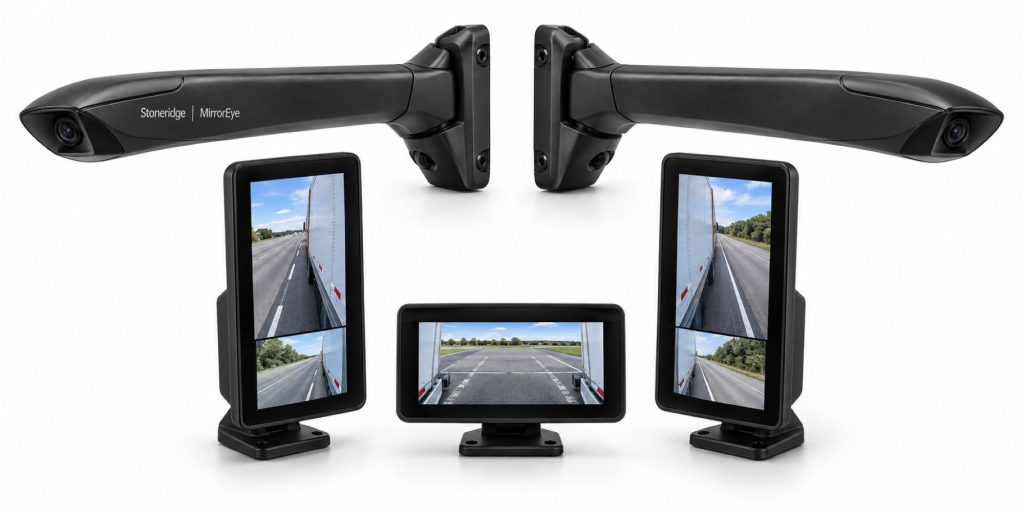
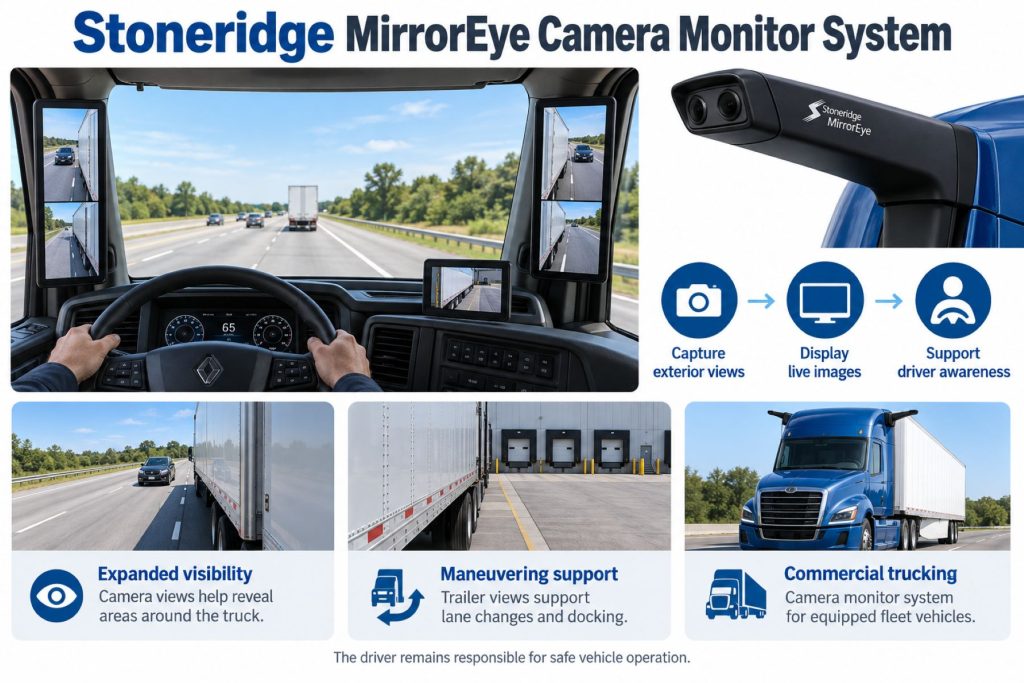
Stoneridge MirrorEye uses external digital cameras and interior monitors to provide real-time vehicle views. Its primary role is driver visibility, which should be distinguished from automated hazard warnings or vehicle control.
The driver must interpret the displayed scene, assess surrounding traffic, and control the vehicle. A camera view does not establish that every hazard is visible or that a maneuver is safe.
This page describes the product family. The exact factory or retrofit installation determines the camera arrangement, displayed views, controls, and service requirements.
Key Characteristics
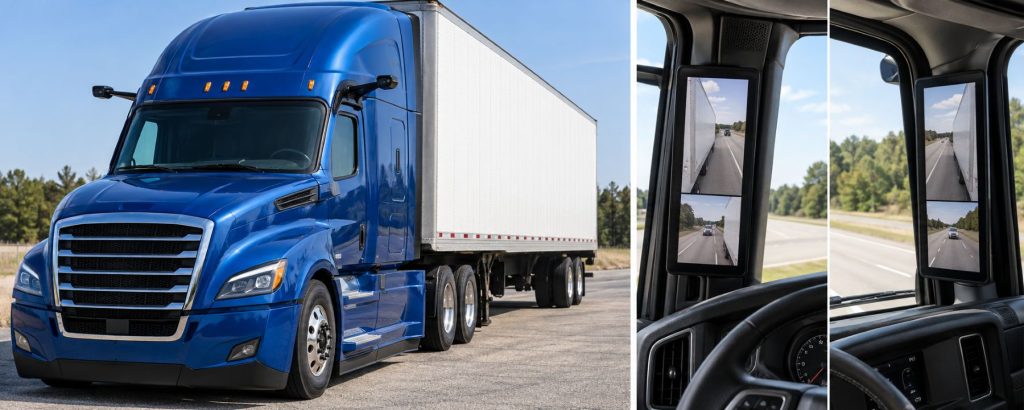
- Provides live visual information to the driver.
- Requires an approved camera and monitor arrangement.
- Has configuration-specific viewing and control functions.
- Requires familiarization with displayed perspective and distance judgment.
- Should be evaluated separately from braking and steering assistance.
Major Components
Identify the complete installation through the vehicle’s parts records and system documentation. Do not apply one retrofit equipment list to every factory installation.
- External camera assemblies and approved mounts.
- In-cab monitors and mounting hardware.
- Video-processing and control electronics.
- Power and video connections.
- Driver controls and supported vehicle inputs.
- Any optional recording or connected-service equipment.
Product Type and Construction
MirrorEye should be reviewed as an installed visibility system. Cameras, mounts, electronics, monitors, and vehicle integration work together to provide the intended views.
A generic camera or display should not be treated as an equivalent replacement. Match approved parts and service procedures to the installation.
Sensor, Hardware, and Software Design
Record camera, monitor, controller, and software identities before arranging repairs or comparing specifications.
Verify the correct configuration and service information. Similar branding does not establish identical hardware, screen layouts, or operating functions.
How the Camera Monitor System Works
External cameras supply images to the installed electronics and monitors. The driver uses the displayed views as part of observing traffic and vehicle position.
Learn the actual truck’s view arrangement and controls. Continue checking the surroundings directly where appropriate and follow the vehicle’s operating instructions.
Position and Function Within the Vehicle
Check camera assemblies and monitor positions against the approved installation layout. Review visibility around cab pillars, controls, and other fitted equipment.
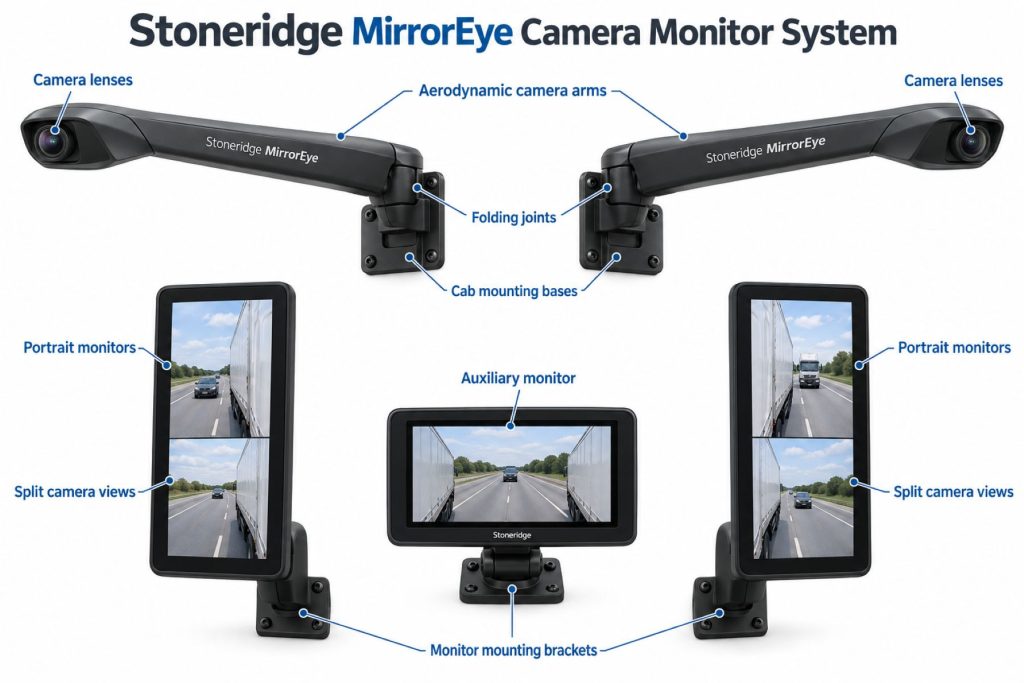
Confirm which areas each view covers. Do not infer an overhead surround view or dedicated rear-facing trailer camera from side-view equipment alone.
Common Specifications
Stoneridge describes a five-camera North American retrofit system. Confirm camera and monitor counts for the individual installation rather than applying that layout universally.
- Vehicle make, model, model year, and identification number.
- Factory or retrofit system identity.
- Camera count, positions, and approved viewing areas.
- Monitor count, placement, and screen layout.
- Available view controls and panning functions.
- Night and environmental features.
- Electrical and communication requirements.
- Setup and verification procedures.
Viewing Coverage and Operating Performance
Review the documented viewing areas and screen layouts. Distinguish improved visibility from a claim that all blind spots have been eliminated.
Practice interpreting vehicle position and distance using approved familiarization methods. Image perspective should be understood before operating in close quarters.
Trailer Panning and Maneuvering Views
Stoneridge lists automatic trailer panning for its North American retrofit system, adjusting views as the trailer angle changes. Confirm the controls and setup for the installed version.
Learn how the view changes during forward turns and backing. Do not assume panning creates visibility beyond the cameras’ actual viewing areas.
Night Vision and Low-Light Operation
Stoneridge lists infrared-assisted night visibility and focused rear-trailer illumination for supported configurations. Verify the installed lighting and operating modes.
Review the actual system’s low-light instructions and limitations. Enhanced visibility does not remove the need to assess road conditions and surrounding traffic.
Weather Protection and Camera Visibility
The North American product page lists coated lenses and heated camera wings. Check the installed equipment’s cleaning and inspection requirements.
Inspect the views before driving and report persistent obscuration or image problems. Do not assume environmental features will clear every contamination condition.
Display Functions and Driver Feedback
Identify the fitted view selections, brightness controls, reference markings, and status indications through the correct operating manual.
Adjust the interface using approved procedures while the vehicle is secured. Drivers should understand the normal display before beginning a trip.
Camera Views and Automated Safety Functions
A live camera view and an automated hazard warning are different functions. Confirm any warning overlays, object detection, braking, or steering integration separately.
Do not infer active vehicle control from the presence of digital mirror monitors.
Camera and Event-Recording Functions
Stoneridge documents optional recording and supported video retrieval. Confirm recorder hardware, storage, connectivity, and account access for the vehicle.
Live viewing does not automatically establish that footage is stored or available remotely. Document the recording arrangement separately.
Electrical Requirements, Wiring, and Connections
Use approved diagrams to identify power, grounds, circuit protection, video connections, and supported vehicle inputs.
Inspect cable routing around camera mounts, cab entry points, trim, and monitors. Match replacement harnesses and connectors to the application.
Vehicle Network and System Integration
Review required inputs and controller compatibility through installation and service records. Diagnose communication issues as part of the complete system.
Verify optional fleet-service connections independently. A connected monitor installation does not establish every available remote feature.
Controls, Indicators, and Driver Feedback
- Identify the normal camera views.
- Learn permitted view and brightness controls.
- Review panning and maneuvering behavior where fitted.
- Understand status and fault indications.
- Follow the vehicle-specific operating instructions.
Driver Controls and System Availability
Learn startup behavior and the documented response to a missing, degraded, or abnormal image. Verify the installed fault-handling procedure before operating.
Do not continue a maneuver when required visibility is uncertain. Follow the vehicle and fleet instructions for visibility-system faults.
System Status, Fault Indicators, and Diagnostics
Record the affected view, displayed messages, and circumstances of the problem. Include recent camera, cab, electrical, or body repairs.
Use supported diagnostic procedures and verify the repair through the applicable checks. Reappearance of an image alone does not establish that mounting and configuration are correct.
Materials, Environmental Protection, and Durability
Inspect camera housings, wings, mounting hardware, lenses, monitors, and connectors. Check component-specific environmental ratings and cleaning methods.
Review impact damage and accessory changes against the approved installation. Preserve the required camera views and mounting geometry.
Duty Cycle and Operating Conditions
Consider highway use, tight yards, docking, night operation, and driver assignments when evaluating the installed system.
Provide familiarization when drivers move between conventional mirrors and different camera-monitor configurations.
Mounting and Installation
Use the approved vehicle-specific camera and monitor mounts. Check cab visibility, control access, and the installation’s viewing requirements.
Do not reposition a camera or monitor solely for convenience. Have proposed changes reviewed through the appropriate installation guidance.
Calibration and Configuration
Determine camera alignment, view setup, and any panning-calibration requirements from the exact installation’s service information.
After component replacement, mounting changes, or relevant vehicle repairs, follow the required verification procedures. Retain the completed setup records.
Vehicle and System Compatibility
Confirm compatibility through Stoneridge, the vehicle manufacturer, or an authorized provider using vehicle identification and system details.
A supported truck model does not establish eligibility for every model year, cab, or equipment configuration.
Related Component Compatibility
Verify cameras, electronics, monitors, mounts, harnesses, and software together. Optional recorders and connected-service equipment require separate checks.
Do not assume factory and retrofit components are interchangeable because both use Stoneridge technology.
Common Applications
- Approved commercial truck factory installations.
- Eligible North American retrofit applications.
- Fleets maintaining existing camera-monitor equipment.
- Vehicle inspections and driver-visibility reviews.
Advantages
- Provides live visual information through an in-cab interface.
- Offers configuration-specific viewing functions.
- Provides a defined system for reviewing digital-mirror equipment.
- Has manufacturer resources for installation and driver familiarization.
Limitations or Considerations
- Viewing coverage must be confirmed for the installation.
- Drivers must learn the displayed perspective and controls.
- Required views depend on correctly functioning equipment.
- Recording and automated warnings require separate verification.
- Mirror removal requires applicable authorization and conditions.
Driver and Operator Experience
Provide training on normal views, distance judgment, panning, brightness, and fault handling before assigning the vehicle.
Use controlled familiarization activities and collect driver feedback about view interpretation and monitor positioning.
Inspection and Wear Points
- Camera lens and housing condition.
- Wing and mounting security.
- Monitor screens and mounting hardware.
- Harness routing and connector condition.
- Normal image presentation and controls.
- Recent impact, cab, or electrical repairs.
Maintenance and Ownership Notes
Retain installation, component, configuration, and service records. Include camera and monitor checks in the vehicle’s maintenance process.
For a used truck, review installation identity, prior damage, service support, and any recording-account arrangements.
Common Camera Monitor System Problems
Diagnostic review should consider image obstruction, mounting changes, power, cables, connectors, display condition, and configuration. Follow the documented troubleshooting process.
Record intermittent problems with the affected view and operating circumstances. Obtain qualified support when required visibility is unreliable.
Safety and Service Precautions
Follow Stoneridge and vehicle-manufacturer instructions for camera, monitor, mounting, and electrical work. Secure the vehicle and use qualified personnel.
Verify required visibility before driving. Follow the documented response to a degraded or unavailable view.
Identification Information
Collect vehicle identification, factory or retrofit system identity, camera and monitor part numbers, controller details, and software records. Match these to the applicable literature.
Buying Considerations
- Identify the exact MirrorEye configuration.
- Confirm vehicle eligibility and installation support.
- Review camera views and monitor positions.
- Verify fitted panning and environmental features.
- Inspect equipment and service records.
- Confirm recording services separately.
- Review applicable mirror-replacement requirements.
- Provide driver training.
Variants and Configurations
Stoneridge supplies both retrofit equipment and manufacturer-specific camera-monitor solutions. Factory systems may use vehicle-brand product names and different layouts.
Identify the installed version rather than combining features from several applications into one universal specification.
Comparison to Similar Equipment
Compare visibility products by displayed views, installation requirements, controls, environmental features, fault handling, and support. Automated blind-spot warnings should be evaluated separately from live camera displays.
- Camera Monitor and Surround-View Systems
- Mobileye Shield+ Blind-Spot Detection System
- ZF WABCO OnSideALERT Blind-Spot Detection System
Best Fit For
- Operators maintaining approved MirrorEye installations.
- Fleets evaluating digital-mirror equipment.
- Buyers reviewing supported factory or retrofit configurations.
- Training and maintenance teams assessing driver visibility.
Related Vehicle and Trailer Types
These links provide equipment background. They do not establish MirrorEye compatibility.
Related Truck and Trailer Models
Explore these profiles for general truck information. Verify model year, factory options, and retrofit eligibility independently.
Related Safety System Types
- Camera Monitor and Surround-View Systems
- Blind-Spot and Vulnerable Road User Detection Systems
- Collision Warning and Automatic Emergency Braking Systems
Related Safety System Products
- Mobileye Shield+ Blind-Spot Detection System
- ZF WABCO OnSideALERT Blind-Spot Detection System
- Bendix BlindSpotter Radar System
- ZF WABCO TailGUARD Reversing Safety System
Related Equipment Systems
Related Guides
- Safety System Guides
- How Commercial Truck Safety Systems Work
- Blind-Spot Detection and Camera Monitor Systems Explained
- How to Choose a Commercial Truck Safety System
Regulatory and Compliance Notes
Confirm current requirements and the applicable mirror-replacement authorization before removing conventional mirrors. Review installation eligibility, operating conditions, and documentation with the manufacturer or an authorized provider.
The presence of a camera-monitor system alone does not establish permission to remove mirrors or compliance for every vehicle and jurisdiction.
Real World Operating Notes
Review driver reports with the selected view, vehicle position, lighting, weather, and equipment status in mind. Specific observations help identify training and service needs.
Keep familiarization aligned with the actual system version and monitor arrangement.
Frequently Asked Questions
Is MirrorEye a blind-spot warning system?
Its primary function is camera-based visibility. Confirm any automated warning features separately.
Does every MirrorEye installation use five cameras?
Do not assume one layout applies to every factory and retrofit configuration. Check the installed system.
Does it automatically brake or steer?
Do not infer vehicle control from a camera-monitor installation. Verify other assistance equipment independently.
Does live viewing mean video is recorded?
No. Confirm recorder equipment, storage, and retrieval services separately.
Can conventional mirrors be removed immediately after installation?
Confirm applicable authorization, installation eligibility, and operating conditions before removing mirrors.
Availability and Where to Find
Contact Stoneridge, the vehicle manufacturer, or an authorized provider for current equipment, installation, parts, and service information. Supply vehicle and system identification.
- Stoneridge MirrorEye Official Overview
- MirrorEye North American Retrofit Information
- Stoneridge Commercial Truck Applications
- MirrorEye Support and Installation Resources
Support Trucking Families
Truck Equipment Atlas supports the mission of Grey Cross, a nonprofit dedicated to helping families of truck drivers who lose their lives while on the road. As the site grows, part of its mission is to bring awareness and support to these families.
Video Overview
Truck Equipment Atlas will continue expanding with video overviews and equipment breakdowns to help drivers and fleets better understand commercial truck safety systems.
Follow the Growth of Truck Equipment Atlas
Truck Equipment Atlas continues to expand with new truck profiles, trailer coverage, diesel engine pages, equipment system resources, manufacturer information, and educational guides.
Visit our Site Updates page to explore recent additions, project milestones, and upcoming resources as we continue building one of the industry’s growing commercial trucking equipment reference libraries.
View the Latest Site Updates: Truck Equipment Atlas Site Updates