
Quick Facts
- Manufacturer: Bendix Commercial Vehicle Systems.
- Product family: Bendix BlindSpotter.
- Equipment type: Radar-based side-object detection and driver warning system.
- Primary components: Side-mounted radar equipment and an in-cab warning interface.
- Primary purpose: Additional awareness of detected objects beside the vehicle.
- Vehicle integration: Configuration-dependent; updated versions support J1939 CAN connectivity.
- Compatibility: Confirm the vehicle, sensor generation, mounting arrangement, and installation requirements.
Overview
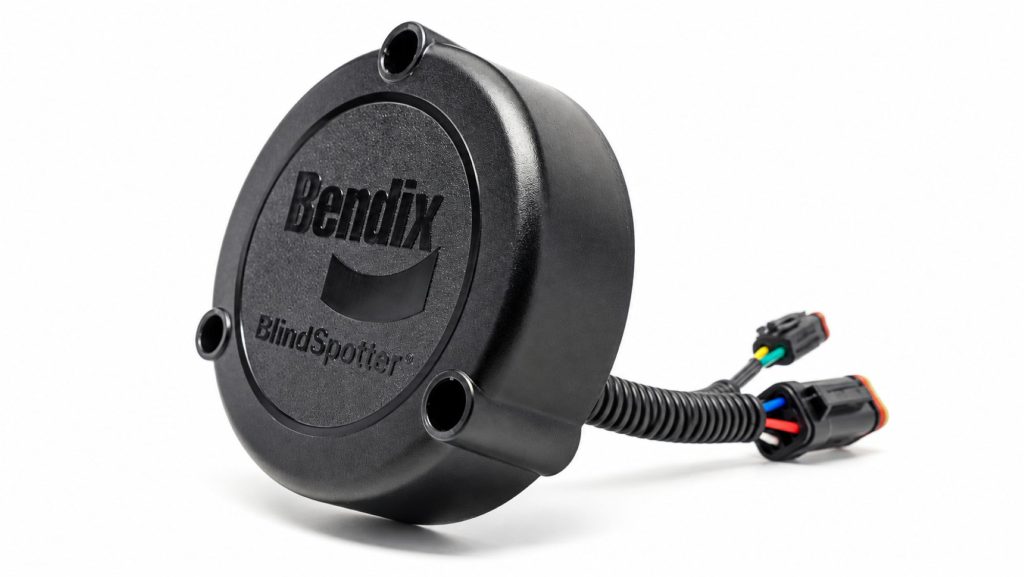
Bendix BlindSpotter is a side-mounted radar warning system designed to support commercial drivers when monitoring vehicle blind spots. It provides additional information about detected objects in its monitored area and is used alongside mirrors and safe driving practices.
BlindSpotter equipment has evolved over time. Earlier installations and updated CAN-connected systems can have different coverage and warning behavior. Identify the actual equipment before applying specifications or operating instructions.
For fleets and equipment buyers, the main questions are which areas are monitored, how warnings reach the driver, and whether the installation suits the truck’s body and operating environment.
Key Characteristics
- Uses radar to monitor a defined area beside the vehicle.
- Provides driver warnings rather than a live camera image.
- Supports additional awareness during lane changes and other maneuvers.
- Updated CAN-connected equipment can change detection behavior according to operating mode.
- Requires correct mounting and generation-specific documentation.
Major Components
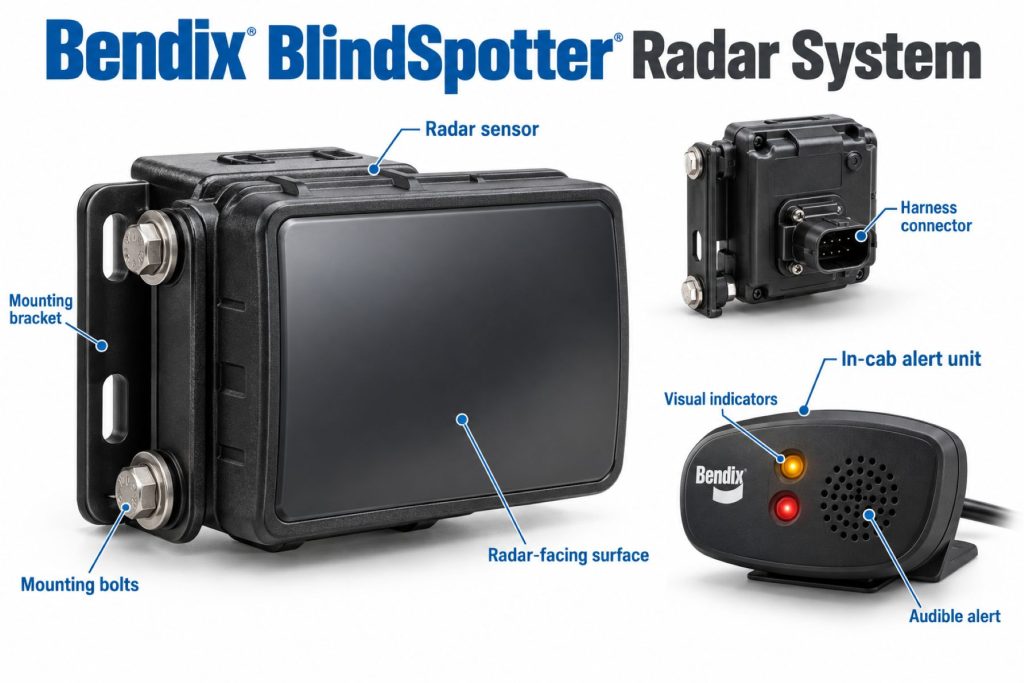
- Side radar sensor or sensors specified for the installation.
- In-cab warning interface.
- Approved mounting brackets and protective components.
- Power and signal wiring.
- Vehicle communication connections where required.
Product Type and Construction
BlindSpotter is an electronic side-detection system with externally mounted sensing equipment and a driver interface inside the cab. It is separate from a conventional mirror, camera monitor, or exterior reversing alarm.
Replacement parts should match the approved installation. Confirm sensor, interface, bracket, and harness compatibility rather than selecting equipment by appearance alone.
Sensor, Hardware, and Software Design
BlindSpotter uses radar reflections to detect supported objects. Its response depends on the sensor generation, configuration, mounting position, and available vehicle inputs.
Do not assume that older and updated units share the same detection pattern. Record part numbers and applicable documentation before comparing or replacing equipment.
How the Safety System Works
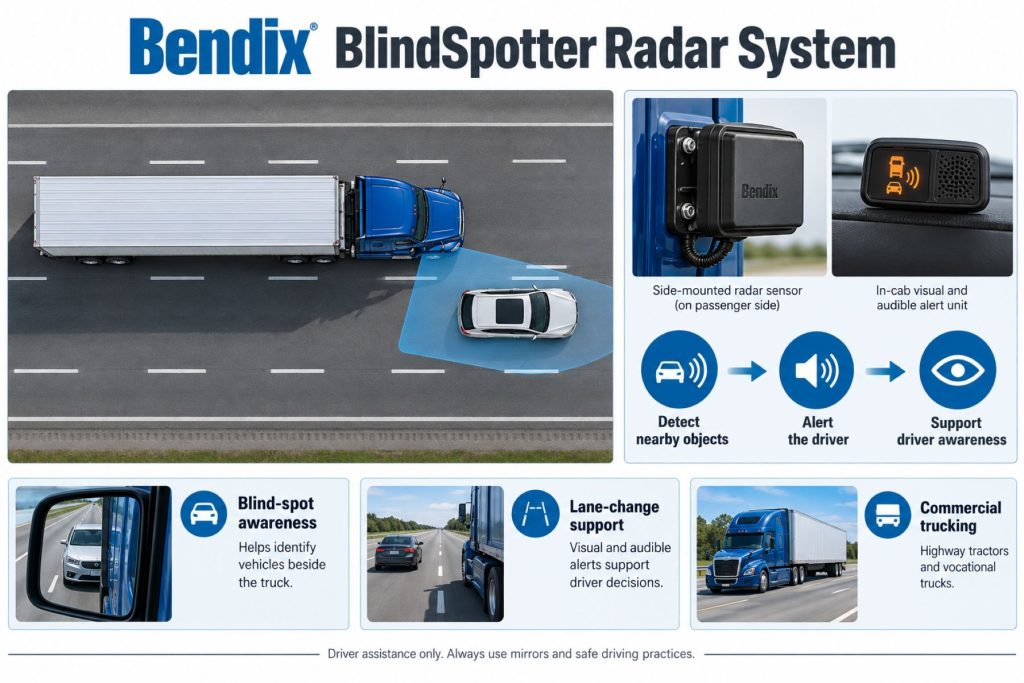
The side radar monitors its defined sensing area. When the system detects a qualifying object, the driver interface provides the supported indication or warning.
Warning behavior can depend on vehicle inputs and operating mode. Drivers should learn the sequence used by their installation instead of assuming that every detection produces the same sound or indicator.
Position and Function Within the Vehicle
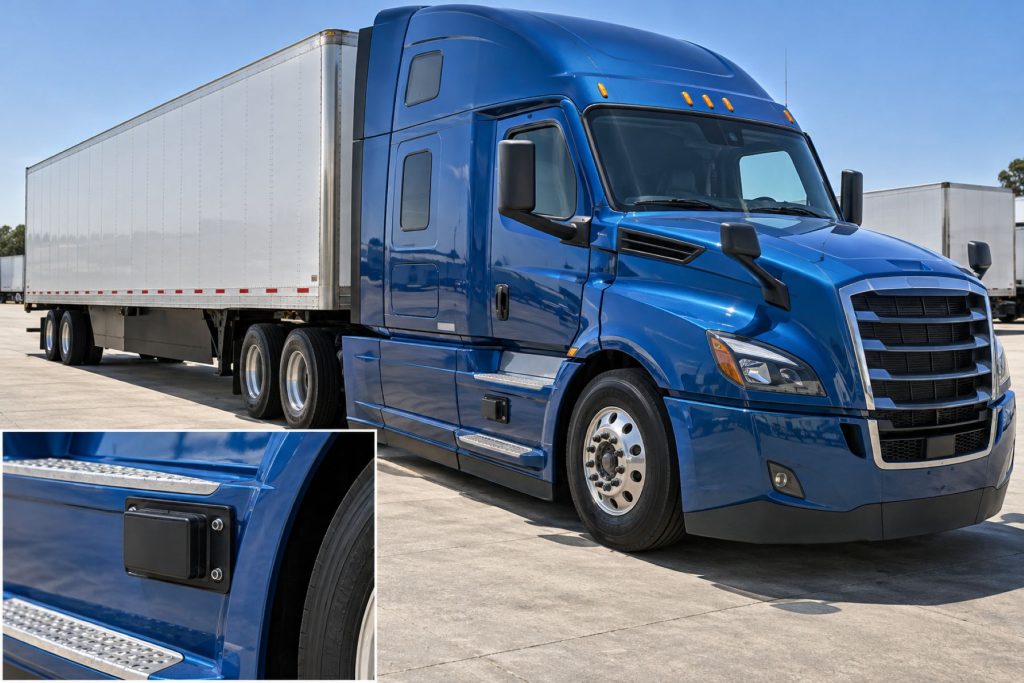
The radar is positioned along the vehicle side to monitor an adjacent area. The warning interface is placed where the driver can use it while checking the relevant mirror and surroundings.
Coverage should be reviewed against the complete truck and any connected trailer. A cab-mounted sensor should not be assumed to monitor every point along a trailer or the area directly behind it.
Common Specifications
Use specifications for the identified generation and installation. One advertised coverage figure or mounting dimension should not be applied to the entire BlindSpotter family.
- Sensor model and part number.
- Number of sensors and monitored vehicle sides.
- Detection-zone dimensions and field of view.
- Operating modes and required vehicle inputs.
- Driver interface and warning behavior.
- Electrical ratings and communication requirements.
- Mounting, orientation, and clearance requirements.
Detection Coverage and Operating Performance
Coverage is determined by the installed equipment and its approved mounting arrangement. Confirm the monitored area before evaluating whether it meets the fleet’s needs.
A sensor can provide useful additional information without eliminating every blind spot. Objects outside the zone, blocked views, or targets the equipment cannot reliably detect still require driver attention.
Supported Targets and Detection Zones
Earlier Bendix service documentation describes detection of substantial radar-reflective metallic objects. It should not be interpreted as pedestrian recognition or identification of every cyclist beside the vehicle.
Confirm target capabilities for the exact sensor. A general blind-spot label does not establish dedicated vulnerable road user detection.
Operating Speeds and Activation Conditions
Bendix describes highway and lower-speed behavior for updated CAN-connected BlindSpotter equipment. Highway operation can filter stationary roadside objects, while lower-speed operation can use a narrower alert area and different filtering.
Check the applicable manual for the installation’s thresholds and input requirements. Do not apply this behavior automatically to an earlier sensor or a system without the required connections.
Warning Functions and Alert Behavior
BlindSpotter installations can provide visual indications and audible warnings associated with detection and turn-signal use. Confirm the exact sequence for the installed equipment.
Drivers should treat a warning as additional information requiring assessment of the surroundings. The absence of a warning does not establish that a lane change or turn is safe.
Warning Functions and Vehicle Intervention
BlindSpotter is a side-object warning system. It should not be described as automatically steering away from an adjacent vehicle or applying the brakes to avoid a side collision.
A truck may carry other assistance equipment, but those functions must be identified separately. The driver remains responsible for the maneuver.
Electrical Requirements, Wiring, and Connections
Use the wiring instructions for the sensor generation and vehicle application. Verify approved power, grounding, protection, and signal connections before installation or repair.
Inspect external harness routing around steps, fairings, and moving equipment. Avoid unapproved splices or accessory connections that could affect warning inputs or communication.
Vehicle Network and System Integration
Updated BlindSpotter equipment supports J1939 CAN connectivity and integration with compatible Wingman Fusion installations. Confirm the actual supported arrangement before describing combined functions.
Network connectivity alone does not establish fleet-data transmission, video recording, or access to a connected service. Verify those capabilities separately when required.
Controls, Indicators, and Driver Feedback
- Identify the warning unit associated with each monitored side.
- Learn normal startup and status indications.
- Understand the visual object-detection indication.
- Learn when audible warnings are issued.
- Recognize fault indications and unavailable operation.
System Status, Fault Indicators, and Diagnostics
Identify fault indications from the documentation matching the warning unit. Record the displayed condition and available diagnostic information before replacing components.
A dark or quiet interface should not automatically be interpreted as a clear detection area. Check normal status, power, and system availability through the approved process.
Materials, Environmental Protection, and Durability
Inspect sensor housings, brackets, connector protection, and exposed wiring. Environmental ratings should be taken from the exact component specification.
Before adding covers, coatings, or nearby accessories, confirm whether they are permitted in the radar’s sensing area.
Duty Cycle and Operating Conditions
Evaluate the system against highway lane changes, regional traffic, yard maneuvering, and other relevant operating situations. Each task can involve different nearby objects and vehicle positions.
Review warning reports in context. Nearby infrastructure may be within a monitored zone, particularly when the installed operating mode does not filter it.
Mounting and Installation
Follow the approved sensor height, orientation, and clearance requirements. Review possible interference from steps, tanks, toolboxes, fairings, and body equipment before choosing the mounting location.
Place the driver interface according to the installation instructions. Verify that the warning corresponds to the monitored side and that required inputs operate correctly.
Calibration and Configuration
Determine the setup and verification requirements for the identified generation. Do not assume BlindSpotter uses the same alignment procedure as a forward collision radar.
After sensor, bracket, wiring, or nearby body repairs, verify the installation through the applicable procedure. Retain records of component identity and completed checks.
Vehicle and System Compatibility
Bendix describes BlindSpotter applications for new and in-service commercial vehicles, including retrofit installations. Suitability still depends on the specific vehicle and approved equipment arrangement.
Confirm compatibility with Bendix or an authorized provider before ordering. Include the vehicle identification number, body configuration, and existing assistance equipment in the review.
Related Component Compatibility
Check the sensor, warning unit, harness, and mounting hardware as a complete installation. Similar footprints do not establish universal interchangeability between generations.
Confirm separately whether any intended connection to another assistance system is supported.
Common Applications
- Highway tractors with approved side-detection installations.
- Regional trucks operating in adjacent-lane traffic.
- Compatible rigid trucks and vocational applications.
- Existing vehicles being evaluated for an approved retrofit.
Advantages
- Provides additional awareness of detected side objects.
- Complements mirror checks and direct observation.
- Communicates detections through an in-cab warning interface.
- Offers configuration-dependent integration opportunities.
- Can be considered for approved new-vehicle or retrofit applications.
Limitations or Considerations
- Coverage and behavior differ between generations.
- Does not eliminate every vehicle blind spot.
- Should not be assumed to recognize all pedestrians or cyclists.
- Does not provide automatic side-collision braking or steering.
- Trailer coverage must be evaluated separately.
- No warning does not mean the maneuvering area is clear.
Driver and Operator Experience
Provide familiarization on the actual installation, including monitored sides, indicator meanings, audible warnings, and operating-mode differences.
Drivers should continue checking mirrors and surroundings before a maneuver. The system provides additional information rather than permission to change lanes or turn.
Inspection and Wear Points
- Sensor obstruction and visible housing damage.
- Loose or bent mounting hardware.
- Harness abrasion and connector condition.
- Warning-unit condition and system-status indications.
- Changes to nearby fairings, steps, tanks, or accessories.
- Evidence of collision damage or unapproved installation changes.
Maintenance and Ownership Notes
Include sensor condition and warning-system operation in preventive maintenance. Use approved cleaning methods and investigate faults before returning the equipment to normal service.
For used vehicles, review installation history and component identity. Confirm that repairs or body modifications have not changed the approved sensing arrangement.
Common Safety System Problems
Areas to investigate include damaged sensors, changed orientation, obstructed sensing areas, power or signal faults, and mismatched replacement equipment.
When evaluating an unexpected alert, record the nearby objects, vehicle speed, turn-signal status, and system indication. Check the documented operating behavior before deciding whether the response indicates a fault.
Safety and Service Precautions
Follow Bendix and vehicle-manufacturer instructions for installation, diagnosis, and repair. Secure the vehicle before working around side-mounted components.
Use an approved verification procedure. Do not demonstrate detection by placing people beside a moving truck or deliberately creating an unsafe lane-change situation.
Identification Information
Collect the vehicle identification number, sensor labels, warning-unit identity, installation records, and relevant diagnostic information. Match these to the correct service documentation before ordering parts.
Buying Considerations
- Identify the sensor generation and supported operating modes.
- Confirm the monitored sides and coverage needed.
- Review the vehicle body and possible mounting obstructions.
- Verify electrical and communication compatibility.
- Confirm installation and service support.
- Compare target capabilities with the fleet’s actual detection needs.
Variants and Configurations
- Earlier-generation BlindSpotter installations.
- Updated CAN-connected equipment.
- Application-specific sensor and warning-unit arrangements.
- Approved factory and retrofit installations.
- Supported connections with compatible assistance equipment.
Comparison to Similar Equipment
Compare side-detection products by supported targets, coverage, operating modes, warning behavior, and installation requirements. Camera visibility and automatic pedestrian recognition are different functions from radar side-object warnings.
- ZF WABCO OnSideALERT Blind-Spot Detection System
- Mobileye Shield+ Blind-Spot Detection System
- Brigade Backeye 360 AI Camera System
Best Fit For
- Compatible fleets seeking additional side-object awareness.
- Operators maintaining existing BlindSpotter installations.
- Buyers evaluating approved side-radar retrofit options.
- Applications where documented coverage matches the required monitoring area.
Related Vehicle and Trailer Types
- Day Cab Trucks
- Sleeper Trucks
- Vocational Trucks
- Dry Van Trailers
- Refrigerated and Reefer Trailers
- Flatbed Trailers
Related Truck and Trailer Models
Related Safety System Types
- Blind-Spot and Vulnerable Road User Detection Systems
- Camera Monitor and Surround-View Systems
- Lane Departure Warning and Lane Keeping Systems
- Collision Warning and Automatic Emergency Braking Systems
Related Safety System Products
- Bendix Wingman Fusion Collision Mitigation System
- Bendix Wingman Advanced Collision Mitigation System
- ZF WABCO OnSideALERT Blind-Spot Detection System
- Mobileye Shield+ Blind-Spot Detection System
- Stoneridge MirrorEye Camera Monitor System
- Brigade Backeye 360 AI Camera System
Related Equipment Systems
- Safety Systems
- Electrical Systems
- Drivelines and Steering Systems
- Telematics and ELD Systems
- Brake Systems
Related Guides
- Safety System Guides
- How Commercial Truck Safety Systems Work
- Blind-Spot Detection and Camera Monitor Systems Explained
- How to Choose a Commercial Truck Safety System
- Lane Departure Warning and Lane Keeping Assistance Explained
Regulatory and Compliance Notes
This overview does not establish compliance with a particular blind-spot or vulnerable road user requirement. Confirm the equipment’s documented capabilities and applicable installation requirements for the vehicle and operating location.
Real World Operating Notes
Understand the actual monitored zone before relying on the warning interface as an additional driving aid. Trailer articulation, nearby objects, and vehicle configuration should be considered during familiarization.
Keep driver reports specific so maintenance personnel can compare the observed behavior with the correct operating instructions.
Frequently Asked Questions
Does BlindSpotter automatically brake or steer?
BlindSpotter provides side-object warnings. Do not treat it as automatic side-collision braking or steering equipment.
Does every generation have the same coverage?
No. Identify the sensor generation and use its installation and operating documentation.
Is BlindSpotter a pedestrian detection system?
Do not assume dedicated pedestrian recognition. Confirm supported targets for the exact equipment.
Can it be installed on an existing truck?
Bendix describes retrofit options, but suitability and the approved installation must be confirmed for the vehicle.
Does no warning mean the adjacent lane is clear?
No. Continue mirror checks and appropriate observation before maneuvering.
Availability and Where to Find
Contact Bendix, the vehicle dealer, or an authorized installation provider for current equipment, service parts, and retrofit information. Provide the vehicle and component identities.
Support Trucking Families
Truck Equipment Atlas supports the mission of Grey Cross, a nonprofit dedicated to helping families of truck drivers who lose their lives while on the road. As the site grows, part of its mission is to bring awareness and support to these families.
Video Overview
Truck Equipment Atlas will continue expanding with video overviews and equipment breakdowns to help drivers and fleets better understand commercial truck safety systems.
Follow the Growth of Truck Equipment Atlas
Truck Equipment Atlas continues to expand with new truck profiles, trailer coverage, diesel engine pages, equipment system resources, manufacturer information, and educational guides.
Visit our Site Updates page to explore recent additions, project milestones, and upcoming resources as we continue building one of the industry’s growing commercial trucking equipment reference libraries.
View the Latest Site Updates: Truck Equipment Atlas Site Updates