
Quick Facts
- Manufacturer: Brigade Electronics.
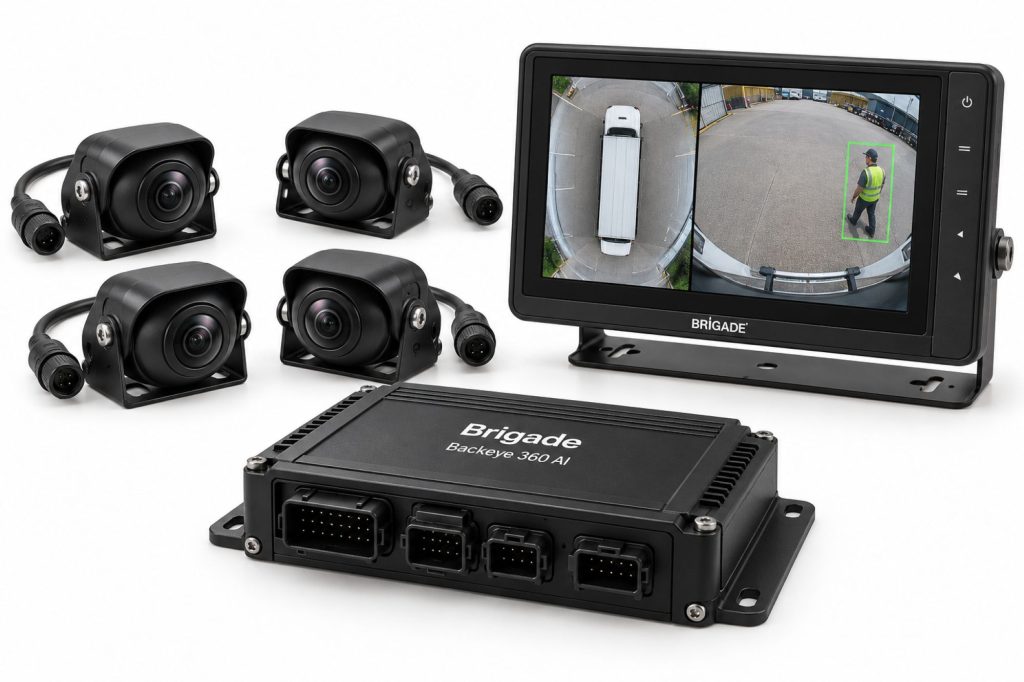
- Product: Backeye 360 AI with Human Form Recognition (HFR).
- Equipment type: Surround-view camera system with AI-based person detection.
- Camera arrangement: Four ultra-wide-angle HD cameras.
- Primary display: Processed bird’s-eye surround view.
- Warning function: On-screen person highlighting with visual and audible alerts in monitored zones.
- Primary section: Safety Systems.
- Compatibility: Confirm model, camera layout, monitor, detection settings, and installation requirements.
Overview
Brigade Backeye 360 AI combines surround-view visibility with human form recognition. It is intended to support awareness of people around the vehicle during maneuvering and low-speed operation.
The driver remains responsible for observing the surroundings, checking clearance, and controlling the vehicle. A displayed image or warning does not establish that every person or obstacle has been detected.
This page describes the equipment family. The installed model, camera positions, calibration, software, and warning settings determine the actual vehicle configuration.
Key Characteristics
- Combines live visual information with supported person warnings.
- Requires approved camera installation and calibration.
- Must be identified separately from standard Backeye 360.
- Requires familiarization with displayed views and warning meanings.
- Should be evaluated separately from active vehicle-control equipment.
Major Components
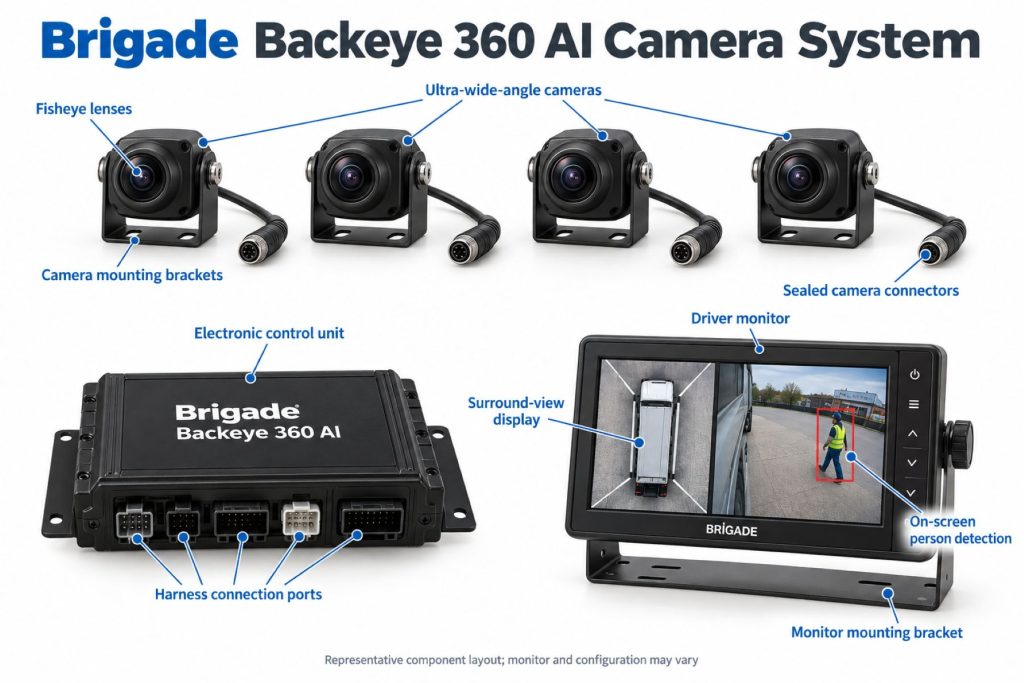
- Approved AI camera assemblies and mounting hardware.
- Electronic control unit.
- Compatible in-cab monitor and warning interface.
- Camera, power, video, and interface harnesses.
- Supported vehicle-signal connections.
- Calibration data and configuration.
- Any separately specified recording equipment.
Check the supplied parts list before purchase. Do not assume a monitor, recorder, or every required cable is included because it appears in a product illustration.
Product Type and Construction
Review Backeye 360 AI as a complete installed electronic system. Cameras, electronics, monitor, warning outputs, and configuration should be assessed together.
A generic camera or standard surround-view component should not be treated as an equivalent replacement. Match approved parts to the model and application.
Sensor, Hardware, and Software Design
Record camera identities, control-unit information, firmware, and configuration before comparing specifications or planning service.
Use software and support files intended for the exact model. Similar branding does not establish component or firmware interchangeability.
How the Camera System Works
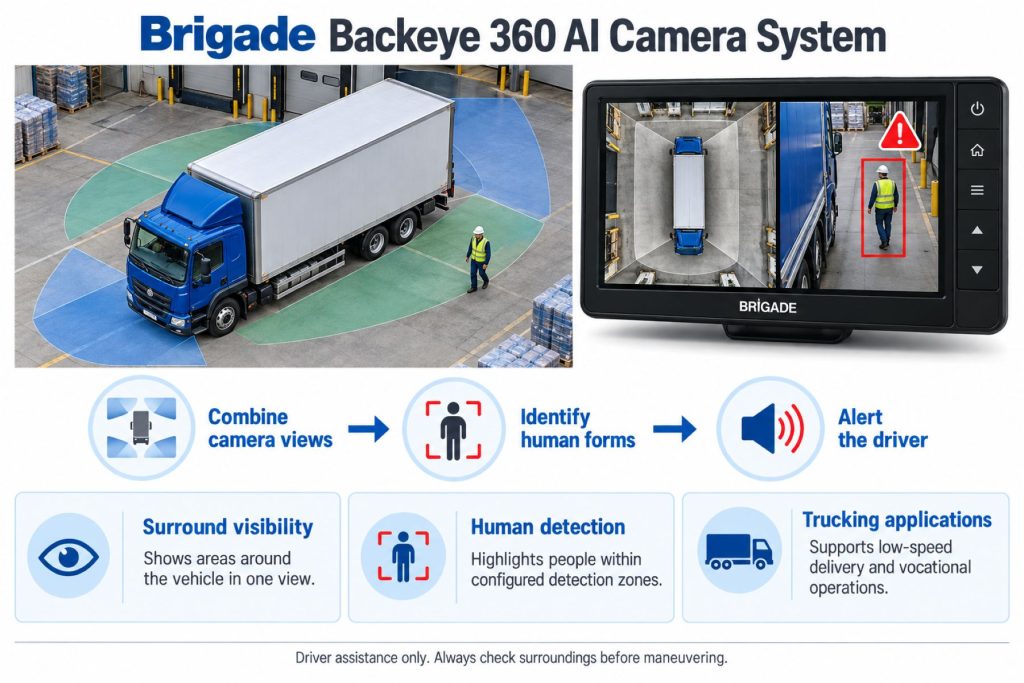
Camera images are combined into a surround view while supported image analysis checks monitored areas for people. The driver uses the resulting views and warnings to assess the surroundings.
The overhead appearance is generated from vehicle-mounted cameras, not a camera above the truck. Learn how the installed views represent nearby objects and vehicle position.
Position and Function Within the Vehicle
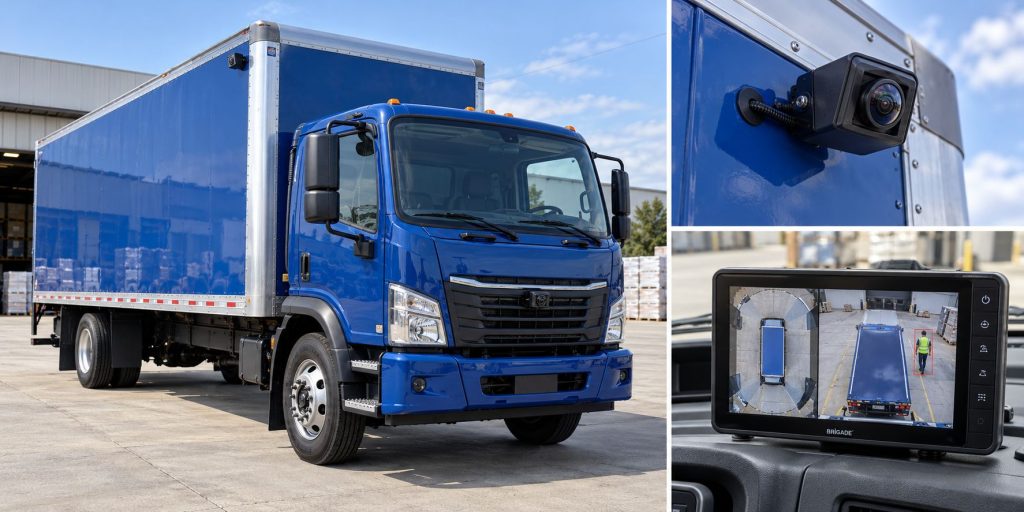
Verify camera and monitor locations through the approved installation layout. Review doors, loading equipment, body panels, and accessories for interference.
For articulated combinations, obtain a layout suited to the tractor and trailer arrangement. Cameras fitted to a tractor should not automatically be described as monitoring an entire attached trailer.
Common Specifications
Brigade lists the VBV-360-1000-AI with 12–24 VDC supply, 1080p AHD 2.0 output, 15 view modes, and two video outputs. Confirm the applicable values for the purchased equipment.
- Vehicle identification and body dimensions.
- Exact system model and part number.
- Camera identities and positions.
- Monitor and video-format compatibility.
- Documented viewing and warning areas.
- Enabled display modes and trigger settings.
- Firmware and calibration records.
- Electrical and environmental requirements.
Detection Coverage and Operating Performance
Check viewing coverage and warning coverage separately. A visible area on the monitor should not automatically be treated as an active detection zone.
Review the installed configuration’s documented limits. Avoid describing coverage as universal detection of every person or obstacle around the truck.
Human Form Recognition and Pedestrian Awareness
The AI function is described in terms of human form recognition. Confirm supported detection conditions through the applicable operating instructions.
Do not assume that person recognition provides automated warnings for every vehicle, pole, wall, or other object. Drivers must continue interpreting the camera views and surroundings.
Image Stitching and Perspective
Calibration aligns camera images for the vehicle’s geometry. Treat the displayed surround view as an assistance tool rather than a precise measurement of all nearby clearances.
Use individual views and direct observation where an object or distance is difficult to judge. Follow the manual’s guidance on image interpretation.
Operating Speeds and Activation Conditions
Confirm display activation, warning availability, trigger inputs, and any speed-related settings for the installation.
A powered monitor does not establish that every detection function is available. Learn the actual system’s operating states before use.
Warning Functions and Alert Behavior
Learn the fitted warning symbols, highlighting, sounds, and status indications. Confirm their meanings using the correct operating instructions.
Respond to the surroundings rather than waiting for an alert. Silence does not establish that the maneuvering area is clear.
AI Warnings and Active Vehicle Control
Person detection and driver warnings are different from automatic braking or corrective steering. Verify any active-control integration independently.
The driver remains responsible for stopping the vehicle and choosing a safe path when a hazard is present.
Camera Visibility and Environmental Conditions
Consult the manual for limitations involving lighting, weather, obstructions, and camera condition. Maintain clear viewing areas using approved cleaning methods.
Report persistent image or warning problems with details about the affected area, conditions, and maneuver.
Camera and Event-Recording Functions
Brigade lists recording compatibility with its MDR equipment. Verify recorder model, connections, storage, and supported footage arrangements separately.
Live views and person alerts do not establish stored video or remote fleet access. Document any connected service independently.
Electrical Requirements, Wiring, and Connections
Use approved diagrams for power, grounds, protection, camera inputs, video outputs, and warning connections. Verify monitor compatibility before installation.
Inspect harness routing around doors, body panels, loading equipment, and exposed areas. Match cable and connector requirements to the model.
Vehicle Signals and System Integration
Identify required inputs and configured responses through the installation records. Check view switching and warning behavior against the vehicle’s actual operation.
Additional radar, recorder, or connected-service equipment requires separate compatibility confirmation.
Controls, Indicators, and Driver Feedback
- Identify normal startup and status information.
- Learn individual and combined camera views.
- Understand person-warning indications.
- Review permitted view and interface controls.
- Recognize missing images and unavailable functions.
Driver Controls and System Availability
Follow approved instructions for controls and permitted settings. Make adjustments while the vehicle is secured.
Do not continue a maneuver when visibility or system behavior is uncertain. Follow vehicle and fleet procedures for unavailable assistance.
System Status, Fault Indicators, and Diagnostics
Record the affected camera, view, warning area, and displayed information before changing settings or replacing components.
Use model-specific diagnostic procedures. Verify image presentation, configuration, and supported warnings after completing repairs.
Materials, Environmental Protection, and Durability
Check component-specific ratings and installation protection for cameras, electronics, monitor, and connectors.
Inspect housings, lenses, mounts, and wiring. Review accessory changes and repairs against the approved camera layout.
Duty Cycle and Operating Conditions
Consider delivery stops, busy yards, loading areas, and interactions with pedestrians when evaluating the installation.
Match training to the actual vehicle layout and work environment. Explain differences between equipped vehicles and those with standard camera views only.
Mounting and Installation
Use approved camera positions, orientations, brackets, and wiring arrangements. Review the vehicle’s geometry and nearby equipment before installation.
Do not relocate cameras solely for convenience. Changes require review against the viewing and detection requirements.
Calibration and Configuration
Follow the model-specific calibration and configuration procedure. Retain the approved settings and completed verification records.
After camera replacement, movement, or relevant body changes, determine which recalibration and detection checks are required before returning the equipment to use.
Vehicle and System Compatibility
Confirm suitability through Brigade or an authorized provider using vehicle identification, body dimensions, camera locations, and intended use.
Broad commercial-vehicle applicability does not replace an installation check, especially for articulated or interchangeable-body arrangements.
Related Component Compatibility
Verify cameras, control unit, monitor, cables, firmware, and configuration together. Confirm optional recording equipment separately.
Do not assume a standard Backeye 360 component can replace an AI-system component without approval.
Common Applications
- Eligible commercial rigid trucks.
- Supported delivery and municipal vehicles.
- Fleets evaluating pedestrian awareness during maneuvering.
- Operators maintaining approved Backeye 360 AI installations.
Advantages
- Combines surround views with supported person warnings.
- Provides an in-cab interface for reviewing nearby activity.
- Offers a defined system for installation and training review.
Limitations or Considerations
- Viewing and detection areas must be verified separately.
- Camera condition and installation geometry matter.
- AI detection does not guarantee recognition of every person.
- Warnings do not establish automatic braking or steering.
- Drivers remain responsible for clearance and vehicle control.
Driver and Operator Experience
Explain views, perspective, monitored areas, warning meanings, and limitations before assigning the vehicle. Use controlled familiarization methods.
Encourage specific reports about the person or object, maneuver, conditions, and system response. These details support useful training and service review.
Inspection and Wear Points
- Camera lenses and housings.
- Mounting security and orientation.
- Obstructions from bodywork or accessories.
- Harness routing and connector condition.
- Monitor and warning-interface operation.
- Calibration, configuration, and repair records.
Maintenance and Ownership Notes
Retain component identification, firmware details, calibration records, and service reports. Include camera and warning-interface checks in routine maintenance.
For a used vehicle, review body modifications and prior camera work alongside current system condition.
Common Camera System Problems
Diagnostic review should consider camera view, mounting changes, power, wiring, display compatibility, calibration, and warning configuration.
Do not diagnose correct or failed detection from one event alone. Record persistent symptoms and obtain qualified evaluation.
Safety and Service Precautions
Follow Brigade and vehicle-manufacturer instructions for installation, electrical work, camera service, and verification. Secure the vehicle and use qualified personnel.
Never use a person as a test obstacle near a moving truck. Use approved verification procedures in controlled conditions.
Identification Information
Collect vehicle identification, system model, camera and monitor part numbers, firmware information, and configuration records. Match these to the appropriate support literature.
Buying Considerations
- Confirm the equipment is the AI configuration.
- Verify vehicle suitability and installation support.
- Review viewing and warning coverage.
- Confirm monitor, cables, and supplied kit contents.
- Inspect calibration and configuration records.
- Verify recording services separately.
- Provide driver familiarization.
Variants and Configurations
Brigade lists VBV-360-1000-AI, part number 7524, and a no-cables package, VBV-360-1000-AI-NC, part number 8123. Confirm current kit contents before ordering.
Keep model-specific specifications and firmware attached to the correct equipment. Do not combine standard Backeye 360 and AI features into a universal parts list.
Comparison to Similar Equipment
Compare systems by viewing arrangement, supported detection, warning presentation, installation requirements, calibration, and service support.
- Brigade Backeye 360 Camera System
- Mobileye Shield+ Blind-Spot Detection System
- Stoneridge MirrorEye Camera Monitor System
Best Fit For
- Operators maintaining approved Backeye 360 AI installations.
- Fleets evaluating surround views with person warnings.
- Eligible vehicles maneuvering around busy loading and delivery areas.
- Training and maintenance teams reviewing installed safety equipment.
Related Vehicle and Trailer Types
These resources provide equipment background and do not establish system compatibility.
Related Truck and Trailer Models
Explore these profiles for general context. Verify installation suitability independently for the completed vehicle and body.
Related Safety System Types
- Camera Monitor and Surround-View Systems
- Blind-Spot and Vulnerable Road User Detection Systems
- Collision Warning and Automatic Emergency Braking Systems
Related Safety System Products
- Brigade Backeye 360 Camera System
- Mobileye Shield+ Blind-Spot Detection System
- Stoneridge MirrorEye Camera Monitor System
- ZF WABCO TailGUARD Reversing Safety System
- ZF WABCO OnSideALERT Blind-Spot Detection System
Related Equipment Systems
Related Guides
- Safety System Guides
- How Commercial Truck Safety Systems Work
- Blind-Spot Detection and Camera Monitor Systems Explained
- How to Choose a Commercial Truck Safety System
Regulatory and Compliance Notes
Confirm applicable requirements and approved installation arrangements for the individual vehicle. AI warnings and surround views do not by themselves establish compliance or permission to remove required mirrors.
Real World Operating Notes
Review warning reports with person position, maneuver, camera condition, configuration, and environmental circumstances in mind.
Maintain direct clearance checks and safe maneuvering procedures, including when no alert is present.
Frequently Asked Questions
How is Backeye 360 AI different from standard Backeye 360?
The AI configuration adds supported person detection and warnings to the surround-view function. Confirm the exact installed equipment.
Does it detect every obstacle?
Do not assume universal object detection. Review the documented human-recognition function and use direct clearance checks.
Does it automatically brake?
Do not infer braking intervention from the camera system. Verify any active-control equipment separately.
Does no warning mean the area is clear?
No. Drivers must observe the surroundings and assess the maneuver.
Is video recording included automatically?
Confirm recorder equipment, connections, storage, and footage access separately.
Availability and Where to Find
Contact Brigade Electronics or an authorized provider for current equipment, vehicle suitability, installation, parts, and service information.
- Brigade Backeye 360 AI Official Product Information
- Brigade Software and Firmware Resources
- Standard Backeye 360 Product Information
Support Trucking Families
Truck Equipment Atlas supports the mission of Grey Cross, a nonprofit dedicated to helping families of truck drivers who lose their lives while on the road. As the site grows, part of its mission is to bring awareness and support to these families.
Video Overview
Truck Equipment Atlas will continue expanding with video overviews and equipment breakdowns to help drivers and fleets better understand commercial truck safety systems.
Follow the Growth of Truck Equipment Atlas
Truck Equipment Atlas continues to expand with new truck profiles, trailer coverage, diesel engine pages, equipment system resources, manufacturer information, and educational guides.
Visit our Site Updates page to explore recent additions, project milestones, and upcoming resources as we continue building one of the industry’s growing commercial trucking equipment reference libraries.
View the Latest Site Updates: Truck Equipment Atlas Site Updates