
Quick Facts
- Manufacturer: ZF Commercial Vehicle Solutions, WABCO product family.
- Product: TailGUARD.
- Equipment type: Reversing collision avoidance system.
- Sensing technology: Ultrasonic obstacle detection.
- Primary purpose: Assist the driver when reversing toward detected obstacles.
- Vehicle assistance: Warnings and automatic braking in supported installations.
- Primary section: Safety Systems.
- Compatibility: Verify sensors, controller, braking equipment, and vehicle configuration.
Overview
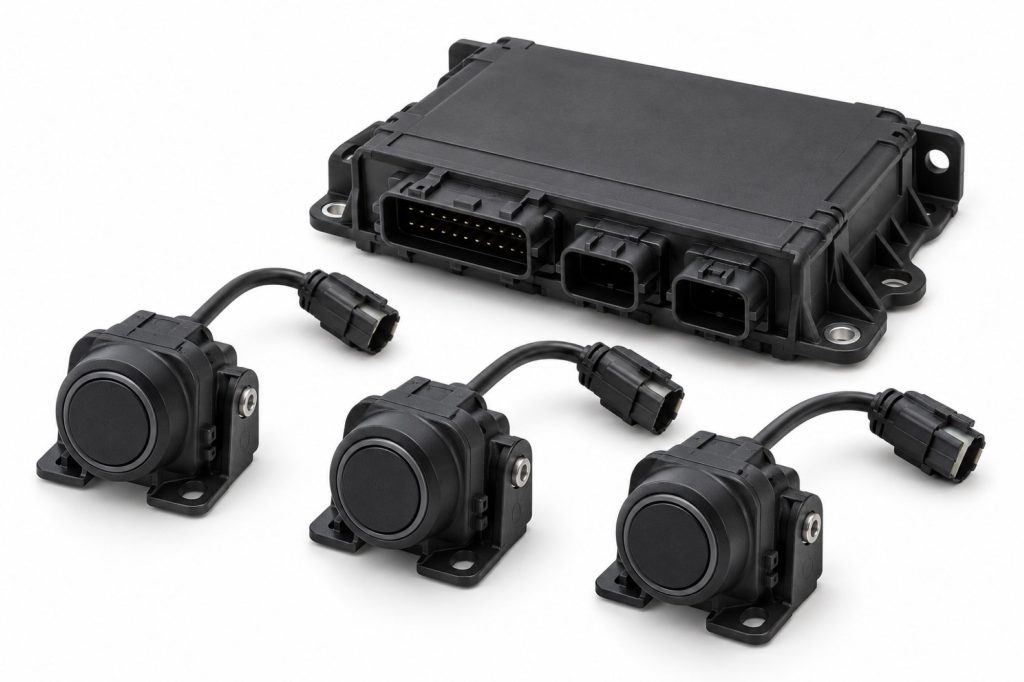
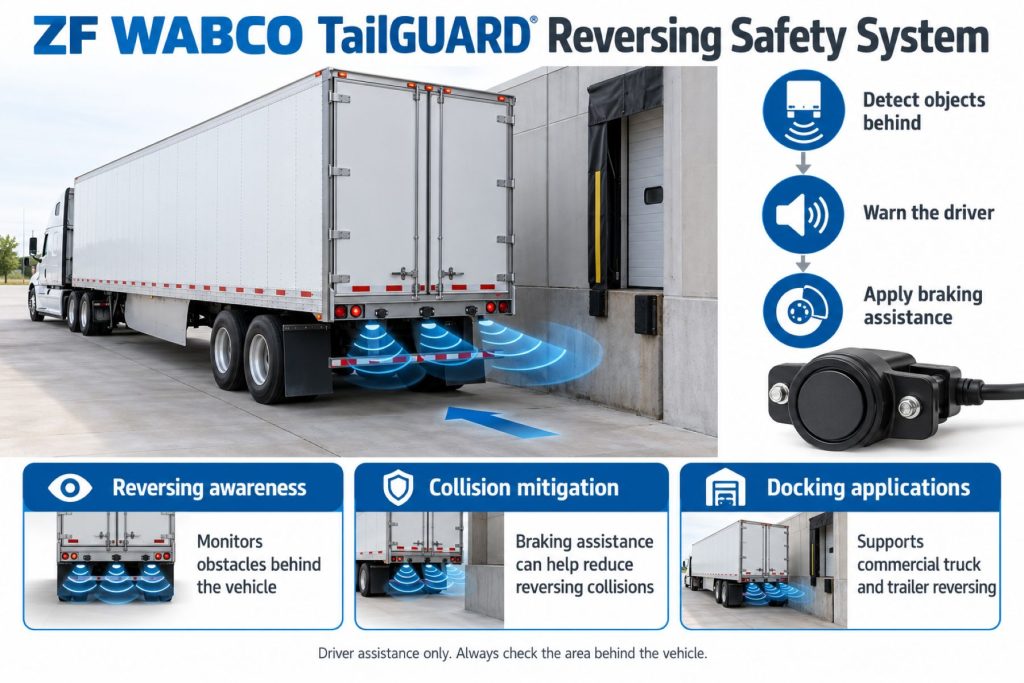
ZF WABCO TailGUARD detects stationary and moving objects in the monitored rear area. In a compatible installation, its warning and braking functions help the driver manage reversing maneuvers.
The driver remains responsible for checking the backing path, controlling the vehicle, and stopping when conditions are uncertain. Assistance does not establish that every obstacle will be detected.
This page covers the product family. Use the documentation for the exact installation to determine operating limits, warning behavior, braking settings, and service requirements.

Key Characteristics
- Provides assistance during reversing.
- Combines obstacle sensing with supported vehicle functions.
- Requires application-specific installation and setup.
- Should be reviewed as a complete system rather than individual sensors.
Major Components
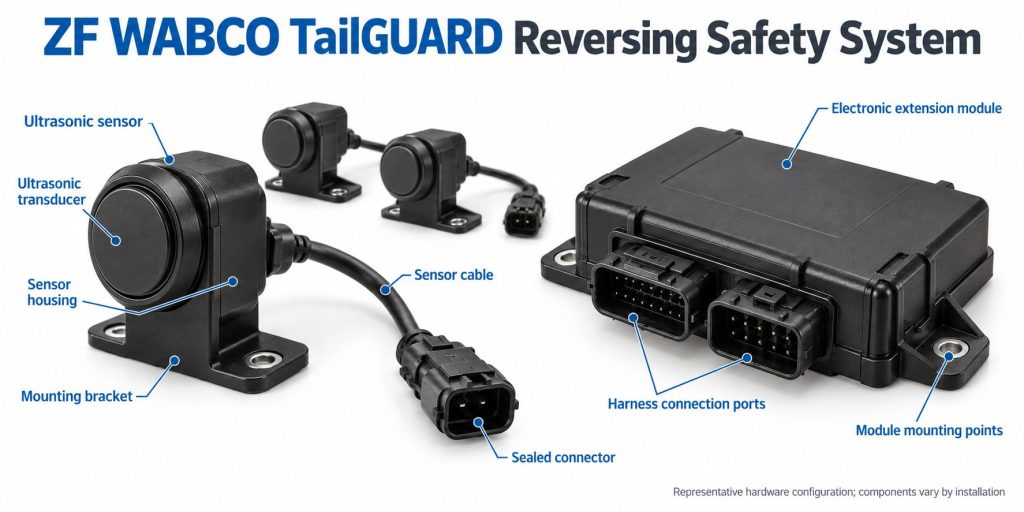
- Ultrasonic sensors and approved mounting hardware.
- Applicable control electronics.
- Power, signal, and communication wiring.
- Compatible braking-system interface.
- Fitted warning outputs and driver interface.
- Application-specific configuration.
Confirm the parts list for the vehicle before ordering replacements. Controller arrangements and warning equipment should not be assumed identical across installations.
Product Type and Construction
TailGUARD is an integrated reversing-assistance system. Evaluate sensor placement, electronics, warning outputs, and braking compatibility together.
Generic parking sensors should not be treated as equivalent replacement components. Match approved part numbers and service requirements.
Sensor, Hardware, and Software Design
Identify sensor numbers, mounting positions, controller identity, and available software records. These details help establish which installation and diagnostic documents apply.
Do not copy setup values from another trailer solely because it uses TailGUARD. Vehicle geometry and the approved equipment arrangement must be considered.
How the Safety System Works
Ultrasonic sensing supplies obstacle-distance information. The installed control and braking arrangement uses that information to provide the supported reversing assistance.
Drivers should learn the actual vehicle’s response before use. Continue checking the backing path and use the service brake as needed rather than deliberately waiting for an automatic intervention.
Position and Function Within the Vehicle
Review rear-mounted sensing equipment against the approved installation drawing. Check the relationship between sensors, rear bodywork, loading equipment, and other accessories.
Reversing assistance should be evaluated separately from forward collision protection, side-object warnings, and camera visibility.
Common Specifications
ZF’s general product information lists two to six sensors and programmable trailer stopping distances of 50–200 cm. These are product-family figures; confirm the values for the actual installation.
- Vehicle or trailer identification number.
- Exact TailGUARD configuration.
- Sensor count, identities, heights, and positions.
- Documented monitoring area.
- Warning and braking settings.
- Controller and braking-system compatibility.
- Electrical and communication requirements.
- Commissioning and verification procedures.
Detection Coverage and Operating Performance
Confirm the documented monitoring area and object-detection limitations. Sensor height and layout should be reviewed before making claims about ground-level or overhead coverage.
A detected distance is not a complete assessment of the backing path. Check clearance around the vehicle, including areas beyond the system’s documented coverage.
Obstacle Detection and Site Conditions
Review the applicable manual for limitations involving object position, shape, surface, and environmental conditions. Assess the installation against the loading areas and yards the vehicle uses.
Include mirrors, any fitted camera, and safe backing procedures in driver familiarization. Arrange a spotter when required by site procedures or visibility conditions.
Operating Speeds and Activation Conditions
Confirm reverse activation, speed-related behavior, and availability indications using the correct manual. Do not transfer instructions between different controller generations or regional applications.
Use the vehicle’s documented reversing procedure. Assistance should not be used to justify faster backing or reduced observation.
Warning Functions and Alert Behavior
Identify the warning outputs fitted to the vehicle and learn their meanings. Confirm whether an output indicates activation, obstacle proximity, excessive speed, or a fault.
The TP19007 installation manual describes distance-dependent marker-light flashing and an optional constant-frequency activation buzzer. Do not assume every audible signal changes with obstacle distance.
Automatic Braking and Final Docking
Review the documented braking response and any procedure for completing the final approach to a loading dock. Drivers must understand the installed system before attempting close positioning.
Do not treat an automatic stop as a parking brake or assume the vehicle will remain secured. Follow the vehicle’s braking and parking procedures.
Camera and Event-Recording Functions
Verify cameras, recording equipment, and fleet services separately. Obstacle-distance assistance does not automatically provide a rear video image or stored footage.
If a camera or telematics system is also installed, identify its product, interface, and service requirements independently.
Electrical Requirements, Wiring, and Connections
Use the approved wiring diagrams for power, grounds, sensor connections, warning outputs, and communication. Match replacement cables to the installation.
Inspect routing near rear doors, liftgates, hinges, and exposed chassis areas. Repair wiring using manufacturer-approved methods.
Vehicle Network and Braking-System Integration
The TP19007 manual describes a Trailer RSSplus-based application. ZF also lists an iEBS Premium arrangement with integrated TailGUARD control. Identify which architecture is installed before selecting parts or procedures.
Confirm braking compatibility through the vehicle manufacturer or an authorized provider. The presence of ABS equipment alone does not establish compatibility with a proposed reversing system.
Controls, Indicators, and Driver Feedback
- Learn the actual startup and activation indications.
- Identify fitted lights, buzzers, or displays.
- Understand warning meanings and braking feedback.
- Review any documented driver controls.
- Learn how faults or unavailable assistance are reported.
Driver Controls and System Availability
Use vehicle-specific instructions for any temporary deactivation, docking, or quiet-operation functions. Confirm how normal assistance is restored.
A quiet warning interface does not establish that the rear area is clear. Drivers should continue observing the maneuver directly.
System Status, Fault Indicators, and Diagnostics
Record symptoms, indicators, and diagnostic information before clearing faults. Include the circumstances of the reversing maneuver and any recent repairs.
Use the diagnostic equipment specified for the installed controller. Complete the approved verification procedure after repair.
Materials, Environmental Protection, and Durability
Check component-specific environmental ratings and cleaning instructions. Inspect sensor faces, housings, connectors, and mounting hardware.
Review repairs, paint, and added rear equipment against the installation requirements. Avoid unsupported changes to the sensing arrangement.
Duty Cycle and Operating Conditions
Consider backing frequency, loading-dock layouts, yard traffic, and rear equipment when evaluating the installation. Match the documented coverage to the vehicle’s work.
Provide familiarization for drivers using different trailer configurations. Sensor layouts and warning behavior should be explained for each installation.
Mounting and Installation
Use approved sensor heights, spacing, orientations, and mounting hardware. Review rear structures and accessories against the installation drawing.
Do not relocate sensors solely for convenience. Have the installation reviewed after rear-body modifications or damage.
Calibration and Configuration
Determine commissioning, parameter-setting, and verification requirements from the applicable manual. Retain the completed setup records.
After sensor replacement or mounting changes, follow the specified checks before returning the vehicle to service. Do not assume configuration is unchanged simply because the replacement looks similar.
Vehicle and System Compatibility
Confirm compatibility through ZF, the vehicle or trailer manufacturer, or an authorized provider. Supply vehicle identification and braking-controller details.
Do not assume that a kit fits every trailer sharing the same body type. Electrical, braking, and mounting arrangements require confirmation.
Related Component Compatibility
Verify sensors, electronics, harnesses, warning outputs, and braking equipment as a complete installation. Check optional displays and communications separately.
Common Applications
- Approved trailers requiring reversing assistance.
- Compatible commercial vehicles working around loading areas.
- Fleets maintaining existing TailGUARD installations.
- Eligible vehicles being evaluated for a supported retrofit.
Advantages
- Adds obstacle-proximity assistance during backing.
- Provides a defined system for reviewing reversing protection.
- Offers published manufacturer installation information.
Limitations or Considerations
- Coverage must be confirmed for the actual sensor layout.
- Braking assistance requires a compatible installation.
- Warning behavior and settings vary by application.
- No warning does not establish a clear backing path.
- Drivers remain responsible for observation and control.
Driver and Operator Experience
Explain the warning interface, supported braking response, and final-docking procedure before assigning the vehicle. Familiarization should use approved methods in a controlled setting.
Encourage reports that identify the obstacle, maneuver, warning behavior, and installation condition. Specific observations support effective service evaluation.
Inspection and Wear Points
- Sensor faces and housings.
- Mounting security and orientation.
- Harness abrasion and connector condition.
- Rear-body damage or added equipment.
- Warning-interface condition.
- Related braking-system service records.
Maintenance and Ownership Notes
Include the installation in preventive maintenance records. Retain parts identification, setup information, diagnostic reports, and verification results.
For a used trailer, review rear-impact repairs and controller history. Obtain qualified inspection when installation condition or operation is uncertain.
Common Safety System Problems
A diagnostic review should consider sensor condition, mounting changes, electrical connections, configuration, warning outputs, and compatible braking equipment. Follow the documented troubleshooting sequence before replacing parts.
Record persistent symptoms and arrange qualified evaluation. Do not infer correct operation solely from one successful warning or stop.
Safety and Service Precautions
Follow manufacturer procedures for electrical work, sensor replacement, and braking-system service. Secure the vehicle and use qualified personnel.
Never use a person as a test obstacle or deliberately approach an occupied area to provoke braking. Follow approved verification procedures.
Identification Information
Collect vehicle identification, sensor part numbers, controller identity, braking-system details, and configuration records. Match these to the appropriate technical literature.
Buying Considerations
- Identify the exact TailGUARD configuration.
- Confirm vehicle and braking compatibility.
- Review coverage, warnings, and operating limits.
- Inspect sensors, mounting hardware, and wiring.
- Check setup and repair records.
- Confirm current parts and service support.
- Provide driver familiarization for the installation.
Variants and Configurations
The TP19007 manual includes TailGUARD, TailGUARDRoof, and TailGUARDMAX arrangements. Confirm the installed version before describing monitoring coverage or selecting service information.
Keep configuration-specific specifications attached to the appropriate equipment. Do not combine features from several versions into a universal product description.
Comparison to Similar Equipment
Compare reversing products by detection coverage, warning presentation, braking capability, installation requirements, and service support. Camera displays, warning-only sensors, and automatic braking provide different functions.
- Camera Monitor and Surround-View Systems
- Blind-Spot and Vulnerable Road User Detection Systems
- ZF WABCO OnSideALERT Blind-Spot Detection System
Best Fit For
- Operators maintaining approved TailGUARD installations.
- Fleets evaluating reversing assistance for compatible equipment.
- Buyers inspecting trailers with documented reversing protection.
- Service teams identifying application-specific requirements.
Related Vehicle and Trailer Types
These resources provide equipment background. They do not establish TailGUARD compatibility.
Related Truck and Trailer Models
Explore these profiles for general equipment context. Verify reversing-system fitment separately for each vehicle.
Related Safety System Types
- Blind-Spot and Vulnerable Road User Detection Systems
- Camera Monitor and Surround-View Systems
- Collision Warning and Automatic Emergency Braking Systems
Related Safety System Products
- ZF WABCO OnSideALERT Blind-Spot Detection System
- Bendix BlindSpotter Radar System
- ZF WABCO OnGuardACTIVE Collision Mitigation System
- Bendix Wingman Fusion Collision Mitigation System
Related Equipment Systems
Related Guides
- Safety System Guides
- How Commercial Truck Safety Systems Work
- Blind-Spot Detection and Camera Monitor Systems Explained
- Collision Warning and Automatic Emergency Braking Explained
- How to Choose a Commercial Truck Safety System
Regulatory and Compliance Notes
Confirm applicable requirements and approved installation arrangements for the individual vehicle. This overview does not establish compliance or authorize changes to braking equipment.
Real World Operating Notes
Review reversing reports with the site layout, obstacle position, vehicle configuration, and system status in mind. Detailed reports are more useful than a statement that assistance did or did not occur.
Maintain safe backing procedures throughout the fleet, including when a driver changes between equipped and unequipped trailers.
Frequently Asked Questions
Is TailGUARD a reversing camera?
Its obstacle sensing is ultrasonic. Verify any fitted camera and video display separately.
Does every installation use the same stopping distance?
No universal setting should be assumed. Check the configuration and documentation for the vehicle.
Will it detect every obstacle behind the trailer?
Do not assume complete coverage. Review the sensor layout and documented detection limitations.
Can it replace mirror checks or a required spotter?
No. Follow safe backing practices and applicable site procedures.
Can the sensors be moved after installation?
Any relocation requires review against approved mounting, configuration, and verification requirements.
Availability and Where to Find
Contact ZF, the vehicle or trailer manufacturer, or an authorized provider for current equipment, retrofit, and service information. Provide vehicle identification and braking-controller details.
- ZF TailGUARD Product Information
- TailGUARD Installation Manual — TP19007
- ZF Commercial Vehicle Technical Literature
Support Trucking Families
Truck Equipment Atlas supports the mission of Grey Cross, a nonprofit dedicated to helping families of truck drivers who lose their lives while on the road. As the site grows, part of its mission is to bring awareness and support to these families.
Video Overview
Truck Equipment Atlas will continue expanding with video overviews and equipment breakdowns to help drivers and fleets better understand commercial truck safety systems.
Follow the Growth of Truck Equipment Atlas
Truck Equipment Atlas continues to expand with new truck profiles, trailer coverage, diesel engine pages, equipment system resources, manufacturer information, and educational guides.
Visit our Site Updates page to explore recent additions, project milestones, and upcoming resources as we continue building one of the industry’s growing commercial trucking equipment reference libraries.
View the Latest Site Updates: Truck Equipment Atlas Site Updates