
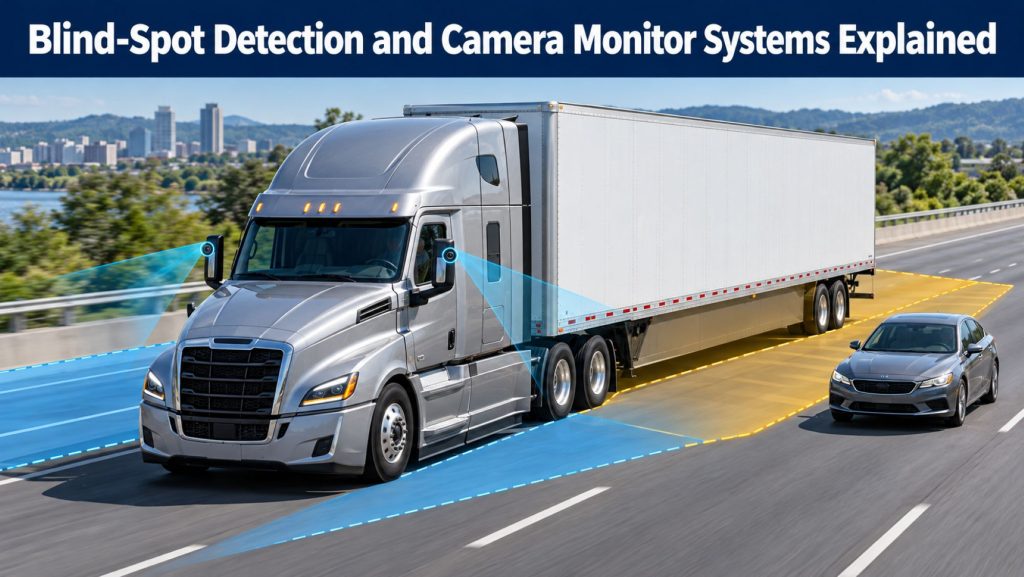
Commercial trucks have large areas around the cab and trailer that can be difficult or impossible to see through direct vision and conventional mirrors. Blind-spot detection and camera monitor systems add electronic sensing and expanded views to help drivers understand what is beside, behind, and immediately around the vehicle.
Radar-based systems can warn when a vehicle, cyclist, pedestrian, or object enters a monitored zone. Camera systems show live exterior views on in-cab displays. Surround-view systems combine several cameras into a single overhead-style image, while camera monitor systems may replace or supplement traditional mirrors.
This guide explains how these technologies work, how radar and camera systems differ, where sensors are installed, what conditions affect performance, and what fleets should consider when selecting and maintaining commercial-vehicle visibility systems.
Why Commercial Trucks Have Blind Spots
A commercial driver’s field of view is affected by cab height, hood length, mirror placement, trailer length, body design, cargo, and vehicle articulation. Important limited-visibility areas can include:
- The passenger side beside the cab and trailer
- The driver side near the cab and drive axles
- The area directly in front of the hood
- The space immediately behind the trailer or truck body
- Areas between the tractor and trailer during turns
- Adjacent lanes during merging and lane changes
- Low areas where pedestrians, cyclists, or small vehicles may be hidden
No single sensor or camera eliminates every blind spot. Effective coverage depends on vehicle dimensions, sensor placement, trailer type, turning movement, and the specific detection zones created during installation.
What Is Blind-Spot Detection?
Blind-spot detection uses radar, ultrasonic sensors, cameras, or a combination of technologies to monitor defined zones around a vehicle. When the system detects a qualifying object, it provides a visual, audible, or haptic warning.
A basic system may illuminate a warning lamp whenever an object is present. A second warning level may sound when the turn signal is active or the vehicle begins moving toward the occupied side. Coverage, object types, speeds, and warning logic vary among products.
What Is a Camera Monitor System?
A camera monitor system uses exterior cameras and in-cab displays to provide indirect vision. It can supplement mirrors or, where permitted and properly approved, serve as a mirror-replacement system.
Cameras can provide wide-angle, close-proximity, rear, trailer, and curbside views. Digital processing may add low-light enhancement, glare control, automatic view changes, guidelines, zoom, or trailer-end tracking. The exact functions depend on the system and vehicle installation.
Blind-Spot Detection vs Camera Monitoring
| Feature | Blind-spot detection | Camera monitor system |
|---|---|---|
| Primary purpose | Detect qualifying objects in defined zones | Show the driver an exterior view |
| Typical sensor | Radar or ultrasonic sensor | Digital video camera |
| Driver output | Warning lamp, tone, vibration, or message | Live image on an in-cab monitor |
| Object recognition | May track object range, movement, or classification | Normally requires the driver to interpret the image |
| Low-light operation | Radar is not dependent on visible light | Depends on camera design, lighting, and image processing |
| Main limitation | Only monitors programmed coverage zones and targets | Lens blockage, display placement, and driver attention affect usefulness |
The technologies are complementary. A radar warning can call attention to an object, while a camera gives the driver visual context before deciding how to respond.
How Radar Blind-Spot Detection Works
- The radar sensor transmits radio-frequency energy. Signals reflect from objects within the monitored area.
- The sensor measures the return. Software estimates an object’s range, position, relative speed, and movement.
- The controller applies detection logic. It determines whether the object meets the system’s warning criteria.
- Vehicle inputs are evaluated. Turn signals, road speed, direction, steering, and other data may change the warning level.
- The driver is alerted. A lamp may indicate an occupied zone, with a stronger warning during a lane-change or turning maneuver.
Radar can operate in darkness and poor lighting, but metal structures, road barriers, closely spaced traffic, sensor blockage, misalignment, or an incorrect installation can affect performance.
How Side Camera Systems Work
Side cameras are mounted on the cab, mirror arms, fenders, body, or trailer to capture views that are difficult to see directly. Images are sent to a monitor positioned within the driver’s normal viewing area.
Some systems display a continuous side view. Others automatically show a larger or different view when a turn signal is activated, reverse gear is selected, or the vehicle reaches a certain speed. Camera location and lens angle determine the visible area and the amount of image distortion.
How Surround-View Camera Systems Work
A surround-view system typically uses several wide-angle cameras mounted around the vehicle. Processing software corrects distortion and combines the images into a single overhead-style view. This stitched image helps the driver understand the vehicle’s position relative to nearby people, vehicles, loading docks, curbs, and obstacles.
The overhead image is a processed representation rather than a camera physically located above the vehicle. Correct calibration is essential. If a camera moves or vehicle dimensions are entered incorrectly, objects may appear misaligned where the camera images join.
Camera Monitor Systems That Replace Mirrors
Mirror-replacement camera systems use compact exterior camera assemblies and monitors mounted inside the cab. They can provide main, wide-angle, and close-proximity views while reducing the size of exterior mirror structures.
Potential functions include automatic brightness adjustment, night enhancement, defrosting or heating, trailer tracking, extended field of view, and reduced glare. Drivers need training because judging distance and speed on a digital display can feel different from using a conventional mirror.
Vehicle approval and mirror requirements vary by jurisdiction and configuration. Fleets should confirm that a particular system and installation are legally approved before removing required mirrors.
AI-Enhanced Camera Detection
Selected camera systems use image-processing or artificial-intelligence models to identify human forms, vehicles, cyclists, or other target classes. Instead of requiring the driver to notice every object in the image, the system can highlight a detected target and issue an alert.
AI detection has defined capabilities and limitations. Performance can be affected by target position, partial obstruction, clothing, lighting, weather, lens condition, image quality, and the training and validation of the recognition system. It should support—not replace—the driver’s visual checks.
Common Detection and Viewing Zones
Passenger-Side Zone
The passenger side is a major focus because cyclists, pedestrians, passenger vehicles, and fixed objects can be hidden beside the cab or trailer. Systems may provide a longer side zone for highway lane changes and a closer zone for low-speed urban turns.
Driver-Side Zone
Driver-side detection can support merging, passing, and lane changes. Coverage should be designed so the sensor monitors the intended adjacent area without producing excessive alerts from unrelated traffic.
Front and Corner Zones
Front and corner cameras or sensors can help reveal pedestrians, cyclists, small vehicles, curbs, and obstacles hidden below the driver’s direct line of sight. These zones are especially important for urban delivery, refuse, transit, and vocational trucks.
Rear Zone
Rear cameras and reversing sensors monitor the area behind a straight truck, trailer, or body. Their value depends on correct height, field of view, trailer length, lens cleanliness, lighting, and whether the view is blocked by cargo or equipment.
Tractor-Trailer Articulation and Changing Blind Spots
A tractor and trailer do not remain in a straight line during turns. As articulation increases, fixed cab-mounted cameras and radar sensors may no longer cover the full trailer side or rear corner. Trailer-mounted equipment or a system designed to track trailer position may be needed for consistent coverage.
Fleets should evaluate the complete combination, including 28-foot, 48-foot, 53-foot, doubles, tank, flatbed, dump, and specialized trailers. A detection zone designed for one configuration may not match another.
Highway Blind-Spot Detection vs Low-Speed Detection
Highway systems often focus on moving vehicles in adjacent lanes during passing and merging. They may use speed and turn-signal information to determine when to increase the warning level.
Low-speed systems focus more heavily on pedestrians, cyclists, workers, curbs, and fixed obstacles during turns, backing, loading, and yard operation. The required sensor range, target classification, warning timing, and display view can differ significantly from a highway system.
Warnings and Driver Interfaces
- Mirror- or pillar-mounted warning lamps
- Instrument-cluster icons and messages
- Audible tones or spoken warnings
- Steering-wheel or seat vibration
- Highlighted zones on a camera monitor
- Colored boxes around AI-detected people or objects
- Automatic camera-view changes during turns or reversing
A warning should be noticeable and easy to interpret without distracting the driver. The display must not block the windshield, interfere with controls, or require excessive eye movement away from the road.
Common Limitations
- Sensors monitor defined zones and may not detect objects outside those boundaries.
- Radar may respond differently to stationary and moving objects.
- Guardrails, signs, parked vehicles, and closely spaced traffic can create nuisance alerts.
- Camera lenses can be blocked by dirt, rain, ice, snow, road spray, or cargo.
- Glare, darkness, fog, precipitation, and damaged lenses can reduce camera image quality.
- Wide-angle views can make distance and object size difficult to judge.
- Surround-view stitching can distort objects near image boundaries.
- Trailer swing and articulation can move blind spots outside a cab-mounted sensor’s coverage.
- Pedestrian or cyclist recognition is not guaranteed in every pose, location, or condition.
- A warning does not confirm that a lane change or turn is safe.
Drivers must continue checking mirrors, camera views, direct sight lines, and the surrounding area. A system that shows no warning does not prove that the space is clear.
Blind-Spot and Camera System Product Examples
Truck Equipment Atlas product profiles related to blind-spot detection and camera monitoring include:
- Bendix BlindSpotter Radar System
- ZF WABCO OnSideALERT Blind-Spot Detection System
- Mobileye Shield+ Blind-Spot Detection System
- Stoneridge MirrorEye Camera Monitor System
- Brigade Backeye 360 Camera System
- Brigade Backeye 360 AI Camera System
These products serve different purposes. Some detect objects with radar, some provide digital indirect vision, and others combine multiple camera views or add object recognition. Compare the precise function rather than treating all visibility systems as interchangeable.
How to Compare Blind-Spot and Camera Systems
- Map the actual blind spots. Evaluate the cab, body, trailer, mirrors, cargo, articulation, and operating environment.
- Define the target. Determine whether the system must detect moving vehicles, cyclists, pedestrians, workers, fixed objects, or several categories.
- Match the speed range. Separate highway lane-change needs from low-speed turning, yard, and reversing risks.
- Compare coverage zones. Review length, width, height, overlap, and trailer-side coverage.
- Select the warning method. Consider lamps, tones, displays, vibration, and escalating alerts tied to turn signals.
- Evaluate camera views. Compare field of view, resolution, night performance, glare control, monitor position, and automatic view switching.
- Review installation requirements. Confirm sensor height, brackets, wiring, trailer connections, camera protection, and calibration space.
- Plan cleaning and service. Account for lens access, sensor covers, diagnostics, replacement parts, and technician training.
- Verify legal compliance. Confirm mirror, display, field-of-view, and equipment requirements for the operating jurisdiction.
For a broader comparison covering collision, cruise, lane, and visibility technologies, visit How to Choose a Commercial Truck Safety System.
Installation and Calibration Considerations
- Measure the complete vehicle and intended coverage zones before mounting sensors.
- Use rigid brackets that maintain the specified height and angle.
- Protect wiring and connectors from abrasion, impact, water, chemicals, and trailer movement.
- Position cameras where the body, mirrors, accessories, cargo, or exhaust will not block the view.
- Mount monitors within the approved driver sight line without blocking direct visibility.
- Enter correct vehicle dimensions when required for surround-view image stitching.
- Calibrate every camera and sensor using the manufacturer’s targets and procedures.
- Verify operation with the intended tractor, trailer, body, and accessory configuration.
Inspection and Maintenance
- Clean camera lenses, radar covers, displays, and warning lamps regularly.
- Inspect housings, seals, brackets, fasteners, wiring, and connectors.
- Check for condensation, cracked lenses, impact damage, corrosion, or water entry.
- Confirm that camera views are upright, stable, and unobstructed.
- Verify that warning lamps and audible alerts operate correctly.
- Investigate repeated nuisance warnings, missing alerts, or frozen video.
- Recalibrate after sensor movement, body repair, camera replacement, or dimensional changes.
- Document faults, repairs, calibration results, and software versions.
Drivers should include visible sensors and cameras in pre-trip and post-trip inspections. A blocked or damaged system should be reported rather than treated as a replacement for required mirrors and visual checks.
Driver Training and Fleet Policies
Drivers need training on monitored zones, warning levels, object types, display views, turn-signal interaction, system limitations, cleaning, fault messages, and the correct response to an alert. They should also understand which areas remain outside coverage.
Fleet policies should reinforce a consistent scan pattern using direct vision, mirrors, camera monitors, and warning indicators. Event reviews should consider vehicle geometry, trailer position, sensor status, road environment, driver input, and available video or telematics data.
Frequently Asked Questions
Do blind-spot systems eliminate commercial-truck blind spots?
No. They monitor specific zones or provide additional views. Coverage gaps, sensor limitations, trailer movement, and blocked cameras can still leave areas the driver must check through other methods.
Can cameras legally replace truck mirrors?
That depends on the vehicle, system approval, installation, and jurisdiction. Fleets should confirm current legal requirements before removing any required mirror.
Does radar detect pedestrians and cyclists?
Some systems are designed to detect selected vulnerable road users, but capabilities differ. Buyers must verify the target classes, speed ranges, coverage zones, and limitations stated by the manufacturer.
Why does a blind-spot system warn near guardrails?
Radar can detect metal structures and other objects within or near its monitored zone. Repeated unexpected warnings may also indicate sensor angle, calibration, mounting, or installation problems.
Can a camera system see in complete darkness?
Low-light capability varies. Some cameras use sensitive sensors, infrared illumination, or image enhancement, but every system still has lighting and visibility limits. The exact specification should be confirmed before selection.
Related Commercial Truck Safety Guides
- How Commercial Truck Safety Systems Work
- Collision Warning and Automatic Emergency Braking Explained
- Adaptive Cruise Control for Commercial Trucks Explained
- Lane Departure Warning and Lane Keeping Assistance Explained
- How to Choose a Commercial Truck Safety System
Final Thoughts
Blind-spot detection and camera monitor systems improve awareness in different ways. Radar can call attention to qualifying objects in a defined zone, while cameras give the driver a broader visual picture of the vehicle’s surroundings.
The best solution matches the truck, trailer, operating speed, target hazards, and driver workflow. Correct installation, calibration, cleaning, maintenance, and training are essential—and the technology must remain one part of a complete observation routine rather than a substitute for it.