
Quick Facts
- Manufacturer: Bendix Commercial Vehicle Systems.
- Product family: Bendix Wingman Fusion.
- Equipment type: Integrated advanced driver assistance and collision mitigation system.
- Core technologies: Forward radar, windshield-mounted camera, and integration with compatible Bendix braking and stability equipment.
- Functions: Collision warnings, supported automatic braking, active cruise with braking, and additional configuration-dependent assistance.
- Applications: Approved commercial truck installations.
- Compatibility: Verify by vehicle identification number, model year, installed hardware, and software configuration.
Overview
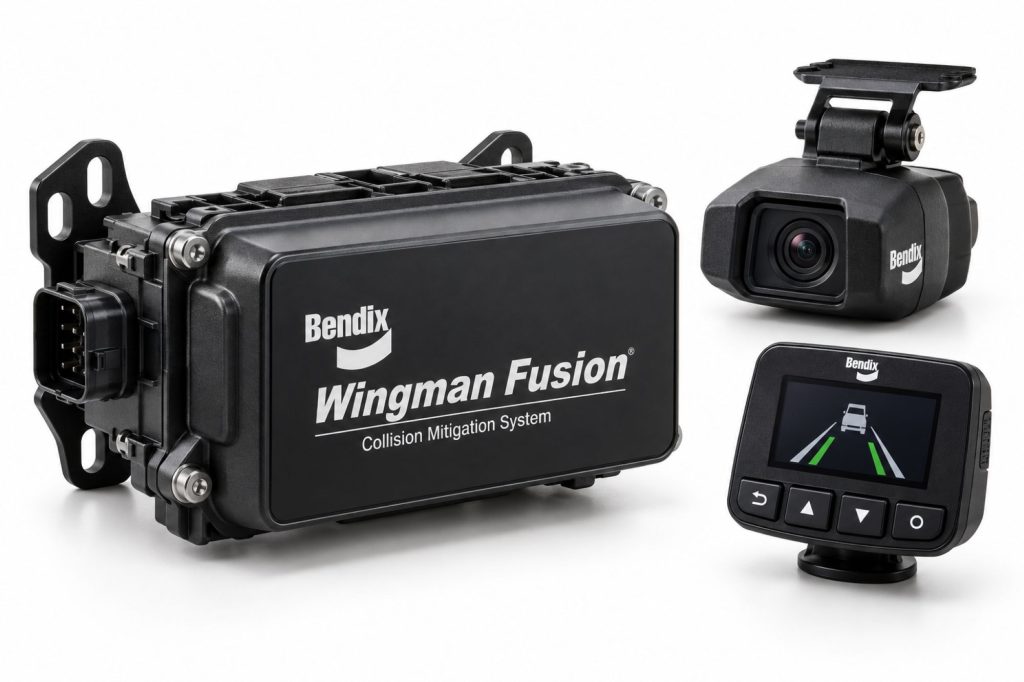
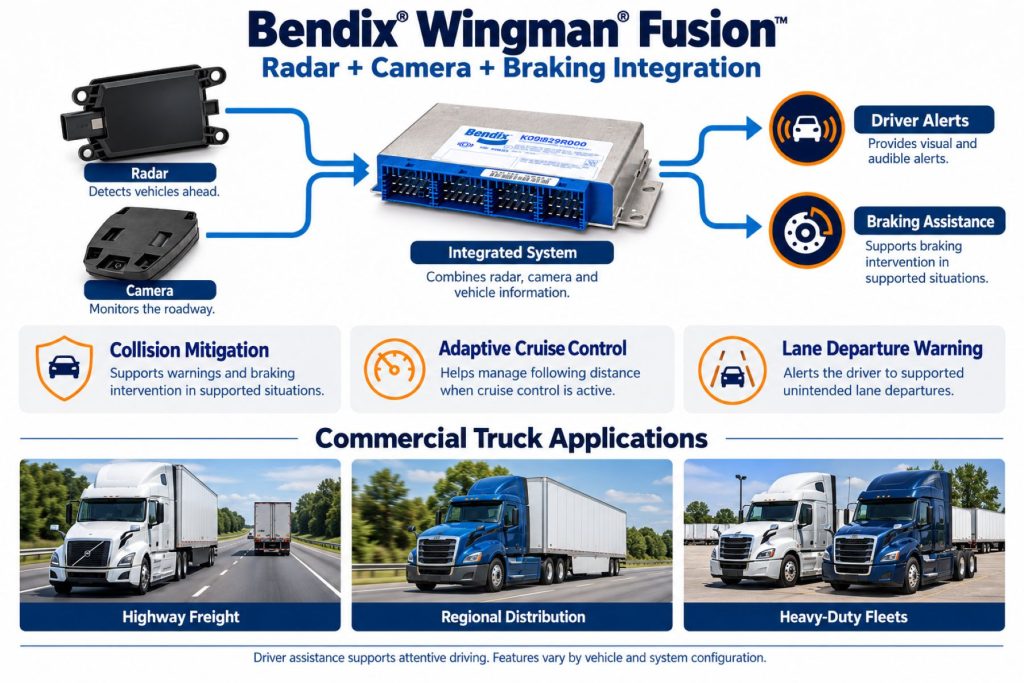
Bendix Wingman Fusion combines information from multiple vehicle systems to support collision mitigation and driver assistance. Its forward radar and camera work with compatible braking and stability controls rather than functioning as independent accessories.
The Fusion name covers multiple generations and vehicle-specific implementations. This page describes the product family; it does not establish that every listed function is present on every Fusion-equipped truck.
For buyers and fleets, the important distinction is between the product name and the actual vehicle specification. Confirm installed capabilities before comparing trucks, planning upgrades, or training drivers.
Key Characteristics
- Combines radar, camera, and vehicle-system information.
- Provides forward collision mitigation in supported conditions.
- Includes active cruise with braking in supported configurations.
- Works with compatible Bendix full-stability technology.
- Offers additional features according to generation and vehicle specification.
- Requires an attentive driver and properly maintained vehicle.
Major Components
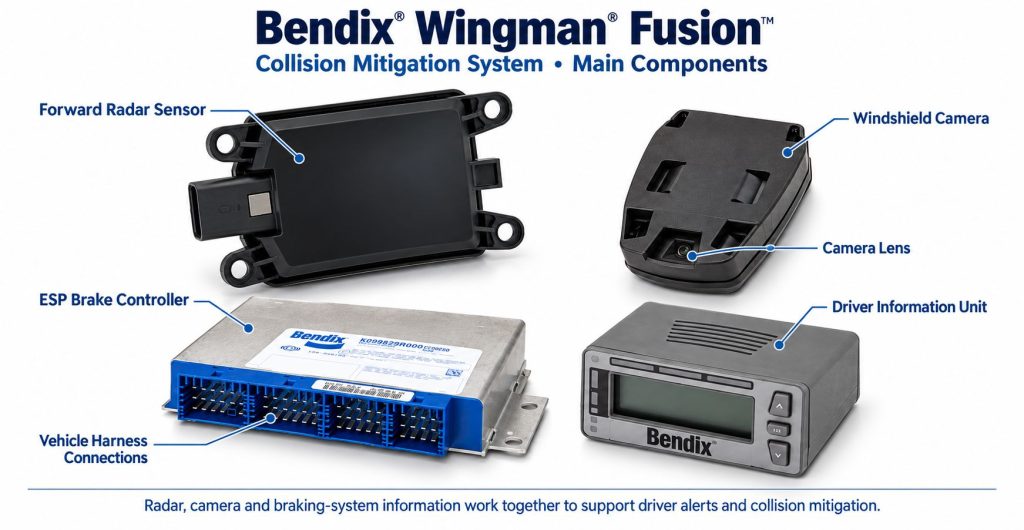
The installed component set must be identified from the vehicle’s equipment records and service documentation. Sensor part numbers and driver interfaces can differ between applications.
- Forward-looking radar sensor and mounting hardware.
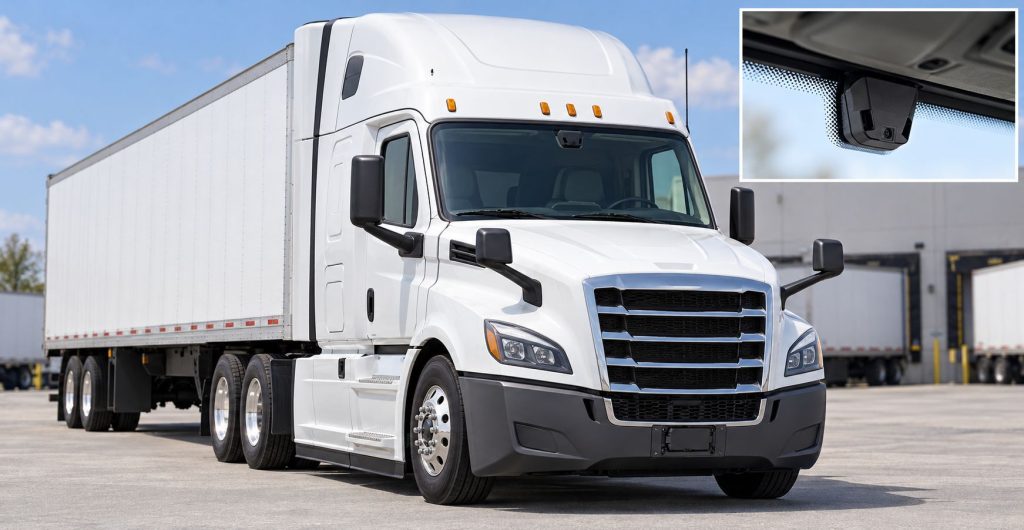
- Forward camera and windshield mounting arrangement.
- Compatible braking and stability-control electronics.
- Driver display, warning indicators, and audible outputs.
- Power, wiring, connectors, and vehicle communication interfaces.
- Additional equipment for optional functions, where specified.
Product Type and Construction
Wingman Fusion is an integrated electronic vehicle system, not a single bolt-on device. Its externally mounted radar, cab-mounted camera, vehicle controllers, and driver interface have different installation and service requirements.
Replacement equipment should be selected by the approved part number and vehicle application. Similar-looking sensors or brackets should not be treated as interchangeable.
Sensor, Hardware, and Software Design
Fusion uses complementary sensor information to evaluate the driving situation. Hardware and software must match the vehicle’s approved configuration.
When reviewing an installation, record sensor identities, controller configuration, and software information together. A newer replacement component does not by itself establish that a vehicle has gained newer assistance features.
How the Safety System Works
The system evaluates radar, camera, and vehicle information to determine whether a supported warning or intervention condition exists. It can then communicate an alert or request supported vehicle actions.
Collision mitigation and cruise assistance serve different purposes. Drivers should learn the behavior of each installed function from the correct operator’s manual rather than relying on experience with another Fusion-equipped truck.
Position and Function Within the Vehicle
The forward sensors observe the road ahead, while the supporting controllers and driver interface connect that information to the vehicle’s assistance functions. Inspect the actual installation to establish component locations.
Forward coverage should not be confused with rear or side monitoring. Those needs may require separate products and approved integrations.
Common Specifications
A useful Fusion specification identifies the installation rather than assigning one universal detection range, activation speed, or electrical rating to the entire product family.
- Vehicle make, model, model year, and identification number.
- Fusion generation and installed feature set.
- Radar, camera, and controller part numbers.
- Supported warning and intervention functions.
- Operating thresholds documented for the vehicle.
- Driver interface, electrical requirements, and calibration procedures.
Detection Coverage and Operating Performance
Fusion is intended to assist under defined conditions, not guarantee collision avoidance. Performance must be evaluated alongside vehicle speed, road conditions, loading, available traction, and the condition of the truck’s braking equipment.
Compare documented capabilities and limitations rather than assuming a warning will always provide the same response time or that braking will always prevent contact.
Supported Targets and Detection Zones
Forward-vehicle detection is central to Fusion’s collision mitigation functions. Recognition of stationary vehicles and other targets must be checked against the installed generation and operator documentation.
Do not assume universal pedestrian, cyclist, animal, or cross-traffic detection from the Fusion name. A target outside supported coverage or recognition conditions may not produce the expected response.
Operating Speeds and Activation Conditions
Activation conditions differ between collision mitigation, cruise assistance, and lane-related functions. Consult the vehicle-specific manual for speed thresholds, required inputs, and conditions that make a function unavailable.
Neither cruise-switch position nor the presence of a sensor is enough to establish the operating status of every assistance function.
Warning Functions and Alert Behavior
Available warnings can include following-distance, collision, lane departure, and overspeed information. Learn the actual display symbols, sounds, and priorities used on the vehicle.
A warning should prompt appropriate driver attention. Its absence does not establish that traffic spacing, lane position, or the road ahead is safe.
Active Braking or Steering Functions
Supported Fusion configurations can provide automatic braking for collision mitigation. Later feature sets may add functions such as multi-lane emergency braking or highway departure braking.
Steering assistance is a separate configuration-dependent capability. Bendix has documented Fusion-related active steering offerings on selected International applications; this does not mean every Fusion installation includes lane keeping or steering control.
Active Cruise with Braking
Active Cruise with Braking can use throttle reduction, the engine retarder, and foundation braking to help maintain spacing behind a detected forward vehicle while cruise is set.
Auto-Resume and Stop & Driver Go are configuration-dependent features. Confirm the vehicle’s resume behavior, cancellation conditions, and driver actions before using them.
Camera and Event-Recording Functions
The Fusion forward camera supports the assistance system. It should not be treated as a surround-view camera or assumed to include a complete fleet recording service.
Optional SafetyDirect integration can support event information and video review through compatible equipment and telematics. Verify the installed hardware and service arrangement if recording or fleet review is required.
Electrical Requirements, Wiring, and Connections
Use the wiring diagrams and electrical specifications for the vehicle and installed components. Confirm approved power connections, circuit protection, grounding, and connector arrangements before repair or replacement.
Inspect harness routing around the radar, camera, and related controllers. Avoid unapproved splices, accessory connections, or wiring changes that could interfere with system operation.
Vehicle Network and System Integration
Fusion relies on compatible vehicle information and control interfaces. Diagnosis should consider the complete installation rather than assuming that every assistance fault originates in the forward sensor.
Check the relevant brake, engine, communication, and assistance-system records using approved service procedures.
Controls, Indicators, and Driver Feedback
- Identify normal system-status indications.
- Learn the warnings used by each installed function.
- Understand cruise settings and available driver controls.
- Recognize fault or unavailable-function messages.
- Use the operator’s manual matching the vehicle’s interface.
Driver Override and System Availability
Driver inputs and cancellation behavior must be understood function by function. Do not assume that canceling cruise also disables collision mitigation, or that every function responds identically to accelerator or brake input.
Use the documented operating procedures and report unavailable functions according to the fleet’s process.
System Status, Fault Indicators, and Diagnostics
Record displayed messages and diagnostic information before replacing components. Qualified service personnel should use the applicable Bendix and vehicle-manufacturer procedures to establish the cause.
Clearing a code alone does not establish that a damaged component, alignment problem, or connection fault has been corrected.
Materials, Environmental Protection, and Durability
Evaluate the condition of housings, mounting hardware, harness protection, and connectors. Confirm component-specific environmental ratings from the correct documentation rather than assigning one rating to the entire system.
Do not paint, cover, or modify sensing areas unless the change is expressly permitted by the manufacturer.
Duty Cycle and Operating Conditions
Review the installation against the truck’s actual routes, loads, weather exposure, and service environment. A highway tractor and a vocational truck may have different equipment specifications and maintenance needs.
Assess driver feedback in context, including the operating situation and system status, before drawing conclusions about an alert or intervention.
Mounting and Installation
Use approved radar and camera mounting arrangements. Before adding bumper accessories, changing bodywork, or replacing mounting components, check whether the work affects the sensing areas or required alignment.
A complete installation requires compatible vehicle systems and commissioning. Purchasing a radar and camera does not establish that an unequipped truck can accept Fusion.
Calibration and Configuration
After sensor replacement, bracket work, windshield work, or relevant vehicle repairs, determine the required alignment and calibration steps from the applicable service documentation.
Retain records of configuration changes and completed setup procedures. Road testing should follow the approved process and should not involve deliberately creating a collision threat.
Vehicle and System Compatibility
Verify compatibility through the vehicle manufacturer, dealer, or Bendix using the vehicle identification number and installed equipment information. Model name alone is insufficient.
Bendix offers approved upgrades for some existing Fusion installations. Eligibility and available features are specific to the vehicle; an upgrade should not be assumed equivalent to every newer factory installation.
Related Component Compatibility
Confirm compatibility of replacement sensors, controllers, displays, brackets, and harnesses as a complete system. Also review any optional side-detection, steering, or fleet-data equipment separately.
Common Applications
- Approved highway tractor installations.
- Regional freight and distribution fleets.
- Supported medium-duty and vocational applications.
- Fleets reviewing factory driver-assistance packages.
- Eligible existing vehicles being evaluated for approved upgrades.
Advantages
- Combines complementary sensing technologies.
- Supports driver awareness and collision mitigation.
- Integrates assistance with compatible vehicle controls.
- Provides several assistance functions within one product family.
- Offers approved upgrade opportunities on some installations.
Limitations or Considerations
- Features vary by vehicle and generation.
- Detection and intervention do not guarantee collision avoidance.
- Challenging road scenes can produce unexpected responses or no response.
- Repairs can require specialized setup and diagnosis.
- Steering, side detection, and connected services are not universal inclusions.
- Safe operation remains the driver’s responsibility.
Driver and Operator Experience
Provide familiarization on the actual truck before assigning it to a driver. Explain the available functions, warning meanings, cruise behavior, and process for reporting faults.
Training should emphasize appropriate speed, following distance, and observation. Assistance should not become a reason to reduce those margins.
Inspection and Wear Points
- Visible radar damage or obstruction.
- Loose or damaged sensor brackets.
- Camera viewing-area contamination or obstruction.
- Harness abrasion and connector damage.
- Display messages and warning-device operation.
- Evidence of recent bumper, windshield, or collision repairs.
Maintenance and Ownership Notes
Include assistance-system checks in preventive maintenance and repair planning. Follow approved cleaning methods and retain diagnostic, calibration, and replacement records.
When buying a used truck, request evidence of the installed feature set and any repairs affecting sensors. Include specialist diagnosis and calibration in the ownership-cost review.
Common Safety System Problems
Inspection areas include obstructed sensors, damaged mounting hardware, connection faults, configuration discrepancies, and unresolved faults elsewhere in the integrated vehicle system.
For an unexpected warning or braking event, document the circumstances and have the installation evaluated. Do not assume either component failure or normal operation without checking the relevant evidence.
Safety and Service Precautions
Follow Bendix and vehicle-manufacturer procedures when servicing the installation. Secure the vehicle and use qualified personnel for work involving braking, steering, electrical systems, or calibration.
Do not reposition sensors, alter wiring, or attempt unsupported bypasses. Verify completed repairs through the prescribed diagnostic and commissioning process.
Identification Information
Collect the vehicle identification number, build information, sensor labels, controller details, and available software records. Match these to the applicable operator and service documents before ordering parts or evaluating an upgrade.
Buying Considerations
- Confirm the actual installed feature set.
- Check fault status and sensor condition.
- Review repair and calibration history.
- Verify parts and service support for the configuration.
- Budget for driver familiarization and specialist maintenance.
- Obtain written confirmation of proposed upgrade eligibility.
Variants and Configurations
- Earlier-generation Wingman Fusion installations.
- Enhanced feature-set installations.
- Vehicle-specific cruise and driver-interface configurations.
- Selected applications with additional active steering equipment.
- Eligible installations updated through approved upgrade programs.
Comparison to Similar Equipment
Compare Fusion with other systems by installed capability: sensing approach, supported targets, warning functions, intervention, driver interface, and service requirements. The number of advertised features alone is not a complete comparison.
- Bendix Wingman Advanced Collision Mitigation System
- ZF WABCO OnGuardACTIVE Collision Mitigation System
- Detroit Assurance with Active Brake Assist 6
Best Fit For
- Buyers evaluating compatible factory-equipped trucks.
- Fleets seeking integrated collision mitigation and cruise assistance.
- Operators able to support driver training and system maintenance.
- Owners of eligible vehicles considering an approved upgrade.
Related Vehicle and Trailer Types
- Day Cab Trucks
- Sleeper Trucks
- Vocational Trucks
- Dry Van Trailers
- Refrigerated and Reefer Trailers
- Flatbed Trailers
Related Truck and Trailer Models
Related Safety System Types
- Collision Warning and Automatic Emergency Braking Systems
- Adaptive Cruise Control Systems
- Lane Departure Warning and Lane Keeping Systems
- Blind-Spot and Vulnerable Road User Detection Systems
Related Safety System Products
- Bendix Wingman Advanced Collision Mitigation System
- Bendix BlindSpotter Radar System
- ZF WABCO OnGuardACTIVE Collision Mitigation System
- Detroit Assurance with Active Brake Assist 6
- Mobileye 8 Connect Collision Avoidance System
Related Equipment Systems
- Safety Systems
- Brake Systems
- ABS and Electronic Braking Systems
- Drivelines and Steering Systems
- Electrical Systems
- Telematics and ELD Systems
Related Guides
- Safety System Guides
- How Commercial Truck Safety Systems Work
- Collision Warning and Automatic Emergency Braking Explained
- Adaptive Cruise Control for Commercial Trucks Explained
- Lane Departure Warning and Lane Keeping Assistance Explained
- How to Choose a Commercial Truck Safety System
Regulatory and Compliance Notes
This product description does not establish compliance for a particular vehicle or operation. Confirm applicable requirements and use approved installation and service documentation when evaluating equipment changes.
Real World Operating Notes
Bendix identifies challenging situations in which Fusion may respond unexpectedly or fail to respond. Differences in speed, radar reflections, and low visual contrast can affect recognition.
Review the challenging-scenario information for the installed system during driver training. When investigating an event, retain the vehicle configuration, fault status, road conditions, and any available event information.
Frequently Asked Questions
Does every Wingman Fusion truck have the same features?
No. Check the vehicle’s generation, installed equipment, and manufacturer specification.
Does Fusion include automatic steering?
Not universally. Steering assistance requires a specifically supported configuration and additional compatible equipment.
Can an older installation be upgraded?
Some vehicles qualify for approved upgrades. Bendix or an authorized provider must confirm eligibility and available functions.
Is the forward camera a complete fleet dashcam service?
Do not assume that. Event recording and fleet review depend on the installed equipment and connected-service arrangement.
Can Fusion prevent every collision?
No. It has defined limitations, and the driver remains responsible for safe vehicle operation.
Availability and Where to Find
Contact the vehicle manufacturer, dealer, or Bendix for current equipment availability, service parts, and upgrade eligibility. Provide the vehicle identification number and installed component details.
- Official Bendix Wingman Fusion Product Information
- Bendix Retrofit Upgrade Information
- Bendix Parts and Technical Resources
Support Trucking Families
Truck Equipment Atlas supports the mission of Grey Cross, a nonprofit dedicated to helping families of truck drivers who lose their lives while on the road. As the site grows, part of its mission is to bring awareness and support to these families.
Video Overview
Truck Equipment Atlas will continue expanding with video overviews and equipment breakdowns to help drivers and fleets better understand commercial truck safety systems.
Follow the Growth of Truck Equipment Atlas
Truck Equipment Atlas continues to expand with new truck profiles, trailer coverage, diesel engine pages, equipment system resources, manufacturer information, and educational guides.
Visit our Site Updates page to explore recent additions, project milestones, and upcoming resources as we continue building one of the industry’s growing commercial trucking equipment reference libraries.
View the Latest Site Updates: Truck Equipment Atlas Site Updates