
Quick Facts
- Manufacturer: ZF Commercial Vehicle Solutions, WABCO product family.
- Product: OnLaneALERT.
- Equipment type: Camera-based lane departure warning system.
- Primary sensor: Forward-looking windshield-mounted camera.
- Primary purpose: Warn the driver of detected unintentional lane departures.
- Vehicle control: Warning assistance; automatic steering is not the product’s core function.
- Installation: Supported commercial vehicle applications and application-specific retrofit arrangements.
- Compatibility: Verify vehicle, windshield, camera, wiring, and configuration requirements.
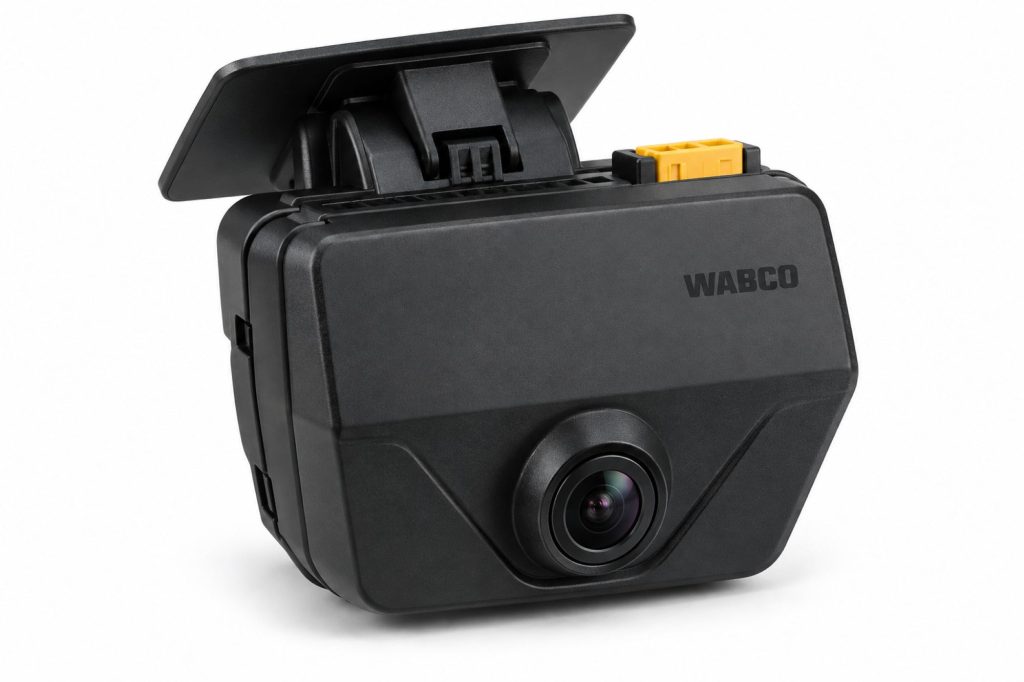
Overview
ZF WABCO OnLaneALERT uses a forward camera to monitor the vehicle’s position relative to recognized lane markings. When a qualifying departure is detected, it warns the driver to take corrective action.
Lane departure warning and lane keeping assistance are different functions. OnLaneALERT provides warnings; its name should not be used to imply that the truck will automatically steer back into the lane.
This page describes the product family. The actual truck’s documentation determines its operating threshold, warning arrangement, controls, and service requirements.
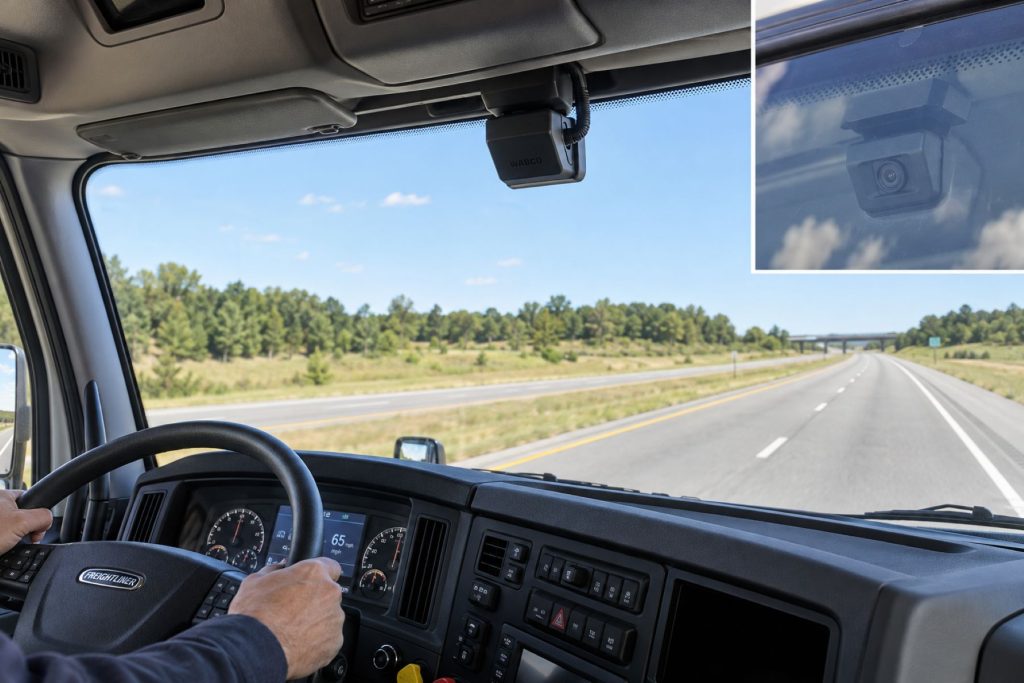
Key Characteristics
- Uses camera-based recognition of lane markings.
- Provides additional awareness of detected lane departures.
- Uses vehicle inputs to support warning decisions.
- Offers configuration-dependent warning outputs.
- Requires the driver to make the necessary steering correction.
- Depends on an appropriate installation and usable camera view.
Major Components
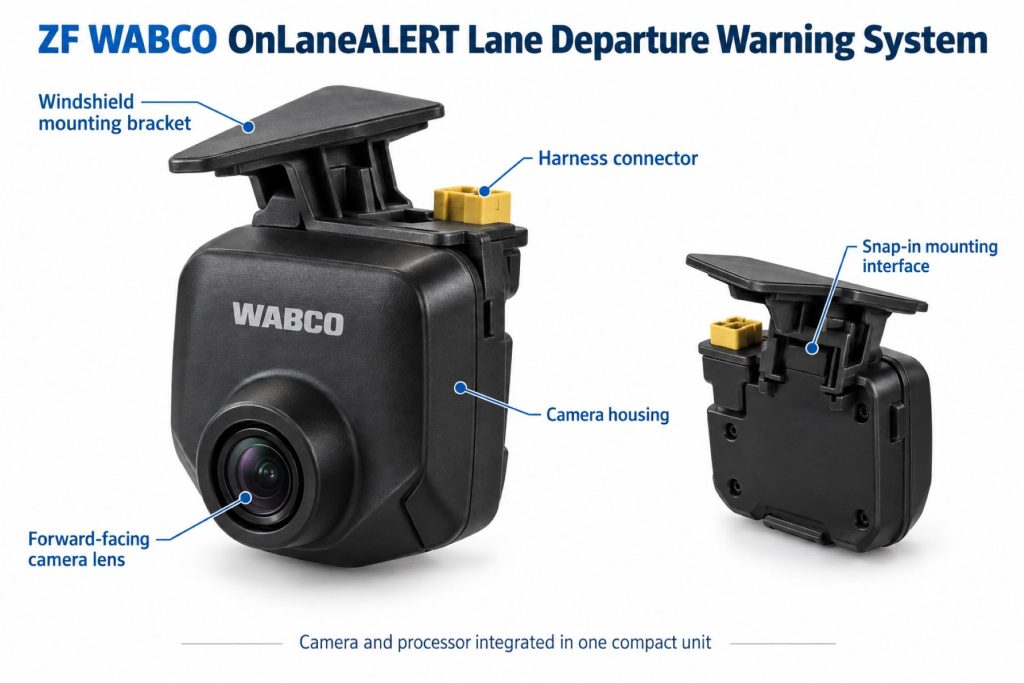
Identify the camera, mounting arrangement, warning interface, and vehicle connections as a complete installation. Component details can differ by application.
- Forward-looking camera module.
- Approved windshield mounting components.
- Warning indicators and supported audible or other outputs.
- Driver control switch, where specified.
- Power, signal, and communication wiring.
- Application-specific configuration.
Product Type and Construction
OnLaneALERT is an electronic driver warning system. Its camera installation is designed around the vehicle’s windshield and required view of the road.
Replacement equipment should be matched to the approved application. A camera with a similar housing should not be assumed compatible with the existing mounting, wiring, or configuration.
Sensor, Hardware, and Software Design
The camera supplies road-image information used to assess lane position. Configuration and supported vehicle inputs influence when the system issues warnings.
Record camera identity and installation details before ordering replacements or comparing systems. A different camera model or software arrangement may require a different service procedure.
How the Safety System Works
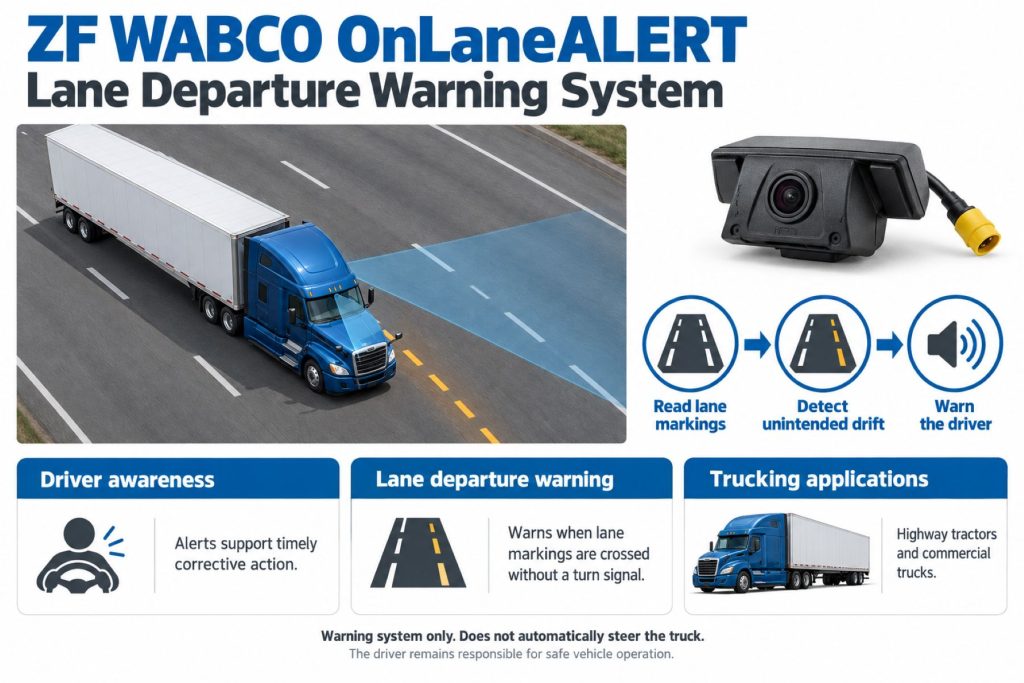
OnLaneALERT observes recognized lane markings and evaluates the truck’s position relative to them. When supported conditions indicate an unintended departure, the system alerts the driver.
The driver must interpret the road situation and steer appropriately. The system does not determine that every movement within a lane is safe or that every departure should be corrected in the same way.
Position and Function Within the Vehicle
The camera is mounted inside the windshield with a forward road view. The warning interface communicates information within the cab.
This lane-monitoring function should not be treated as side-object detection, rear visibility, or forward collision braking. Specify those capabilities through the appropriate equipment.
Common Specifications
A useful specification identifies the actual camera and vehicle application. Check documented values rather than assigning one operating threshold or electrical rating to every installation.
- Vehicle make, model, model year, and identification number.
- Windshield type and approved camera position.
- Camera part number and configuration.
- Warning outputs and driver controls.
- Required speed, turn-signal, and other vehicle inputs.
- Electrical supply and communication requirements.
- Mounting and setup procedures.
Detection Coverage and Operating Performance
The relevant sensing area is the camera’s road view. Successful lane monitoring depends on the installation and the markings the system can recognize.
A lane warning is additional information, not a guarantee against road departure or contact with adjacent traffic. Evaluate performance in the conditions the vehicle actually encounters.
Lane-Marking Recognition and Road Conditions
ZF’s driver guidance identifies obscured or deteriorated lane markings, windshield condition, glare, poor lighting, and adverse weather as factors that can affect assistance.
Drivers should remain attentive in construction zones, changing road layouts, and areas where markings are difficult to interpret. Do not treat the absence of a warning as confirmation of correct lane position.
Operating Speeds and Activation Conditions
Warning availability depends on the installed configuration and vehicle inputs. Check the applicable operator information for activation speed and conditions that suppress warnings.
Do not assume that the system provides low-speed yard assistance merely because its camera is powered. Camera operation and active lane-warning availability are different states.
Warning Functions and Alert Behavior
ZF describes configurable visual, audible, or haptic warning arrangements. The outputs actually fitted must be confirmed on the vehicle.
Learn the warning’s meaning and the difference between a departure alert and an unavailable-system indication. Drivers should respond to the road situation rather than wait for a particular output.
Lane Departure Warning and Steering Assistance
OnLaneALERT warns the driver; it should not be described as lane centering or automatic corrective steering. Those capabilities require separately supported equipment.
When comparing products, distinguish the warning function from lane keeping assistance and from systems that combine several vehicle-control features.
Camera and Event-Recording Functions
The OnLaneALERT camera’s primary role is lane monitoring. A camera installation should not automatically be described as a fleet video recording service.
ZF has documented compatible SmartDrive integration for safety-event video. Verify current hardware, service support, and configuration before describing recording or fleet access as included.
Electrical Requirements, Wiring, and Connections
Use the wiring diagrams and electrical specifications for the camera and vehicle. Confirm power, grounding, circuit protection, and required signal connections.
Route wiring according to the approved cab installation, avoiding interference with trim, driver visibility, and other vehicle equipment. Use compatible replacement harnesses and connectors.
Vehicle Network and System Integration
Required vehicle inputs and communication arrangements depend on the application. Investigate missing or incorrect inputs alongside camera and warning-interface condition.
Integration with other driver assistance or telematics equipment must be verified separately. A connection does not establish automatic steering, braking, recording, or remote access.
Controls, Indicators, and Driver Feedback
- Identify the installed control switch and indicators.
- Learn startup behavior and normal status information.
- Recognize the departure warning used by the vehicle.
- Distinguish ready, unavailable, and fault conditions.
- Use the vehicle-specific operating instructions.
Driver Controls and System Availability
Driver controls and warning-suppression behavior must be learned from the correct manual. Vehicle inputs, recognized markings, and operating conditions influence availability.
Follow the documented process for any temporary disable function. A powered camera or illuminated switch does not by itself establish that lane warnings are available.
System Status, Fault Indicators, and Diagnostics
Record the indication and circumstances when assistance becomes unavailable. Determine whether the condition is associated with the operating environment, vehicle inputs, installation, or a component fault.
Use the applicable ZF service procedures and supported diagnostic tools. Clearing an indication is not sufficient evidence that an installation problem has been corrected.
Materials, Environmental Protection, and Durability
Inspect camera housing, mounting components, wiring, and connectors. Verify component-specific ratings rather than assigning an external-sensor rating to cab-mounted equipment.
Keep the required windshield viewing area clear. Avoid adding stickers, curtains, accessories, or other items that interfere with the approved camera view.
Duty Cycle and Operating Conditions
Review routes, road-marking quality, lighting, weather exposure, and vehicle use when evaluating lane-warning equipment. Highway lane monitoring and low-speed maneuvering are different applications.
Driver familiarization should reflect the conditions encountered by the fleet, including situations where the system cannot provide useful assistance.
Mounting and Installation
Use the approved camera position and application-specific windshield template. Windshield shape and cab arrangement matter when selecting mounting equipment.
Follow the instructions for mounting preparation, wiring, and verification. A location suitable for a general dash camera should not be assumed suitable for lane-warning equipment.
Calibration and Configuration
Determine the setup requirements for the exact camera and installation. Some replacement or upgrade arrangements can use preconfigured equipment; others require application-specific parameter or setup work.
After camera replacement, mounting changes, or windshield work, follow the applicable verification procedure. Do not assume every OnLaneALERT installation uses the same calibration process.
Vehicle and System Compatibility
Confirm compatibility through ZF, the vehicle manufacturer, or an authorized provider using the vehicle identification number and windshield configuration.
ZF lists application-specific installation and upgrade documents. Their existence does not establish suitability for every model year or every truck sharing the same model name.
Related Component Compatibility
Verify the camera, mounting components, warning outputs, wiring, and configuration as a complete installation. Check optional video or telematics connections independently.
A camera from another driver assistance product should not be treated as an approved substitute without confirmation.
Common Applications
- Approved commercial highway truck installations.
- Regional trucks operating on marked roads.
- Existing fleets maintaining OnLaneALERT equipment.
- Eligible vehicles being reviewed for an application-specific retrofit.
Advantages
- Provides additional awareness of detected unintended lane departures.
- Uses a windshield camera for lane-position monitoring.
- Supports configurable warning arrangements.
- Can be considered for supported factory or retrofit applications.
- Offers documented integration options for compatible equipment.
Limitations or Considerations
- Provides warnings rather than automatic steering correction.
- Requires lane markings the system can recognize.
- Camera visibility and environmental conditions affect availability.
- Warning outputs and thresholds depend on configuration.
- Recording is not a universal inclusion.
- Does not replace attentive driving or correct lane positioning.
Driver and Operator Experience
Explain the actual warning outputs, availability indicators, and driver controls before assigning the truck. Drivers should understand that they remain responsible for steering.
Encourage reports that identify road conditions, indicator state, and the circumstances of the warning. This helps distinguish operating limitations from installation or component problems.
Inspection and Wear Points
- Windshield condition in the camera’s viewing area.
- Camera mounting security and visible damage.
- Obstructions from accessories or cab items.
- Harness and connector condition.
- Warning-device and indicator condition.
- Evidence of windshield replacement or mounting changes.
Maintenance and Ownership Notes
Include camera condition and warning-system status in preventive maintenance. Use approved cleaning methods and retain replacement, setup, and diagnostic records.
When purchasing a used vehicle, review windshield and camera service history. Budget for qualified inspection when the mounting or configuration is uncertain.
Common Safety System Problems
Areas to investigate include obstructed camera views, mounting changes, damaged wiring, missing vehicle inputs, warning-output faults, and incorrect configuration.
Review environmental conditions before concluding that the camera has failed. Persistent faults or inconsistent behavior require evaluation using the correct service information.
Safety and Service Precautions
Follow ZF and vehicle-manufacturer instructions for camera service, windshield-related work, and electrical repairs. Secure the vehicle and use qualified personnel.
Do not reposition the camera or alter configuration through unsupported methods. Verification should follow approved procedures without deliberately drifting into traffic or leaving the road.
Identification Information
Collect the vehicle identification number, camera material number, windshield type, mounting details, and available configuration records. Match them to the appropriate parts and service documents.
Buying Considerations
- Confirm the installed equipment is OnLaneALERT.
- Verify vehicle and windshield compatibility.
- Review warning outputs and operating conditions.
- Check camera condition and active faults.
- Review mounting, replacement, and setup history.
- Confirm parts, diagnostic, and installation support.
Variants and Configurations
- Vehicle-manufacturer installations.
- Application-specific retrofit arrangements.
- Different windshield mounting requirements.
- Supported warning-output configurations.
- Approved video or telematics integration arrangements.
Comparison to Similar Equipment
Compare lane-warning products by camera installation, operating conditions, warning outputs, and service requirements. Compare lane keeping equipment separately because steering assistance adds different vehicle integration and operating responsibilities.
- ZF WABCO OnLaneASSIST Lane Keeping Assistance System
- Bendix Wingman Fusion Collision Mitigation System
- Mobileye 8 Connect Collision Avoidance System
Best Fit For
- Operators maintaining compatible OnLaneALERT installations.
- Fleets evaluating lane departure warnings for marked-road operation.
- Eligible vehicles being considered for an approved retrofit.
- Buyers seeking warning assistance with suitable training and service support.
Related Vehicle and Trailer Types
Related Truck and Trailer Models
Related Safety System Types
- Lane Departure Warning and Lane Keeping Systems
- Collision Warning and Automatic Emergency Braking Systems
- Blind-Spot and Vulnerable Road User Detection Systems
- Camera Monitor and Surround-View Systems
Related Safety System Products
- ZF WABCO OnLaneASSIST Lane Keeping Assistance System
- ZF WABCO OnGuardACTIVE Collision Mitigation System
- ZF WABCO OnSideALERT Blind-Spot Detection System
- Bendix Wingman Fusion Collision Mitigation System
- Mobileye 8 Connect Collision Avoidance System
Related Equipment Systems
Related Guides
- Safety System Guides
- How Commercial Truck Safety Systems Work
- Lane Departure Warning and Lane Keeping Assistance Explained
- Blind-Spot Detection and Camera Monitor Systems Explained
- How to Choose a Commercial Truck Safety System
Regulatory and Compliance Notes
This overview does not establish regulatory compliance for an individual vehicle. Confirm applicable requirements, equipment specifications, and approved installation arrangements before making compliance claims.
Real World Operating Notes
Evaluate lane-warning reports with the road layout, marking visibility, vehicle inputs, and system status in mind. A report is more useful when it describes those conditions rather than stating only that a warning occurred.
For fleets with several lane-assistance products, provide vehicle-specific familiarization so drivers understand which trucks warn and which have separately supported steering assistance.
Frequently Asked Questions
Does OnLaneALERT automatically steer the truck?
No. Its core function is lane departure warning. The driver makes the steering correction.
Does it operate whenever the camera is powered?
Not necessarily. Warning availability depends on operating conditions, vehicle inputs, and configuration.
Can it work without recognizable lane markings?
Its lane-monitoring function depends on markings the camera system can recognize.
Does every installation record video?
No. Recording requires a supported equipment and service arrangement.
Does a replacement camera always need the same calibration procedure?
No universal procedure should be assumed. Follow the instructions for the camera, vehicle, and replacement arrangement.
Availability and Where to Find
Contact ZF, the vehicle dealer, or an authorized provider for current equipment, service parts, and retrofit information. Provide the vehicle identification number, camera identity, and windshield configuration.
Support Trucking Families
Truck Equipment Atlas supports the mission of Grey Cross, a nonprofit dedicated to helping families of truck drivers who lose their lives while on the road. As the site grows, part of its mission is to bring awareness and support to these families.
Video Overview
Truck Equipment Atlas will continue expanding with video overviews and equipment breakdowns to help drivers and fleets better understand commercial truck safety systems.
Follow the Growth of Truck Equipment Atlas
Truck Equipment Atlas continues to expand with new truck profiles, trailer coverage, diesel engine pages, equipment system resources, manufacturer information, and educational guides.
Visit our Site Updates page to explore recent additions, project milestones, and upcoming resources as we continue building one of the industry’s growing commercial trucking equipment reference libraries.
View the Latest Site Updates: Truck Equipment Atlas Site Updates