
Quick Facts
- Manufacturer: Mobileye.
- Product: Mobileye 8 Connect.
- Equipment type: Aftermarket collision-warning system with connected fleet capabilities.
- Primary sensor: Forward-facing windshield-mounted camera.
- Processing: Mobileye EyeQ4 technology.
- Driver interface: Audible alerts and EyeWatch visual indications.
- Primary section: Safety Systems, with a cross-link from Telematics and ELD Systems.
- Compatibility: Confirm vehicle eligibility, installation requirements, connectivity, and service support.
Overview
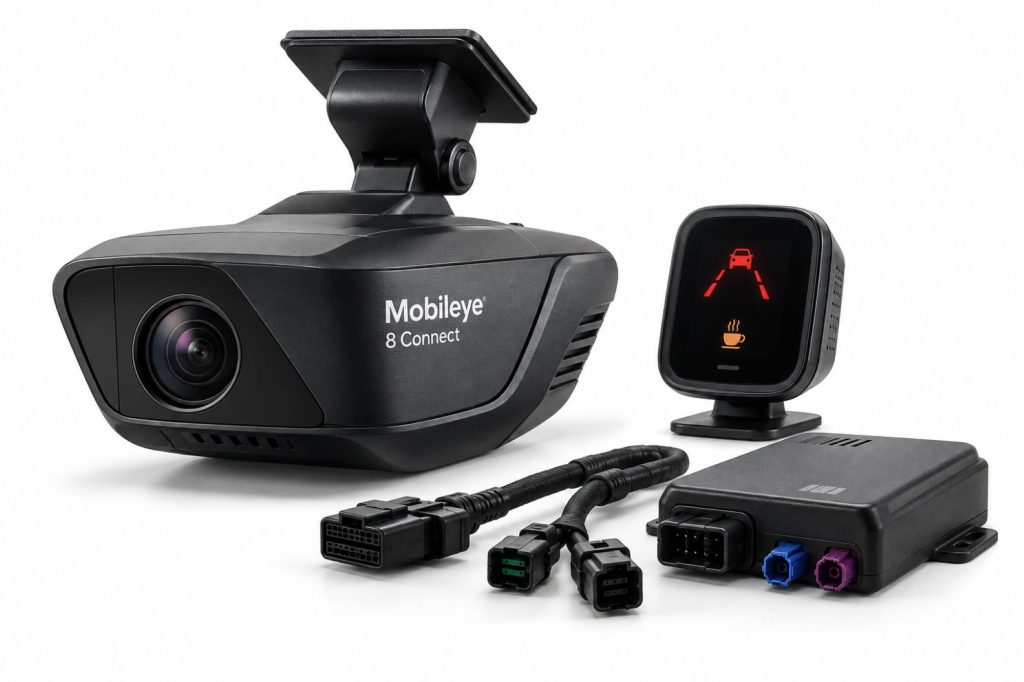
Mobileye 8 Connect uses camera-based analysis to provide real-time driver warnings. Its documented functions include forward collision warning, lane departure warning, headway monitoring, pedestrian and cyclist collision warning, and speed-limit indication.
The driver must interpret the road situation and take the necessary action. Collision-warning equipment should not be presented as permission to reduce attention, follow more closely, or delay braking.
This page covers the equipment and its connected-service relationship. The applicable manual and installation records determine the functions and operating conditions of an individual vehicle.
Key Characteristics
- Provides additional driver awareness through warnings.
- Requires approved installation and configuration.
- Combines an in-cab safety interface with supported fleet-data services.
- Should be evaluated separately from braking and steering assistance.
- Requires confirmation of current hardware and service support.
Major Components
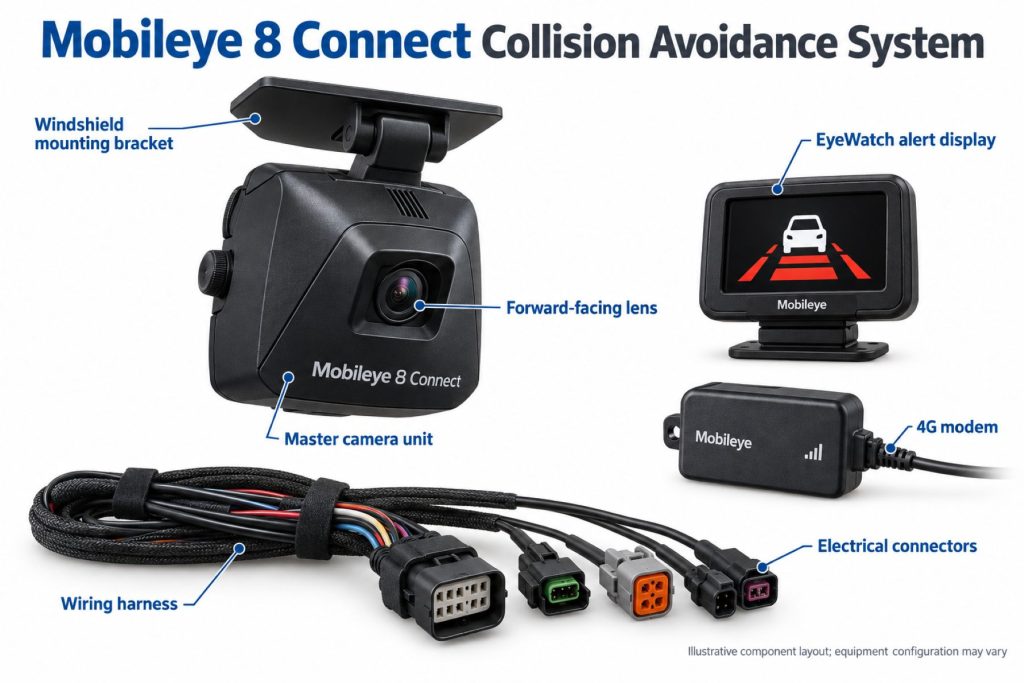
Identify the complete kit through installation records and approved parts information. Confirm which components are fitted rather than assuming every package is identical.
- Forward camera and processing equipment.
- EyeWatch display and control interface.
- Approved windshield mounts.
- Power and vehicle-signal connections.
- Applicable positioning and connectivity equipment.
- Installation-specific configuration.
Product Type and Construction
Review Mobileye 8 Connect as an installed electronic warning system. Camera position, driver-interface placement, wiring, and configuration should be assessed together.
A general-purpose dash camera is not an equivalent replacement. Match approved components and procedures when maintaining the installation.
Sensor, Hardware, and Software Design
Record equipment identity, software information, installation settings, and supported vehicle inputs. These details help determine the correct manual and service procedure.
Do not assume that similar-looking Mobileye equipment has identical functions. Verify the exact product and configuration before comparing specifications.
How the Safety System Works
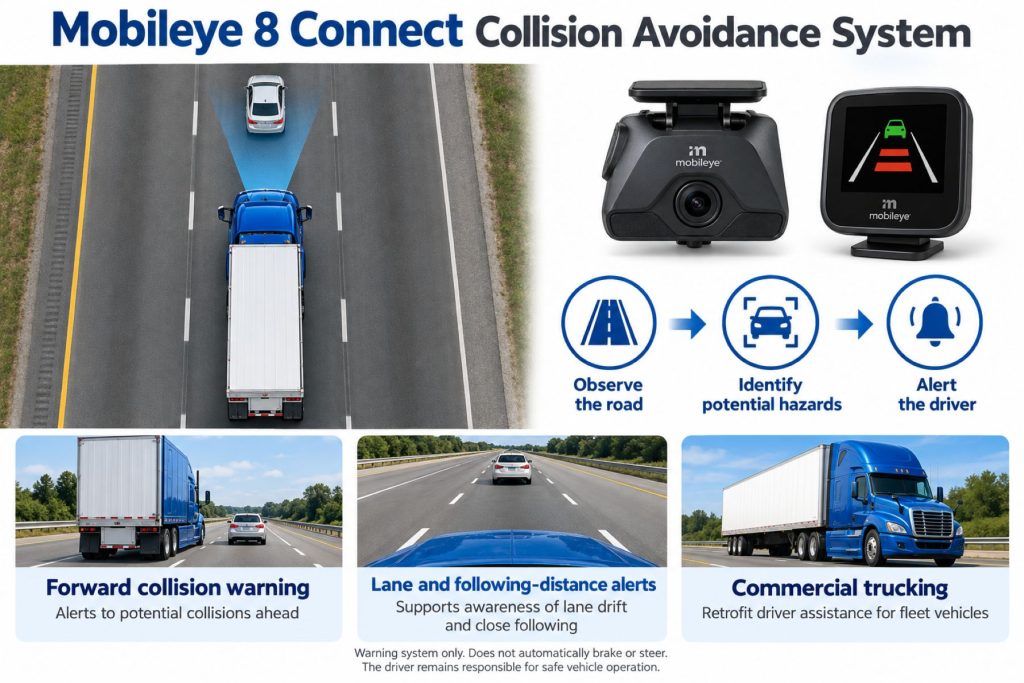
The camera observes the road ahead and the system analyzes supported hazards. When warning conditions are met, it communicates information to the driver.
The driver makes the braking or steering response. Do not treat the absence of a warning as confirmation that the road is clear or the following distance is appropriate.
Position and Function Within the Vehicle
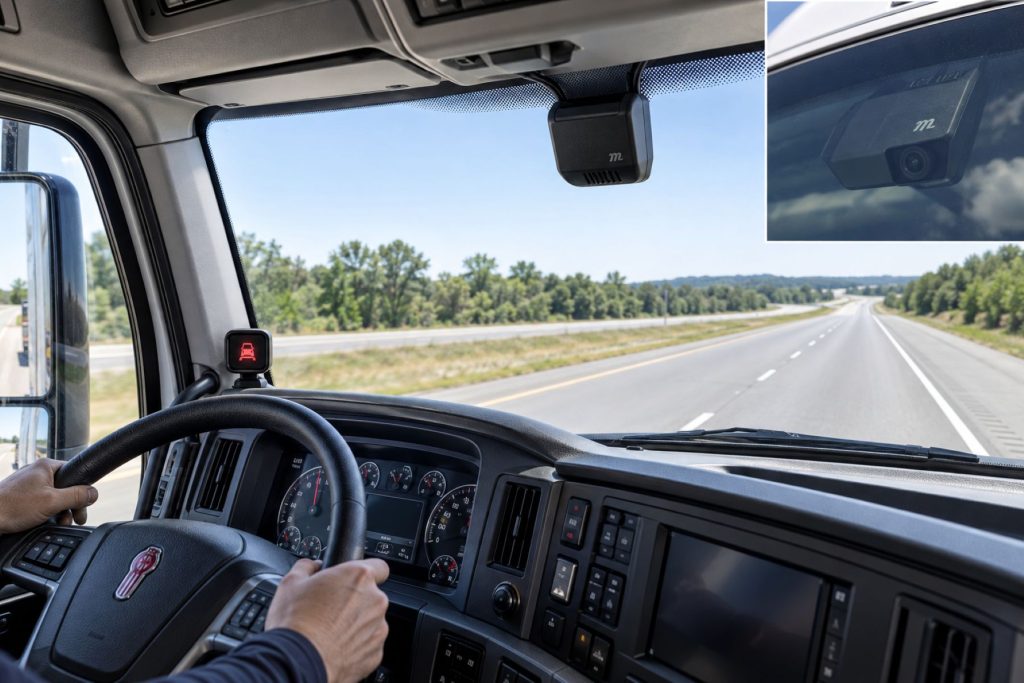
Use approved installation information to verify camera and display positions. Preserve driver visibility and the required camera view.
Assess rear visibility, side blind spots, and recording needs separately. A forward-warning installation does not establish coverage around the entire truck or trailer.
Common Specifications
Build the specification around the actual vehicle and equipment version. Obtain numerical limits from the applicable documentation.
- Vehicle make, model, model year, and identification number.
- Mobileye hardware identity and serial information.
- Camera position and mounting arrangement.
- Enabled warning functions and settings.
- Required vehicle inputs.
- Electrical supply and connection requirements.
- Connectivity version and supported service.
- Calibration and verification requirements.
Detection Coverage and Operating Performance
Review the documented camera coverage and warning conditions. Separate sensing range from the circumstances in which a warning can be issued.
Do not convert a published warning-time figure into a guaranteed reaction window. Road conditions and the developing traffic situation still require direct driver judgment.
Camera Visibility and Road Conditions
Consult the manual for limitations involving lighting, weather, windshield condition, road markings, and object visibility. Keep the required viewing area clear.
Report persistent or inconsistent warning behavior with details about the road, traffic, lighting, and system status.
Operating Speeds and Activation Conditions
Check operating thresholds separately for each warning function. Camera power does not by itself establish that every alert is available.
Use the manual appropriate to the installed software and market. Do not transfer numerical thresholds from another Mobileye product.
Warning Functions and Alert Behavior
Learn the fitted warning symbols, sounds, and permitted settings. Distinguish a hazard alert from a system-status indication.
Explain critical warnings using the applicable manual. Do not assume that every warning can be muted or adjusted in the same way.
Forward Collision and Headway Warnings
Collision risk and following spacing are related but different concepts. Driver familiarization should explain the fitted indications for each.
Maintain an appropriate following distance for traffic, speed, loading, and road conditions. Drivers should brake when needed rather than wait for an alert.
Pedestrian and Cyclist Awareness
Review the installed function’s documented operating limits and visibility requirements. Continue checking directly for vulnerable road users.
Do not infer side-blind-spot or reversing protection from a forward pedestrian-warning function. Specify those needs separately.
Lane Departure Warning and Steering Assistance
Lane departure warning provides information to the driver. Corrective steering and lane centering are different capabilities and should not be inferred from a warning-system installation.
The driver remains responsible for lane position and safe steering. Verify any separately installed active assistance through its own documentation.
Camera and Event-Recording Functions
Verify stored-video and footage-access capabilities independently. Image processing for warnings is not sufficient evidence that the fleet can retrieve dashcam recordings.
If separate recording equipment is fitted, document its hardware, storage, services, and relationship to the warning installation.
Electrical Requirements, Wiring, and Connections
Use approved diagrams for power, grounding, circuit protection, display connections, and vehicle signals. Match replacement harnesses to the installation.
Route wiring without interfering with driver visibility, controls, cab trim, or other equipment. Use qualified installation and repair support.
Vehicle Network and System Integration
Confirm required speed, turn-signal, and other vehicle inputs through the installation documentation. Investigate input and communication problems alongside hardware condition.
Verify external integrations separately. A connection to vehicle data does not establish automatic braking, steering, or ELD compliance.
Fleet Connectivity and Mobileye Connect Platform
Mobileye describes its Connect Platform as providing fleet tracking, safety-alert reporting, driver scoring, geofencing, and related fleet insights using supported connected equipment.
Confirm current regional availability, connectivity support, account access, and service terms before describing these capabilities as included in a purchase.
Review event reports alongside route conditions and driver feedback. A score or alert count should be interpreted with the circumstances in which it was generated.
Controls, Indicators, and Driver Feedback
- Learn normal startup and status indications.
- Identify the meaning of warning icons and sounds.
- Review permitted volume and sensitivity settings.
- Understand which warnings require immediate attention.
- Follow the installed system’s user manual.
Driver Controls and System Availability
Use approved instructions for settings and driver controls. Do not alter installation parameters through unsupported methods.
A quiet display does not confirm clear traffic or a healthy installation. Drivers must continue observing the road directly.
System Status, Fault Indicators, and Diagnostics
Record displayed information, symptoms, and recent service work before changing settings or replacing equipment.
Use authorized diagnostic and support procedures. Verify the completed repair using the applicable installation checks.
Materials, Environmental Protection, and Durability
Inspect housings, mounts, cables, and connectors. Check component-specific environmental and cleaning requirements.
Avoid adding accessories or other items that interfere with the approved camera view or driver interface.
Duty Cycle and Operating Conditions
Review highway, regional, and urban route conditions when evaluating warning equipment. Match the documented functions to the fleet’s intended use.
Explain differences between vehicles with warning-only equipment and vehicles with separately fitted active braking or steering assistance.
Mounting and Installation
Confirm vehicle eligibility and use approved camera and display positions. Preserve visibility and follow the correct mounting preparation procedure.
A suitable location for a general dashcam should not automatically be treated as suitable for calibrated warning equipment.
Calibration and Configuration
Determine setup and calibration requirements from the applicable installation guide. Retain the completed configuration records.
After windshield work, camera movement, or component replacement, consult the required verification procedures before relying on the installation.
Vehicle and System Compatibility
Confirm compatibility with Mobileye or an authorized provider using vehicle identification and cab details. Broad retrofit claims should not replace an application check.
Review windshield geometry, mounting space, available vehicle inputs, and supported equipment versions before purchase.
Related Component Compatibility
Verify the camera equipment, display, mounts, harnesses, and configuration as a complete installation. Confirm connected services and optional integrations independently.
Common Applications
- Eligible commercial vehicles being evaluated for warning assistance.
- Fleets maintaining existing Mobileye 8 Connect installations.
- Driver-awareness and coaching programs.
- Supported connected-fleet reporting applications.
Advantages
- Adds real-time warning information for the driver.
- Provides a defined retrofit product for vehicle eligibility review.
- Offers a connection between in-cab warnings and supported fleet reporting.
Limitations or Considerations
- Requires the driver to respond to hazards.
- Coverage and warning availability have documented limits.
- Installation and configuration must suit the vehicle.
- Fleet connectivity and video access require separate verification.
- Current parts, connectivity, and service support should be confirmed.
Driver and Operator Experience
Explain warning meanings, permitted settings, and limitations before assigning the vehicle. Familiarization should use the installed equipment’s documentation.
Discuss fleet reporting openly with drivers and review alerts with route context. Specific feedback helps identify training and service needs.
Inspection and Wear Points
- Camera mount security and position.
- Windshield condition in the viewing area.
- Display condition and visibility.
- Harness and connector condition.
- Obstructions from accessories or cab items.
- Recent windshield or installation service records.
Maintenance and Ownership Notes
Retain installation, calibration, component, and service records. Include the warning interface and camera condition in routine equipment reviews.
When purchasing a used vehicle, confirm hardware ownership, current support, and any fleet-account arrangements before assuming connected services will transfer.
Common Safety System Problems
Diagnostic review should consider camera view, mounting condition, power, vehicle inputs, configuration, and display operation. Investigate connected-service complaints separately where appropriate.
Record persistent symptoms and obtain qualified support rather than changing settings repeatedly without a diagnosis.
Safety and Service Precautions
Follow Mobileye and vehicle-manufacturer instructions for installation, electrical work, and windshield-related service. Secure the vehicle and use qualified personnel.
Do not deliberately approach vehicles, pedestrians, or lane boundaries to test warnings. Use approved verification methods.
Identification Information
Collect vehicle identification, hardware serial information, software details, installation records, and connected-service information. Match these to the correct support documents.
Buying Considerations
- Confirm the product is Mobileye 8 Connect.
- Verify vehicle eligibility and installation support.
- Review warning functions and operating limits.
- Check hardware condition and calibration records.
- Confirm connectivity and platform availability.
- Clarify service costs and account access.
- Provide driver familiarization.
Variants and Configurations
Identify the installed hardware, connectivity version, enabled functions, and regional service arrangement. Confirm optional features using the applicable manual.
Keep Mobileye 8 Connect specifications distinct from other Mobileye camera and blind-spot products.
Comparison to Similar Equipment
Compare warning products by alert functions, installation requirements, coverage, driver interface, and service support. Compare braking systems separately because they add active vehicle intervention.
- ZF WABCO OnLaneALERT Lane Departure Warning System
- Bendix Wingman Fusion Collision Mitigation System
- Detroit Assurance with Active Brake Assist 6
Best Fit For
- Operators maintaining supported Mobileye 8 Connect equipment.
- Fleets evaluating aftermarket warning assistance.
- Driver-awareness and coaching programs.
- Buyers reviewing supported safety and fleet-data capabilities together.
Related Vehicle and Trailer Types
These resources provide equipment context and do not establish Mobileye compatibility.
Related Truck and Trailer Models
Explore these truck profiles for general background. Confirm retrofit eligibility independently for each vehicle.
Related Safety System Types
- Collision Warning and Automatic Emergency Braking Systems
- Lane Departure Warning and Lane Keeping Systems
- Blind-Spot and Vulnerable Road User Detection Systems
Related Safety System Products
- ZF WABCO OnLaneALERT Lane Departure Warning System
- Bendix Wingman Fusion Collision Mitigation System
- ZF WABCO OnGuardACTIVE Collision Mitigation System
- Detroit Assurance with Active Brake Assist 6
Related Equipment Systems
Related Guides
- Safety System Guides
- How Commercial Truck Safety Systems Work
- Collision Warning and Automatic Emergency Braking Explained
- Lane Departure Warning and Lane Keeping Assistance Explained
- How to Choose a Commercial Truck Safety System
Regulatory and Compliance Notes
Confirm applicable requirements and installation arrangements for the individual vehicle. Warning functions and connected fleet data do not by themselves establish regulatory or ELD compliance.
Real World Operating Notes
Review warnings with road conditions, vehicle inputs, driver observations, and system status in mind. An alert count is more useful when interpreted with its operating context.
Keep driver training and service records aligned with the installed hardware and configuration.
Frequently Asked Questions
Should this product appear under Safety Systems or Telematics?
Keep the primary product page under Safety Systems and link to it from Telematics and ELD Systems where connected fleet capabilities are relevant.
Does a lane warning mean automatic steering is installed?
No. Verify corrective steering or lane centering separately.
Does the camera automatically provide retrievable video?
Do not assume video recording or footage access. Confirm the installed equipment and service arrangement.
Will it fit every commercial truck?
Confirm eligibility, mounting requirements, and vehicle inputs with an authorized provider.
Does no warning mean the road is clear?
No. Drivers must continue observing traffic and responding appropriately.
Availability and Where to Find
Contact Mobileye or an authorized provider to confirm current regional equipment availability, installation support, replacement parts, and connected services.
- Mobileye Fleet Safety and Product Information
- Mobileye 8 Connect User Manual
- Mobileye Official Website
Support Trucking Families
Truck Equipment Atlas supports the mission of Grey Cross, a nonprofit dedicated to helping families of truck drivers who lose their lives while on the road. As the site grows, part of its mission is to bring awareness and support to these families.
Video Overview
Truck Equipment Atlas will continue expanding with video overviews and equipment breakdowns to help drivers and fleets better understand commercial truck safety systems.
Follow the Growth of Truck Equipment Atlas
Truck Equipment Atlas continues to expand with new truck profiles, trailer coverage, diesel engine pages, equipment system resources, manufacturer information, and educational guides.
Visit our Site Updates page to explore recent additions, project milestones, and upcoming resources as we continue building one of the industry’s growing commercial trucking equipment reference libraries.
View the Latest Site Updates: Truck Equipment Atlas Site Updates