
Quick Facts
- Manufacturer: Grote Industries
- Product Name: 4SEE® Smart Trailer System
- Product Type: Hardwired smart-trailer monitoring, communication, and safety platform
- Primary Controller: 4SEE smart nosebox
- Communication Architecture: Proprietary 4SEE digital harness with a dedicated trailer data stream
- Primary Functions: Trailer monitoring, fault alerts, sensor integration, data collection, driver information, and fleet telematics integration
- Available Monitoring: Lighting, tires, ABS, doors, cargo, weight, location, cameras, radar, and other compatible equipment
- Trailer Applications: Dry vans, refrigerated trailers, and flatbeds, with configuration-specific availability
- Data Destinations: Driver displays, fleet portals, cloud services, and compatible third-party telematics platforms
- Primary Benefits: Improved visibility into trailer condition, real-time alerts, reduced downtime, increased safety, and centralized data
- Production Status: Current and expanding product platform; individual functions depend on the selected configuration
Overview
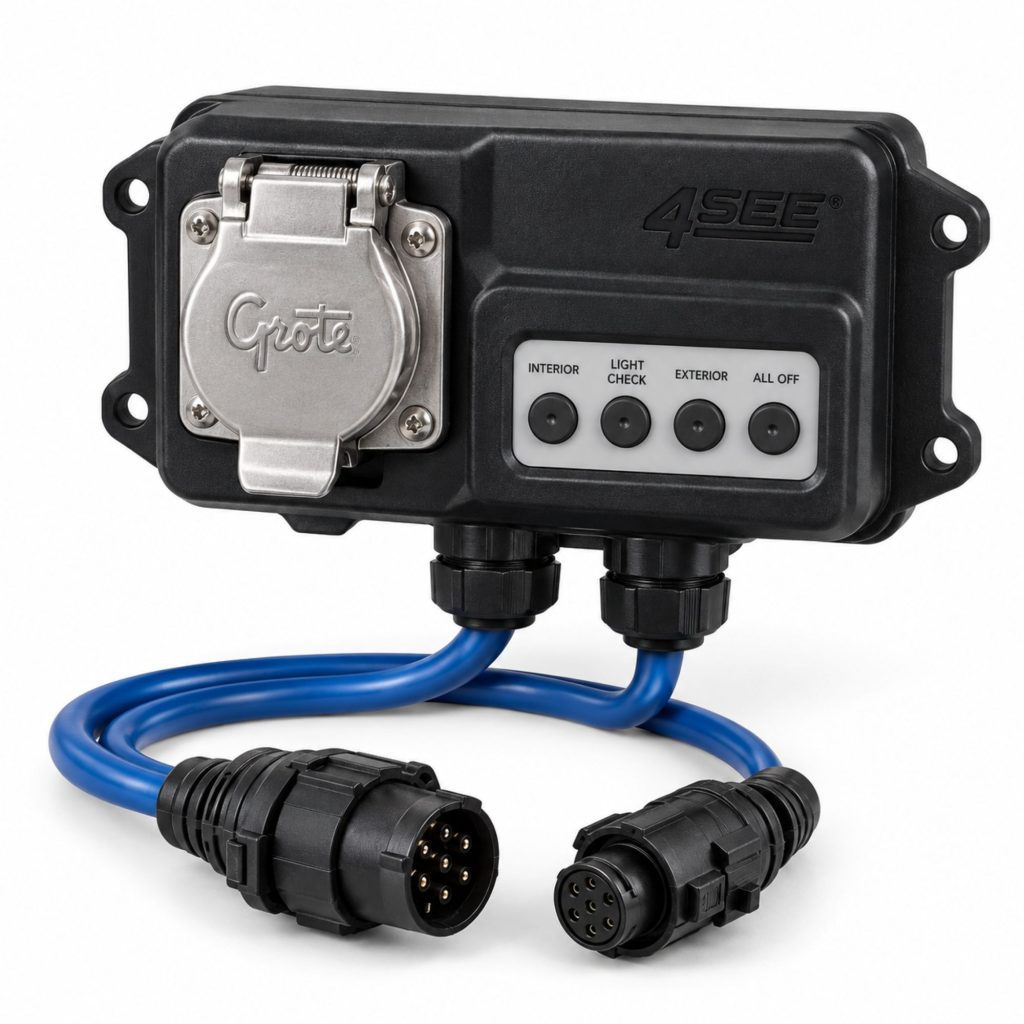
The Grote 4SEE Smart Trailer System is a connected hardware and software platform designed to collect, organize, and communicate information from multiple commercial-trailer systems. It uses a smart nosebox and dedicated digital harness to connect compatible sensors, modules, lights, and safety equipment through one trailer-wide communication architecture.
Rather than requiring separate communication systems for every monitored component, 4SEE creates a common data path. The smart nosebox gathers trailer information and can make it available to the driver, fleet-management portal, cloud service, or compatible third-party telematics provider.
The system can be configured to monitor equipment such as trailer lighting, tire pressure, tire inflation, ABS, doors, cargo, weight, cameras, radar, and location. Not every installation includes every function. The hardware, subscriptions, telematics connection, and sensors must be selected for the fleet’s trailer design and operational needs.
Key Characteristics
- Hardwired smart-trailer architecture
- Central smart nosebox
- Proprietary digital trailer harness
- Dedicated common data stream
- Real-time trailer monitoring capability
- Centralized fault and condition reporting
- Integration with compatible fleet telematics
- Support for new digital and selected legacy equipment
- Application-specific sensor and module selection
- Lighting, tire, ABS, cargo, door, weight, camera, and radar integrations
- Driver, fleet portal, cloud, and third-party data outputs
- Expandable platform for additional smart-trailer functions
- Designed for new installations and selected retrofit applications
Major Components
- 4SEE smart nosebox
- 4SEE digital harness
- Power and communication connections
- Application-specific interface modules
- Trailer lighting modules
- Smart lamps where equipped
- Tire-pressure sensors where equipped
- Automatic tire-inflation interface where equipped
- ABS interface where equipped
- Cargo and door sensors where equipped
- Trailer-weight interface where equipped
- Radar and proximity sensors where equipped
- Rearview camera where equipped
- GPS and telematics hardware where equipped
- Driver display or warning indicators where equipped
- Cloud, portal, and third-party software connections
Product Type and Construction
The 4SEE system is a distributed electronic network rather than one standalone component. Its physical architecture begins at the trailer’s nosebox and extends through the trailer on a dedicated digital harness.
Modules and sensors connect to the harness at application-specific locations. The system can isolate compatible components so a problem affecting one connected device does not necessarily interrupt every other monitored function.
The exact construction depends on the trailer and selected capabilities. A basic monitoring package may contain fewer components than a system equipped with cameras, radar, smart lamps, tire monitoring, cargo sensors, and telematics services.
How the Smart Trailer System Works
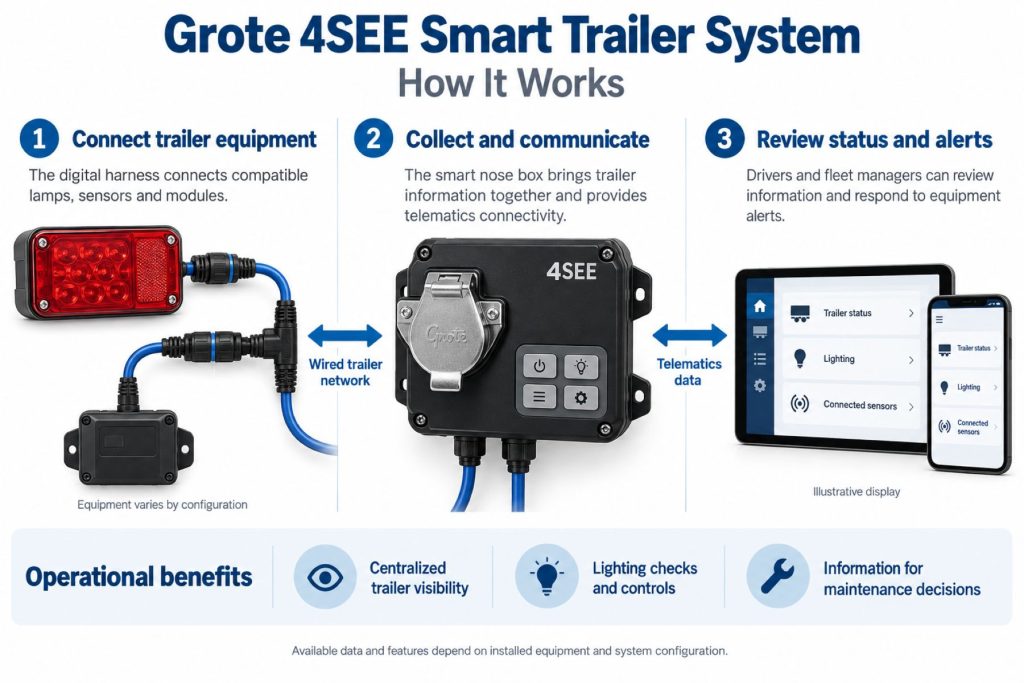
Compatible trailer sensors, modules, and controlled components generate operating information. The 4SEE digital harness carries this information through a dedicated hardwired communication stream to the smart nosebox.
The nosebox organizes information from the connected trailer systems and routes it to the appropriate destination. Depending on the installation, information and alerts may be sent to:
- An in-cab driver display
- A fleet-management portal
- A cloud-based monitoring service
- A smartphone or authorized connected device
- A compatible third-party telematics platform
- Maintenance or dispatch personnel
Because the primary trailer network is hardwired, safety-related information such as rear-camera video, lighting condition, radar alerts, and other monitored data can be transmitted without relying entirely on local wireless communication.
Position and Function Within the Vehicle
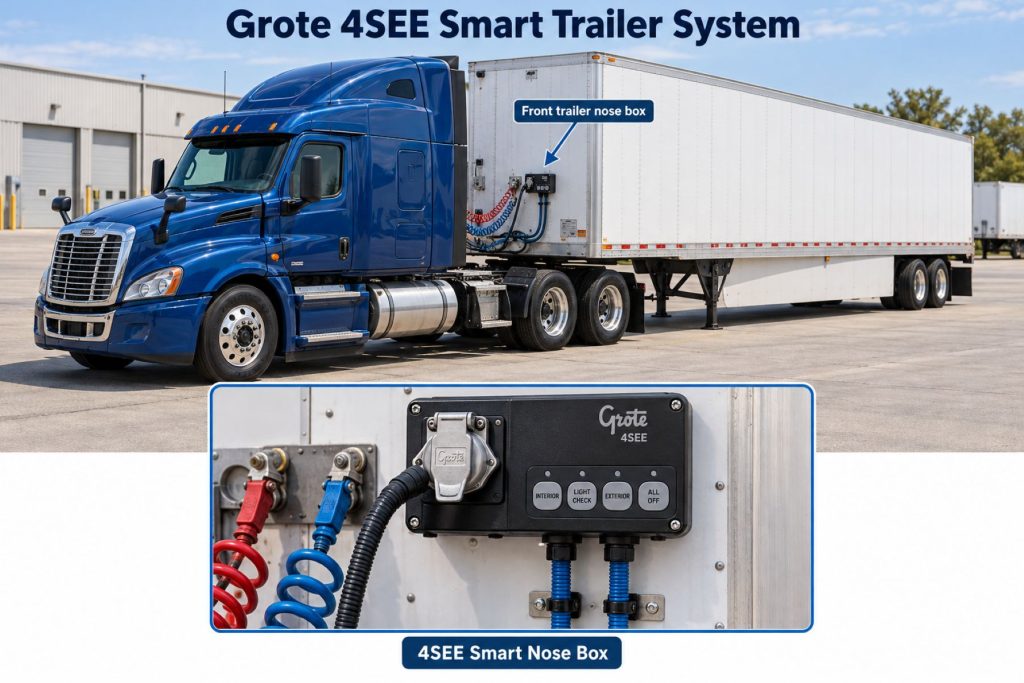
The smart nosebox is positioned near the front of the trailer, where the tractor-to-trailer electrical connection enters the trailer system. The digital harness extends rearward through protected trailer routing paths.
Connected modules and sensors are installed near the equipment they monitor. Camera, radar, lighting, tire, door, cargo, ABS, and weight-system components may therefore be distributed across the front, sides, undercarriage, axles, cargo area, and rear of the trailer.
Common Specifications
- System Type: Integrated smart-trailer monitoring and communication platform
- Primary Architecture: Hardwired distributed electronic network
- Central Interface: 4SEE smart nosebox
- Primary Communication Path: Proprietary 4SEE digital harness
- Data Operation: Real-time or near-real-time reporting, depending on the connected function and telematics service
- Cab Connection: Configuration-specific tractor and cab interface, including supported communication through existing tractor-to-trailer connections
- Telematics Integration: Grote platform and compatible third-party telematics connections
- Sensor Support: Application-specific lighting, tire, ABS, door, cargo, weight, camera, radar, location, and safety equipment
- Installation: New-trailer or approved retrofit installation, depending on trailer and equipment configuration
- Trailer Compatibility: Application-specific dry-van, refrigerated, and flatbed configurations
Voltage range, network topology, connector assignments, data plans, sensor quantities, subscription requirements, software features, and hardware packages must be confirmed for the exact 4SEE installation.
Power, Data, and Operating Capacity
The system receives electrical power through the trailer’s approved power architecture. Power demand depends on the smart nosebox, communication hardware, connected sensors, lamps, cameras, radar units, heaters, and other installed equipment.
Data capacity and reporting frequency depend on the selected modules and telematics configuration. High-priority information such as camera video or immediate safety alerts may have different communication requirements from routine maintenance data.
Additional sensors or controlled equipment should not be connected without verifying available power, circuit protection, network compatibility, connector capacity, and software support.
Digital Harness and Network Architecture
The 4SEE digital harness provides a dedicated hardwired communication path for compatible smart-trailer equipment. Grote uses this architecture to keep multiple trailer data sources on one organized stream.
The hardwired design supports dependable communication and reduces reliance on individual wireless links between trailer components. The harness can also support modules that connect selected legacy and digital hardware while separating component functions within the broader network.
Smart Nosebox and Central Data Management
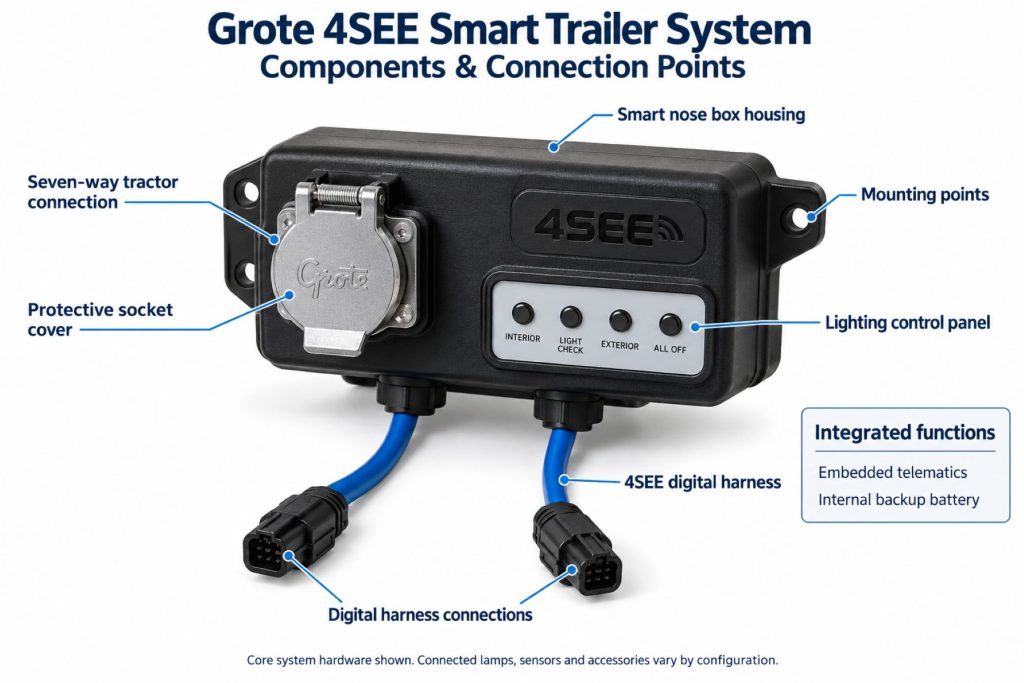
The smart nosebox serves as the central connection and data-management point. It receives information from the trailer’s digital harness and prepares that information for driver, fleet, cloud, or third-party telematics use.
Centralizing the connection reduces the need for every trailer subsystem to use an independent cab interface. The precise inputs, outputs, cellular equipment, diagnostics, and software services depend on the ordered configuration.
Lighting and Electrical-System Monitoring
Configured 4SEE installations can monitor trailer lighting and related electrical conditions. Depending on the hardware, the system may identify failed lamps, abnormal circuit behavior, or other electrical conditions and communicate an alert.
Available 4SEE smart lamps can add digital control, multifunction operation, and customizable behavior. Lighting-monitoring capability does not eliminate required pre-trip and post-trip inspection.
Tire Pressure and Inflation Integration
The system can integrate compatible tire-pressure monitoring and automatic tire-inflation equipment. Tire information can help fleets identify low pressure, abnormal operating conditions, or inflation-system problems before they lead to roadside downtime or tire damage.
Exact pressure readings, alert thresholds, sensor locations, inflation controls, and reporting intervals depend on the installed tire system and fleet configuration.
ABS and Brake-System Integration
Compatible ABS information can be incorporated into the 4SEE data stream. This may allow the system to report ABS-related status or faults to drivers and fleet personnel through the selected interface.
4SEE does not replace the trailer ABS controller, warning lamp, diagnostic software, or required brake inspections. Brake and ABS faults must be diagnosed using the appropriate manufacturer procedures.
Cargo, Door, and Weight Monitoring
Door sensors can report whether a trailer door is open or closed. Cargo-related sensors may provide information about cargo presence, condition, or whether freight has shifted against a door.
Compatible weight-system integration can provide trailer-weight information to support loading decisions and fleet operations. Sensor output should not be treated as a replacement for certified scale weights where legally required.
Camera, Radar, and Proximity-Sensing Integration
Available rearview-camera integration can provide the driver with a real-time view behind the trailer. Grote has demonstrated a wired trailer camera that communicates through the standard tractor-to-trailer connection to a compatible in-cab display with minimal latency.
Radar and proximity sensors can detect objects or vehicles near the trailer. Configured warning indicators may help notify the driver about traffic or obstacles in areas that are difficult to see.
These systems are driver-assistance technologies. They do not replace mirrors, direct observation, proper backing procedures, lane-change checks, or the driver’s responsibility for safe vehicle operation.
Rear-Collision and Roadside Warning Integration
Selected 4SEE configurations can support Grote rear-collision and roadside-warning technologies. A rear radar system can identify rapidly approaching traffic and activate an auxiliary warning lamp where configured.
H.E.L.P. DeliverSAFE integration can provide specialized lighting and digital alerts intended to increase the visibility of a stopped or vulnerable vehicle. Available functions depend on the nosebox, smart lamps, telematics service, and installed warning equipment.
Telematics, Cloud, and Fleet-Portal Integration
The system can transmit trailer information to fleet-management and telematics platforms. Centralized data may help maintenance, dispatch, safety, and operations teams monitor trailer condition and respond to faults.
Available functions may include:
- Real-time or scheduled trailer-status reporting
- Location information
- Fault and condition alerts
- Maintenance-event history
- Door and cargo status
- Tire and inflation information
- Lighting and ABS condition
- Weight-system information
- Fleet dashboards and reports
- Third-party telematics data exchange
Installation and System Setup
Installation includes mounting the smart nosebox, routing the digital harness, connecting compatible modules and sensors, establishing power and communication connections, and configuring the software environment.
Grote states that installation can take approximately 40 minutes for an applicable configuration, with harness routing accounting for much of the work. Actual installation time depends on trailer design, retrofit complexity, equipment package, technician experience, and required software setup.
System setup may require:
- Assigning the trailer identification number
- Registering the nosebox or communication hardware
- Identifying installed sensors and modules
- Configuring alert thresholds
- Connecting the fleet or third-party telematics account
- Confirming cab-display compatibility
- Testing every monitored component
- Verifying data transmission and alert delivery
Trailer Frame and Body Compatibility
The system must be matched to the trailer structure, electrical architecture, sensor locations, axle equipment, doors, cargo area, rear lighting, and existing telematics hardware.
Compatibility depends on:
- Trailer manufacturer and model
- Trailer type and production year
- Dry-van, refrigerated, or flatbed construction
- Electrical and lighting architecture
- Available nosebox mounting space
- Harness-routing paths
- ABS and brake-system configuration
- Tire and inflation equipment
- Door and cargo layout
- Camera and radar mounting locations
- Existing telematics hardware
- Tractor-to-trailer connection design
Vehicle and Telematics-System Compatibility
The trailer system must communicate correctly with the assigned tractors, displays, gateways, fleet portal, and third-party telematics services. Fleets using multiple tractor, trailer, and telematics platforms should confirm compatibility across every intended pairing.
Software accounts, cellular service, subscriptions, application programming interfaces, gateway hardware, and cab displays may be required for some capabilities. A physically installed sensor does not guarantee that its information will appear in every fleet platform.
Common Applications
- Dry-van fleets
- Refrigerated-trailer fleets
- Flatbed operations
- Long-haul trucking fleets
- Regional distribution fleets
- Private fleets
- High-value cargo operations
- Drop-and-hook trailer fleets
- Large trailer pools
- Safety-focused fleets
- Fleets seeking predictive maintenance information
- Operations integrating multiple trailer sensors
Advantages
- Centralizes information from multiple trailer systems
- Uses a dedicated hardwired data network
- Supports real-time safety-related information
- Can integrate with compatible existing telematics platforms
- Provides driver and fleet personnel with trailer-condition alerts
- Can improve visibility into lighting, tires, ABS, cargo, and doors
- Supports compatible rear cameras and proximity sensors
- May reduce unplanned downtime through earlier fault awareness
- Supports selected legacy and digital trailer equipment
- Can reduce separate wiring and communication systems
- Expandable as fleet requirements and available functions change
- Supports maintenance, safety, dispatch, and operations teams
Limitations or Considerations
- Not every function is included in every installation
- Requires compatible hardware, sensors, and software
- Some functions may require subscriptions or cellular service
- Installation complexity varies by trailer design
- Retrofitting older trailers may require additional hardware
- Incorrect configuration can produce missing or unreliable data
- Sensor alerts do not replace required vehicle inspections
- Camera and radar systems do not replace driver observation
- Third-party telematics compatibility must be confirmed
- Network faults can interrupt data from connected equipment
- Software and firmware require lifecycle management
- Technicians may require specialized diagnostic training
- Fleet cybersecurity and user-access policies remain necessary
Driver and Operator Experience
Depending on the configuration, the driver may receive warnings or status information through an in-cab display, indicator, connected telematics interface, or fleet communication system.
Driver-facing information may include:
- Lighting faults
- ABS status
- Low tire pressure
- Door status
- Cargo-related warnings
- Blind-spot or proximity alerts
- Rear-camera video
- Trailer connection or communication faults
Drivers should understand which alerts require immediate action and which can be reported for scheduled service. The system should support, rather than replace, established pre-trip, en-route, and post-trip inspection procedures.
Inspection and Wear Points
- Smart nosebox housing and mounting
- Tractor-to-trailer electrical connections
- Digital harness jacket and routing
- Harness connectors and seals
- Module mounting points
- Sensor brackets and alignment
- Camera lens and housing
- Radar units and mounting angles
- Door and cargo sensors
- Tire sensors and wheel-end wiring
- ABS interface connections
- Lighting modules and smart lamps
- Ground connections
- Harness clips, clamps, and strain relief
Software, Firmware, and System Calibration
The 4SEE platform may require software configuration, device registration, firmware management, sensor assignment, and alert-threshold setup. Exact procedures depend on the installed hardware and connected fleet platform.
Cameras, radar units, weight sensors, tire systems, and door sensors may require position assignment or calibration. Software updates should be installed according to Grote and connected-equipment instructions.
Data Security and User Access
Fleet administrators should control access to trailer locations, cargo information, camera systems, maintenance records, and operational alerts. User permissions should be assigned according to job responsibilities.
Account credentials, connected applications, mobile devices, software integrations, and third-party access should follow the fleet’s cybersecurity and data-retention policies. Decommissioned trailers and users should be removed from the active system.
Component and System Service Life
System life depends on installation quality, trailer duty cycle, environmental exposure, connector sealing, vibration, impacts, wiring support, software maintenance, and sensor location.
Individual sensors, modules, harness sections, cameras, and communication devices may have different service lives. A failed component should be identified through proper diagnostics rather than replacing the complete system without testing.
Maintenance and Ownership Notes
Inspect physical hardware during normal trailer preventive maintenance. Keep harnesses properly supported, connectors fully engaged, camera lenses clean, sensors correctly aligned, and mounting hardware secure.
Review system alerts and communication history instead of clearing repeated warnings without diagnosis. Fleet maintenance records should identify replaced modules, firmware changes, sensor assignments, calibration work, and unresolved faults.
Common Smart-Trailer System Problems
- Trailer appears offline: Loss of power, a damaged tractor connection, nosebox fault, telematics outage, weak cellular service, account problem, or network failure may prevent reporting.
- Sensor data is missing: A disconnected sensor, damaged branch harness, incorrect device assignment, incompatible module, failed sensor, or software configuration error may be responsible.
- Repeated false alerts: Incorrect thresholds, poor calibration, loose mounting, damaged wiring, sensor contamination, or improper component placement can create unreliable warnings.
- Camera image is unavailable: A power fault, damaged cable, failed camera, display incompatibility, connection problem, or software configuration issue may interrupt the video feed.
- Radar warning is inaccurate: Misalignment, blocked sensors, damaged brackets, contamination, incorrect calibration, or unsuitable mounting can affect detection.
- Lighting fault is not reported: The installed lamp or circuit may not be connected to the monitoring module, or the module, wiring, configuration, or alert routing may be incorrect.
- Data does not reach the fleet portal: Gateway, cellular, cloud, account, subscription, integration, or third-party platform problems may block transmission.
- Intermittent network communication: Loose connectors, harness damage, low voltage, poor grounding, moisture intrusion, or module failure can interrupt the data stream.
Safety and Service Precautions
Secure the tractor and trailer before inspecting or servicing the system. Disconnect or isolate electrical power according to Grote, trailer-manufacturer, and connected-component procedures.
- Do not rely on electronic alerts as the only inspection method
- Do not work beneath unsupported trailer equipment
- Use approved electrical and network diagnostic tools
- Protect harnesses from sharp edges, heat, tires, and moving components
- Restore seals, supports, and strain relief after service
- Calibrate cameras, radar, and sensors after replacement or movement
- Confirm warning indicators and alert routing before returning the trailer to service
- Verify brake, ABS, tire, lighting, and door systems independently after repairs
- Follow fleet cybersecurity procedures when servicing connected equipment
Identification Information
Identification information may be located on the smart nosebox, digital harness, sensors, modules, camera, radar unit, telematics hardware, packaging, or trailer build records.
Record the following information before ordering parts or requesting technical support:
- Trailer manufacturer
- Trailer identification number
- Trailer model and production year
- Trailer type and body length
- 4SEE system or package identification
- Smart nosebox part and serial numbers
- Digital harness part numbers
- Installed module and sensor numbers
- Camera and radar identification
- ABS and tire-system information
- Telematics gateway information
- Software and firmware versions
- Fleet account and trailer-assignment information
- Third-party telematics platform
Buying Considerations
- Identify the trailer types included in the deployment
- Determine which systems must be monitored
- Select required camera, radar, tire, lighting, cargo, door, ABS, and weight functions
- Confirm new-installation or retrofit compatibility
- Review tractor and cab-display requirements
- Verify compatibility with existing telematics services
- Determine cellular, cloud, and subscription costs
- Review installation labor and trailer downtime
- Confirm fleet-portal and reporting capabilities
- Establish alert thresholds and response procedures
- Plan technician and driver training
- Review replacement-parts and technical-support availability
- Establish data security and user-access policies
- Compare system cost with expected safety and maintenance benefits
Variants and Configurations
- Dry-van configurations
- Refrigerated-trailer configurations
- Flatbed-trailer configurations
- New-trailer installations
- Approved retrofit installations
- Lighting-monitoring packages
- Smart-lamp configurations
- TPMS and tire-inflation integrations
- ABS integrations
- Cargo and door monitoring
- Trailer-weight integration
- Rearview-camera configurations
- Radar and proximity-sensing packages
- Rear-collision warning configurations
- H.E.L.P. DeliverSAFE integrations
- Grote portal and third-party telematics connections
Comparison to Similar Equipment
Compared with a basic trailer GPS tracker, 4SEE can collect information from multiple trailer systems rather than reporting only location and movement.
Compared with independent wireless sensors, 4SEE uses a dedicated hardwired digital harness to bring compatible devices into one organized trailer network.
Compared with the Grote Guardian Smart Trailer System, 4SEE provides a broader architecture intended to integrate lighting, tires, ABS, cameras, radar, cargo, doors, weight, and telematics equipment. Guardian is more directly associated with trailer-lighting monitoring.
Compared with a conventional trailer wiring harness, 4SEE adds digital communication and data management while continuing to distribute power to compatible equipment.
Best Fit For
- Fleets seeking centralized trailer-condition data
- Large dry-van and refrigerated-trailer fleets
- Flatbed fleets using compatible configurations
- Operations with large drop-and-hook trailer pools
- Fleets needing real-time safety alerts
- Maintenance programs seeking earlier fault awareness
- Operations integrating multiple trailer sensors
- Fleets wanting compatible cameras and proximity detection
- Organizations already using fleet telematics platforms
- High-value or security-sensitive cargo operations
- Fleets planning long-term smart-trailer adoption
Related Vehicle and Trailer Types
- Dry Van Trailers
- Refrigerated Trailers
- Flatbed Trailers
- Complete Guide to Semi Truck Types
- Class 6 vs Class 7 vs Class 8 Trucks
Related Truck and Trailer Models
- Great Dane Champion
- Great Dane Everest
- Hyundai Translead Dry Van
- Utility 3000D
- Utility 3000R
- Vanguard VXP
- Wabash DuraPlate Dry Van
Related Electrical System Types
- Wiring, Connectors & Power Distribution
- Truck & Trailer Lighting Systems
- Inverters, Converters & Auxiliary Electrical Power
- Smart-trailer electrical networks
- Trailer telematics systems
- Trailer sensor networks
- Trailer camera and radar systems
- Trailer lighting-monitoring systems
Related Electrical Products
- Grote Guardian Smart Trailer System
- Grote 4SEE Smart Nosebox
- Grote 4SEE Digital Harness
- Grote 4SEE Smart Lamps
- Grote 4SEE Rearview Camera System
- Grote 4SEE Rear-Collision Warning System
- Grote H.E.L.P. DeliverSAFE System
- Phillips STA-DRY SLIM-7 Electrical System
- Bendix SmarTire Trailer-Link TPMS
- Hendrickson TIREMAAX PRO-LB Tire Inflation System
Related Equipment Systems
- Electrical Systems
- Telematics & ELD Systems
- Safety Systems
- Brake Systems
- Tires & Wheels
- Suspension Systems
Related Guides
- Electrical System Guides
- How Commercial Truck Electrical Systems Work
- How to Inspect and Maintain Truck Wiring and Electrical Connections
- Commercial Truck and Trailer Lighting Systems Explained
- How Smart Trailer Systems Work
- Commercial Trailer Telematics Explained
- Trailer Tire Pressure Monitoring and Inflation Systems Explained
Regulatory and Compliance Notes
Smart-trailer monitoring does not replace required driver inspections, maintenance procedures, certified weighing, cargo-securement checks, brake inspections, tire inspections, lighting checks, or regulatory documentation.
Installed cameras, radar units, lamps, warning devices, ABS interfaces, and telematics equipment must preserve all applicable vehicle requirements. Modifications must not disable required lamps, warning indicators, brake functions, or other safety equipment.
Fleets should also review privacy, data-retention, cybersecurity, camera-use, driver-notification, and location-tracking requirements applicable to their operations.
Real World Operating Notes
The value of a connected system depends on how the fleet responds to its information. Alerts should be assigned to responsible personnel and connected to clear inspection, repair, and escalation procedures.
Repeated warnings should not simply be cleared. A recurring tire, lighting, ABS, door, communication, or sensor alert may indicate an intermittent physical fault that requires inspection.
Before a large fleet deployment, a controlled pilot can help establish installation time, alert thresholds, technician training, driver acceptance, telematics compatibility, and expected return on investment.
Frequently Asked Questions
What is the Grote 4SEE Smart Trailer System?
It is a connected trailer platform that uses a smart nosebox and hardwired digital harness to collect and communicate information from compatible trailer systems.
Is 4SEE wireless?
Its primary trailer communication architecture is hardwired. Cellular or other communication may still be used to transmit information from the trailer to cloud and fleet platforms.
What can the system monitor?
Available integrations can include lighting, ABS, tire pressure, tire inflation, doors, cargo, trailer weight, location, cameras, radar, and other compatible systems.
Does every 4SEE installation include all available features?
No. Hardware and software functions depend on the system package, trailer design, sensors, integrations, subscriptions, and fleet requirements.
Can 4SEE work with third-party telematics?
Grote designed the platform to integrate with compatible existing telematics solutions. Specific compatibility must be confirmed with Grote and the telematics provider.
Can it be installed on existing trailers?
Selected retrofit installations may be possible. Compatibility depends on the trailer structure, electrical system, existing equipment, and desired functions.
How long does installation take?
Grote states that installation can take approximately 40 minutes for an applicable configuration. Actual time varies according to trailer design, equipment package, retrofit work, and system setup.
Does the system replace pre-trip inspections?
No. It supplements driver and maintenance inspections by providing another source of trailer-condition information and en-route alerts.
Can 4SEE show a rear-camera image in the cab?
A compatible wired rearview-camera configuration can provide a real-time feed to an approved in-cab display.
How are replacement components identified?
Use the trailer VIN, 4SEE package information, smart nosebox number, harness part numbers, sensor and module numbers, installed software version, and connected telematics platform.
Availability and Where to Find
The Grote 4SEE Smart Trailer System may be available through Grote Industries, participating trailer manufacturers, commercial-trailer dealers, fleet-equipment integrators, telematics providers, and approved installation partners.
Availability depends on trailer type, installation method, selected monitoring functions, compatible sensors, telematics platform, software services, and geographic support. Current system information and sales assistance are available through the Grote 4SEE website.
Support Trucking Families
Truck Equipment Atlas supports the mission of Grey Cross, a nonprofit dedicated to helping families of truck drivers who lose their lives while on the road. As the site grows, part of its mission is to bring awareness and support to these families.
Podcast or Video Section
Learn More Through Audio and Video
Truck Equipment Atlas will continue expanding with podcast episodes, interviews, and equipment breakdowns to help drivers and fleets better understand trucks and equipment.
Follow the Growth of Truck Equipment Atlas
Truck Equipment Atlas continues to expand with new truck profiles, trailer coverage, diesel engine pages, equipment system resources, manufacturer information, and educational guides.
Visit our Site Updates page to explore recent additions, project milestones, and upcoming resources as we continue building one of the industry’s growing commercial trucking equipment reference libraries.
View the Latest Site Updates: Truck Equipment Atlas Site Updates