
Bendix Intellipark Electronic Parking Brake
Quick Facts
- Manufacturer: Bendix Commercial Vehicle Systems
- Product Name: Bendix Intellipark Electronic Parking Brake System
- Product Type: Electronically controlled pneumatic parking-brake system
- Brake-System Category: Electronic braking and parking-brake control
- Primary Function: Controls application and release of commercial-vehicle spring brakes
- Primary Safety Function: Helps mitigate unintended vehicle rollaways
- Driver Interface: Electronic tractor and trailer parking-brake switches with LED indicators
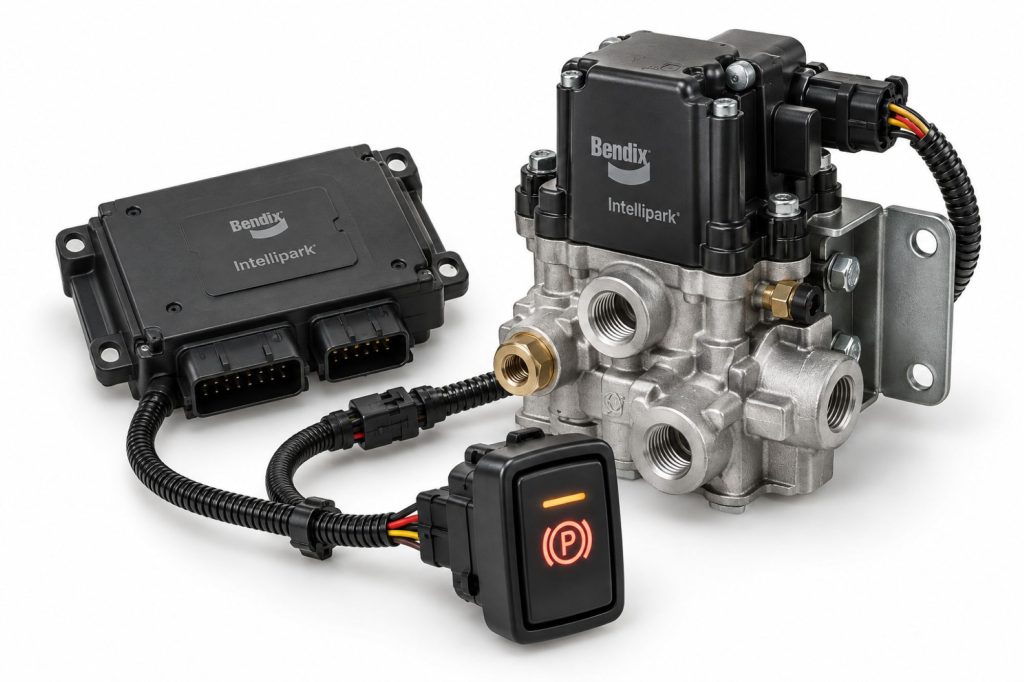
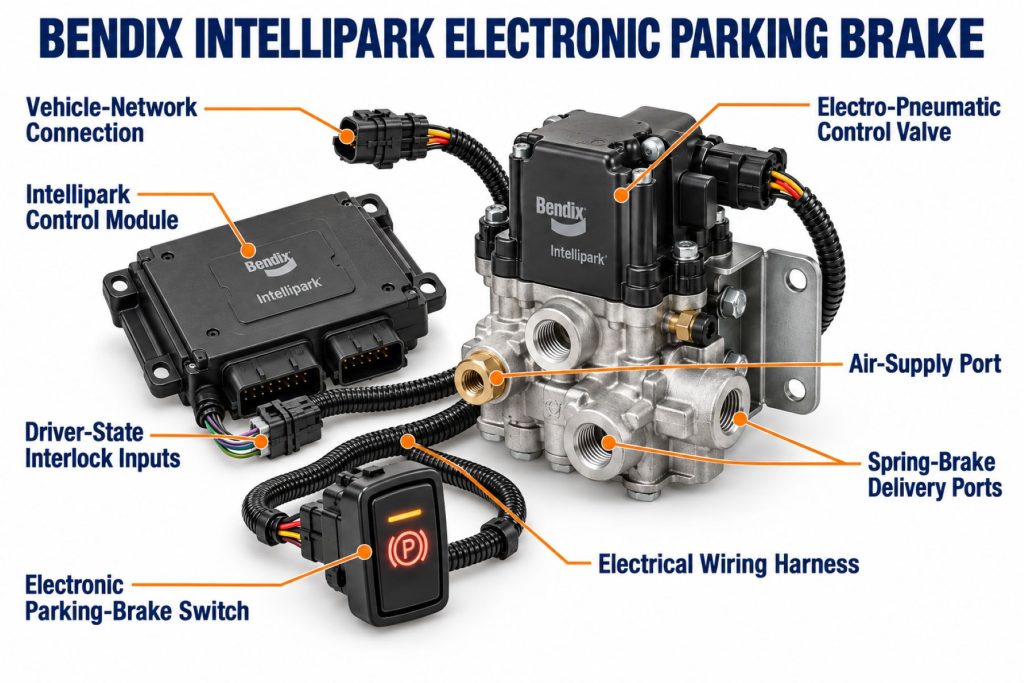
- Core Modules: Dash Electronic Control Unit and Park Valve Module
- Key Feature: Automatically applies the parking brakes when specified rollaway-risk conditions are detected
- Smart Unpark Function: Uses vehicle interlocks to help confirm the vehicle is ready to move
- Optional Functions: Auto Trailer Brake Release, Exhaust-at-Speed, Intellipark Display Unit, and fleet-data integration
- Primary Applications: Tractors, straight trucks, motor coaches, school buses, and other air-braked commercial vehicles
- Installation Type: Factory-installed, vehicle-specific integrated system
- Primary Benefit: Combines rollaway mitigation with a simpler electronic parking-brake interface
Overview
The Bendix Intellipark Electronic Parking Brake System is an electronically controlled pneumatic system that replaces traditional red and yellow push-pull parking-brake control valves with electronic switches.
The system continues to operate the vehicle’s pneumatic spring brakes. However, it uses electronic controls, vehicle-status information, and electropneumatic valves to determine when the tractor and trailer parking brakes should apply or release.
Its primary safety function is rollaway mitigation. If the driver fails to apply the parking brakes and the system detects specified conditions associated with the driver leaving or not properly controlling the vehicle, Intellipark can automatically apply the parking brakes.
The system also provides Smart Unpark functionality. When the required interlock conditions are satisfied, the driver can release the parking brakes using the electronic switch. Inputs may include door position, seat-belt status, vehicle movement, brake status, and other vehicle-specific information.
LED indicators communicate whether the tractor and trailer brakes are applied or released. An available Intellipark Display Unit can provide additional system messages, alerts, operating status, and interlock information.
Bendix describes Intellipark as a rollaway-mitigation system designed for tractor-trailers, single-unit trucks, motor coaches, and school buses. Bendix Intellipark product information
Key Characteristics
- Electronically controlled pneumatic parking-brake system
- Replaces conventional red and yellow push-pull control knobs
- Uses ergonomic electronic parking-brake switches
- Includes integrated LED status indicators
- Helps mitigate unattended vehicle rollaways
- Can automatically apply parking brakes under specified conditions
- Smart Unpark interlock functionality
- Controls tractor and trailer parking brakes on towing configurations
- Supports single-unit vehicle configurations
- Retains spring-brake fail-safe operation
- Designed to operate with commercial-vehicle air-brake systems
- Optional automatic trailer parking-brake release
- Optional emergency Exhaust-at-Speed function
- Available Intellipark Display Unit
- Can produce system and event information
- Compatible with selected Bendix driver-assistance technologies
- Vehicle-specific electronic and pneumatic integration
Major Components
- Dash Electronic Control Unit
- Electronic tractor parking-brake switch
- Electronic trailer parking-brake switch on towing vehicles
- Integrated LED indicators
- Park Valve Module
- Intellipark Display Unit where equipped
- Spring-brake control valves
- Vehicle air reservoirs
- Spring-brake chambers
- Parking-brake air lines
- Trailer-supply circuit
- Tractor-protection system
- Door-position input
- Seat-belt-status input
- Vehicle-speed input
- Service-brake input
- Transmission-status input where specified
- Ignition-status input
- SAE J1939 vehicle-network connection
- Electrical wiring harnesses
- Connectors and mounting hardware
- Diagnostic interface
How the Brake Component or System Works
Intellipark electronically controls the pneumatic valves that apply and release the vehicle’s spring brakes. The driver uses dash-mounted electronic switches instead of mechanically operated push-pull valves.
When the driver requests parking-brake application, the Dash Electronic Control Unit sends an electronic command to the Park Valve Module. The valve module exhausts air from the appropriate spring-brake circuit. The spring-brake actuators then use their internal mechanical power springs to apply the brakes.
When the driver requests parking-brake release, the controller first evaluates the applicable interlock conditions. If the vehicle is ready to move, the Park Valve Module supplies air pressure to the spring-brake chambers. This compresses the power springs and releases the parking brakes.
If Intellipark determines that an unintended rollaway may be developing because the driver failed to set the brakes, it can automatically command parking-brake application.
The system’s exact logic depends on the vehicle manufacturer and configuration. It may evaluate inputs such as:
- Driver-door position
- Seat-belt status
- Vehicle movement
- Service-brake application
- Transmission state
- Ignition state
- Available air pressure
- Tractor or trailer connection status
Intellipark does not replace the spring brakes. It replaces and expands the control method used to apply and release them.
Position and Function Within the Brake System
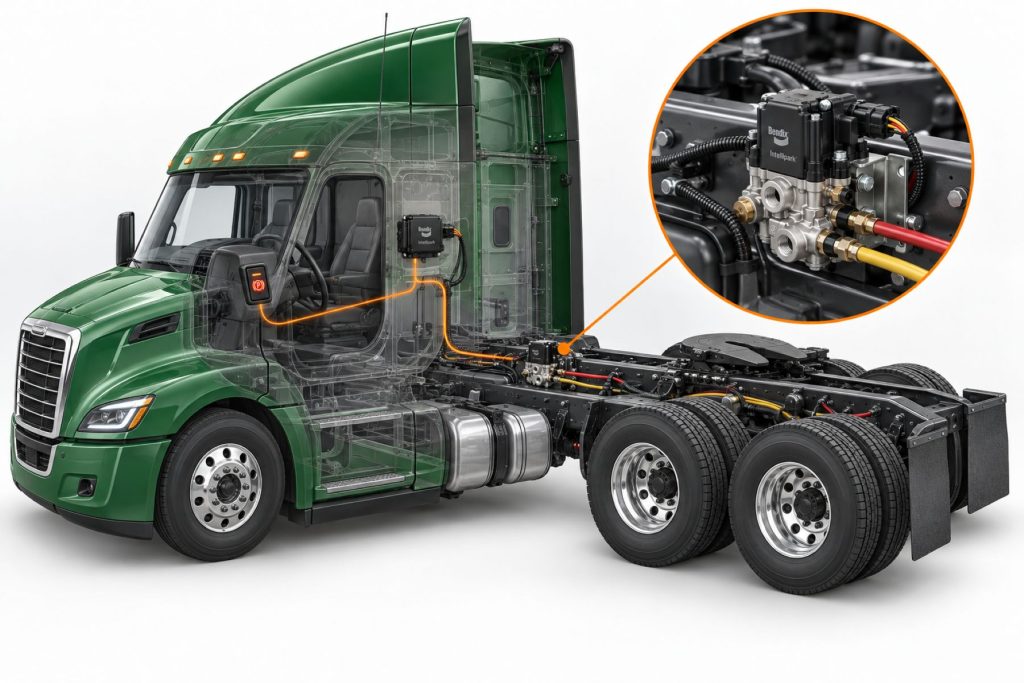
Intellipark is installed between the driver’s parking-brake controls and the vehicle’s pneumatic spring-brake circuits.
The driver interface is located in the cab. The electronic switches send requests to the Dash Electronic Control Unit rather than directly controlling air pressure.
The controller processes the driver’s request and information received from other vehicle systems. It then commands the Park Valve Module to apply or release the appropriate pneumatic circuit.
On a tractor, the system may control:
- Tractor spring brakes
- Trailer spring brakes
- Trailer air supply
- Rollaway-mitigation functions
- Smart Unpark functions
- Optional trailer-brake release logic
On a straight truck or bus, the system generally controls the vehicle’s spring brakes without a separate trailer circuit unless the chassis is equipped for towing.
Common Specifications
- System Type: Electronic parking-brake control
- Brake Actuation: Pneumatic spring brakes
- Driver Control: Electronic switches
- Status Display: Integrated LEDs and optional display unit
- Primary Controller: Dash Electronic Control Unit
- Primary Pneumatic Component: Park Valve Module
- Vehicle Inputs: Application-specific door, seat belt, speed, service-brake, transmission, and ignition information
- Vehicle Communication: Application-specific electronic data network
- Tractor Configuration: Tractor and trailer parking-brake control
- Single-Unit Configuration: Vehicle parking-brake control
- Fail-Safe Medium: Mechanical spring-brake force
- Diagnostics: Electronic diagnostic trouble codes and Bendix-compatible service tools
- Installation: Original-equipment and vehicle-specific
- Foundation-Brake Compatibility: Compatible air-braked vehicle configurations
Exact switch arrangement, valve module, software, wiring, interlocks, pneumatic connections, and optional functions depend on the vehicle manufacturer and model.
Operating Specifications and Performance
Intellipark requires adequate air pressure, electrical power, valid input signals, and functional pneumatic components for normal parking-brake release.
Parking-brake application relies on exhausting air from the spring-brake circuit. The spring inside each actuator then supplies the mechanical force needed to apply the foundation brake.
Normal release requires sufficient pressure to compress the power springs. Low system pressure may prevent the brakes from releasing even if the electronic control system accepts the driver’s request.
The system continually monitors operating information and communicates brake status through its LEDs or display. A steady, flashing, or unexpected indicator may communicate a normal transition, an unmet interlock condition, or a system fault. Drivers must follow the exact vehicle operator’s manual because indicator patterns can vary by application.
Intellipark performance depends on:
- Adequate air-system pressure
- Correct spring-brake operation
- Functional Park Valve Module
- Reliable electrical power
- Valid sensor and interlock inputs
- Correct controller software
- Proper vehicle-network communication
- Correct pneumatic plumbing
- Functional foundation brakes
- Proper parking-brake adjustment and maintenance
Braking Performance and System Integration
Intellipark does not create additional foundation-brake torque. Parking-brake holding ability remains dependent on the spring-brake actuators, brake chambers, slack adjusters, calipers or cam brakes, friction material, drums or rotors, tires, and road surface.
The system improves parking-brake control by adding electronic logic and automatic functions. It can recognize certain operating conditions that a conventional manual push-pull valve cannot evaluate.
Integration may include communication with:
- Engine controller
- Transmission controller
- ABS or stability controller
- Instrument cluster
- Driver-door sensors
- Seat-belt system
- Vehicle-speed network
- Bendix advanced driver-assistance technology
- SafetyDirect fleet-information services
The system must distinguish between an intentional parking-brake request, a valid release request, an interlock that has not been satisfied, and a potential rollaway event.
Air Supply, Controls, and Electronic Integration
Intellipark combines electronic commands with pneumatic brake control. Electrical switches tell the controller what the driver has requested, while the Park Valve Module directs compressed air through the parking-brake system.
The system may interact with:
- Air compressor
- Air dryer
- Supply reservoirs
- Primary and secondary reservoirs
- Spring-brake reservoirs
- Spring-brake chambers
- Tractor-protection valve
- Trailer-supply circuit
- ABS controller
- Stability-control system
- Engine controller
- Transmission controller
- Instrument cluster
- SAE J1939 communication network
- Bendix diagnostic software
The electronic system does not eliminate pneumatic fail-safe operation. If air pressure falls below the level needed to contain the spring brakes, the mechanical power springs can apply the brakes.
Bendix states that parking-brake actuation remains possible without electrical power. The exact degraded-mode behavior and driver procedure must be confirmed using the vehicle-specific operator’s manual.
Installation, Adjustment, and Brake Balance
Intellipark is engineered as part of the complete vehicle. Installation requires the correct electronic controller, switches, Park Valve Module, pneumatic circuits, wiring, software, interlocks, and vehicle-network integration.
It should not be treated as a universal electronic switch that can replace a conventional dash valve without additional engineering.
Correct system installation depends on:
- Vehicle manufacturer
- Chassis model
- Model year
- Tractor or single-unit configuration
- Air-brake system layout
- Spring-brake circuit
- Trailer-control system
- Electrical architecture
- Network communication
- Transmission type
- Door and seat-belt inputs
- Approved controller software
- Correct valve-module plumbing
The foundation brakes must also be correctly adjusted and balanced. Intellipark can command brake application, but it cannot compensate for worn friction material, excessive chamber stroke, damaged spring brakes, seized components, or contaminated braking surfaces.
Following repairs, technicians should verify tractor and trailer parking-brake operation, switch response, LED status, interlock behavior, diagnostic codes, air leakage, and proper brake holding.
Foundation Brake, Axle, and Wheel-End Compatibility
Intellipark controls the vehicle’s spring-brake circuits and can work with approved air-disc or S-cam drum-brake configurations.
Compatibility depends on:
- Spring-brake actuator specification
- Foundation-brake type
- Axle arrangement
- Tractor or straight-truck configuration
- Parking-brake circuit design
- Brake chamber size
- Park Valve Module configuration
- Trailer air-supply system
- Vehicle electrical system
- Controller calibration
The electronic control system cannot make an incompatible or improperly maintained foundation brake safe. All wheel-end components must meet the vehicle manufacturer’s specifications.
Common Applications
- Class 8 highway tractors
- Medium-duty trucks
- Heavy-duty straight trucks
- Vocational trucks
- Delivery vehicles
- Refuse trucks
- Construction trucks
- Utility vehicles
- Motor coaches
- Transit buses
- School buses
- Emergency vehicles
- Specialty commercial vehicles
- Air-braked towing vehicles
- Vehicles with frequent stop-and-exit duty cycles
Vehicle and Brake-System Compatibility
Bendix Intellipark is available on selected factory-built commercial vehicles. Compatibility depends on the manufacturer, model, production date, chassis, air-brake system, transmission, cab electronics, and selected option package.
As of late 2025, Bendix announced factory availability for Kenworth trucks and Peterbilt heavy-duty, medium-duty, and Model 520 vehicles. Availability for an individual vehicle must still be verified through its build information.
Intellipark may be configured for:
- Tractor-trailers
- Single-unit trucks
- Motor coaches
- School buses
- Vocational vehicles
- Other approved air-braked chassis
A truck cannot be assumed to have Intellipark because it has electronic stability control, Bendix ABS, or Bendix Wingman Fusion. The system must be confirmed from its electronic switches, component labels, vehicle build sheet, or diagnostic information.
Advantages
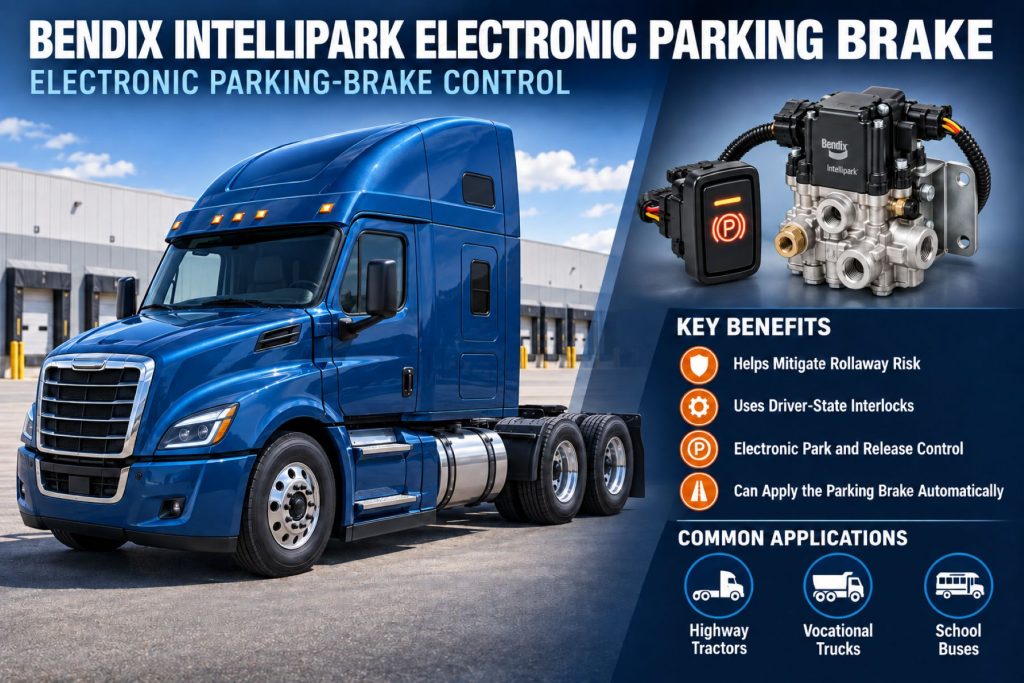
- Helps mitigate unintended vehicle rollaways
- Can apply parking brakes if the driver forgets
- Uses electronic interlocks
- Provides clear LED brake-status information
- Replaces conventional push-pull controls
- Reduces push-pull valve effort and kickback
- Can reduce driver distraction during frequent stops
- Provides quieter control operation
- Supports tractor and trailer brake control
- Offers Smart Unpark functionality
- Can automatically release trailer brakes in qualifying conditions
- May reduce trailer tire and wheel-end damage caused by moving with trailer brakes applied
- Supports diagnostic and event information
- Can integrate with Bendix advanced safety systems
- Retains pneumatic spring-brake fail-safe operation
Limitations or Considerations
- Cannot prevent every rollaway
- Does not replace proper parking procedures
- Requires vehicle-specific electronic integration
- Requires reliable electrical power for normal control functions
- Requires adequate air pressure for brake release
- Faulty interlock inputs can prevent normal release
- Network problems can disable electronic functions
- Drivers must understand LED and display indications
- Optional features are not included on every vehicle
- Not intended as a universal aftermarket conversion
- Foundation-brake condition still determines holding performance
- Improper loading or steep grades can exceed available tire adhesion
- Wheel chocks may still be required by operating rules
- Controller software must match the vehicle
- Previous units may be subject to product-action or recall checks
Driver and Operator Experience
Intellipark replaces the traditional parking-brake knobs with electronic switches. The switches retain familiar colors, symbols, and identification but require less physical effort to operate.
LED indicators allow the driver to check parking-brake status at a glance. An available display can communicate system messages, alerts, and reasons why an unpark request has not been accepted.
Before leaving the driver’s seat, the driver should still:
- Bring the vehicle to a complete stop.
- Apply the parking brakes.
- Place the transmission in the required position.
- Confirm the brake-status indication.
- Shut down or secure the vehicle as required.
- Use wheel chocks when required.
Drivers should not intentionally depend on automatic rollaway mitigation instead of setting the parking brakes.
Operators should report unexpected brake application, failure to release, flashing indicators, status disagreement, fault messages, air leakage, or changes in switch operation.
Maintenance and Ownership Notes
- Inspect electronic parking-brake switches.
- Check LED indicators during startup.
- Verify the displayed brake status.
- Test normal tractor parking-brake application.
- Test trailer parking-brake application where equipped.
- Verify Smart Unpark operation.
- Inspect Park Valve Module air connections.
- Check pneumatic lines for leaks and abrasion.
- Inspect wiring harnesses and connectors.
- Check electrical grounds and supply voltage.
- Retrieve and document diagnostic trouble codes.
- Verify door-position sensor operation.
- Check seat-belt-status input.
- Inspect vehicle-network wiring.
- Maintain correct reservoir pressure.
- Inspect spring-brake chambers.
- Measure chamber stroke where applicable.
- Maintain foundation brakes.
- Confirm trailer-supply and protection-system operation.
- Check current recall and product-action information.
- Use Bendix and vehicle-manufacturer service procedures.
Common Brake-System Problems
- Parking brakes will not release: Low air pressure, an unmet interlock, an active fault, a failed switch, Park Valve Module malfunction, wiring damage, or a spring-brake problem may prevent release.
- Parking brakes will not apply by switch command: Electrical power loss, controller failure, valve-module problems, wiring faults, pneumatic restrictions, or incorrect system configuration may be responsible.
- LED indicator flashes: The system may have detected a fault, rejected a request, or identified an incomplete operating condition. The vehicle-specific operator’s manual should be consulted.
- Brake-status indication is incorrect: A switch, controller, valve, wiring circuit, network message, or pressure-related input may not agree with the actual brake state.
- Smart Unpark request is rejected: The driver door, seat belt, service brake, transmission, air pressure, or another required condition may not satisfy the programmed interlock logic.
- Unexpected parking-brake application: The system may have detected a rollaway-risk condition, lost a required input, experienced low pressure, or recorded an electronic or pneumatic fault.
- Trailer brakes remain applied: A trailer-control fault, insufficient air pressure, Park Valve Module problem, damaged line, trailer valve fault, or disabled optional release function may be responsible.
- Air leakage: Leaks may occur at the valve module, fittings, hoses, spring-brake chambers, trailer connections, or other pneumatic components.
- Communication fault: Damaged data-network wiring, poor connections, low voltage, failed modules, or incompatible software may interrupt system communication.
- Repeated fault after component replacement: The original problem may involve wiring, calibration, software, connector condition, pneumatic plumbing, or another vehicle module.
Safety and Service Precautions
Intellipark controls powerful spring brakes and must be treated as a safety-critical electronic and pneumatic system.
Before service:
- Park on a level surface.
- Apply the parking brakes.
- Block the wheels.
- Follow approved lockout procedures.
- Drain or isolate air pressure when required.
- Disconnect electrical power when directed.
- Confirm actual brake condition rather than relying only on the display.
- Retrieve diagnostic codes before disconnecting components.
- Use vehicle-specific Bendix service information.
Automatic parking-brake application can occur when the system detects configured conditions. Technicians must remain clear of brake chambers, pushrods, slack adjusters, calipers, wheels, driveshafts, and other components that may move.
Never work beneath or around a vehicle secured only by its parking brakes. Use properly rated supports and wheel restraints.
If the electronic system is unavailable, follow the vehicle manufacturer’s approved procedure for securing, moving, or towing the vehicle. Do not assume a switch command has applied the brakes unless the vehicle’s actual condition has been confirmed.
Identification Information
System identification may be found on the Dash Electronic Control Unit, Park Valve Module, electronic switches, vehicle build sheet, diagnostic report, or manufacturer service records.
Record the following information:
- Vehicle manufacturer
- Vehicle identification number
- Truck or bus model
- Model year
- Intellipark system configuration
- Dash Electronic Control Unit part number
- Dash Electronic Control Unit serial number
- Park Valve Module part number
- Electronic switch part numbers
- Software version
- Calibration information
- Tractor or single-unit configuration
- Trailer-control configuration
- Optional feature list
- Display-unit information
- Active diagnostic trouble codes
- Stored diagnostic trouble codes
- Vehicle production date
- Controller manufacturing date
- Recall or product-action completion status
Identification is especially important for earlier units. Bendix issued a product action affecting certain Intellipark Dash Electronic Control Units manufactured before June 15, 2021. Vehicle owners should verify status by VIN and component information through Bendix, the manufacturer, or an authorized dealer.
Buying Considerations
- Confirm factory compatibility.
- Check the vehicle build sheet.
- Record the vehicle identification number.
- Identify the Dash Electronic Control Unit.
- Match the Park Valve Module.
- Verify tractor or single-unit configuration.
- Confirm trailer-control requirements.
- Identify installed optional features.
- Check connector and harness condition.
- Verify software and calibration compatibility.
- Retrieve diagnostic trouble codes before ordering parts.
- Check recall and product-action status.
- Confirm access to Bendix-compatible diagnostic software.
- Determine whether programming is required.
- Use an authorized commercial-vehicle service provider.
- Avoid installing used electronic modules with unknown software.
- Test all interlocks after repair.
- Verify actual parking-brake holding ability.
Variants and Configurations
- Tractor configuration
- Single-unit truck configuration
- Motor-coach configuration
- School-bus configuration
- Vocational vehicle configuration
- Single electronic parking-brake switch
- Separate tractor and trailer switches
- Integrated LED status indication
- Intellipark Display Unit
- Smart Unpark functionality
- Rollaway-mitigation functionality
- Auto Trailer Brake Release
- Exhaust-at-Speed functionality
- SafetyDirect data integration
- Bendix Wingman Fusion integration
- Vehicle-manufacturer-specific interlock logic
- Vehicle-manufacturer-specific controller software
Available functions vary by vehicle. Buyers should confirm the exact Intellipark package rather than assuming every optional feature is included.
Comparison to Similar Equipment
Compared with conventional red and yellow push-pull parking-brake valves, Intellipark uses electronic switches and a controller to operate the pneumatic spring-brake circuits. This makes automatic interlocks and rollaway-mitigation functions possible.
Compared with the Bendix ESP Full-Stability System, Intellipark primarily manages parking-brake application and release. ESP manages vehicle stability during motion through engine-torque reduction and selective service-brake intervention.
Compared with the Bendix SR-7 Spring Brake Modulating Valve, Intellipark is a complete electronic parking-brake control system. The SR-7 is a pneumatic valve used in specific spring-brake control and modulation functions.
Compared with a mechanical parking-brake control, Intellipark can evaluate driver and vehicle inputs before releasing the brakes and can automatically apply them under certain rollaway-risk conditions.
Best Fit For
- Vehicles originally engineered for Bendix Intellipark
- Fleets prioritizing rollaway mitigation
- Vehicles with frequent driver entry and exit
- Pickup and delivery trucks
- Refuse vehicles
- Utility trucks
- School buses
- Transit buses
- Motor coaches
- Highway tractors
- Vocational trucks
- Fleets seeking electronic brake-status information
- Vehicles using compatible Bendix safety technologies
- Operators with trained electronic brake-system technicians
Related Vehicle and Trailer Types
- Complete Guide to Semi Truck Types
- Class 6 vs Class 7 vs Class 8 Trucks
- Highway tractors
- Day cab tractors
- Sleeper tractors
- Medium-duty trucks
- Straight trucks
- Refuse trucks
- Utility vehicles
- School buses
- Transit buses
- Motor coaches
- Tractor-trailer combinations
Related Truck and Trailer Models
- Kenworth T680
- Kenworth T880
- Kenworth T280
- Peterbilt 579
- Peterbilt 567
- Peterbilt 536
- Peterbilt Model 520
- Kenworth medium-duty trucks
- Kenworth heavy-duty trucks
- Selected school-bus chassis
- Selected motor-coach platforms
Related Brake System Types
- Brake Systems
- Air Brake Systems
- ABS & Electronic Braking Systems
- Brake Chambers & Actuators
- Trailer Brake Systems
- Electronic parking-brake systems
- Spring-brake systems
- Parking-brake control systems
- Rollaway-mitigation systems
- Electropneumatic brake controls
Related Brake Products
- Bendix ESP Full-Stability System
- Bendix SR-7 Spring Brake Modulating Valve
- Bendix EverSure Spring Brake
- Bendix EnduraSure Pro Spring Brake
- Bendix ADB22X Air Disc Brake
- Bendix ADB22X-LT Air Disc Brake
- Dash Electronic Control Unit
- Park Valve Module
- Electronic parking-brake switches
- Spring-brake chambers
- Tractor-protection valves
- Trailer-supply valves
Related Equipment Systems
- Equipment Systems
- Axles & Differentials
- Suspension Systems
- Tires & Wheels
- Vehicle electrical systems
- Compressed-air systems
- Transmission controls
- Vehicle telematics systems
- Advanced driver-assistance systems
- Driver-information systems
Related Guides
- Brake System Guides
- Air Brake Systems Explained
- How Truck ABS and Electronic Stability Control Work
- How to Inspect and Maintain Commercial Truck Brakes
- Tractor vs Trailer Brake Systems
- Commercial Truck Brake Components Explained
Regulatory and Compliance Notes
Intellipark does not relieve the driver of responsibility for securing the vehicle. Drivers must follow federal, state, provincial, local, employer, and site-specific parking procedures.
Required procedures may include:
- Fully applying the parking brakes
- Placing the transmission in the required position
- Shutting down the engine
- Removing the ignition key
- Using wheel chocks
- Verifying that the vehicle remains stationary
- Following loading-dock restraint procedures
The parking-brake system must hold the vehicle under applicable inspection and operating requirements. Electronic controls do not compensate for worn foundation brakes, insufficient spring force, contaminated friction surfaces, overloaded vehicles, or inadequate tire traction.
Vehicles involved in earlier Intellipark product actions should have their recall status verified. A safety recall or product-action remedy should only be performed using approved parts, software, and procedures.
Modifying the parking-brake controls, interlocks, pneumatic plumbing, or software may affect regulatory compliance and vehicle certification.
Real World Operating Notes
Intellipark can be particularly valuable in operations where drivers repeatedly enter and exit the cab. Refuse collection, delivery work, utility service, school transportation, and vocational operations can involve frequent stops where forgetting the parking brake creates significant risk.
The electronic switches eliminate the physical kickback sometimes experienced with conventional pneumatic dash valves. Their LED indicators also provide a clearer visual indication of brake status.
Auto Trailer Brake Release can help when a driver moves a combination vehicle while the trailer parking brakes remain applied. Automatically releasing the trailer brakes under approved conditions may reduce tire flat-spotting, brake damage, wheel-end heat, and downtime.
Drivers should never intentionally test rollaway mitigation by leaving an unsecured vehicle. System verification should be performed only through approved diagnostic and service procedures.
If switch indication and actual vehicle behavior disagree, the vehicle should be secured immediately and removed from service until the cause is identified.
Frequently Asked Questions
What is the Bendix Intellipark Electronic Parking Brake?
It is an electronically controlled pneumatic parking-brake system that replaces traditional push-pull dash valves with electronic switches and adds rollaway-mitigation functions.
Does Intellipark replace the vehicle’s spring brakes?
No. It electronically controls the pneumatic system that applies and releases the existing spring-brake actuators.
Can Intellipark apply the brakes automatically?
Yes. Under specified conditions, it can automatically apply the parking brakes if the system determines that an unintended rollaway may occur.
What is Smart Unpark?
Smart Unpark uses vehicle inputs and interlocks to help verify that the vehicle is ready to move before accepting a parking-brake release request.
What inputs can Smart Unpark monitor?
Depending on the vehicle, inputs may include door position, seat-belt status, service-brake application, vehicle movement, transmission state, and available air pressure.
Does Intellipark control trailer parking brakes?
Towing configurations can control both tractor and trailer parking-brake functions using separate electronic switches.
What is Auto Trailer Brake Release?
It is an available function that can automatically release the trailer parking brakes when the system detects that the vehicle is moving while the trailer remains in a parked state.
What is Exhaust-at-Speed?
It is an available emergency function designed to help the driver slow the vehicle using parking-brake-system capabilities when normal service brakes are unavailable. Drivers must follow the vehicle-specific operating instructions.
Will the parking brakes release without enough air pressure?
No. Spring-brake release requires sufficient air pressure to compress the mechanical power springs.
Does the system work if electrical power is lost?
The spring brakes retain their pneumatic and mechanical fail-safe characteristics. Bendix indicates that parking-brake actuation remains possible without electricity, but the exact procedure and system behavior depend on the vehicle.
Can Intellipark be installed on any truck?
No. It requires vehicle-specific pneumatic, electrical, software, interlock, and network integration.
How can I identify an Intellipark-equipped vehicle?
Look for the electronic parking-brake switches, LED status indicators, system labels, Park Valve Module, build-sheet information, and diagnostic-system identification.
Availability and Where to Find
Bendix Intellipark is available as factory-installed equipment on selected commercial vehicles. Bendix announced expanded availability on Kenworth and Peterbilt truck platforms in December 2025. Exact availability depends on the model, production schedule, chassis configuration, and factory option package.
Replacement Dash Electronic Control Units, Park Valve Modules, electronic switches, displays, wiring components, and service parts may be available through Bendix distributors, commercial-truck dealers, vehicle manufacturers, and qualified air-brake service facilities.
Before ordering parts, confirm the vehicle identification number, system configuration, controller and valve-module numbers, software version, optional functions, and recall status.
Current product details, service resources, and system information are available through the Bendix Intellipark product page and B2Bendix.
Support Trucking Families
Truck Equipment Atlas supports the mission of Grey Cross, a nonprofit dedicated to helping families of truck drivers who lose their lives while on the road. As the site grows, part of its mission is to bring awareness and support to these families.
Podcast or Video Section
Learn More Through Audio and Video
Truck Equipment Atlas will continue expanding with podcast episodes, interviews, and equipment breakdowns to help drivers and fleets better understand trucks and equipment.
Follow the Growth of Truck Equipment Atlas
Truck Equipment Atlas continues to expand with new truck profiles, trailer coverage, diesel engine pages, equipment system resources, manufacturer information, and educational guides.
Visit our Site Updates page to explore recent additions, project milestones, and upcoming resources as we continue building one of the industry’s growing commercial trucking equipment reference libraries.
View the Latest Site Updates: Truck Equipment Atlas Site Updates